ova export not functional
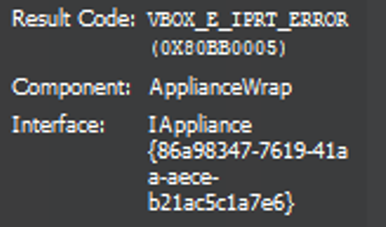
-
@Gheppy yes
at least if fixes import \o/
I am creatig card in the backlog to improve the import. Could you extract the ovf file of the windows ova ( rename it to tar and extract it) , and send it to me or post in in the forum ( it should not contains any confidential information )
-
this is the metadata.ovf
<?xml version="1.0" encoding="UTF-8"?> <!--Generated by Xen Orchestra--> <ovf:Envelope xmlns="http://schemas.dmtf.org/ovf/envelope/1" xmlns:ovf="http://schemas.dmtf.org/ovf/envelope/1" xmlns:rasd="http://schemas.dmtf.org/wbem/wscim/1/cim-schema/2/CIM_ResourceAllocationSettingData" xmlns:vssd="http://schemas.dmtf.org/wbem/wscim/1/cim-schema/2/CIM_VirtualSystemSettingData"> <References> <File ovf:href="w10-22h2_sda.vmdk" ovf:id="file1"/> </References> <DiskSection> <Info>Virtual disk information</Info> <Disk ovf:capacity="51200" ovf:capacityAllocationUnits="byte * 2^20" ovf:diskId="vmdisk1" ovf:fileRef="file1" ovf:format="http://www.vmware.com/interfaces/specifications/vmdk.html#streamOptimized" /> </DiskSection> <NetworkSection> <Info>The list of logical networks</Info> <Network ovf:name="LAN0-1Gb"/> </NetworkSection> <VirtualSystem ovf:id="w10-22h2"> <Info>A virtual machine</Info> <Name>w10-22h2</Name> <OperatingSystemSection ovf:id="1"> <Info>The kind of installed guest operating system</Info> </OperatingSystemSection> <VirtualHardwareSection> <Info>Virtual hardware requirements</Info> <System> <vssd:ElementName>Virtual Hardware Family</vssd:ElementName> <vssd:InstanceID>0</vssd:InstanceID> <vssd:VirtualSystemIdentifier>w10-22h2</vssd:VirtualSystemIdentifier> <vssd:VirtualSystemType>vmx-11</vssd:VirtualSystemType> </System> <Item> <rasd:AllocationUnits>hertz * 10^6</rasd:AllocationUnits> <rasd:Description>Number of Virtual CPUs</rasd:Description> <rasd:ElementName>4 virtual CPU(s)</rasd:ElementName> <rasd:InstanceID>1</rasd:InstanceID> <rasd:ResourceType>3</rasd:ResourceType> <rasd:VirtualQuantity>4</rasd:VirtualQuantity> </Item> <Item> <rasd:AllocationUnits>byte * 2^20</rasd:AllocationUnits> <rasd:Description>Memory Size</rasd:Description> <rasd:ElementName>4096MB of memory</rasd:ElementName> <rasd:InstanceID>2</rasd:InstanceID> <rasd:ResourceType>4</rasd:ResourceType> <rasd:VirtualQuantity>4096</rasd:VirtualQuantity> </Item> <Item> <rasd:Address>0</rasd:Address> <rasd:Description>IDE Controller</rasd:Description> <rasd:ElementName>VirtualIDEController 0</rasd:ElementName> <rasd:InstanceID>4</rasd:InstanceID> <rasd:ResourceType>5</rasd:ResourceType> </Item> <Item ovf:required="false"> <rasd:AutomaticAllocation>false</rasd:AutomaticAllocation> <rasd:ElementName>VirtualVideoCard</rasd:ElementName> <rasd:InstanceID>5</rasd:InstanceID> <rasd:ResourceType>24</rasd:ResourceType> </Item> <Item> <rasd:AddressOnParent>0</rasd:AddressOnParent> <rasd:ElementName>Hard Disk 1</rasd:ElementName> <rasd:HostResource>ovf:/disk/vmdisk1</rasd:HostResource> <rasd:InstanceID>vmdisk1</rasd:InstanceID> <rasd:Parent>4</rasd:Parent> <rasd:ResourceType>17</rasd:ResourceType> </Item> <Item> <rasd:AddressOnParent>0</rasd:AddressOnParent> <rasd:AutomaticAllocation>true</rasd:AutomaticAllocation> <rasd:Connection>LAN0-1Gb</rasd:Connection> <rasd:Description>PCNet32 ethernet adapter on "LAN0-1Gb"</rasd:Description> <rasd:ElementName>Connection to LAN0-1Gb</rasd:ElementName> <rasd:InstanceID>nic0</rasd:InstanceID> <rasd:ResourceSubType>PCNet32</rasd:ResourceSubType> <rasd:ResourceType>10</rasd:ResourceType> </Item> </VirtualHardwareSection> <AnnotationSection ovf:required="false"> <Info>A human-readable annotation</Info> <Annotation>w10-22h2</Annotation> </AnnotationSection> </VirtualSystem> </ovf:Envelope> -
@Gheppy could you get us an ovf file generated by vmware ?
it would help us find the right fields to use -
I don't use VMWare but if you give me some time ( one day ) I will install a server with ESXI and I will do an export.
-
@Gheppy said in ova export not functional:
I don't use VMWare but if you give me some time ( one day ) I will install a server with ESXI and I will do an export.
no worries I 've got one in my lab, I will just have to create the VM
-
@Gheppy
found it , it's the keys for UEFI<vmw:Config ovf:required="false" vmw:key="firmware" vmw:value="efi"/> <vmw:Config ovf:required="false" vmw:key="powerOpInfo.standbyAction" vmw:value="checkpoint"/>and there is for the video card
      <Item ovf:required="false">
                <rasd:AutomaticAllocation>false</rasd:AutomaticAllocation>
                <rasd:ElementName>VirtualVideoCard</rasd:ElementName>
                <rasd:InstanceID>8</rasd:InstanceID>
                <rasd:ResourceType>24</rasd:ResourceType>
                <vmw:Config ovf:required="false" vmw:key="useAutoDetect" vmw:value="true"/>
                <vmw:Config ovf:required="false" vmw:key="videoRamSizeInKB" vmw:value="16384"/>
                <vmw:Config ovf:required="false" vmw:key="enable3DSupport" vmw:value="false"/>
                <vmw:Config ovf:required="false" vmw:key="use3dRenderer" vmw:value="automatic"/>
                <vmw:Config ovf:required="false" vmw:key="graphicsMemorySizeInKB" vmw:value="262144"/>
                <vmw:CoresPerSocket ovf:required="false">1</vmw:CoresPerSocket>
              </Item>
we should be able to parse them ( from a virtual box/ esxi export) and add them in XO export
-
I am glad for this.
Is it published in git?
I will want to test it .
. -
I'm sorry this is a bit over my head but I'm glad to see that you have found the issue. I assume that it will become available in a Xen Orchestra update in the near future? I'm keen to try it out when it does. Thanks
-
@Gheppy I only identfied the data , I didn't write any code for now
-
@gasky thank you for signaling this and helping us identifying the cause
-
Thank you for responding and helping. Please let me know when there is a solution to test out as I will be eager to try it. Thanks
-
@florent I was recently able to test the .ova export again and I was pleased to find that it worked without the errors we had been experiencing. I'm not sure if this is something that I should be putting in a new topic but the only thing now stopping me is that for some reason I cannot get the network drivers to work on a brand new Win10 VM. I exported a working Win10 VM from my local VMware workstation. I then imported it into XCP-ng using the latest version of Xen Orchestra and it worked as expected. I then tried exporting as .ova from Xen orchestra without installing Citrix drivers (and then tried a test with the Cirtrix drivers installed), but after importing back into VMware I couldn't get any network options to work except a 3rd party USB to Ethernet adaptor.
Thanks in advance if you have any advice.
-
That's on VMware side then, double check you have all the emulated NICs setup in VMware

-
 O olivierlambert marked this topic as a question on
-
O olivierlambert has marked this topic as solved on


Hello! It looks like you're interested in this conversation, but you don't have an account yet.
Getting fed up of having to scroll through the same posts each visit? When you register for an account, you'll always come back to exactly where you were before, and choose to be notified of new replies (either via email, or push notification). You'll also be able to save bookmarks and upvote posts to show your appreciation to other community members.
With your input, this post could be even better 💗
Register Login