VM performance VMWare 8 vs XCP-NG 8.2.1
-
Hello guys,
We've been playing with the VMWare Import tool in XO and after a lot of fighting we finally have it working.
First we have some weird issues when XO was not in the same VLAN as the VMWare source host and XCP-NG destination host so we had to re-design our lab to make that work.
Then there was this "strange" problem that XO never actually started the import, sometimes there was a brief error and some times just nothing. Clicking Import again actually started the import.Now one of my colleagues mentioned that the VM's feels a bit sluggish, I myself never noticed anything but he's mainly doing Windows and im mainly doing Linux so maybe thats why I didn't notice.
He is sure this is due to disk performance so we booted up a VM on our VMWare host that we successfully migrated to XCP (Both hosts have a Samsung PM893 960Gb SSD for SR/Datastore, the OS sits on an NVME, a single Xeon E3-1225 v5 @ 3.30GHz and 64Gb DDR3 RAM)
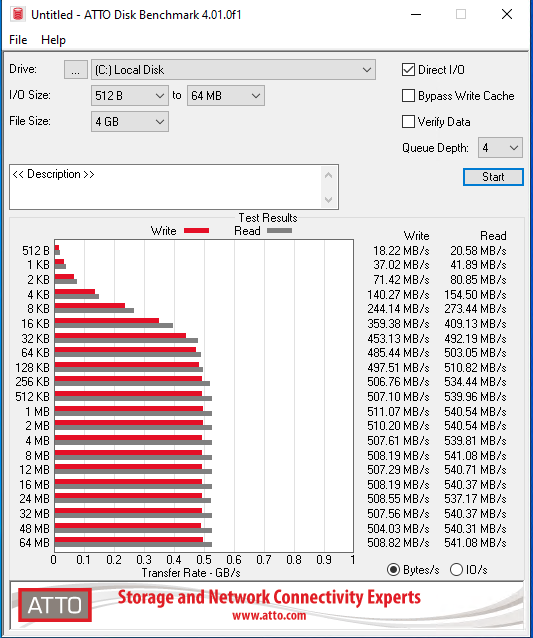
This VM is running Windows Server 2022, on VMware we have the latest 8.0 VMWare tools installed and on XCP-NG we have the Citrix VM Tools 9.3.1 installed. The VM has 2 vCPU, 4Gb RAM and 50Gb disk and this is bench32 on VMWare:
And this is on XCP-NG:
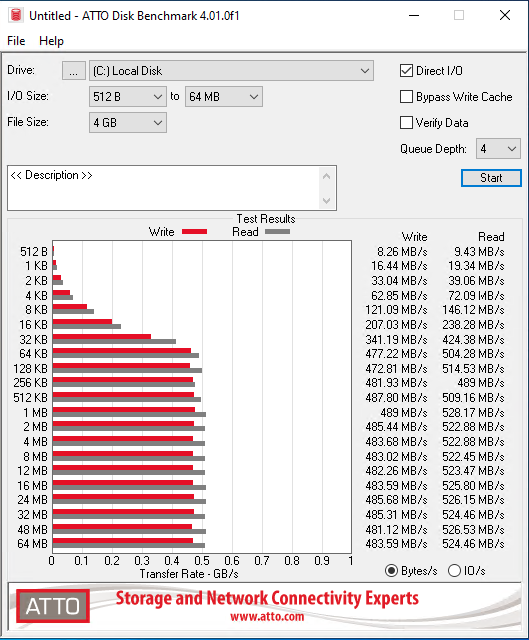
The difference is not huge but enough to worry us a bit. I know about the SMAPIv1 limitations and history and I also know SMAPIv3 is in progress, but is anyone else seeing this or am I alone?
-
I did disk speed tests on about thirty VMs as I moved from esxi 8 to XCP-NG (both 8.2.1 and 8.3). In about 60% of the tests esxi was faster and 40% XCP-NG was faster. I used Crystalmark in my tests. When the test disk was a 1gb disk, esxi was a lot faster but when I changed the test disks to 8gb the results were split and there was not much of a difference between winner and looser..
-
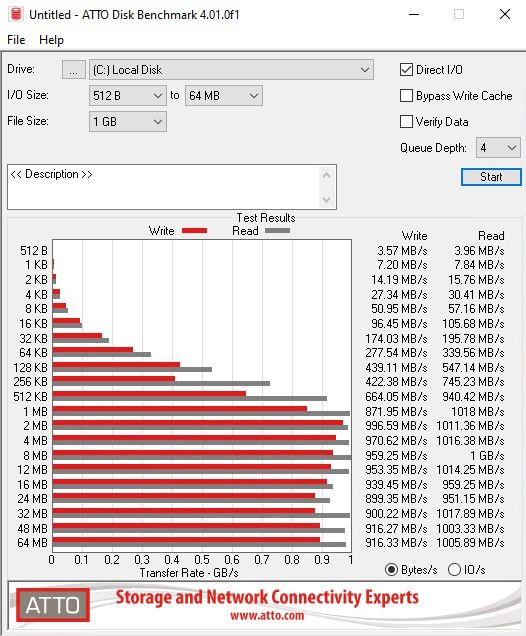
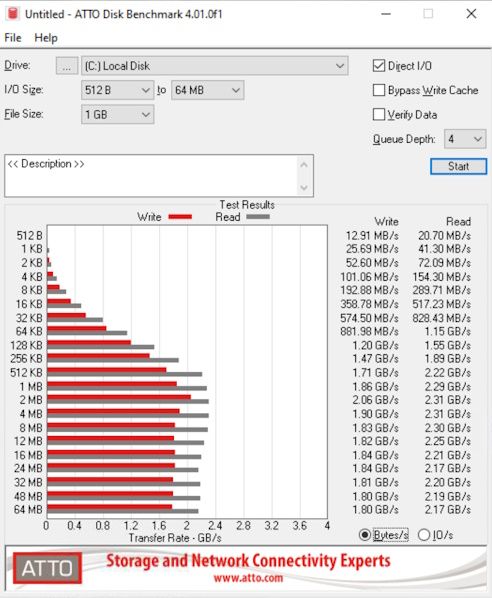
@nikade Here are some results I get from Windows 10....
HP DL360p G8 E5-2680v2 and 10Gb ethernet with SR on NFS (TrueNAS):
Asus PN63 i7-11370H and local NVMe (RAID 1) with SR on EXT4:
-
I would take a look at the disk-scheduler in use ( lsblk -t ) and change to perhaps deadline. CFQ is kind of a dog and a waste of time with SSD.
-
I think, this is the limitation of the (single-threaded) tapdisk. In my tests, Xenserver and XCP-ng were always slower than vSphere on fast storage, but were able to scale well with more VMs
-
Thanks everyone for your replies. I'll look into the scheduler, but it might just be that SMAPIv1 is the bottleneck here.
-
@nikade
Something to consider is that due to the way XCP-ng isolates for each disk for each VM for better security there can be some performance issues. But because it's per VM (unless your use case is to only running a single VM) this is less of an issues as most people run many VM's. -
You can redo the bench with 4 virtual disks in RAID0 and try again, that will represent the more "real" value in the real world (when you have many VMs and disks)




Hello! It looks like you're interested in this conversation, but you don't have an account yet.
Getting fed up of having to scroll through the same posts each visit? When you register for an account, you'll always come back to exactly where you were before, and choose to be notified of new replies (either via email, or push notification). You'll also be able to save bookmarks and upvote posts to show your appreciation to other community members.
With your input, this post could be even better 💗
Register Login