Backup fails with "Body Timeout Error", "all targets have failed, step: writer.run()"
-
For the last week or so, the backup on one paticular VM gives this error:
VM1 (xcp-ng-1)
•	Snapshot
Start: 2024-05-12 04:00
End: 2024-05-12 04:00
•	NFS2
o	transfer
Start: 2024-05-12 04:00
End: 2024-05-12 05:21
Duration: an hour
Error: Body Timeout Error
•	Start: 2024-05-12 04:00
•	End: 2024-05-12 05:21
•	Duration: an hour
•	Error: Body Timeout Error
NFS2
o	transfer
Start: 2024-05-12 04:00
End: 2024-05-12 05:21
Duration: an hour
Error: Body Timeout Error
•	Start: 2024-05-12 04:00
•	End: 2024-05-12 05:21
•	Duration: an hour
•	Error: Body Timeout Error
Start: 2024-05-12 04:00
End: 2024-05-12 05:23
Duration: an hour
Error: all targets have failed, step: writer.run()
Type: full
The host is running xcp beta 3 (updated through 5-12-24), XO is version "Xen Orchestra, commit 9b9c7".
This VM and numerous other VM's back up the same way (goes to two different NFS targets) for the last five months.
I've tried running it in the middle of the day (when other backups are not running) but it didn't help.
"Number of retries if VM backup fails"=0
"Timeout " = <blank>
"Compression"="zstd"
Any ideas?
-
@archw
FWIW...It happened again last night.Start: 2024-05-15 04:00
End: 2024-05-15 07:07
Duration: 3 hours
Error: Body Timeout Error
Duration: 3 hours
Error: all targets have failed, step: writer.run()
Type: full -
@archw did you find a solution for this? We expiriencing this error on all of our backup jobs since two days.
Start: 2024-06-28 14:07 End: 2024-06-28 14:28 Duration: 21 minutes Error: Body Timeout Error Type: delta -
In the words of Ronald Reagan "I don't recall the answer to that question"

If I remember correctly (subject to the after effects of many happy hours since 5-12-24), I ended up rebooting the host that had that VM. It has never done it since.
Arch
-
We realize this is an older issue, but we're experiencing something similar. Last week, I performed a rolling pool update, which involved rebooting all nodes and migrating VMs as part of the process.
Interestingly, the issue consistently affects the same VMs each time. These VMs have the necessary tools installed, and I can't pinpoint why only they are impacted.
We're encountering the same error across multiple pools. All pools use the same backup repositories, but out of approximately 100 VMs, only 3-4 are affected.
i know even more happy hours since the last post haha.
I could clone the VM etc but that seems a bit drastic.
-
S supportcphl referenced this topic on
-
Many, many happy hours have since transpired
I ended up wiping out the XO vm that was running the process and making a new one. That seems to have fixed it.
With all that said, I got one again last night with backing up the same VM that has caused an issue in the past. I just told the backup to restart so lets see what happens.
-
@archw hello.
I had the same issue with xoa VM (vates build).
Body timeout error on backups.
I tried another VM XO from sources. Didn't fix the issue and some backups are also failing.
To my understanding is not XO issue.
Also this started when i upgrade the hosts from 8.2 to 8.3, im not sure if this is relevant or not, or is just a coincidence.
Also i have 2 hosts in the same pool. Backups are failing on both hosts.Any updates from your side?? What is your suggestion on what i should try next?
-
@Bambos try restarting your hosts.
-
I see this Body Timeout Error frequently, almost every day, but for random VMs. It has been happening for weeks but since it's not consistently the same VM I figured overall I still have good backups. I also back up the VMs in different ways and the others aren't failing. It has more recently been happening with the config backups which should be very short. Previously I wondered if it could be increased network activity that messes with a long backup of a big VM but that would not be the case for config backups.
The failing backups are all network local, just to be clear, I am not streaming this backup to Backblaze or something where internet connectivity might be causing it.
-
Actually after latest XO update I also started to see "body timeout error". Interestingly on my metadata backup job.
-
Unfortunately, I also get "body timeout error" errors during backups. I run several xen-orchestra servers, but it only occurs where the version is up to date. It also occurs with random VMs, and even with metadata backups. I've attached this morning's log. [xo-server.log](Invalid MIME type)
-
@bogikornel We had a very old XO built from sources, which worked fine. One day we decided to deploy a new VM and migrate to a new XO built from sources, and immediately ran into problems.
All tho it was resolved, after switching machines from HP to Cisco, which makes us believe it has something to do with the NIC, driver or firmware. -
I saw that happening sometimes during backend storage failure or internal storage failure.
-
@Bambos It's possible, but with the old version, there was no such problem, and nothing else changed except xen-orchestra.
-
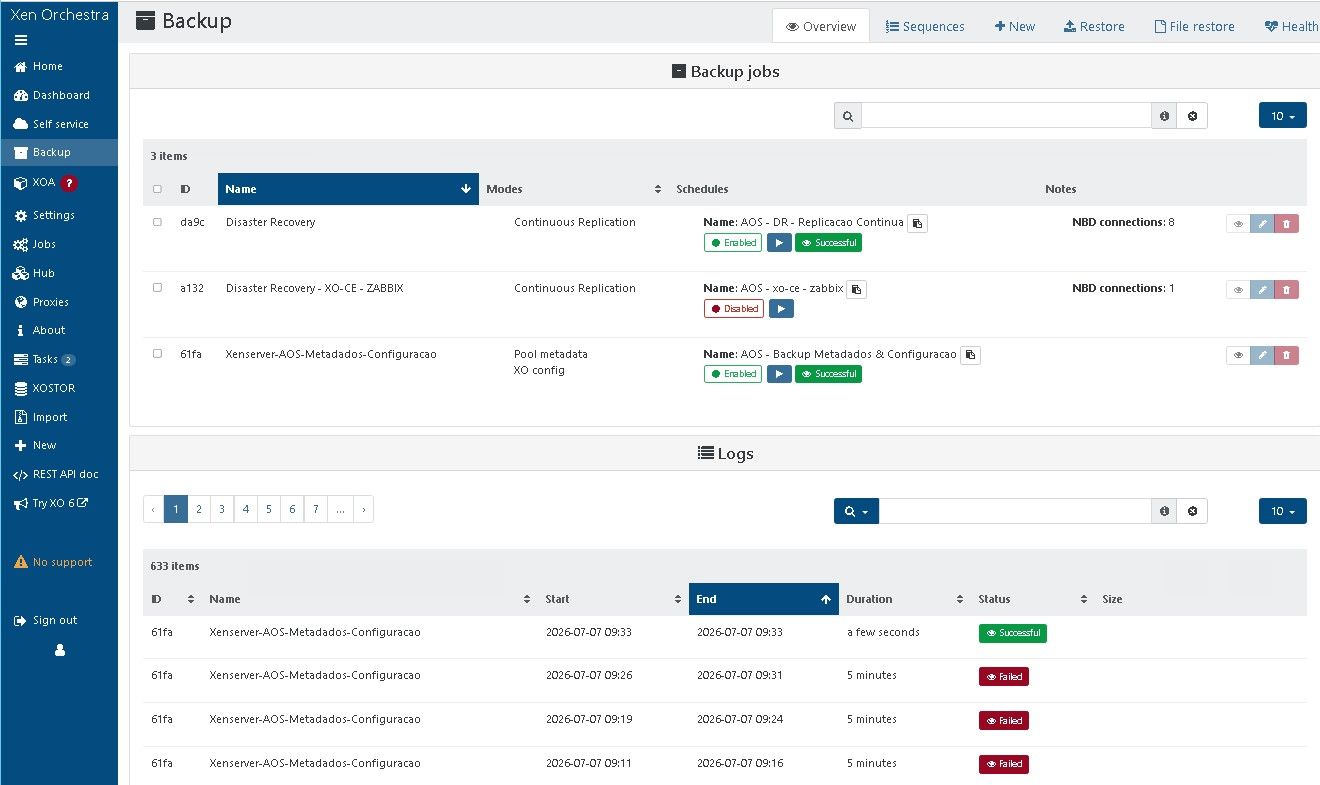
I'm having the same problem. The issue occurs with the XO config metadata backup.
-
Also seeing the "Body timeout error" only on the metadata and XO-config backups for the past 2 weeks. All the VMs are backing up just fine.
The Remote is NFS on a share called Backups:
NFS Backups \192.168.191.8:Port:/Backups Click to edit
2 TiB / 4.84 TiB 105.4 MiB/s / 1.8 GiB/s NoneI recently needed to restore from the metadata and xo-config backs and was able to find an old one, but can't make any new ones, so it is a source of concern.
-
A little more information about my post...
5 minutes ago, I deleted the metadata and xo-config backup job.
Next, I deleted the xo-config-backups directory on the remote NFS.
I also deleted the xo-pool-metadata-backups directory on the remote NFS.
I then created a new "metadata_and_xo_config_backup" job and then ran it.
The new job created both a xo-config-backups directory with sub dirs, as well as a xo-pool-metadata-backups directory under the /Backups NFS share on the NAS.
The xo-config-backups directory has a subdir and it holds a data.json (size 22.55KB), and a metadata.json (size 233 Bytes).
The xo-pool-metadata-backups directory has a subdirectory structure that has no saved data, no files.
The job failed after waiting a 5-minute period. -
@bogikornel
Same here.....was getting the errors a while back and then they stopped. Over the last week it now happens a lot. I found that it rarely happens on incremental backups. -
It's happening to me every day.
-
I try to back it up manually, and after 3 or 4 attempts, the backup succeeds.


Hello! It looks like you're interested in this conversation, but you don't have an account yet.
Getting fed up of having to scroll through the same posts each visit? When you register for an account, you'll always come back to exactly where you were before, and choose to be notified of new replies (either via email, or push notification). You'll also be able to save bookmarks and upvote posts to show your appreciation to other community members.
With your input, this post could be even better 💗
Register Login