Backup fails with "Body Timeout Error", "all targets have failed, step: writer.run()"
-
@archw hello.
I had the same issue with xoa VM (vates build).
Body timeout error on backups.
I tried another VM XO from sources. Didn't fix the issue and some backups are also failing.
To my understanding is not XO issue.
Also this started when i upgrade the hosts from 8.2 to 8.3, im not sure if this is relevant or not, or is just a coincidence.
Also i have 2 hosts in the same pool. Backups are failing on both hosts.Any updates from your side?? What is your suggestion on what i should try next?
-
@Bambos try restarting your hosts.
-
I see this Body Timeout Error frequently, almost every day, but for random VMs. It has been happening for weeks but since it's not consistently the same VM I figured overall I still have good backups. I also back up the VMs in different ways and the others aren't failing. It has more recently been happening with the config backups which should be very short. Previously I wondered if it could be increased network activity that messes with a long backup of a big VM but that would not be the case for config backups.
The failing backups are all network local, just to be clear, I am not streaming this backup to Backblaze or something where internet connectivity might be causing it.
-
Actually after latest XO update I also started to see "body timeout error". Interestingly on my metadata backup job.
-
Unfortunately, I also get "body timeout error" errors during backups. I run several xen-orchestra servers, but it only occurs where the version is up to date. It also occurs with random VMs, and even with metadata backups. I've attached this morning's log. [xo-server.log](Invalid MIME type)
-
@bogikornel We had a very old XO built from sources, which worked fine. One day we decided to deploy a new VM and migrate to a new XO built from sources, and immediately ran into problems.
All tho it was resolved, after switching machines from HP to Cisco, which makes us believe it has something to do with the NIC, driver or firmware. -
I saw that happening sometimes during backend storage failure or internal storage failure.
-
@Bambos It's possible, but with the old version, there was no such problem, and nothing else changed except xen-orchestra.
-
I'm having the same problem. The issue occurs with the XO config metadata backup.
-
Also seeing the "Body timeout error" only on the metadata and XO-config backups for the past 2 weeks. All the VMs are backing up just fine.
The Remote is NFS on a share called Backups:
NFS Backups \192.168.191.8:Port:/Backups Click to edit
2 TiB / 4.84 TiB 105.4 MiB/s / 1.8 GiB/s NoneI recently needed to restore from the metadata and xo-config backs and was able to find an old one, but can't make any new ones, so it is a source of concern.
-
A little more information about my post...
5 minutes ago, I deleted the metadata and xo-config backup job.
Next, I deleted the xo-config-backups directory on the remote NFS.
I also deleted the xo-pool-metadata-backups directory on the remote NFS.
I then created a new "metadata_and_xo_config_backup" job and then ran it.
The new job created both a xo-config-backups directory with sub dirs, as well as a xo-pool-metadata-backups directory under the /Backups NFS share on the NAS.
The xo-config-backups directory has a subdir and it holds a data.json (size 22.55KB), and a metadata.json (size 233 Bytes).
The xo-pool-metadata-backups directory has a subdirectory structure that has no saved data, no files.
The job failed after waiting a 5-minute period. -
@bogikornel
Same here.....was getting the errors a while back and then they stopped. Over the last week it now happens a lot. I found that it rarely happens on incremental backups. -
It's happening to me every day.
-
I try to back it up manually, and after 3 or 4 attempts, the backup succeeds.
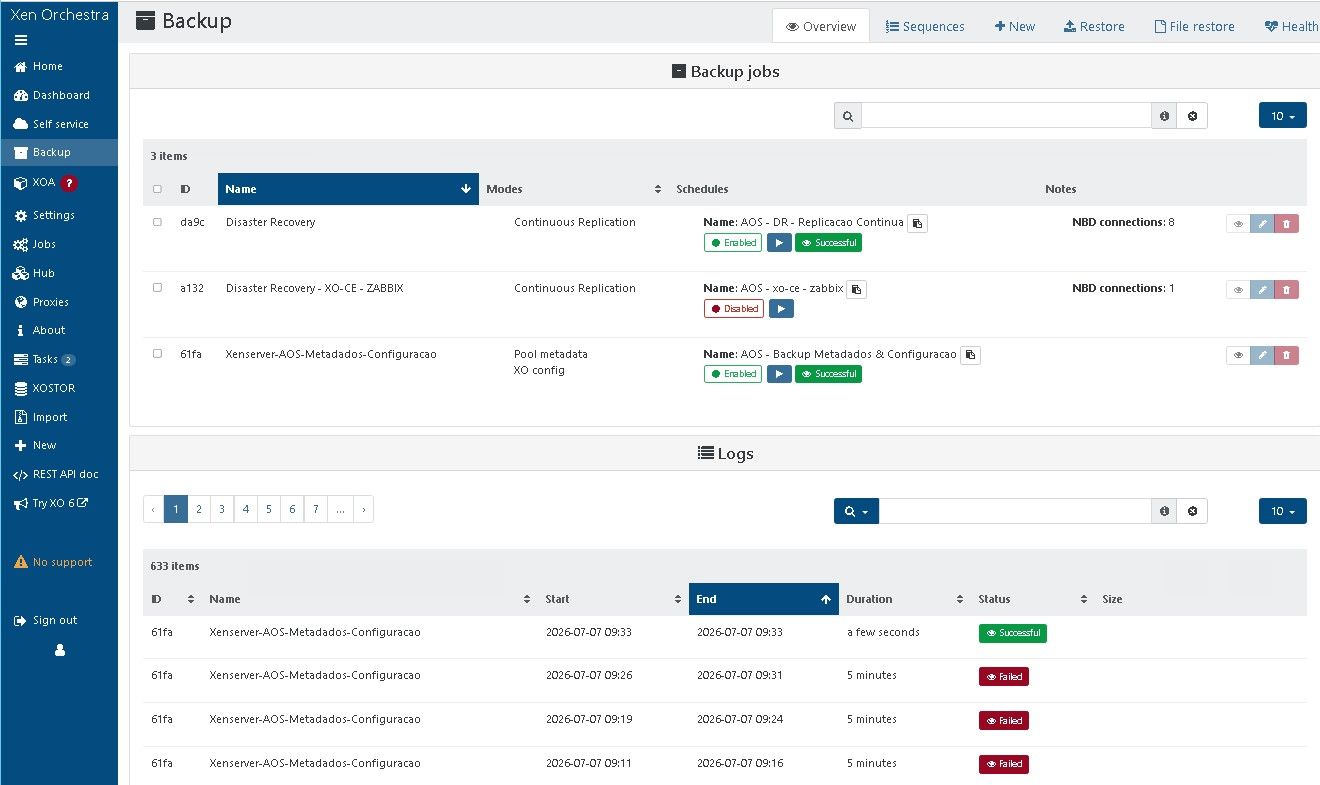
-
@bogikornel Can you tell us on which versions you are please?
the ones where it works and the ones where it does not work.
Thanks for your help! -
@bogikornel Can you tell us on which versions you are please?
the ones where it works and the ones where it does not work.
Thanks for your help!Not working: commit bb4da build date: 2026.07.01
Not working: commit 3bc70 build date: 2026.07.02
Working:: commit 71fa8 build date: ~ 2025.11.29
Working: commit 96b76 build date: ~ 2024.07.22 -
@bogikornel @jb @gregbinsd @majorp93
We tested metadata backups every 5 min and it works in XO. It seems it might be coming from XCP-NG, can you provide us a xensource.log from the problematic timeline? -
@pierrebrunet I'll try to collect the logs.
However, I can't even backup VMs. What's interesting is that the error always occurs with only 1 VM or 1 Metadata backup. This morning's backup report:
Job ID: 3c17f0c1-85f5-4b98-b43a-0d117c812a9a
Run ID: 1783461900005
Mode: full
Start time: Wednesday, July 8th 2026, 12:05:00 am
End time: Wednesday, July 8th 2026, 1:22:44 am
Duration: an hour
Successes: 14 / 15
Transfer size: 276.37 GiBOr with another host and another XO:
Job ID: 53c582e5-ba01-4a82-8a45-948a991add99
Job name: metadata
Run ID: 1783483200004
Start time: Wednesday, July 8th 2026, 6:00:00 am
End time: Wednesday, July 8th 2026, 6:05:00 am
Duration: 5 minutes
Successes: 5 / 6
Error: backup task failed with undefined error -
Thanks @bogikornel, that version comparison really helps.
Narrowing it to something that changed between the late-November 2025 build and the July 2026 ones gives everyone a better place to start than "it just times out".
On the log Pierre asked for: the useful one is
/var/log/xensource.logfrom the pool master, covering one failed run's window.
You already have the Job and Run IDs and the 00:05 to 01:22 timestamps from this morning's run, so that exact span is perfect.
If you can pull it from the master and attach it here (or just the slice around the timeout), that's what lets them line the failure up against what xapi was doing.
It's looking like it may be coming from the XCP-ng side rather than XO, so a mention to @Team-Storage might help too. I could be wrong about where it actually lands, but the log is the thing that'll tell us. -
 P poddingue referenced this topic on
-
Narrowing it to something that changed between the late-November 2025 build and the July 2026 ones gives everyone a better place to start than "it just times out".
The backup function was definitely still good in the 2026-05-28 build. So I think you should look at the last 1 month.


Hello! It looks like you're interested in this conversation, but you don't have an account yet.
Getting fed up of having to scroll through the same posts each visit? When you register for an account, you'll always come back to exactly where you were before, and choose to be notified of new replies (either via email, or push notification). You'll also be able to save bookmarks and upvote posts to show your appreciation to other community members.
With your input, this post could be even better 💗
Register Login