XCP-ng
    • Categories
    • Recent
    • Tags
    • Popular
    • Users
    • Groups
    • Register
    • Login

    Attach PCIs - Not enough permissions

    Scheduled Pinned Locked Moved Solved Xen Orchestra
    12 Posts 3 Posters 1.7k Views 4 Watching
    Loading More Posts
    • Oldest to Newest
    • Newest to Oldest
    • Most Votes
    Reply
    • Reply as topic
    Log in to reply
    This topic has been deleted. Only users with topic management privileges can see it.
    • A Online
      abudef
      last edited by

      Hi, I have a pass-through activated on the host for one PCI device:
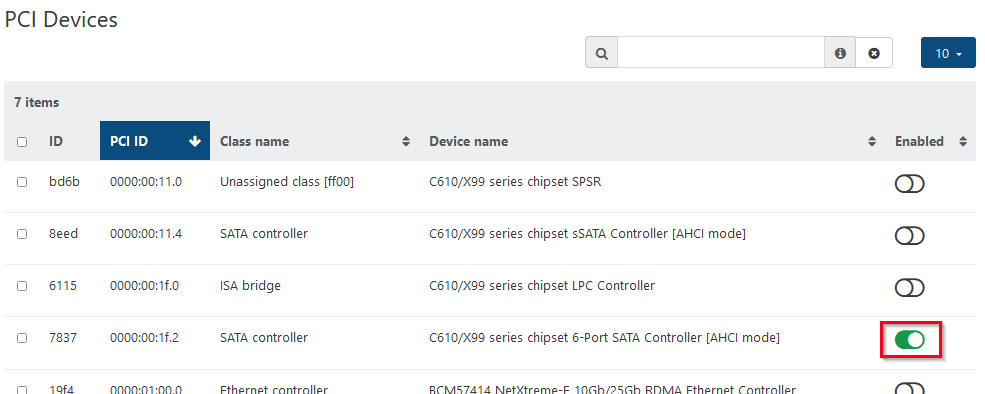
      bf0c9f1f-d111-4b6d-bca4-1f8c4a2be099-image.png

      But when I want to add it in the guest configuration, the button is inactive and a message is displayed:
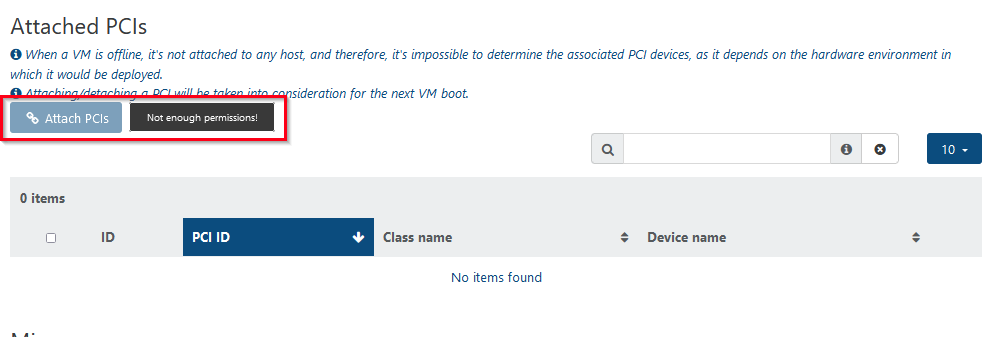
      c7b88274-7d12-4fa3-b2e3-f73c94d7c371-image.png

      I am logged into XO as the main admin. Please advise me where the problem might be? Thanks a lot!

      Dell R630, Xen Orchestra commit 32359, XCP-ng 8.3 (latest candidates update)

      1 Reply Last reply Reply Quote 0
      • MathieuRAM Offline
        MathieuRA Vates 🪐 XO Team @abudef
        last edited by

        Hi 🙂

        Fix available on the master branch.
        Commit: b539b

        1 Reply Last reply Reply Quote 0
        • olivierlambertO Offline
          olivierlambert Vates 🪐 Co-Founder CEO
          last edited by

          Hi,

          Are you sure you are not a user with admin right, but a real admin? Check your Settings/users and check if Permissions is "Admin" and not "User".

          A 1 Reply Last reply Reply Quote 0
          • A Online
            abudef @olivierlambert
            last edited by

            @olivierlambert Well, I'd say he's a real admin:
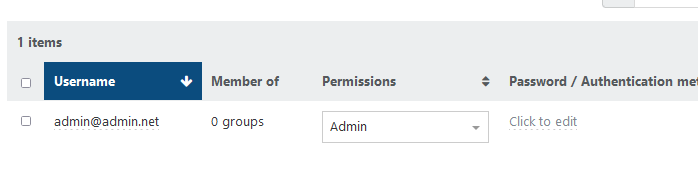
            f72ba7fa-d2ee-4f88-8f54-544557e62ccd-image.png

            1 Reply Last reply Reply Quote 0
            • olivierlambertO Offline
              olivierlambert Vates 🪐 Co-Founder CEO
              last edited by

              Do you have the complete error in Settings/logs or the button is just greyed out?

              A 1 Reply Last reply Reply Quote 0
              • A Online
                abudef @olivierlambert
                last edited by

                @olivierlambert There is no log entry, the button is just grayed out. Now I tried it in XO Appliance 5.95.1 build: 20240401 and it behaves the same.

                1 Reply Last reply Reply Quote 0
                • olivierlambertO Offline
                  olivierlambert Vates 🪐 Co-Founder CEO
                  last edited by

                  Hmm @MathieuRA can you check?

                  1 Reply Last reply Reply Quote 0
                  • A Online
                    abudef
                    last edited by abudef

                    Could this be related to the guest template? A guest created on a Windows 2022 template is not affected, while another on a Windows 2016, Windows 11 or CentOS 7 template is.

                    A 1 Reply Last reply Reply Quote 0
                    • A Online
                      abudef @abudef
                      last edited by abudef

                      @abudef said in Attach PCIs - Not enough permissions:

                      Could this be related to the guest template? A guest created on a Windows 2022 template is not affected, while another on a Windows 2016, Windows 11 or CentOS 7 template is.

                      No, that was a bad guess. The button is active on a guest that is powered off and has a disk on the local SR of that host - in the list, the VM is visible in the "host - pool" context. If the guest is running on that host, the button is also active, as it is most certainly in the "host - pool" context. The problem is with virtuals that are powered off and have a disk on the NFS SR and thus are only in the "pool" context at the moment, not "host - pool".

                      1b8816fa-ca90-48c1-852f-acf335c12479-image.png

                      MathieuRAM 3 Replies Last reply Reply Quote 0
                      • MathieuRAM Offline
                        MathieuRA Vates 🪐 XO Team @abudef
                        last edited by MathieuRA

                        Hi @abudef thanks for the report. I spotted where the bug came from and I will fix it soon.

                        1 Reply Last reply Reply Quote 1
                        • MathieuRAM Offline
                          MathieuRA Vates 🪐 XO Team @abudef
                          last edited by

                          Hi @abudef 🙂
                          A fix is available on the branch fix-attach-pci

                          1 Reply Last reply Reply Quote 1
                          • MathieuRAM Offline
                            MathieuRA Vates 🪐 XO Team @abudef
                            last edited by

                            Hi 🙂

                            Fix available on the master branch.
                            Commit: b539b

                            1 Reply Last reply Reply Quote 0
                            • A Online
                              abudef
                              last edited by

                              Great, it's working fine now 👌

                              1 Reply Last reply Reply Quote 2
                              • olivierlambertO olivierlambert marked this topic as a question on
                              • olivierlambertO olivierlambert has marked this topic as solved on

                              Hello! It looks like you're interested in this conversation, but you don't have an account yet.

                              Getting fed up of having to scroll through the same posts each visit? When you register for an account, you'll always come back to exactly where you were before, and choose to be notified of new replies (either via email, or push notification). You'll also be able to save bookmarks and upvote posts to show your appreciation to other community members.

                              With your input, this post could be even better 💗

                              Register Login
                              • First post
                                Last post
