@pierrebrunet This is the same error, but it occurs more often when saving metadata. I'm attaching the logfile. xo-backup-error-log.txt
 B
Offline
B
Offline
Posts
-
RE: Backup fails with "Body Timeout Error", "all targets have failed, step: writer.run()"
-
RE: Backup fails with "Body Timeout Error", "all targets have failed, step: writer.run()"
The problem is that my VM backups don't run either, because I still get a timeout. This morning out of 11 VM backups, 2 failed, on Tuesday 1 failed, 20 were good.
-
RE: Backup fails with "Body Timeout Error", "all targets have failed, step: writer.run()"
@poddingue httpInactivityTimeout changed the only thing for me, I received the email half an hour later that the metadata could not be saved.
-
RE: Backup fails with "Body Timeout Error", "all targets have failed, step: writer.run()"
Narrowing it to something that changed between the late-November 2025 build and the July 2026 ones gives everyone a better place to start than "it just times out".
The backup function was definitely still good in the 2026-05-28 build. So I think you should look at the last 1 month.
-
RE: Backup fails with "Body Timeout Error", "all targets have failed, step: writer.run()"
@pierrebrunet I'll try to collect the logs.
However, I can't even backup VMs. What's interesting is that the error always occurs with only 1 VM or 1 Metadata backup. This morning's backup report:
Job ID: 3c17f0c1-85f5-4b98-b43a-0d117c812a9a
Run ID: 1783461900005
Mode: full
Start time: Wednesday, July 8th 2026, 12:05:00 am
End time: Wednesday, July 8th 2026, 1:22:44 am
Duration: an hour
Successes: 14 / 15
Transfer size: 276.37 GiBOr with another host and another XO:
Job ID: 53c582e5-ba01-4a82-8a45-948a991add99
Job name: metadata
Run ID: 1783483200004
Start time: Wednesday, July 8th 2026, 6:00:00 am
End time: Wednesday, July 8th 2026, 6:05:00 am
Duration: 5 minutes
Successes: 5 / 6
Error: backup task failed with undefined error -
RE: Backup fails with "Body Timeout Error", "all targets have failed, step: writer.run()"
@bogikornel Can you tell us on which versions you are please?
the ones where it works and the ones where it does not work.
Thanks for your help!Not working: commit bb4da build date: 2026.07.01
Not working: commit 3bc70 build date: 2026.07.02
Working:: commit 71fa8 build date: ~ 2025.11.29
Working: commit 96b76 build date: ~ 2024.07.22 -
RE: Backup fails with "Body Timeout Error", "all targets have failed, step: writer.run()"
@Bambos It's possible, but with the old version, there was no such problem, and nothing else changed except xen-orchestra.
-
RE: Backup fails with "Body Timeout Error", "all targets have failed, step: writer.run()"
Unfortunately, I also get "body timeout error" errors during backups. I run several xen-orchestra servers, but it only occurs where the version is up to date. It also occurs with random VMs, and even with metadata backups. I've attached this morning's log. [xo-server.log](Invalid MIME type)
-
RE: Second (and final) Release Candidate for QCOW2 image format support
@pkgw I tested it with a cluster size of 2 megabytes. I got similar results to those with the default size.
-
RE: Second (and final) Release Candidate for QCOW2 image format support
Might be interesting to test a different cluster size and see the impact
I tested it with a cluster size of 2 megabytes, and nothing changed
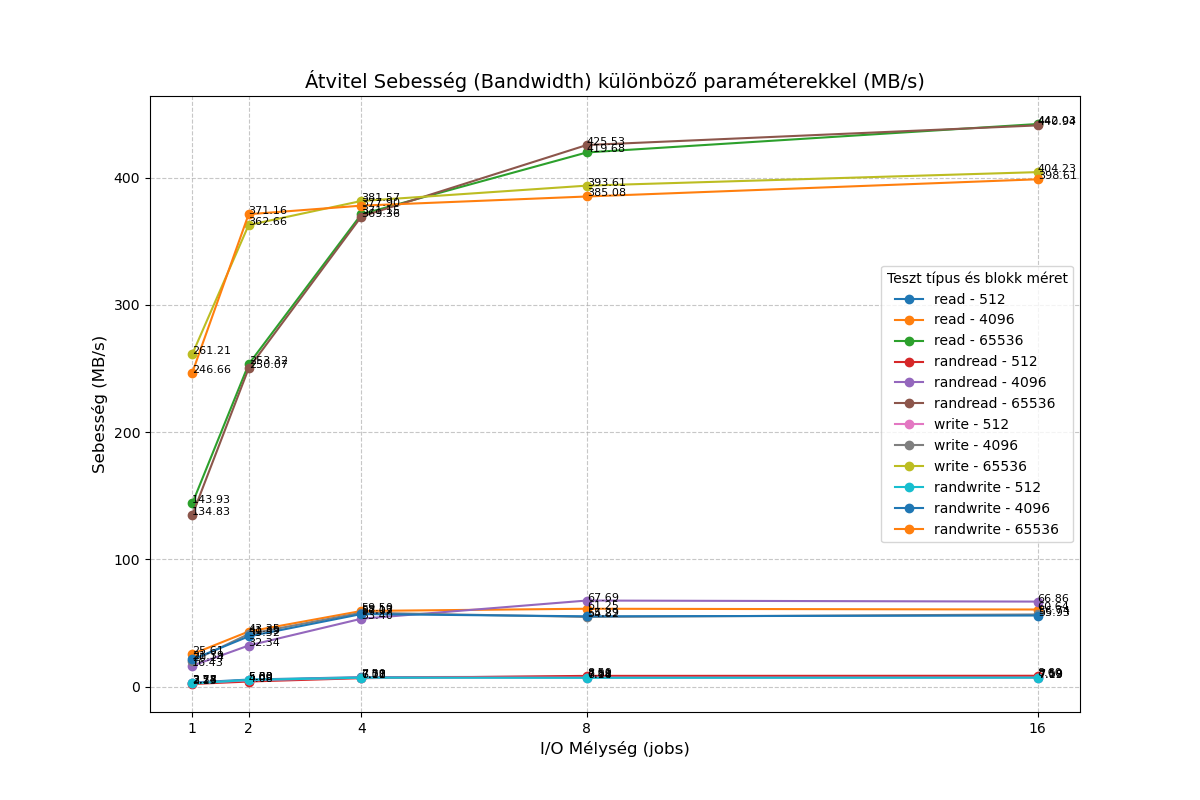
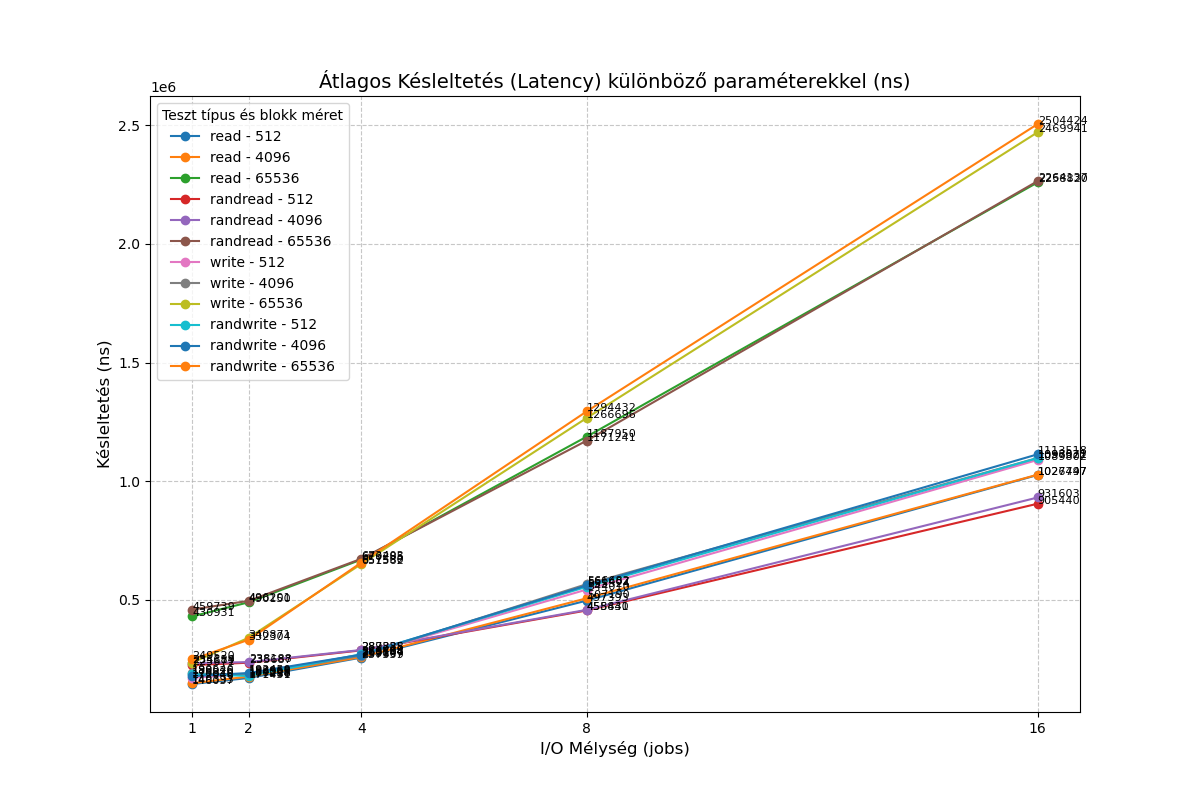
-
RE: Second (and final) Release Candidate for QCOW2 image format support
@stormi XCP-ng QCOW2 vs. VHD Performance Feedback on NVMe
First of all, I would like to thank the team for all the hard work in bringing QCOW2 support to a production-ready state. It is a very welcome feature.I have performed some quick I/O benchmarks comparing the new QCOW2 format against the traditional VHD. In my tests, QCOW2 appears significantly slower than VHD on my hardware.
Test Environment
Hypervisor: Dell PowerEdge R420CPU: Intel Xeon E5-2470 v2
Storage: Intel SSDPELKX010T8 NVMe
VM OS: Debian 13
VM Specs: 2 vCPUs, 1GB RAM
Setup: One 10GB VHD and one 10GB QCOW2 disk, both pre-filled from /dev/random.
Methodology
I used a custom test suite available here: https://vm01.unsoft.hu/~ventura/fio/fio_test_20250408.tar.gz
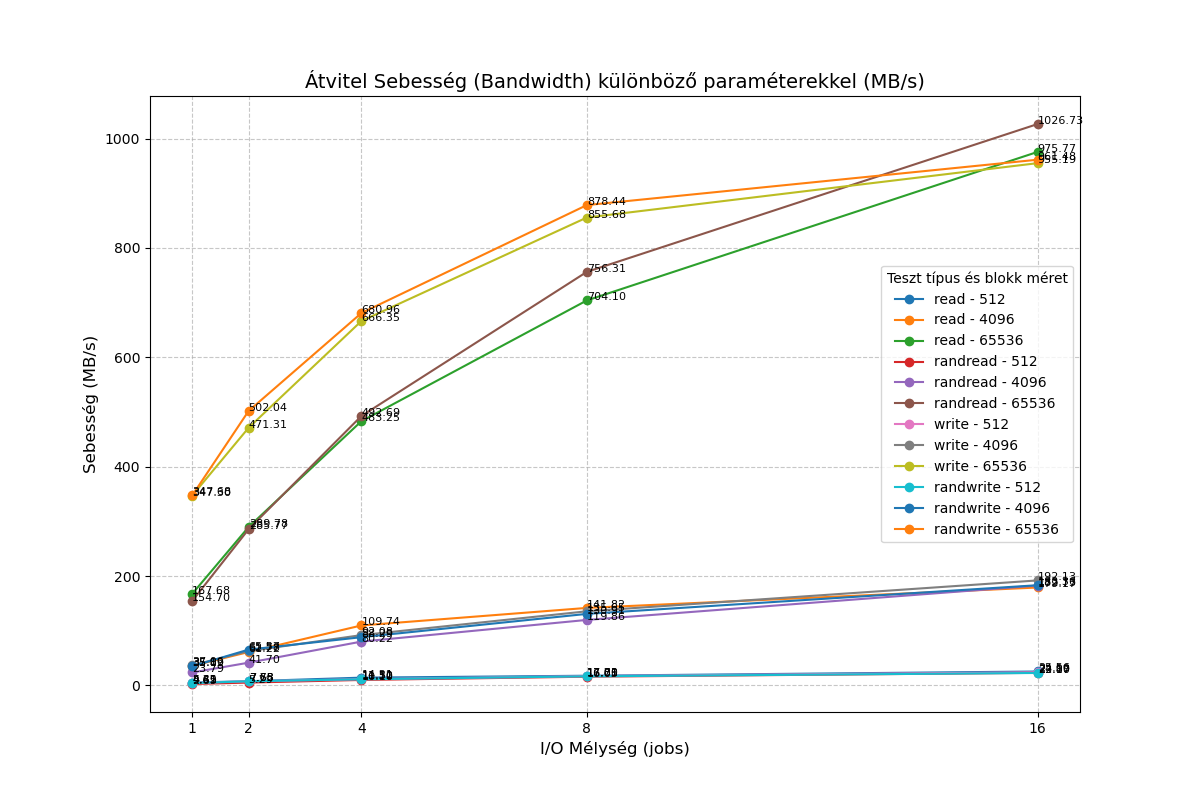
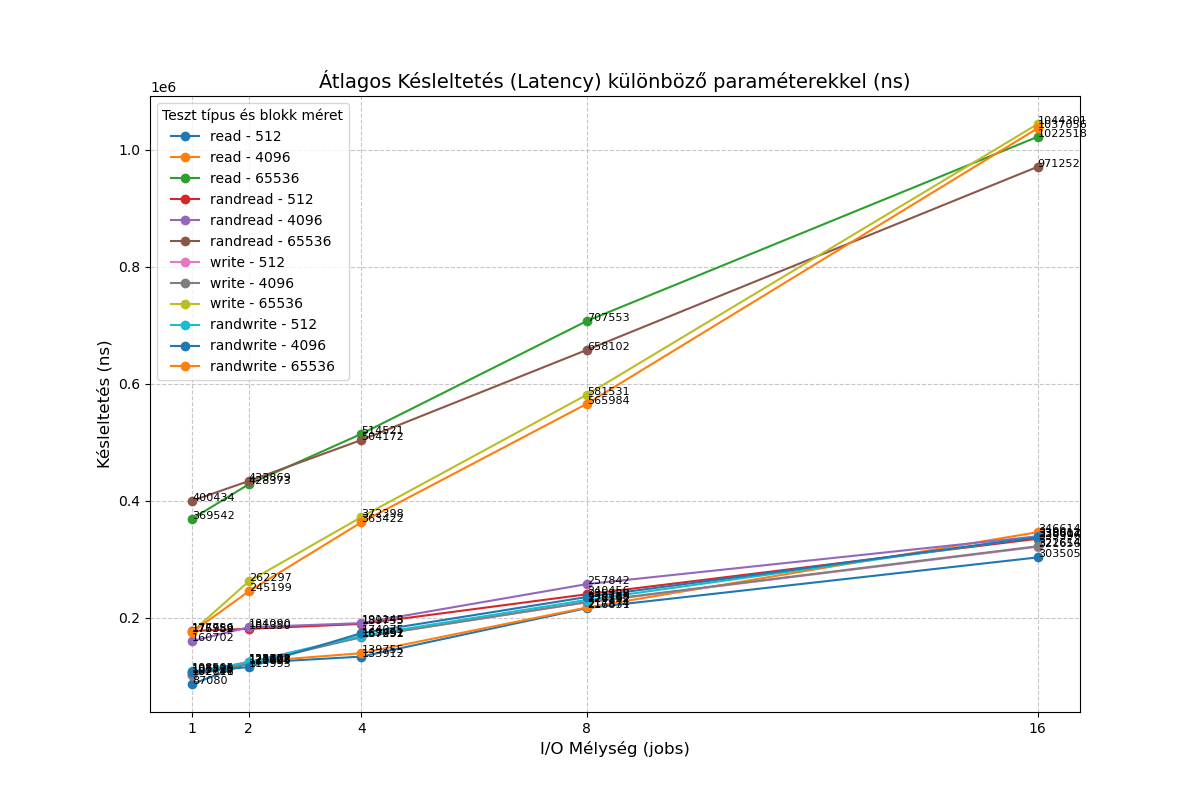
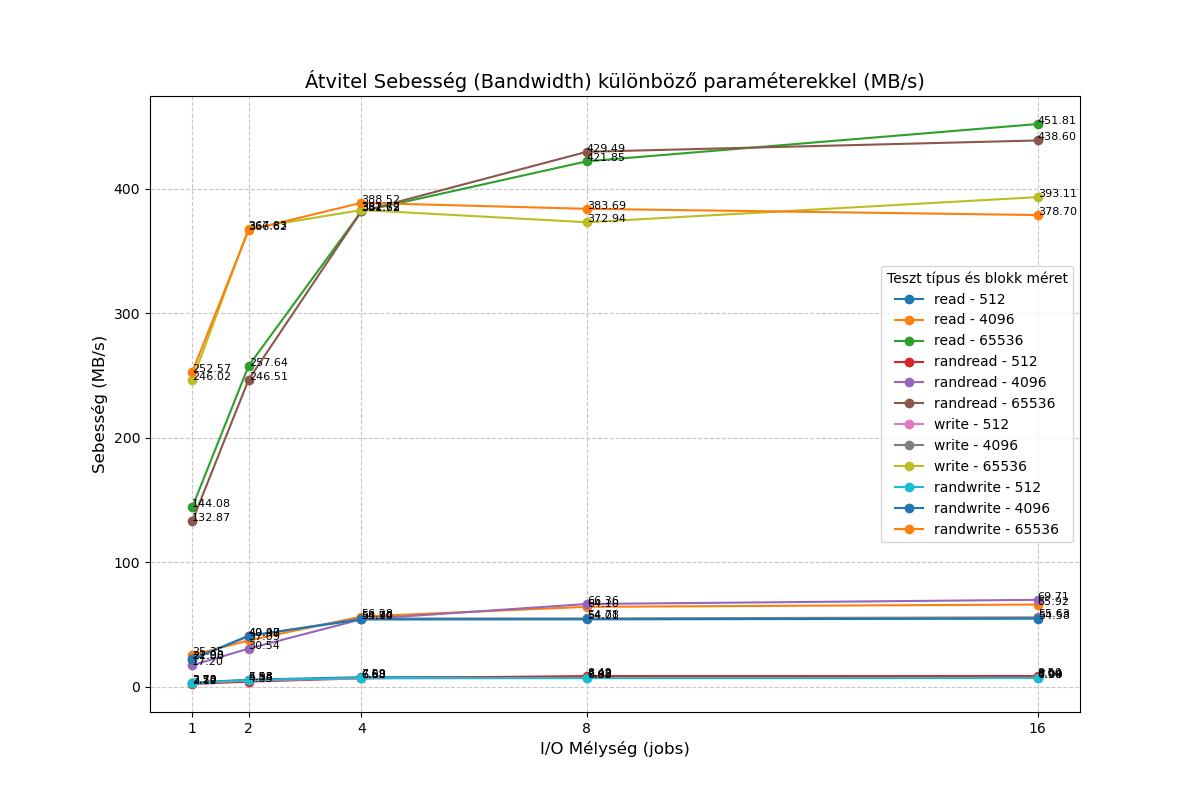
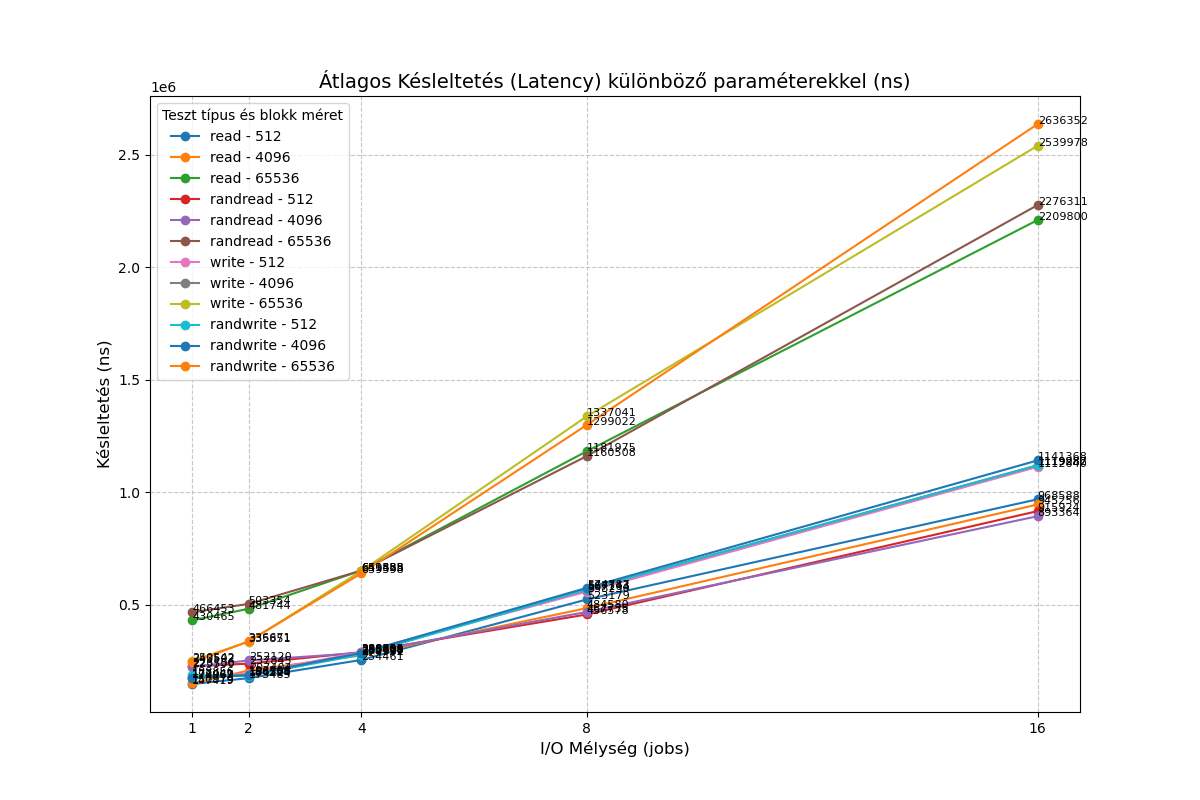
I also ran a simplefio loop with the following results:
VHD:root@Debian-13-CloudInit-20250810:/mnt/vhd# for mode in read write; do for jobs in 1 16; do for bs in 4 64; do for t in "" rand; do printf "%2i qd %2ik % 4s " $jobs $bs $t; fio --name=random-write --rw=$t$mode --bs=${bs}k --numjobs=1 --size=1g --iodepth=$jobs --runtime=10 --time_based --direct=1 --ioengine=libaio|grep -e BW -e runt ; done; done; done; done 1 qd 4k read: IOPS=9625, BW=37.6MiB/s (39.4MB/s)(376MiB/10001msec) 1 qd 4k rand read: IOPS=5414, BW=21.2MiB/s (22.2MB/s)(212MiB/10001msec) 1 qd 64k read: IOPS=2657, BW=166MiB/s (174MB/s)(1661MiB/10001msec) 1 qd 64k rand read: IOPS=2575, BW=161MiB/s (169MB/s)(1610MiB/10001msec) 16 qd 4k read: IOPS=45.7k, BW=178MiB/s (187MB/s)(1785MiB/10001msec) 16 qd 4k rand read: IOPS=45.9k, BW=179MiB/s (188MB/s)(1794MiB/10001msec) 16 qd 64k read: IOPS=16.7k, BW=1041MiB/s (1092MB/s)(10.2GiB/10001msec) 16 qd 64k rand read: IOPS=16.7k, BW=1042MiB/s (1093MB/s)(10.2GiB/10001msec) 1 qd 4k write: IOPS=8842, BW=34.5MiB/s (36.2MB/s)(345MiB/10001msec); 0 zone resets 1 qd 4k rand write: IOPS=8880, BW=34.7MiB/s (36.4MB/s)(347MiB/10001msec); 0 zone resets 1 qd 64k write: IOPS=6095, BW=381MiB/s (399MB/s)(3810MiB/10001msec); 0 zone resets 1 qd 64k rand write: IOPS=6006, BW=375MiB/s (394MB/s)(3755MiB/10001msec); 0 zone resets 16 qd 4k write: IOPS=49.3k, BW=193MiB/s (202MB/s)(1928MiB/10001msec); 0 zone resets 16 qd 4k rand write: IOPS=47.3k, BW=185MiB/s (194MB/s)(1848MiB/10001msec); 0 zone resets 16 qd 64k write: IOPS=14.3k, BW=891MiB/s (934MB/s)(8910MiB/10001msec); 0 zone resets 16 qd 64k rand write: IOPS=15.5k, BW=966MiB/s (1013MB/s)(9663MiB/10001msec); 0 zone resetsQCOW2
root@Debian-13-CloudInit-20250810:/mnt/qcow2# for mode in read write; do for jobs in 1 16; do for bs in 4 64; do for t in "" rand; do printf "%2i qd %2ik % 4s " $jobs $bs $t; fio --name=random-write --rw=$t$mode --bs=${bs}k --numjobs=1 --size=1g --iodepth=$jobs --runtime=10 --time_based --direct=1 --ioengine=libaio|grep -e BW -e runt ; done; done; done; done
 1 qd  4k        read: IOPS=5866, BW=22.9MiB/s (24.0MB/s)(229MiB/10001msec)
 1 qd  4k rand   read: IOPS=4000, BW=15.6MiB/s (16.4MB/s)(156MiB/10001msec)
 1 qd 64k        read: IOPS=2229, BW=139MiB/s (146MB/s)(1394MiB/10001msec)
 1 qd 64k rand   read: IOPS=2161, BW=135MiB/s (142MB/s)(1351MiB/10001msec)
16 qd  4k        read: IOPS=16.9k, BW=66.2MiB/s (69.4MB/s)(662MiB/10001msec)
16 qd  4k rand   read: IOPS=17.6k, BW=68.8MiB/s (72.1MB/s)(688MiB/10001msec)
16 qd 64k        read: IOPS=7244, BW=453MiB/s (475MB/s)(4529MiB/10002msec)
16 qd 64k rand   read: IOPS=6994, BW=437MiB/s (458MB/s)(4372MiB/10002msec)
 1 qd  4k        write: IOPS=5551, BW=21.7MiB/s (22.7MB/s)(217MiB/10001msec); 0 zone resets
 1 qd  4k rand   write: IOPS=5159, BW=20.2MiB/s (21.1MB/s)(202MiB/10001msec); 0 zone resets
 1 qd 64k        write: IOPS=4024, BW=252MiB/s (264MB/s)(2515MiB/10001msec); 0 zone resets
 1 qd 64k rand   write: IOPS=4027, BW=252MiB/s (264MB/s)(2517MiB/10001msec); 0 zone resets
16 qd  4k        write: IOPS=14.5k, BW=56.8MiB/s (59.6MB/s)(568MiB/10002msec); 0 zone resets
16 qd  4k rand   write: IOPS=14.0k, BW=54.7MiB/s (57.4MB/s)(547MiB/10001msec); 0 zone resets
16 qd 64k        write: IOPS=6360, BW=398MiB/s (417MB/s)(3976MiB/10002msec); 0 zone resets
16 qd 64k rand   write: IOPS=6090, BW=381MiB/s (399MB/s)(3807MiB/10002msec); 0 zone resets
I would be interested to know if I'm overlooking something, or if the qcow2 format simply provides lower performance compared to VHD for the time being?
-
RE: VDI not showing in XO 5 from Source.
@anthoinebThe problem still persists; when can we expect it to be resolved?
-
RE: VDI not showing in XO 5 from Source.
@florent The following error occurred:
Mar 16 18:38:10 XOA xo-server[4001]: 2026-03-16T17:38:10. 246Z xo:rest-api:error-handler INFO [GET] /vms/0691be81-7ce9-7dba-9387-5620f8e0c52f/vdis (404)
XO version: Master, commit 15917
xcp-ng version: 8.3 with the latest updates.What’s interesting is that there are two xcp-ng servers, and the problem only occurs on one of them.
-
RE: [SOLVED] Just FYI: current update seams to break NUT dependancies
@FritzGerald workaround
yum update --exclude=net-snmp* -
RE: Red Hat Linux 10.1 ISO Won't Boot in UEFI Mode
@kagbasi-ngc
RHEL 10.x only supports CPUs from amd64_v3 onwards, while yours is amd64_v2. Rocky / Almalinux builds for even older CPUs.
https://xcp-ng.org/forum/topic/11447/almalinux-10-dvd-won-t-boot-in-uefi-mode/2
-
RE: AlmaLinux 10 DVD Won't Boot in UEFI Mode
Which ISO are you booting?
The default Alamlinux 10 only supports CPUs from amd64 v3 upwards. You need to download the amd64 v2 installer separately. -
RE: Early testable PVH support
@hoh
How can I boot it, because so far I have not been able to. I tried PV-bootloader=pygrub but it fails.
xl dmesg output(XEN) [939408.303345] d47v0 Triple fault - invoking HVM shutdown action 3 (XEN) [939408.303347] *** Dumping Dom47 vcpu#0 state: *** (XEN) [939408.303350] ----[ Xen-4.17.5-13 x86_64 debug=n Not tainted ]---- (XEN) [939408.303351] CPU: 0 (XEN) [939408.303352] RIP: 0008:[<000000000367a562>] (XEN) [939408.303354] RFLAGS: 0000000000010046 CONTEXT: hvm guest (d47v0) (XEN) [939408.303356] rax: 0000000000000000 rbx: 00000000566e6558 rcx: 0000000000000000 (XEN) [939408.303357] rdx: 00000000000000e9 rsi: ffffffff849600a6 rdi: 0000000000000004 (XEN) [939408.303359] rbp: 0000000040000000 rsp: 000000000373cf70 r8: 65584d4d566e6558 (XEN) [939408.303360] r9: 0000000000000026 r10: 6920485650206e65 r11: 7a696c616974696e (XEN) [939408.303361] r12: 0000000000000005 r13: 0000000000000000 r14: 0000000000000000 (XEN) [939408.303362] r15: 0000000000000000 cr0: 0000000080000011 cr4: 0000000000000020 (XEN) [939408.303363] cr3: 0000000002c10000 cr2: 0000000000000000 (XEN) [939408.303364] fsb: 0000000000000000 gsb: 0000000003738f80 gss: 0000000000000000 (XEN) [939408.303366] ds: 0010 es: 0010 fs: 0000 gs: 0000 ss: 0010 cs: 0008 -
RE: Early testable PVH support
Since the xcp-ng 8.3 update, there is again no console for PVH VMs, neither XO nor XO Lite.