XCP-ng
    • Categories
    • Recent
    • Tags
    • Popular
    • Users
    • Groups
    • Register
    • Login
    1. Home
    2. Bytevenidos
    Offline
    • Profile
    • Following 0
    • Followers 0
    • Topics 3
    • Posts 13
    • Groups 0

    Bytevenidos

    @Bytevenidos

    9
    Reputation
    6
    Profile views
    13
    Posts
    0
    Followers
    0
    Following
    Joined
    Last Online
    Location United States

    Bytevenidos Unfollow Follow

    Best posts made by Bytevenidos

    • RE: Incorret time in bash-prompt and logs on XOA

      @Danp Yup, that fixed the time and the logs also. Thanks!

      [12:42 19] xoa@xoa:~$ timedatectl
                     Local time: Sun 2025-10-19 12:42:55 EDT
                 Universal time: Sun 2025-10-19 16:42:55 UTC
                       RTC time: Sun 2025-10-19 16:42:55
                      Time zone: America/New_York (EDT, -0400)
      System clock synchronized: yes
                    NTP service: active
                RTC in local TZ: no
      [12:42 19] xoa@xoa:~$ last reboot
      reboot   system boot  6.1.0-40-amd64   Sun Oct 19 12:42   still running
      reboot   system boot  6.1.0-40-amd64   Sun Oct 19 08:27 - 12:42  (04:15)
      reboot   system boot  6.1.0-40-amd64   Sun Oct 19 08:18 - 08:26  (00:08)
      reboot   system boot  6.1.0-40-amd64   Sat Oct 18 15:16 - 08:17  (17:01)
      
      posted in Management
      BytevenidosB
      Bytevenidos
    • RE: REST API: Attaching an existing .vhd to a stopped VM

      Updated now! 🤦

      @Danp 96f16a1e-20d5-4e97-b6f5-ba1a4023c2d3-image.png

      posted in REST API
      BytevenidosB
      Bytevenidos

    Latest posts made by Bytevenidos

    • RE: Ignition and creating a SUSE MicroOS VM

      @Greg_E Hello, I've gotten combustion to work just fine. You upload your combustion.vhd to an SR (not iso storage) and make sure you're using the selfinstall.iso. Then uncheck boot VM after creation so that you can mount the combustion.vhd on the next screen. Then after mounting it startup the VM and it should recognize it and start the provisioning process.

      posted in Xen Orchestra
      BytevenidosB
      Bytevenidos
    • RE: REST API: Attaching an existing .vhd to a stopped VM

      @Danp alright, thanks. I'll give that a try.

      posted in REST API
      BytevenidosB
      Bytevenidos
    • RE: REST API: Attaching an existing .vhd to a stopped VM

      @danp The POST /vbds endpoint allows configuring both "RW" or "RO" and a bootable Boolean.

      If I need to mount an OS installation ISO and a separate provisioning VDI to the same VM, I assume I must execute two distinct POST /vbds requests:

      For the CD-ROM (ISO): Set "mode": "RO" and "bootable": true.
      For the provisioning VDI: Set "mode": "RW" and "bootable": false.

      Would this work in mounting my OS .iso to my VM in the CD-ROM and also mount the VDI to the vm so it will read it on first boot?

      {
        "VM": "VM-UUID", 
        "VDI": "VDI-UUID", 
        "bootable": false,
        "mode": "RW" 
      }
      
      posted in REST API
      BytevenidosB
      Bytevenidos
    • RE: REST API: Attaching an existing .vhd to a stopped VM

      @Danp How about the CD-ROM with the .iso? Can i mount that on the VM using these also ?

      posted in REST API
      BytevenidosB
      Bytevenidos
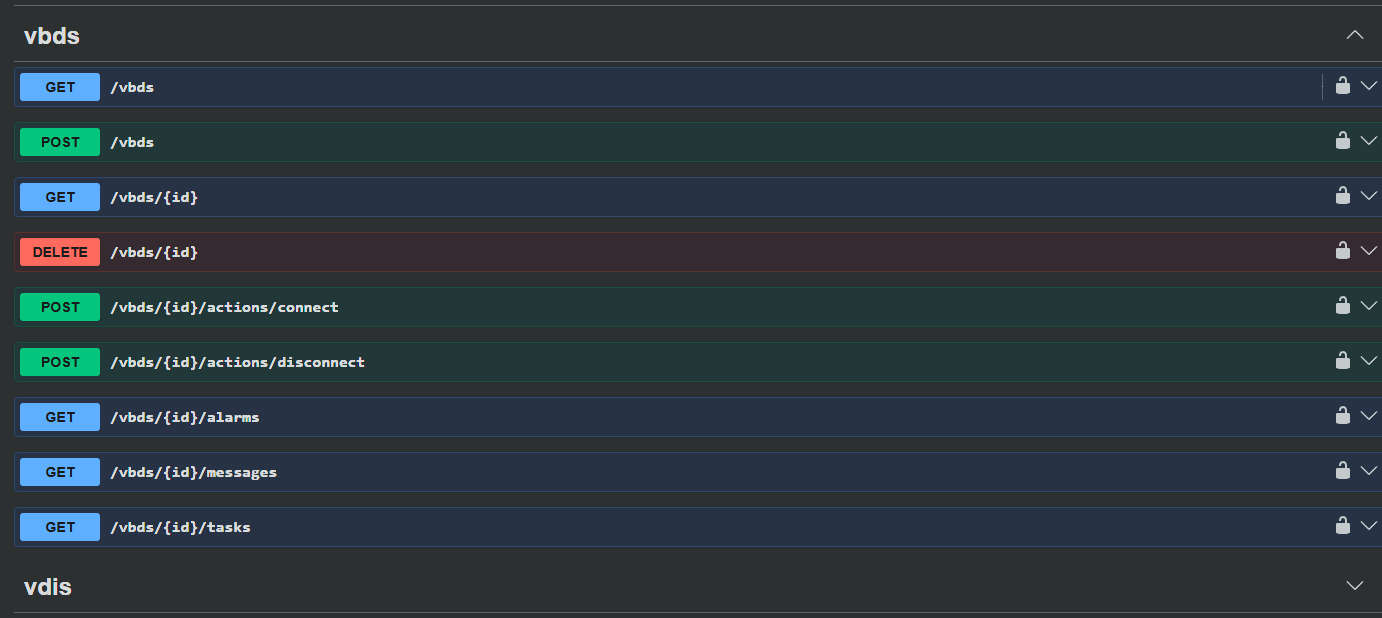
    • RE: REST API: Attaching an existing .vhd to a stopped VM

      Updated now! 🤦

      @Danp 96f16a1e-20d5-4e97-b6f5-ba1a4023c2d3-image.png

      posted in REST API
      BytevenidosB
      Bytevenidos
    • RE: REST API: Attaching an existing .vhd to a stopped VM

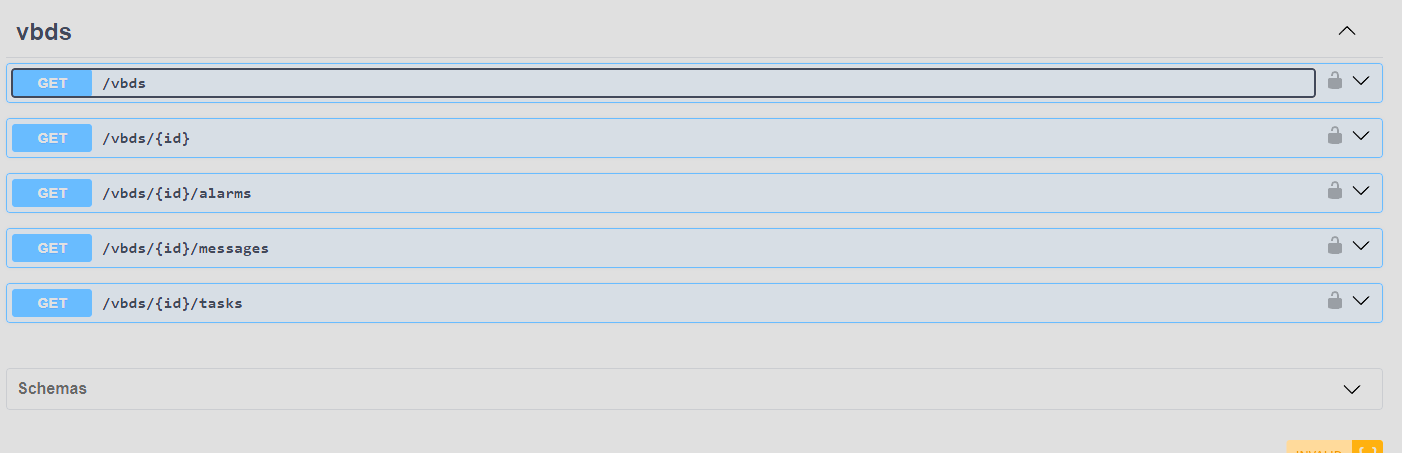
      @Danp They're all GET methods no way to mount anything.

      bf010454-dd1e-4540-a86c-a7bda790b6d7-image.png

      posted in REST API
      BytevenidosB
      Bytevenidos
    • RE: REST API: Attaching an existing .vhd to a stopped VM

      @Danp Thanks! Also, I converted my VM to a template and it had the .iso in it prior to doing that but then when i spin it up from the REST API the .iso is gone?

      posted in REST API
      BytevenidosB
      Bytevenidos
    • REST API: Attaching an existing .vhd to a stopped VM

      I am automating VM deployments using XOA's REST API. I am successfully deploying a VM from a template and uploading a VHD to one of my SRs. The final step in my automated deployment is attaching this existing VHD that i uploaded to the newly created, halted VM.

      I also need to select which .iso is inserted into the CD drive. Is that something configured at the template level? I thought I had done that prior to converting my template.

      I saw some discussions about attaching an existing VDI a year ago in the forums, so I am not sure if anyone has asked recently. I am not sure if attaching a disk to a stopped VM after it was newly created is an endpoint I might have missed.

      Is this handled under an action sub-URL?

      posted in REST API
      BytevenidosB
      Bytevenidos
    • RE: Incorret time in bash-prompt and logs on XOA

      @Danp Yup, that fixed the time and the logs also. Thanks!

      [12:42 19] xoa@xoa:~$ timedatectl
                     Local time: Sun 2025-10-19 12:42:55 EDT
                 Universal time: Sun 2025-10-19 16:42:55 UTC
                       RTC time: Sun 2025-10-19 16:42:55
                      Time zone: America/New_York (EDT, -0400)
      System clock synchronized: yes
                    NTP service: active
                RTC in local TZ: no
      [12:42 19] xoa@xoa:~$ last reboot
      reboot   system boot  6.1.0-40-amd64   Sun Oct 19 12:42   still running
      reboot   system boot  6.1.0-40-amd64   Sun Oct 19 08:27 - 12:42  (04:15)
      reboot   system boot  6.1.0-40-amd64   Sun Oct 19 08:18 - 08:26  (00:08)
      reboot   system boot  6.1.0-40-amd64   Sat Oct 18 15:16 - 08:17  (17:01)
      
      posted in Management
      BytevenidosB
      Bytevenidos
    • RE: Incorret time in bash-prompt and logs on XOA

      @olivierlambert

      I ran that tool and tried both the US/Eastern and America/New_York but I'm still getting a time zone that does not account for daylight savings time. I did reboot inbetween each different sudo dpkg-reconfigure tzdata region selection.

      [07:22 19] xoa@xoa:timesyncd.conf.d$ sudo dpkg-reconfigure tzdata
      
      Current default time zone: 'US/Eastern'
      Local time is now:      Sun Oct 19 08:23:19 EDT 2025.
      Universal Time is now:  Sun Oct 19 12:23:19 UTC 2025.
      
      [07:24 19] xoa@xoa:timesyncd.conf.d$ sudo dpkg-reconfigure tzdata
      
      Current default time zone: 'America/New_York'
      Local time is now:      Sun Oct 19 08:25:59 EDT 2025.
      Universal Time is now:  Sun Oct 19 12:25:59 UTC 2025.
      
      [07:27 19] xoa@xoa:~$ date
      Sun Oct 19 07:27:30 AM EST 2025
      [07:27 19] xoa@xoa:~$ last reboot
      reboot   system boot  6.1.0-40-amd64   Sun Oct 19 07:27   still running
      reboot   system boot  6.1.0-40-amd64   Sun Oct 19 07:18 - 07:26  (00:08)
      
      
      posted in Management
      BytevenidosB
      Bytevenidos