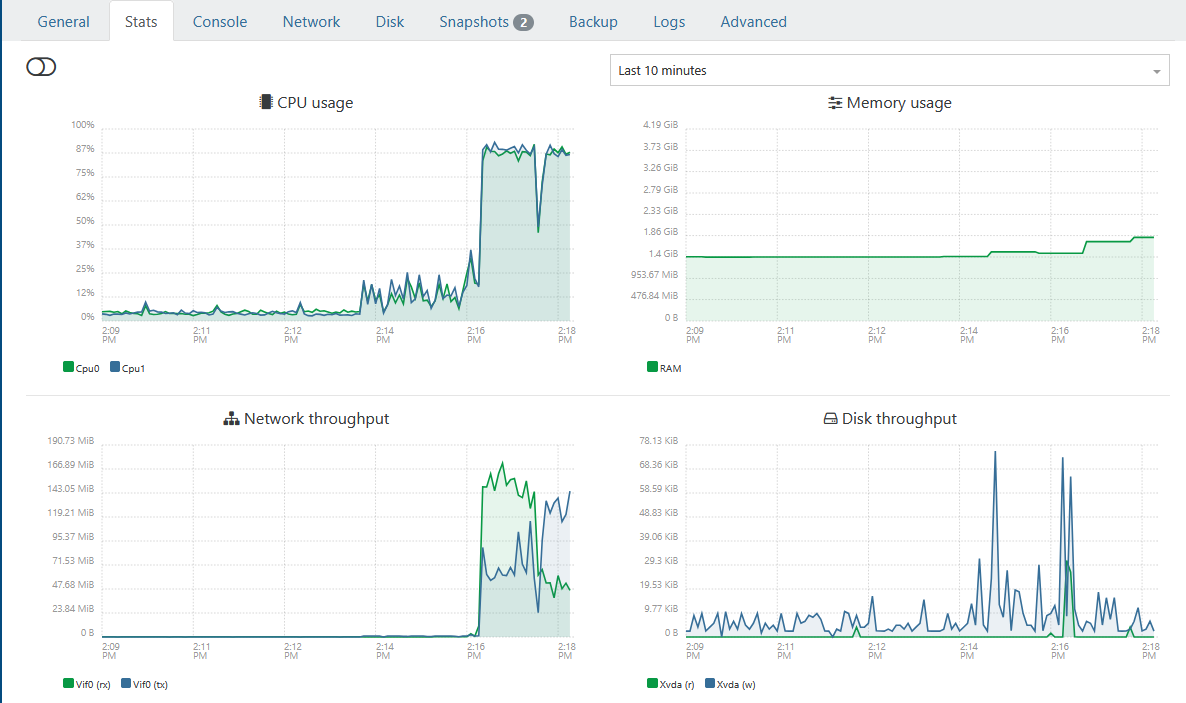
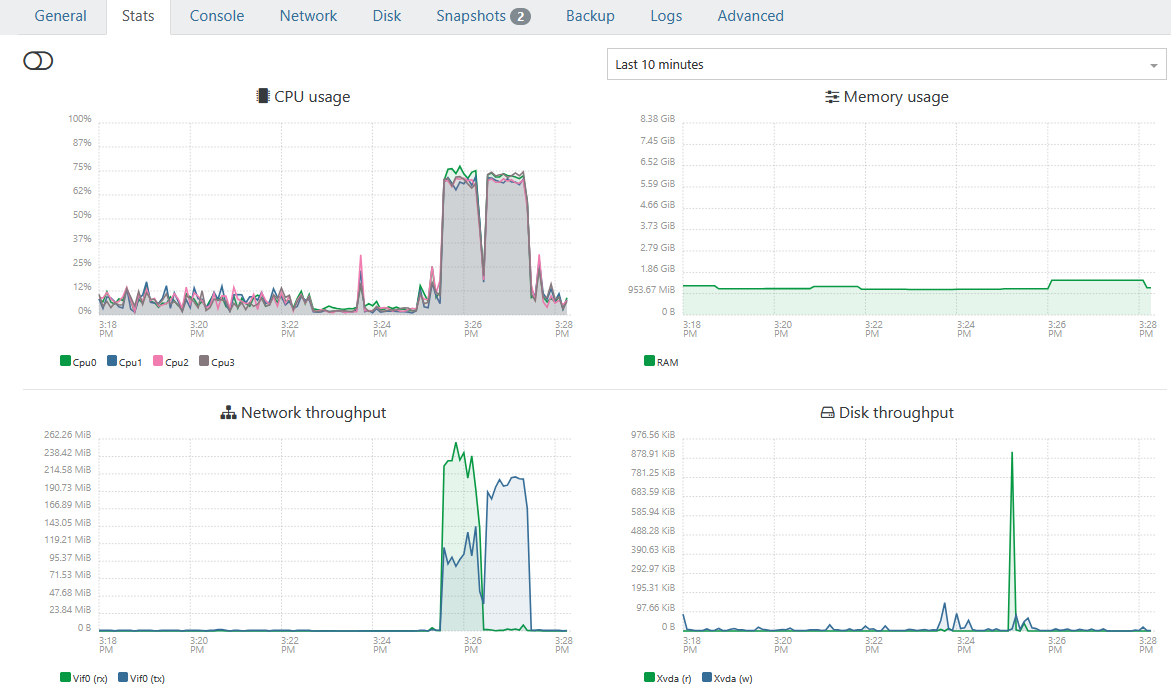
@poddingue @pilow Thanks again for the inputs, i added the additional information in my initial post
 L
Offline
L
Offline
Posts
-
RE: Slow Backups | XOA Performance Test – Upgrading from 2 vCPU to 4 vCPU / 8GB RAM
-
RE: Slow Backups | XOA Performance Test – Upgrading from 2 vCPU to 4 vCPU / 8GB RAM
@Pilow Thanks will look into this. MEM was somhow never realy at high peak during all the tasks. But off course is allocating more MEM when it is not used semi optimal

-
Slow Backups | XOA Performance Test – Upgrading from 2 vCPU to 4 vCPU / 8GB RAM
XOA Performance Test – Upgrading from 2 vCPU to 4 vCPU / 8GB RAM
I wanted to share my experience because I was seeing unusually high CPU usage on my XOA VM during backup operations.
Environment:
- XCP-ng pool with multiple hosts
- XOA running as a VM
- SSD RAID10 NFS storage
- Daily delta backups (~17 production VMs)
- Weekly backup jobs with Health Checks
- Backup window previously around 7 hours
Symptoms before optimization:
- XOA CPU usage frequently close to 100%
- During backups, multiple backupWorker.mjs processes saturated available CPUs
- XOA felt sluggish while backups were running
- Backup jobs took significantly longer than expected
- htop showed worker processes fighting for CPU resources
Original XOA VM configuration:
- 2 vCPU
- 4 GB RAM
- 1 socket / 2 cores
Observed htop behavior during backups:
/usr/local/lib/node_modules/xo-server/node_modules/@xen-orchestra/backups/backupWorker.mjs
Several workers continuously consumed nearly all available CPU.
IMPORTANT:
Run the following commands via SSH directly on the XCP-ng Pool Master.
Do NOT perform these changes through the Xen Orchestra GUI itself because you are modifying the XOA VM that is currently managing your environment. Otherwise you may lock yourself out or interrupt your own management session during the reconfiguration process.
Connect to the Pool Master:
ssh root@<POOL-MASTER-IP>
First identify the XOA VM UUID:
xe vm-list | grep -i xoa -B1 -A2
or:
xe vm-list name-label="<YOUR-XOA-VM-NAME>"Example output:
uuid ( RO): xxxxxxxx-xxxx-xxxx-xxxx-xxxxxxxxxxxx
name-label ( RW): XOA-Production
power-state ( RO): runningCopy the UUID for the following steps.
Test procedure:
I increased XOA resources to:New XOA configuration:
- 4 vCPU
- 8 GB RAM
- CPU topology: 1 socket / 4 cores
Procedure used:
- Shutdown XOA VM
xe vm-shutdown uuid=<XOA-VM-UUID>
Wait a few seconds and verify status:
xe vm-list
uuid=<XOA-VM-UUID>
params=name-label,power-state- Set memory
xe vm-memory-limits-set
uuid=<XOA-VM-UUID>
static-min=8GiB
dynamic-min=8GiB
dynamic-max=8GiB
static-max=8GiB- Increase vCPU count
xe vm-param-set
uuid=<XOA-VM-UUID>
VCPUs-max=4xe vm-param-set
uuid=<XOA-VM-UUID>
VCPUs-at-startup=4- Set CPU topology
xe vm-param-set
uuid=<XOA-VM-UUID>
platform:cores-per-socket=4- Adjust xo-server.service config
sudo nano /etc/systemd/system/xo-server.service
replace entry
ExecStart=/usr/local/bin/xo-server
with:
ExecStart=/usr/local/bin/node --max-old-space-size=7680 /usr/local/bin/xo-server- Start XOA again
xe vm-start uuid=<XOA-VM-UUID>
Verification:
xe vm-param-get
uuid=<XOA-VM-UUID>
param-name=VCPUs-maxxe vm-param-get
uuid=<XOA-VM-UUID>
param-name=VCPUs-at-startupxe vm-param-get
uuid=<XOA-VM-UUID>
param-name=platformxe vm-list
uuid=<XOA-VM-UUID>
params=name-label,power-stateResults from the same backup job:
Before:
- Backup size: 10.58 GiB
- Transfer speed: 150.21 MiB/s
- Total duration: 3 minutes
- Health check transfer: 2 minutes
After:
- Backup size: 10.71 GiB
- Transfer speed: 229.12 MiB/s
- Total duration: 2 minutes
- Health check transfer: 1 minute
Measured improvement:
Transfer throughput:
+52%Backup duration:
-33%Health check transfer:
-50%After the upgrade, htop showed backup workers distributed across all available CPUs instead of saturating only two cores.
Conclusion:
For my environment the bottleneck was not:
- NFS
- Storage
- SSD RAID10
- Host performance
The bottleneck appears to have been XOA itself being underprovisioned.
If you are running larger backup jobs, health checks, multiple workers, or backup-heavy environments, increasing XOA resources may provide a noticeable improvement.
I still need to test the full nightly production run (~17 VMs), but initial results are very promising.
Hope this helps someone.
-
RE: bug about provoked BACKUP FELL BACK TO A FULL due to DR job
I have ticket open at Vates for this Issue, but no feedback as for now
-
RE: bug about provoked BACKUP FELL BACK TO A FULL due to DR job
@Goulven Looks like we have the same Issue

Any Progress or updates on this topic? -
RE: WMware ESXi import XO V2V Change Mgmt
But even without my special use case it would be nice to actualy be able to have control of the last two steps (Snapshot & Boot). Because when you in a bigger envirement you probably have to follow a Change Management Process where you need to declare/get-approved the Migration of in Production Infrastructure. Normaly you would declare the Migration timeslot within the change window i.e. 00:00 - 03:00 and a exactly Service Impact timeslot (Where the Services are not availible) within the Migration Window i.e 02:00 - 02:30
-
RE: WMware ESXi import XO V2V Change Mgmt
Hi Dan,
Where the problem ist as soon as the VM starts the license Manager will notice the change of the Hardware and therefore Block the CAD licenses. Unforgettably this type of license is not only atached to the Mac address. And when that happens I need to fil out a recovery report for the licences and this is an nightmare.
What I would like to do is before the last snapchat will be taken I can take out the licences and then take the snapshot and move the WM and start on the new location and start the licence Manager again -
WMware ESXi import XO V2V Change Mgmt
Hi,
Just a short question regarding a "Controlled" WMware ESXi import with XO V2V.
When Importing a VM I do not know how long it takes for the initial sync (Step 2) which is ok.
But before step 3 do i get asked that I would like to proceed or is the system just doing it?
Because I would like define exactly when I will do the last snapshot as I need to release first some CAD Licences as the get blocked on the new VM becuase of new Hardware.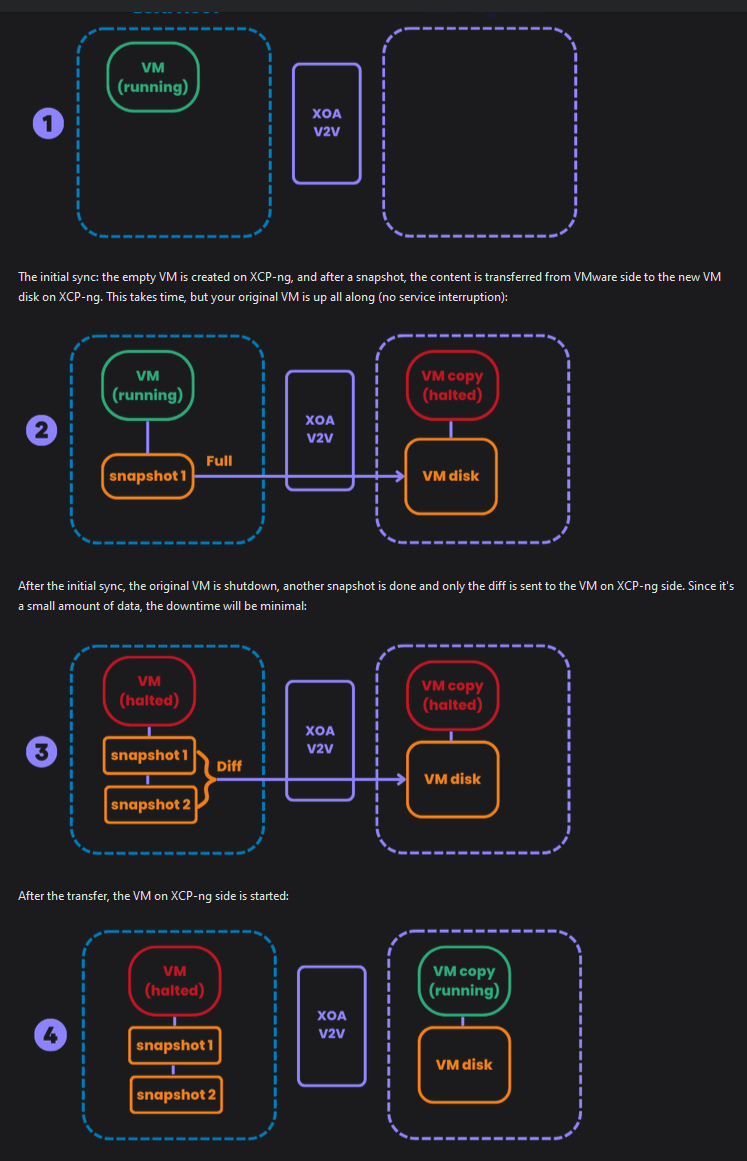
THX