@stormi Installed on our 2 production pools, DR and remote sites, 46 hosts total ranging from Dell, Lenovo, HP, and Supermicro servers, no issues to report!
F
Offline
-
RE: XCP-ng 8.3 updates announcements and testing
-
RE: XCP-ng 8.3 updates announcements and testing
Installed on my usual selection of hosts. (A mixture of AMD and Intel hosts, SuperMicro, Asus, and Minisforum). No issues after a reboot, PCI Passthru, backups, etc continue to work smoothly. Also installed on a HP GL325 Gen 10 with no issues after reboot.
-
RE: XCP-ng 8.3 updates announcements and testing
@gduperrey Updated my usual test hosts, (Minisforum and Supermicro X11) as well as an two sets of 2 host AMD pools (one pool of HP DL320 Gen10s and another of Asus Epyc servers of some sort, and lastly a Dell R360 without issue.
-
RE: XCP-ng 8.3 updates announcements and testing
@gduperrey Installed on my usual round test hosts. No issues to report so far! With such a small change i wasn't expecting anything to go wrong!
-
RE: XCP-ng 8.3 updates announcements and testing
Installed on my usual selection of hosts. (A mixture of AMD and Intel hosts, SuperMicro, Asus, and Minisforum). No issues after a reboot, PCI Passthru, backups, etc continue to work smoothly
-
RE: log_fs_usage / /var/log directory on pool master filling up constantly
One of our pools. (5 hosts, 6 NFS SRs) had this issue when we first deployed it. I engaged with support from Vates and they changed a setting that reduced the frequency of the SR.scan job from 30 seconds to every 2 mins instead. This totally fixed the issue for us going on a year and a half later.
I dug back in our documentation and found the command they gave us
xe host-param-set other-config:auto-scan-interval=120 uuid=<Host UUID>Where hosts UUID is your pool master.
-
RE: XCP-ng 8.3 updates announcements and testing
@stormi Installed on my usual test hosts (Intel Minisforum MS-01, and Supermicro running a Xeon E-2336 CPU). Also installed onto a 2 host AMD epyc pool. Updates went smooth, backups continue to function as before.
3 windows 11 VMs had secure boot enabled. In XOA i clicked "Copy pool's default UEFI certificates to the VM" after the update was complete. The VMs continued to boot without issue after.
-
RE: XCP-ng 8.3 updates announcements and testing
installed on 2 test machines
Machine 1:
Intel Xeon E-2336
SuperMicro board.Machine 2:
Minisforum MS-01
i9-13900H
32 GB Ram
Using Intel X710 onboard NICBoth machines installed fine and all VMs came up without issue after. My one test backup job also seemed to run without any issues.
-
RE: XCP-ng 8.3 updates announcements and testing
@gduperrey installed on 2 test machines
Machine 1:
Intel Xeon E-2336
SuperMicro board.Machine 2:
Minisforum MS-01
i9-13900H
32 GB Ram
Using Intel X710 onboard NICBoth machines installed fine and all VMs came up without issue after.
I ran a backup job after to test snapshot coalesce, no issues there.
-
RE: XCP-ng 8.3 updates announcements and testing
@stormi Updated a test machine running only couple VMs. Everything installed fine and rebooted without issue.
Machine is:
Intel Xeon E-2336
SuperMicro board.
One VM happens to be windows based with an Nvidia GPU passed though to it running Blue Iris using the MSR fixed found elsewhere on these forums, fix continues to work with this version of Xen.
-
RE: XCP-ng 8.3 updates announcements and testing
Installed on my usual test hosts without any issues so far.
-
RE: XCP-ng 8.3 updates announcements and testing
@dinhngtu We did initially run into this issue a number of years ago and were able to fix it by following this kb article at the time:
https://support.citrix.com/external/article?articleUrl=CTX692813-xenserver-potential-performance-issues-on-imported-windows-vms&language=en_USChecking s few random migrated windows VMs and it appears these flags are still set as they should be.
-
RE: XCP-ng 8.3 updates announcements and testing
@dinhngtu Thanks for clarifying. I can confirm our windows VMs that were migrated with V2V with "Other Install media" do show having this enabled.
I will deploy to my usual batch of test hosts and update this post with my results.
-
RE: XCP-ng 8.3 updates announcements and testing
Disable Viridian in the "Other install media" template by default. As a reminder, Windows VMs must use Windows templates.
Working on testing this update out however this change has me a bit concerned. Will existing Windows VMs using "Other install media" be affected by this? Or is this just for VMs created going forward? Back in 2024 when we migrated from VMware using V2V all Windows VMs we migrated were created with "Other Install Media" as I'm guessing that's just how the migration process worked at the time.
-
RE: XOA 6.8 Pool Metadata backup
@poddingue This was fixed a number of weeks ago via a ticket. I believe @florent may know the exact fix.
-
RE: XOA 6.8 Pool Metadata backup
Doing some more testing it doesn't seem to matter how many pools i have in the metadata backup job, it will hang and time out after 20 mins. I am also seeing this on my home install with XO from sources after updating to the latest commit.
-
RE: XOA 6.8 Pool Metadata backup
-
XOA 6.8 Pool Metadata backup
Since upgrading to XOA 6.8 i'm experiencing XOA pool metadata backup failures. The task will run and a number of pools will successfully backup however a random set of pools will stall until the job eventually fails after 20 mins. The error is "Body Timeout Error". I have tried restarting the toolstack on the hosts as well as restarting XOA. It is not always the same hosts each time i retry either.
I would attach the log but it is quite long as it seems to show successes as well as failures
"id": "0mtln3sci-stmgt9yih8i", "start": 1788446895426, "status": "failure", "tasks": [ { "id": "0mtln3sde-8lp6c7ei6un", "start": 1788446895458, "status": "failure", "end": 1788448100196, "result": { "name": "BodyTimeoutError", "code": "UND_ERR_BODY_TIMEOUT", "message": "Body Timeout Error", "stack": "BodyTimeoutError: Body Timeout Error\n at FastTimer.onParserTimeout [as _onTimeout] (/usr/local/lib/node_modules/xo-server/node_modules/undici/lib/dispatcher/client-h1.js:703:28)\n at Timeout.onTick [as _onTimeout] (/usr/local/lib/node_modules/xo-server/node_modules/undici/lib/util/timers.js:162:13)\n at listOnTimeout (node:internal/timers:585:17)\n at processTimers (node:internal/timers:521:7)" }, "message": "Starting metadata backup for the pool (19bda980-70ec-bada-5d9d-6f35c8a2122b) for the remote (5b9abfa7-f5f1-4e80-bfde-cabe82864988). (5220a296-765d-4023-acc7-70d4ae66fe1e)", "data": { "id": "5b9abfa7-f5f1-4e80-bfde-cabe82864988", "type": "remote", "progress": 0 } -
RE: XOA 6.8 causes backup / replication failure
@florent Im having the same issue on 6.8.1 as well. XO and Proxies both updated.
The backup fails with "Fetch Failed" and the following appears in the log:
{
  "data": {
    "mode": "delta",
    "reportWhen": "failure"
  },
  "id": "1788359113454",
  "jobId": "61c9c971-a2ca-453a-9ed6-934e7cf241b2",
  "jobName": "TestLab-14Day-VMVault03",
  "message": "backup",
  "proxyId": "3b26e911-1502-4686-ada4-7e4e33ad6222",
  "scheduleId": "23f4b532-feb3-4c23-8fcd-1fd318e9ce63",
  "start": 1788359113454,
  "status": "failure",
  "end": 1788359173436,
  "result": {
    "message": "fetch failed",
    "name": "TypeError",
    "stack": "TypeError: fetch failed\n    at node:internal/deps/undici/undici:14976:13\n    at AsyncResource.runInAsyncScope (node:async_hooks:214:14)\n    at cb (/usr/local/lib/node_modules/xo-server/node_modules/bluebird/js/release/util.js:355:42)\n    at tryCatcher (/usr/local/lib/node_modules/xo-server/node_modules/bluebird/js/release/util.js:16:23)\n    at Promise._settlePromiseFromHandler (/usr/local/lib/node_modules/xo-server/node_modules/bluebird/js/release/promise.js:547:31)\n    at Promise._settlePromise (/usr/local/lib/node_modules/xo-server/node_modules/bluebird/js/release/promise.js:604:18)\n    at Promise._settlePromise0 (/usr/local/lib/node_modules/xo-server/node_modules/bluebird/js/release/promise.js:649:10)\n    at Promise._settlePromises (/usr/local/lib/node_modules/xo-server/node_modules/bluebird/js/release/promise.js:725:18)\n    at _drainQueueStep (/usr/local/lib/node_modules/xo-server/node_modules/bluebird/js/release/async.js:93:12)\n    at _drainQueue (/usr/local/lib/node_modules/xo-server/node_modules/bluebird/js/release/async.js:86:9)\n    at Async._drainQueues (/usr/local/lib/node_modules/xo-server/node_modules/bluebird/js/release/async.js:102:5)\n    at Immediate.Async.drainQueues (/usr/local/lib/node_modules/xo-server/node_modules/bluebird/js/release/async.js:15:14)\n    at processImmediate (node:internal/timers:484:21)\n    at process.callbackTrampoline (node:internal/async_hooks:130:17)"
  }
}
However the backup appears to carry on the in the background after i receive the email of failure / the backup shows as failed on the backups page in XO5.
-
XOA 6.8 causes backup / replication failure
I submitted a ticket about this as well but posting here for visibility
When running backup job that both backups up and replicates a VM the job will fail with the error "Error: fetch failed" both XOA and all proxies in the environment were upgraded. I also notice regular backups that do not have a replication running as well now show "NBT" instead of "NBD" when backing up. (Screenshot attached)
Screenshot 2026-08-31
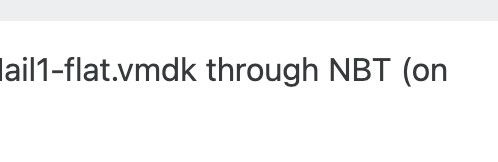
Log attached:
{
  "data": {
    "mode": "delta",
    "reportWhen": "failure"
  },
  "id": "1788197619873",
  "jobId": "61c9c971-a2ca-453a-9ed6-934e7cf241b2",
  "jobName": "TestLab-14Day-VMVault03",
  "message": "backup",
  "proxyId": "3b26e911-1502-4686-ada4-7e4e33ad6222",
  "scheduleId": "23f4b532-feb3-4c23-8fcd-1fd318e9ce63",
  "start": 1788197619873,
  "status": "failure",
  "end": 1788197679884,
  "result": {
    "message": "fetch failed",
    "name": "TypeError",
    "stack": "TypeError: fetch failed\n    at node:internal/deps/undici/undici:14976:13\n    at AsyncResource.runInAsyncScope (node:async_hooks:214:14)\n    at cb (/usr/local/lib/node_modules/xo-server/node_modules/bluebird/js/release/util.js:355:42)\n    at tryCatcher (/usr/local/lib/node_modules/xo-server/node_modules/bluebird/js/release/util.js:16:23)\n    at Promise._settlePromiseFromHandler (/usr/local/lib/node_modules/xo-server/node_modules/bluebird/js/release/promise.js:547:31)\n    at Promise._settlePromise (/usr/local/lib/node_modules/xo-server/node_modules/bluebird/js/release/promise.js:604:18)\n    at Promise._settlePromise0 (/usr/local/lib/node_modules/xo-server/node_modules/bluebird/js/release/promise.js:649:10)\n    at Promise._settlePromises (/usr/local/lib/node_modules/xo-server/node_modules/bluebird/js/release/promise.js:725:18)\n    at _drainQueueStep (/usr/local/lib/node_modules/xo-server/node_modules/bluebird/js/release/async.js:93:12)\n    at _drainQueue (/usr/local/lib/node_modules/xo-server/node_modules/bluebird/js/release/async.js:86:9)\n    at Async._drainQueues (/usr/local/lib/node_modules/xo-server/node_modules/bluebird/js/release/async.js:102:5)\n    at Immediate.Async.drainQueues (/usr/local/lib/node_modules/xo-server/node_modules/bluebird/js/release/async.js:15:14)\n    at processImmediate (node:internal/timers:484:21)\n    at process.callbackTrampoline (node:internal/async_hooks:130:17)"
  }
}
Rolling back to 6.7.1 results in the job functioning again.