Backup Suddenly Failing
-
@JSylvia007 long stretch test but, if you have some space on the SR where resides the VM.
shut the VM down and full-clone it.try a backup of this clone.
report back ?
-
@Pilow - I can try this, but not until a bit later.
-
@pilow & @florent - The plot thickens. I'm unable to full-clone the VM...
{ "id": "0mn6ds7ih", "properties": { "method": "vm.copy", "params": { "vm": "afe4bee2-745d-da4a-0016-c74751856556", "sr": "247ef8a6-9c10-e100-acd3-c9193f34ddc3", "name": "ADMIN-VM02_COPY" }, "name": "API call: vm.copy", "userId": "b06e5d9f-a602-4b76-a7bb-b1c915712ca3", "type": "api.call" }, "start": 1774463552009, "status": "failure", "updatedAt": 1774464678345, "end": 1774464678344, "result": { "code": "VDI_COPY_FAILED", "params": [ "Fatal error: exception Unix.Unix_error(Unix.EIO, \"read\", \"\")\n" ], "task": { "uuid": "555f90cc-12b7-7c2c-a2df-0f29a16a007e", "name_label": "Async.VM.copy", "name_description": "", "allowed_operations": [], "current_operations": {}, "created": "20260325T18:32:32Z", "finished": "20260325T18:51:18Z", "status": "failure", "resident_on": "OpaqueRef:22c5ddea-00c6-f412-4439-536c4bbdca63", "progress": 1, "type": "<none/>", "result": "", "error_info": [ "VDI_COPY_FAILED", "Fatal error: exception Unix.Unix_error(Unix.EIO, \"read\", \"\")\n" ], "other_config": {}, "subtask_of": "OpaqueRef:NULL", "subtasks": [ "OpaqueRef:655cc4e3-0205-ba7d-5831-4b191ecfba9e" ], "backtrace": "(((process xapi)(filename ocaml/xapi/xapi_vm_clone.ml)(line 77))((process xapi)(filename list.ml)(line 110))((process xapi)(filename ocaml/xapi/xapi_vm_clone.ml)(line 120))((process xapi)(filename ocaml/libs/xapi-stdext/lib/xapi-stdext-pervasives/pervasiveext.ml)(line 24))((process xapi)(filename ocaml/libs/xapi-stdext/lib/xapi-stdext-pervasives/pervasiveext.ml)(line 39))((process xapi)(filename ocaml/xapi/xapi_vm_clone.ml)(line 128))((process xapi)(filename ocaml/xapi/xapi_vm_clone.ml)(line 171))((process xapi)(filename ocaml/xapi/xapi_vm_clone.ml)(line 210))((process xapi)(filename ocaml/xapi/xapi_vm_clone.ml)(line 221))((process xapi)(filename list.ml)(line 121))((process xapi)(filename ocaml/xapi/xapi_vm_clone.ml)(line 223))((process xapi)(filename ocaml/xapi/xapi_vm_clone.ml)(line 461))((process xapi)(filename ocaml/libs/xapi-stdext/lib/xapi-stdext-pervasives/pervasiveext.ml)(line 24))((process xapi)(filename ocaml/libs/xapi-stdext/lib/xapi-stdext-pervasives/pervasiveext.ml)(line 39))((process xapi)(filename ocaml/xapi/xapi_vm.ml)(line 791))((process xapi)(filename ocaml/libs/xapi-stdext/lib/xapi-stdext-pervasives/pervasiveext.ml)(line 24))((process xapi)(filename ocaml/libs/xapi-stdext/lib/xapi-stdext-pervasives/pervasiveext.ml)(line 39))((process xapi)(filename ocaml/xapi/rbac.ml)(line 228))((process xapi)(filename ocaml/xapi/rbac.ml)(line 238))((process xapi)(filename ocaml/xapi/server_helpers.ml)(line 78)))" }, "message": "VDI_COPY_FAILED(Fatal error: exception Unix.Unix_error(Unix.EIO, \"read\", \"\")\n)", "name": "XapiError", "stack": "XapiError: VDI_COPY_FAILED(Fatal error: exception Unix.Unix_error(Unix.EIO, \"read\", \"\")\n)\n at XapiError.wrap (file:///opt/xo/xo-builds/xen-orchestra-202603241416/packages/xen-api/_XapiError.mjs:16:12)\n at default (file:///opt/xo/xo-builds/xen-orchestra-202603241416/packages/xen-api/_getTaskResult.mjs:13:29)\n at Xapi._addRecordToCache (file:///opt/xo/xo-builds/xen-orchestra-202603241416/packages/xen-api/index.mjs:1078:24)\n at file:///opt/xo/xo-builds/xen-orchestra-202603241416/packages/xen-api/index.mjs:1112:14\n at Array.forEach (<anonymous>)\n at Xapi._processEvents (file:///opt/xo/xo-builds/xen-orchestra-202603241416/packages/xen-api/index.mjs:1102:12)\n at Xapi._watchEvents (file:///opt/xo/xo-builds/xen-orchestra-202603241416/packages/xen-api/index.mjs:1275:14)" } } -
"Fatal error: exception Unix.Unix_error(Unix.EIO, \"read\", \"\")\n"mmmm SR is failing ?
can you restore the last known good state of this VM (in parallel of the one in production) and try to backup this restored version ? -
@Pilow - Well... Didn't you ruin my day yesterday... LOL.
Long story short... The local SR is on a RAID5 in the server. The damn thing isn't reporting that a drive has failed (hard failed, it's not even showing up in the RAID Controller anymore). The array says degraded, but fine... So it's weird to me that this could be related. I have a drive on order and plan to rebuild the array as soon as the drive arrives.
Once that happens, I will start investigating this again... Maybe it magically clears up.
-
@JSylvia007 hoho... beware of array rebuilding on old disks
-
@Pilow - This is why I'm nervous... BUT... EVERYTHING else has a good backup. I plan to shut down all the VMs and then backup once more while I rebuild the array.
Fingers crossed. -
Living on the edge at my home lab
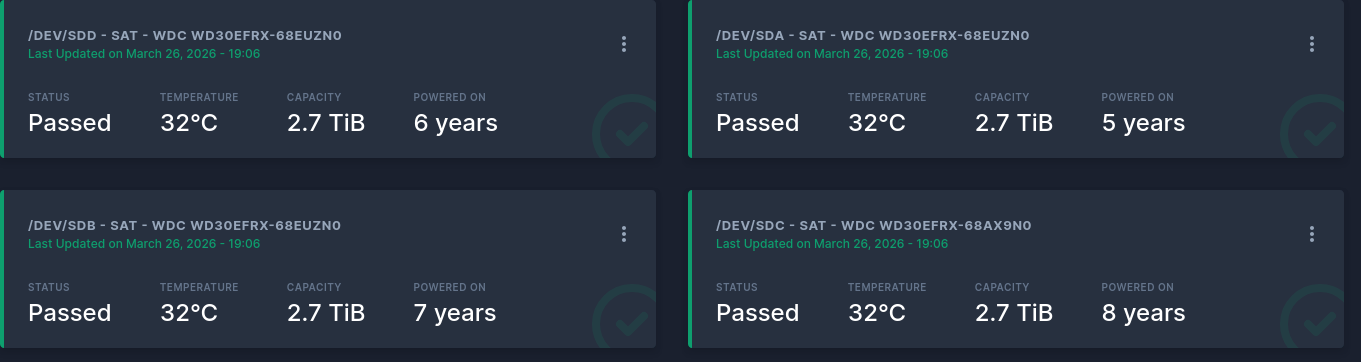
In my other NAS the oldest one is closing up 11 years

-
@pilow - I know this has gotten a bit off topic, but in the interests of keeping folks informed... I've managed to migrate ALL VDIs over to remote NFS Storage, except this problem VM.
To solve that problem, I:
- Added a second disk on the remote storage, attached it, and booted into clonezilla.
- Cloned the disk from INSIDE the VM.
- Detatched and removed the old disk.
The local SR is now void of disks. I decided that instead of rebuild the RAID with a new disk, I'm just going to completely pull the disks and replace with shiny new disks. It's just not worth the uncertainty of what MIGHT happen. All the disks in that array are the same age.
EDIT: Backup Succeeded on the new disk, so I think you hit the nail on the head @pilow ... Failing SR.
-
Nice catch and great news to hear

-
@JSylvia007 Sorry, I'm really late to this thread, but note that backups can become problematic if the SR is something like 90% or more full. There needs to be some buffer for storage as part of the process. The fact you could copy/clone VMs means your SR is working OK, but backups are a different situation. If need be, you can always migrate VMs to other storage which is evidently what you ended up doing, which frees up extra disk space. Also backups are pretty intensive so make sure you have both enough CPU capacity and memory to handle the load. Finally. a defective SR will definitely cause issues if there are I/O errors, so watch your /var/log/SMlog for any such entries.



Hello! It looks like you're interested in this conversation, but you don't have an account yet.
Getting fed up of having to scroll through the same posts each visit? When you register for an account, you'll always come back to exactly where you were before, and choose to be notified of new replies (either via email, or push notification). You'll also be able to save bookmarks and upvote posts to show your appreciation to other community members.
With your input, this post could be even better 💗
Register Login