Potential bug with Windows VM backup: "Body Timeout Error"
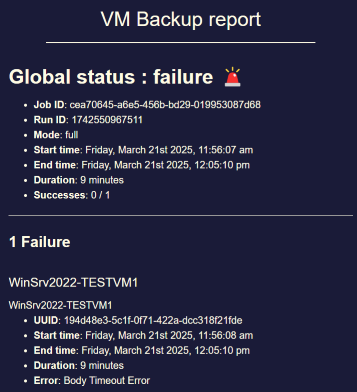
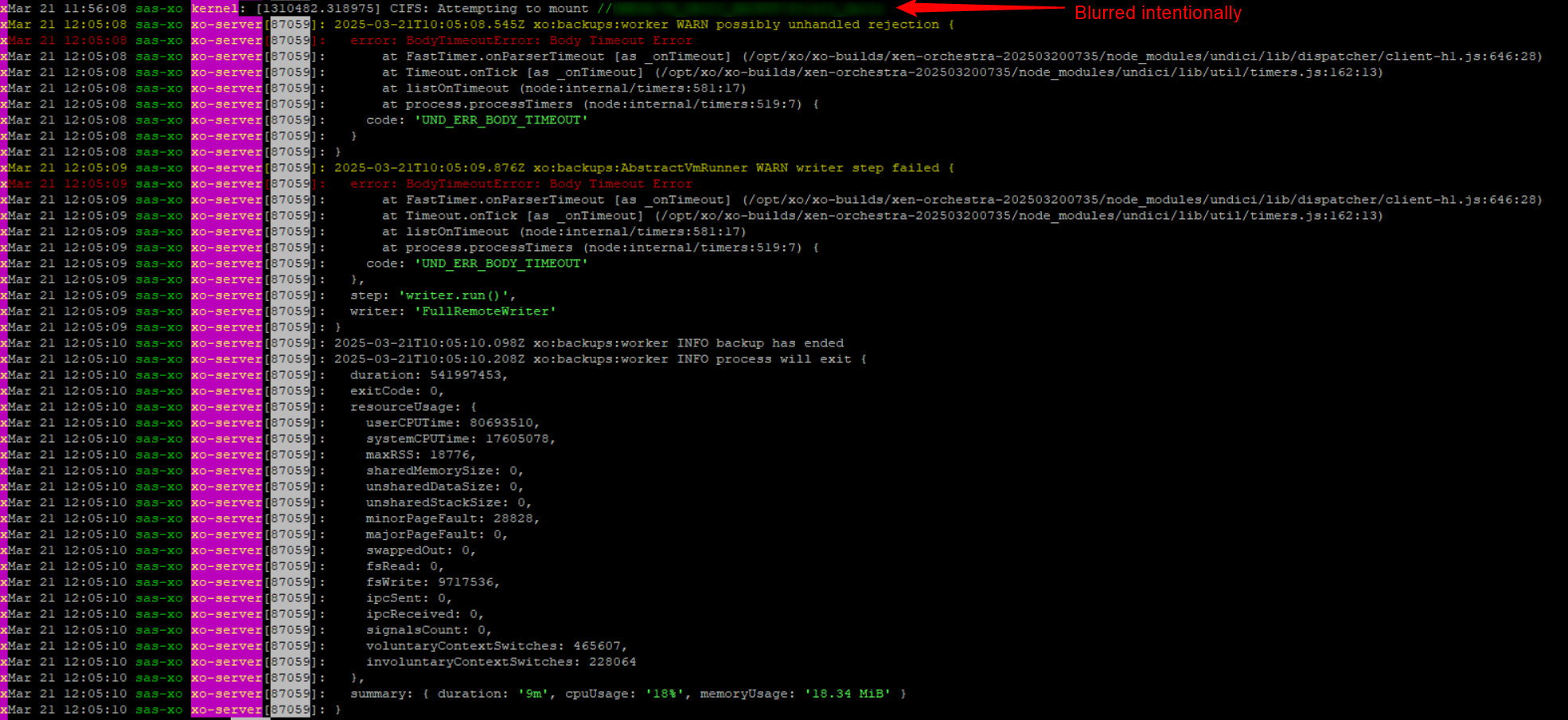
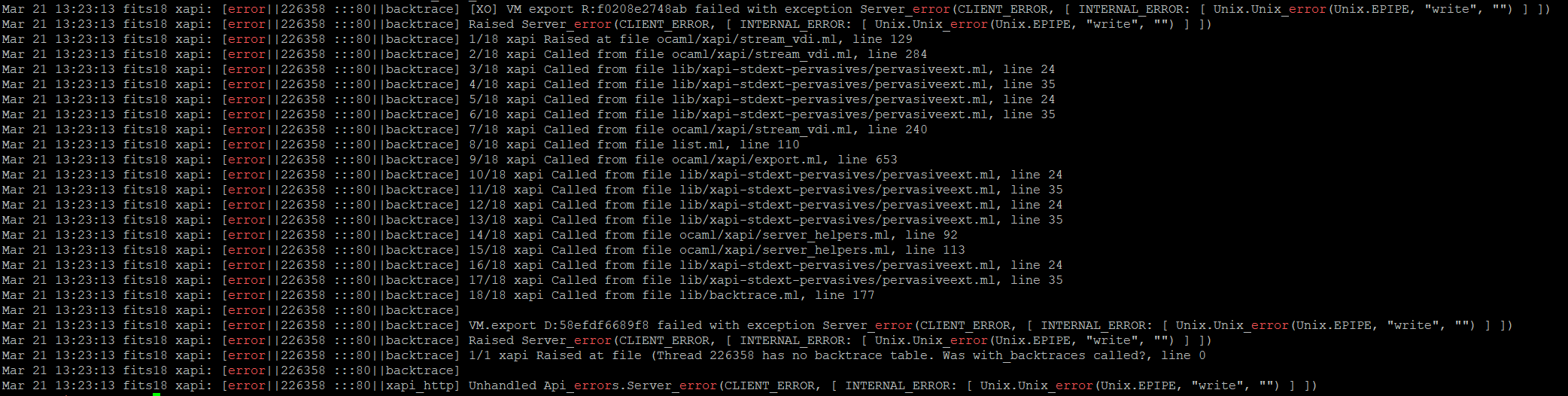
-
@MajorP93
I'l do that, didn't know about it. -
Thirty to forty seconds of clock drift after a power outage, and then the backup goes through once you fix the time. That could be coincidence, but it might not be.

I don't know enough about how the XAPI client handles time skew to say whether it would surface as aBodyTimeoutErrorrather than an auth or TLS failure, so I could easily be wrong here.
If it fails again, could you look at what the host clock is doing before you correct it? @pierrebrunet from the XO team is already on this one, and a second data point either way would tell him whether it's worth pulling on. Thanks for putting the logs on the pastebin, much easier to read that way. -
I checked my hosts and the clocks all seem to be very close in time, certainly within a second of each other. The one difference is that the host that is often the target for the backups is set to UTC and the other two are set to MST. Clearly an oversight on my part, unless it is purely a display issue. When I ssh into dom0 and use date, those two show MST and the other shows UTC. If that has ever changed, it would most likely have been in the upgrade from 8.2 to 8.3, which I performed on Jan 28.
All that said, this body timeout issue happens to me every day on random VMs within my backup. Occasionally a backup will complete with none of these errors on any VM but that's uncommon. All of the failed backups are from VMs or configs on the two MST hosts and are stored on the UTC host. (To be clear, they are also stored elsewhere.) I also have an XO instance on one of the MST hosts that performs delta backups and those have never failed. I don't know if that's because they are delta or if it's because they don't touch the UTC host.
The recent failed backups started on 6/26 for my VM full backups and on 6/29 for the config backups. Prior to that the config backups had never had a problem and the full backups had been fine back into February. From February 21 to March 12, I had a smattering of backup failures due to
body timeout errorfor the full backups. -
Thanks for checking. That's useful, even if it points away from where I was looking.

Clocks within a second of each other means drift probably isn't your problem, and I'd guess the MST/UTC difference is just howdom0displays it, though I'm not sure.
What I keep coming back to is that your full backups fail while the delta jobs on the same hosts never do. That's the same split in https://github.com/vatesfr/xen-orchestra/issues/9181, where full backups hitBodyTimeoutErroron VMs with big disks or a lot of free space and the deltas are fine.
If your failing VMs look like that, your dates and the MST/UTC detail would do more good on that issue than buried in here. -
My three hosts are all EDT, drift on mine is pretty small because I have a local NTP server with GNSS.
So it could be a timezone issue and might be worth looking into.
-
Thanks Greg, that's a useful data point.

If your clocks are within a second across all three hosts and you're still seeing it, that makes me doubt the timezone angle as the root cause, even if the waydom0displays the time is confusing.
The thing I keep coming back to is the split you and I both see: full backups fail while the delta jobs on the same VMs never do. That's the same pattern in https://github.com/vatesfr/xen-orchestra/issues/9181, which points at large VMs or VMs with a lot of free disk space rather than anything clock-related.
I'm not sure that's your case, but it might be worth checking whether the VMs that fail are the ones carrying the most free space inside the guest. -
@poddingue These are VMs that have been doing full backups fine for a very long time. I have run into the too-much-free-space issue in the past with a different brand new VM but these have been around since I migrated them from VMware during the Broadcom fiasco years ago. It is also totally inconsistent which VMs fail with the body timeout. One day it'll be a single one, the next day it'll be three or four and won't include that one, then it'll be a couple other ones unrelated to any of the earlier ones, then I'll have no failures. It's all over the place. I'm just glad that over the course of several days I get good backups of everything.
Oh, a maybe useful data point is that my delta backups that all succeed are handled by a different instance of XO that runs on a different one of the hosts. I might be overly paranoid, but I run full backups and delta backups of the same VMs using different XO instances to different target remotes, at different non-overlapping times. This is part of the reason that I'm not hair-on-fire worried about the failing full backups.
A while back I stupidly let one of my Storage Repositories run out of space and it was the one hosting my main XO instance that handled all the backups. It took a while to get it back going again and I realized I wanted redundancy in what handled backups and moved the deltas over to another XO instance. Too many eggs in that one basket. I also wasn't able to restore the backup of that XO instance because that XO instance is what handled the backups. Thankfully it all worked out in the end, plus a number of extra gray hairs it gave me.
-
Thanks, that complicates the large-VM theory in a good way.
If these are long-established VMs that backed up fine for years, "too much free space on a new VM" probably isn't the whole story here.
Your deltas run from a completely different XO instance, on a different host, to different remotes, at non-overlapping times, so "deltas never fail, fulls do" might not be purely about job type, it could be tangled up with which instance or remote is doing the work.
If you ever get the chance to run a full from the XO instance that normally handles your deltas, that would help tell whether the timeout follows the job type or the instance.
I could easily be wrong, though, but that split feels worth isolating before we lean too hard on the free-space angle in https://github.com/vatesfr/xen-orchestra/issues/9181 . -
@ph7 Hi,
Thank you for your log, can you give me the logs before the backup operation if it happens again?
Another thing to check is the exact time between your XO and your host. Maybe you should resync your clock.I ask that because it seems XAPI was unavailable before this backup or there was a gap of 5 min between the time the backup started and XAPI actually doing this backup.
Maybe you had a xapi db sync just before this backup, do you make these backup regularly? If it is too often (every 5 min for example), it can struggle to start the backup.
-
Another thing to check is the exact time between your XO and your host.
I installed the host with NTP from "static" DHCP (OK according to https://docs.xcp-ng.org/installation/requirements/) not made any manual changes/configs
After I did a RTC adjustment in BIOS 3 days ago, the time now is ~1s ahead
This is the output fromtimedatectl[22:04 x2 ~]# timedatectl status Local time: tor 2026-07-16 22:06:45 CEST Universal time: tor 2026-07-16 20:06:45 UTC RTC time: tor 2026-07-16 20:06:42 Time zone: Europe/Stockholm (CEST, +0200) NTP enabled: yes NTP synchronized: no RTC in local TZ: no DST active: yes Last DST change: DST began at sön 2026-03-29 01:59:59 CET sön 2026-03-29 03:00:00 CEST Next DST change: DST ends (the clock jumps one hour backwards) at sön 2026-10-25 02:59:59 CEST sön 2026-10-25 02:00:00 CETNTP synchronized: no
I thought that the time would be adjusted automatically at reboot
The first NTP sync should allow a bigger step than when it's already synced.do you make these backup regularly?
They run once a day @ 03:04 before the normal backup that starts @ 03:10 and they have all run OK since July 8, the failed one reported 8 days ago ( post ~85 )
Maybe you should resync your clock
NTP is enabled but not synced, I don't know the correct way to sync it
Inxsconsole/I triedUse DHCP NTP Servers
It changed the RTC clock to the same asUTC timebut time was still 1s ahead and NTP not synced.I rebooted the host and I got this:
[23:36 x2 ~]# timedatectl status
      Local time: tor 2026-07-16 23:37:17 CEST
  Universal time: tor 2026-07-16 21:37:17 UTC
        RTC time: tor 2026-07-16 21:37:16
       Time zone: Europe/Stockholm (CEST, +0200)
     NTP enabled: yes
NTP synchronized: no
 RTC in local TZ: no
      DST active: yes
 Last DST change: DST began at
                  sön 2026-03-29 01:59:59 CET
                  sön 2026-03-29 03:00:00 CEST
 Next DST change: DST ends (the clock jumps one hour backwards) at
                  sön 2026-10-25 02:59:59 CEST
                  sön 2026-10-25 02:00:00 CET
NTP still not synced, Local time 2s ahead, RTC 1s ahead,
I don't know, If not someone can show me the proper way to manually resync, maybe I should try to reinstall the host -
-
Hi, just to be sure, are you saying it is working ok apart one task 8 days ago?
Yes, after I adjusted the time it's working

Hello! It looks like you're interested in this conversation, but you don't have an account yet.
Getting fed up of having to scroll through the same posts each visit? When you register for an account, you'll always come back to exactly where you were before, and choose to be notified of new replies (either via email, or push notification). You'll also be able to save bookmarks and upvote posts to show your appreciation to other community members.
With your input, this post could be even better 💗
Register Login