XCP-ng
    • Categories
    • Recent
    • Tags
    • Popular
    • Users
    • Groups
    • Register
    • Login

    Delta backup fails on SMB remote
    Scheduled Pinned Locked Moved Unsolved Xen Orchestra
    25 Posts 6 Posters 10.3k Views 3 Watching
    Loading More Posts
    • Oldest to Newest
    • Newest to Oldest
    • Most Votes
    Reply
    • Reply as topic
    Log in to reply
    This topic has been deleted. Only users with topic management privileges can see it.
    • olivierlambertO Offline
      olivierlambert Vates 🪐 Co-Founder CEO
      last edited by

      Are you on the latest master commit?

      J 1 Reply Last reply Reply Quote 0
      • J Offline
        johnarvid @olivierlambert
        last edited by

        @olivierlambert Yeah, I just read through some forum posts and saw that the version numbers did not mean much anymore. I have to test some more in the container were it is running.

        1 Reply Last reply Reply Quote 0
        • J Offline
          johnarvid
          last edited by

          Did another test now with the latest master.

          Now I got another error message: EINVAL: invalid argument, open '/run/xo-server/mounts/93d6810c-711c-4c13-b5ba-9009f3d75933/xo-vm-backups/f8d7e336-57ac-5d98-7825-98c722ef927c/vdis/7e734662-59e8-45cd-a5e0-3abedeecf0dc/621d81e1-0ea2-4155-a7d4-0966b607fb60/20210409T130439Z.vhd'

          Log file: 2021-04-09T13_04_30.972Z - backup NG.txt

          FYI: While I did this test I also ran a normal backup from another xen-orchestra instance. The VM that I ran a delta backup on was not currently worked with by the normal backup.

          D 1 Reply Last reply Reply Quote 0
          • olivierlambertO Offline
            olivierlambert Vates 🪐 Co-Founder CEO
            last edited by

            Are you sure you can access the VHD file reported by the error?

            1 Reply Last reply Reply Quote 0
            • J Offline
              johnarvid
              last edited by

              I will try to import it and check.
              But does it matter? Normal backup works, delta backup does not.

              1 Reply Last reply Reply Quote 0
              • J Offline
                johnarvid
                last edited by

                But yes, the VDI that was mentioned in the error is working as expected.
                Let me know if there is anything else I should try.

                1 Reply Last reply Reply Quote 0
                • olivierlambertO Offline
                  olivierlambert Vates 🪐 Co-Founder CEO
                  last edited by olivierlambert

                  From XO, what's the result of:

                  ls -lah '/run/xo-server/mounts/93d6810c-711c-4c13-b5ba-9009f3d75933/xo-vm-backups/f8d7e336-57ac-5d98-7825-98c722ef927c/vdis/7e734662-59e8-45cd-a5e0-3abedeecf0dc/621d81e1-0ea2-4155-a7d4-0966b607fb60/20210409T130439Z.vhd`
                  
                  1 Reply Last reply Reply Quote 0
                  • J Offline
                    johnarvid
                    last edited by

                    @olivierlambert Do you mean from xcp-ng?
                    ls: cannot access .... No such file or directory
                    There is no xo-server folder in /run/

                    1 Reply Last reply Reply Quote 0
                    • olivierlambertO Offline
                      olivierlambert Vates 🪐 Co-Founder CEO
                      last edited by

                      Does it ring any bell @julien-f ?

                      julien-fJ 1 Reply Last reply Reply Quote 0
                      • julien-fJ Offline
                        julien-f Vates 🪐 Co-Founder XO Team @olivierlambert
                        last edited by

                        Maybe your remote is not mounted, you can try to disable/enable the remote.

                        J 1 Reply Last reply Reply Quote 0
                        • J Offline
                          johnarvid @julien-f
                          last edited by

                          @julien-f Do you mean that the remote is not mounted when a normal backup completes successfully but a Delta backup fails?
                          How can I go forward?

                          julien-fJ 1 Reply Last reply Reply Quote 0
                          • julien-fJ Offline
                            julien-f Vates 🪐 Co-Founder XO Team @johnarvid
                            last edited by

                            @johnarvid I was answering the ls problem, not the initial message of the thread 🙂

                            Backup issues should be self correcting, does the next run not fix the situation for you?

                            If not, you can take a look at the integrity of your backup files: https://xcp-ng.org/forum/topic/2994/check-backup-integrity/5

                            J 1 Reply Last reply Reply Quote 0
                            • J Offline
                              johnarvid @julien-f
                              last edited by

                              @julien-f Ok, understand:)
                              I missunderstood @olivierlambert "From XO" description. I ran that command from the xcp-ng server, and not from the XO server.

                              I ran it now and the ls command is successfull.

                              A next run does not fix the situasion.

                              vhd-cli check returns OK.
                              Do you want me to run the xo-backups clean-vms also?

                              1 Reply Last reply Reply Quote 0
                              • D Offline
                                DeOccultist @johnarvid
                                last edited by

                                @johnarvid That error looks like the error that I've been getting... https://xcp-ng.org/forum/topic/4353/delta-backup-failed-invalid-argument

                                I've switched back to full backups for now.
                                I'm still investigating and troubleshooting though so no solutions yet...

                                J 1 Reply Last reply Reply Quote 1
                                • J Offline
                                  johnarvid @DeOccultist
                                  last edited by

                                  @deoccultist Thanks for the reply.
                                  I have tried all the steps that @julien-f suggested to you in the last post in your topic.
                                  Guess I have to wait until they have something new I should try.

                                  1 Reply Last reply Reply Quote 0
                                  • J Offline
                                    johnarvid
                                    last edited by

                                    I have tested with a clean install of xcp-ng with the latest patches. (Just to make sure it was nothing there causing a problem)
                                    But the issue is still there.

                                    1 Reply Last reply Reply Quote 0
                                    • J Offline
                                      johnarvid
                                      last edited by

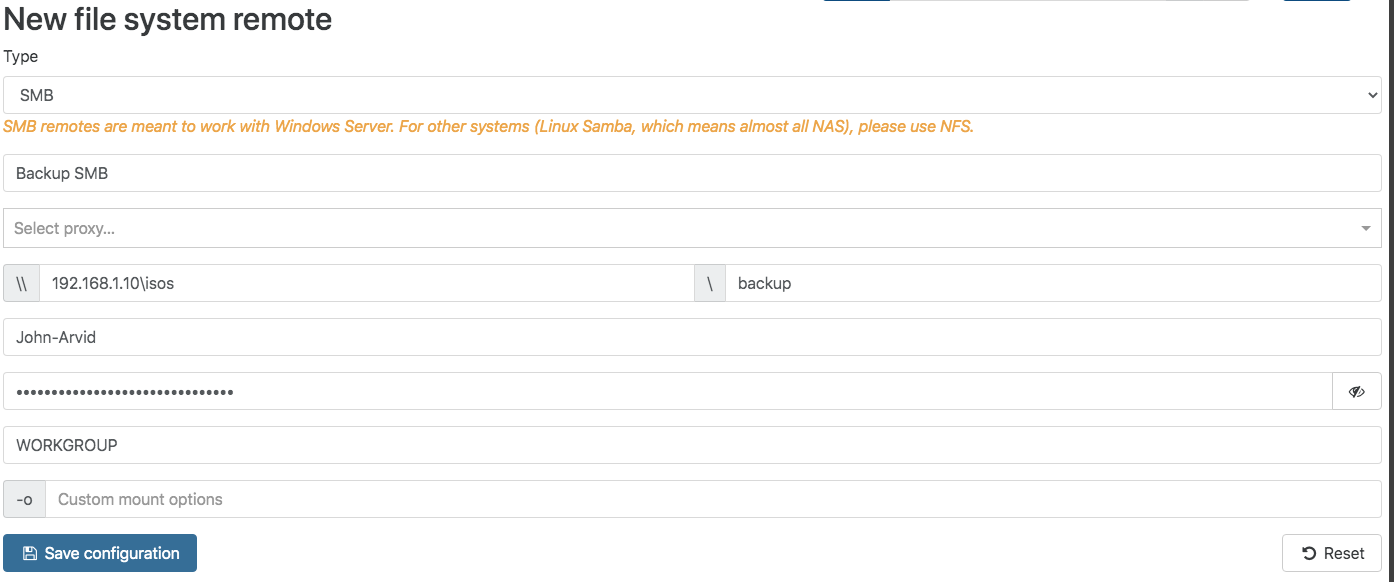
                                      I can add information that using a share on windows 10 as remote causes this error.
                                      But using samba on linux with this config is ok:

                                      [global]
                                        workgroup = BERG
                                        server string = ember
                                        security = user
                                        guest ok = no
                                        map to guest = Bad Password
                                        log file = /var/log/samba/%m.log
                                        max log size = 50
                                        printcap name = /dev/null
                                        load printers = no
                                        min protocol = SMB2
                                        ntlm auth = yes
                                      
                                      [localNetwork]
                                        comment = Local Network Storage
                                        path = /mnt/storage/localNetwork
                                        browsable = yes
                                        read only = no
                                        guest ok = no
                                        valid users = local,john-arvid
                                        force group = samba
                                        force user = local
                                      
                                      
                                      1 Reply Last reply Reply Quote 1
                                      • olivierlambertO Offline
                                        olivierlambert Vates 🪐 Co-Founder CEO
                                        last edited by

                                        So could it be permission related on Windows share? 🤔

                                        D 1 Reply Last reply Reply Quote 0
                                        • D Offline
                                          DeOccultist @olivierlambert
                                          last edited by

                                          @olivierlambert I don't think it's a permission error since the same Windows Server 2019 SMB share works fine with full back ups.

                                          1 Reply Last reply Reply Quote 0
                                          • olivierlambertO Offline
                                            olivierlambert Vates 🪐 Co-Founder CEO
                                            last edited by

                                            That's because delta is using temporary files named with a dot first. Maybe something causing a problem on your share?


                                            V 1 Reply Last reply Reply Quote 0

                                            Hello! It looks like you're interested in this conversation, but you don't have an account yet.

                                            Getting fed up of having to scroll through the same posts each visit? When you register for an account, you'll always come back to exactly where you were before, and choose to be notified of new replies (either via email, or push notification). You'll also be able to save bookmarks and upvote posts to show your appreciation to other community members.

                                            With your input, this post could be even better 💗

                                            Register Login
                                            • First post
                                              Last post