XCP-ng
    • Categories
    • Recent
    • Tags
    • Popular
    • Users
    • Groups
    • Register
    • Login

    Ghost Backup job keeps failing
    Scheduled Pinned Locked Moved Xen Orchestra
    23 Posts 3 Posters 5.7k Views 3 Watching
    Loading More Posts
    • Oldest to Newest
    • Newest to Oldest
    • Most Votes
    Reply
    • Reply as topic
    Log in to reply
    This topic has been deleted. Only users with topic management privileges can see it.
    • N Offline
      nuentes @olivierlambert
      last edited by

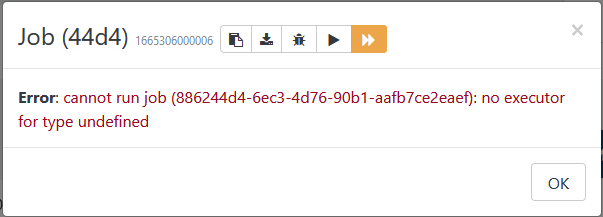
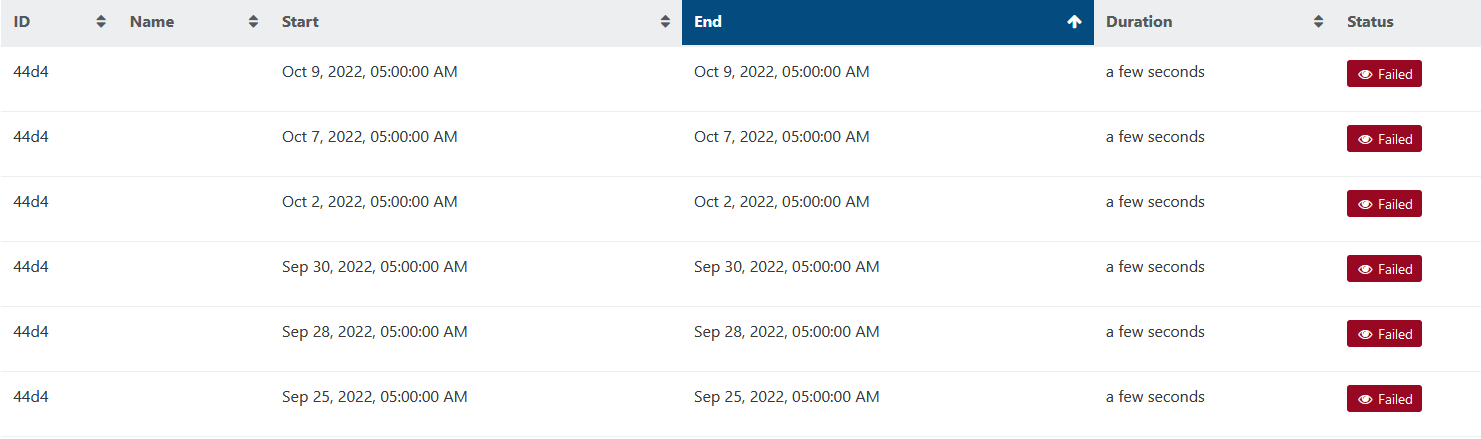
      @olivierlambert I am now on c2eb6, and not seeing any change. My container updated last night at 10PM, and a new failed ghost snapshot occurred at 5AM this morning.

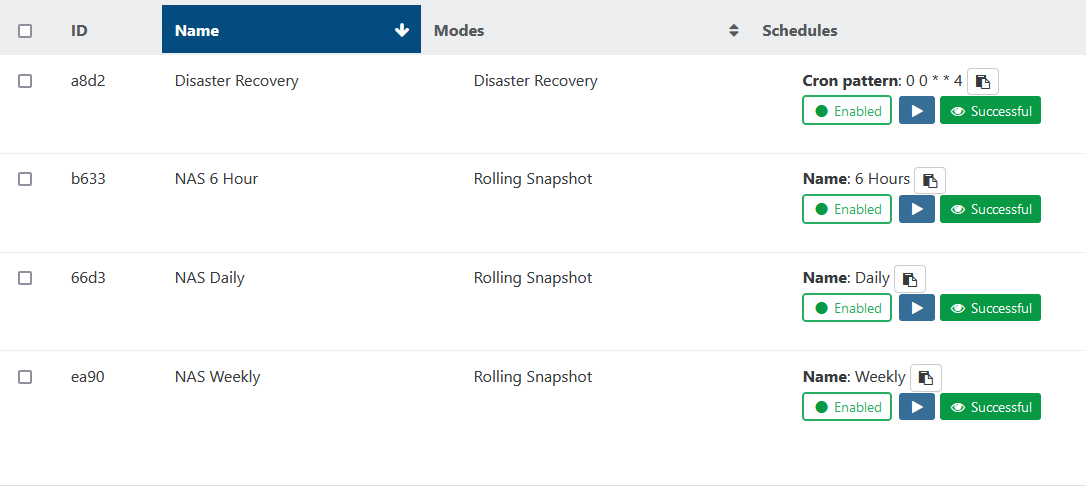
      Again, you can see in my screenshots above, the ID is 44d4, which is not an ID that I have available in my list of backup jobs.

      florentF 2 Replies Last reply Reply Quote 0
      • olivierlambertO Offline
        olivierlambert Vates 🪐 Co-Founder CEO
        last edited by

        Adding @florent in the loop. It's not clear to me 🤔

        1 Reply Last reply Reply Quote 0
        • florentF Offline
          florent Vates 🪐 XO Team @nuentes
          last edited by

          @nuentes hi , I am looking into a way to really purge this job. I will keep you informed

          1 Reply Last reply Reply Quote 0
          • florentF Offline
            florent Vates 🪐 XO Team @nuentes
            last edited by

            @nuentes can you go to the xo-server directory and launch the command
            ./db-cli.mjs ls job and ./db-cli.mjs ls schedule then paste me the results ?

            N 1 Reply Last reply Reply Quote 0
            • N Offline
              nuentes @florent
              last edited by

              @florent I've pulled up the console for xcp-ng, but I can't figure out how to change paths. The cd and ls commands don't work at all, and I'm struggling to find this in the documentation.

              1 Reply Last reply Reply Quote 0
              • olivierlambertO Offline
                olivierlambert Vates 🪐 Co-Founder CEO
                last edited by

                This is a command to run inside your Xen Orchestra 🙂

                N 1 Reply Last reply Reply Quote 0
                • N Offline
                  nuentes @olivierlambert
                  last edited by nuentes

                  @olivierlambert @florent Whoops. Yes, ok. In the CLI for my docker container. It seems I didn't need to be in the xo-server folder, I needed to be in the dist subfolder. But here are my results

                  root@54727a77cd7a:/etc/xen-orchestra/packages/xo-server/dist# ./db-cli.mjs ls job
                  5 record(s) found
                  { id: '886244d4-6ec3-4d76-90b1-aafb7ce2eaef', mode: 'full' }
                  {
                    id: '570366d3-558f-4e0c-85ca-cc0a608d4633',
                    mode: 'full',
                    name: 'NAS Daily',
                    remotes: '{"id":{"__or":[]}}',
                    settings: '{"8500fa4c-88e8-4c5d-85f2-3b4c67575537":{"snapshotRetention":3}}',
                    srs: '{"id":{"__or":[]}}',
                    type: 'backup',
                    userId: '2c7dcd77-8e98-43b4-8311-ebe81b2bb3c0',
                    vms: '{"id":"b4b08d92-bb02-c02e-bbd7-fd5ed2575dd5"}'
                  }
                  {
                    id: '9dfab633-9435-4ea0-9564-b0f73749e118',
                    mode: 'full',
                    name: 'NAS 6 Hour',
                    remotes: '{"id":{"__or":[]}}',
                    settings: '{"d737f6d8-734c-4c7e-aac7-09fe8e59e795":{"snapshotRetention":3}}',
                    srs: '{"id":{"__or":[]}}',
                    type: 'backup',
                    userId: '2c7dcd77-8e98-43b4-8311-ebe81b2bb3c0',
                    vms: '{"id":"b4b08d92-bb02-c02e-bbd7-fd5ed2575dd5"}'
                  }
                  {
                    id: 'f3ada8d2-6979-4a16-90d5-ed8fc17cbe8f',
                    mode: 'full',
                    name: 'Disaster Recovery',
                    remotes: '{"id":{"__or":[]}}',
                    settings: '{"e3129421-1ea1-4dc4-8854-b629c62b5ae1":{"copyRetention":3}}',
                    srs: '{"id":"b4f0994f-914a-564e-0778-6d747907ff9a"}',
                    type: 'backup',
                    userId: '2c7dcd77-8e98-43b4-8311-ebe81b2bb3c0',
                    vms: '{"id":"b4b08d92-bb02-c02e-bbd7-fd5ed2575dd5"}'
                  }
                  {
                    id: 'd9faea90-4cd5-47ef-ab92-646ac62f9b3c',
                    mode: 'full',
                    name: 'NAS Weekly',
                    remotes: '{"id":{"__or":[]}}',
                    settings: '{"b1957ab0-fd8d-4c83-ab93-27173abc4290":{"snapshotRetention":4}}',
                    srs: '{"id":{"__or":[]}}',
                    type: 'backup',
                    userId: '2c7dcd77-8e98-43b4-8311-ebe81b2bb3c0',
                    vms: '{"id":"b4b08d92-bb02-c02e-bbd7-fd5ed2575dd5"}'
                  }
                  root@54727a77cd7a:/etc/xen-orchestra/packages/xo-server/dist# ./db-cli.mjs ls schedule
                  {
                    cron: '5 5 * * 1',
                    enabled: 'true',
                    id: 'b1957ab0-fd8d-4c83-ab93-27173abc4290',
                    jobId: 'd9faea90-4cd5-47ef-ab92-646ac62f9b3c',
                    name: 'Weekly',
                    timezone: 'America/New_York'
                  }
                  {
                    cron: '0 5 * * 0,3,5',
                    enabled: 'true',
                    id: '9ae19958-f28c-4e0b-aae4-a45836428d77',
                    jobId: '886244d4-6ec3-4d76-90b1-aafb7ce2eaef',
                    name: '',
                    timezone: 'America/New_York'
                  }
                  {
                    cron: '0 0 * * 4',
                    enabled: 'true',
                    id: 'e3129421-1ea1-4dc4-8854-b629c62b5ae1',
                    jobId: 'f3ada8d2-6979-4a16-90d5-ed8fc17cbe8f',
                    name: '',
                    timezone: 'America/New_York'
                  }
                  {
                    cron: '5 11,17,23 * * *',
                    enabled: 'true',
                    id: 'd737f6d8-734c-4c7e-aac7-09fe8e59e795',
                    jobId: '9dfab633-9435-4ea0-9564-b0f73749e118',
                    name: '6 Hours',
                    timezone: 'America/New_York'
                  }
                  {
                    cron: '5 5 * * 0,2,3,4,5,6',
                    enabled: 'true',
                    id: '8500fa4c-88e8-4c5d-85f2-3b4c67575537',
                    jobId: '570366d3-558f-4e0c-85ca-cc0a608d4633',
                    name: 'Daily',
                    timezone: 'America/New_York'
                  }
                  
                  florentF 1 Reply Last reply Reply Quote 1
                  • florentF Offline
                    florent Vates 🪐 XO Team @nuentes
                    last edited by

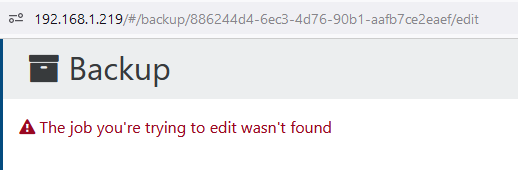
                    @nuentes the job { id: '886244d4-6ec3-4d76-90b1-aafb7ce2eaef', mode: 'full' } seems broken

                    can you open the url http://YOURDOMAIN/#/backup/886244d4-6ec3-4d76-90b1-aafb7ce2eaef/edit and save it ?

                    N 2 Replies Last reply Reply Quote 0
                    • N Offline
                      nuentes @florent
                      last edited by

                      @florent said in Ghost Backup job keeps failing:

                      /#/backup/886244d4-6ec3-4d76-90b1-aafb7ce2eaef/edit
                      ba109eea-9840-4ee5-96d5-5e86c911b380-image.png

                      I'm heading on vacation, so you can think on it for another week!

                      1 Reply Last reply Reply Quote 0
                      • N Offline
                        nuentes @florent
                        last edited by

                        @florent I'm back from my vacation. Any update on this? Much appreciated.

                        N 1 Reply Last reply Reply Quote 0
                        • N Offline
                          nuentes @nuentes
                          last edited by

                          @florent any update? This job is still appearing regularly, and I'd love to get it purged.

                          florentF 1 Reply Last reply Reply Quote 0
                          • florentF Offline
                            florent Vates 🪐 XO Team @nuentes
                            last edited by florent

                            @nuentes in your xo-serve/dist folder, can you try

                            ./db-cli.mjs repl
                            job.get('886244d4-6ec3-4d76-90b1-aafb7ce2eaef')
                            job.remove('886244d4-6ec3-4d76-90b1-aafb7ce2eaef`')
                            
                            job.get() #here the problematic job shoulw not appears
                            

                            then restart xo-server

                            Also, can you check if there is any linked schedule
                            ./db-cli.mjs ls schedule

                            N 1 Reply Last reply Reply Quote 0
                            • N Offline
                              nuentes @florent
                              last edited by

                              @florent thanks for getting back to me! Unfortunately, I bring only bad news.

                              root@54727a77cd7a:/etc/xen-orchestra/packages/xo-server/dist# ./db-cli.mjs repl
                              > job.get('886244d4-6ec3-4d76-90b1-aafb7ce2eaef')
                              [
                                [Object: null prototype] {
                                  mode: 'full',
                                  id: '886244d4-6ec3-4d76-90b1-aafb7ce2eaef'
                                }
                              ]
                              > job.remove('886244d4-6ec3-4d76-90b1-aafb7ce2eaef`')
                              true
                              > job.get()
                              [
                                [Object: null prototype] {
                                  name: 'NAS 6 Hour',
                                  srs: '{"id":{"__or":[]}}',
                                  vms: '{"id":"b4b08d92-bb02-c02e-bbd7-fd5ed2575dd5"}',
                                  type: 'backup',
                                  userId: '2c7dcd77-8e98-43b4-8311-ebe81b2bb3c0',
                                  remotes: '{"id":{"__or":[]}}',
                                  settings: '{"d737f6d8-734c-4c7e-aac7-09fe8e59e795":{"snapshotRetention":3}}',
                                  mode: 'full',
                                  id: '9dfab633-9435-4ea0-9564-b0f73749e118'
                                },
                                [Object: null prototype] {
                                  name: 'NAS Weekly',
                                  mode: 'full',
                                  settings: '{"b1957ab0-fd8d-4c83-ab93-27173abc4290":{"snapshotRetention":4}}',
                                  vms: '{"id":"b4b08d92-bb02-c02e-bbd7-fd5ed2575dd5"}',
                                  userId: '2c7dcd77-8e98-43b4-8311-ebe81b2bb3c0',
                                  type: 'backup',
                                  remotes: '{"id":{"__or":[]}}',
                                  srs: '{"id":{"__or":[]}}',
                                  id: 'd9faea90-4cd5-47ef-ab92-646ac62f9b3c'
                                },
                                [Object: null prototype] {
                                  mode: 'full',
                                  id: '886244d4-6ec3-4d76-90b1-aafb7ce2eaef'
                                },
                                [Object: null prototype] {
                                  name: 'NAS Daily',
                                  mode: 'full',
                                  settings: '{"8500fa4c-88e8-4c5d-85f2-3b4c67575537":{"snapshotRetention":3}}',
                                  vms: '{"id":"b4b08d92-bb02-c02e-bbd7-fd5ed2575dd5"}',
                                  userId: '2c7dcd77-8e98-43b4-8311-ebe81b2bb3c0',
                                  type: 'backup',
                                  remotes: '{"id":{"__or":[]}}',
                                  srs: '{"id":{"__or":[]}}',
                                  id: '570366d3-558f-4e0c-85ca-cc0a608d4633'
                                },
                                [Object: null prototype] {
                                  userId: '2c7dcd77-8e98-43b4-8311-ebe81b2bb3c0',
                                  type: 'backup',
                                  vms: '{"id":"b4b08d92-bb02-c02e-bbd7-fd5ed2575dd5"}',
                                  name: 'Disaster Recovery',
                                  mode: 'full',
                                  settings: '{"e3129421-1ea1-4dc4-8854-b629c62b5ae1":{"copyRetention":3}}',
                                  srs: '{"id":"b4f0994f-914a-564e-0778-6d747907ff9a"}',
                                  remotes: '{"id":{"__or":[]}}',
                                  id: 'f3ada8d2-6979-4a16-90d5-ed8fc17cbe8f'
                                }
                              ]
                              

                              You can see the job still exists. I restarted xo-server after this point, and still see the job when I run

                              ./db-cli.mjs ls job
                              
                              1 Reply Last reply Reply Quote 0
                              • N Offline
                                nuentes
                                last edited by

                                @florent any other ideas in order to resolve this?

                                1 Reply Last reply Reply Quote 0

                                Hello! It looks like you're interested in this conversation, but you don't have an account yet.

                                Getting fed up of having to scroll through the same posts each visit? When you register for an account, you'll always come back to exactly where you were before, and choose to be notified of new replies (either via email, or push notification). You'll also be able to save bookmarks and upvote posts to show your appreciation to other community members.

                                With your input, this post could be even better 💗

                                Register Login
                                • First post
                                  Last post