Problem: Encrypted Remotes
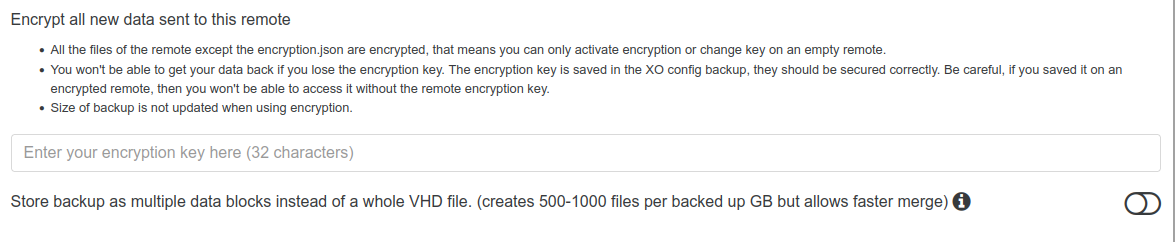
-
you should type a 32 char hexadecimal key ( 0 to 9 A to F )
Note that if you lose this key, all your backup will be lost, and this can only be changed when the remote is empty
-
@florent After setting a 32 character hexadecimal password, encryption was applied.

My question now is whether encryption is applied only “to the remote drive that acts as a vault” or to each stored file.
-
@cairoti The data that is sent and stored on the remote is locally encrypted. The volume as a whole is not encrypted.
-
andrew is right
(nice storage size) -
16 EiB, holy cow!
-
Yeah holy cow ~18K Petabytes of storage space... that was definitely a pretty penny, I just hope it's not an OBR5, lol.
-
@florent It's actually only 3TB. It's a local S3 mount on the XO server that I mapped. The size shown is wrong.
-
@cairoti you know you can backup directly to S3, it will be more efficient that way ( we rework S3 code 3 years ago , because of limitation of S3)
-
16 EIB is pretty close (1 byte close) to 18446744073709551615 bytes, which is the maximum representable 64-bits number.
-
@florent I couldn't map it directly to the XO, so I mounted it on Linux.
-
@cairoti you should be able to add it as a remote ( not as a storage repository on xcp-ng)




Hello! It looks like you're interested in this conversation, but you don't have an account yet.
Getting fed up of having to scroll through the same posts each visit? When you register for an account, you'll always come back to exactly where you were before, and choose to be notified of new replies (either via email, or push notification). You'll also be able to save bookmarks and upvote posts to show your appreciation to other community members.
With your input, this post could be even better 💗
Register Login