-
We reserved a PCI ID (if I remember correctly), so it's more about asking Microsoft to put it in their update system. I have no idea if it's feasible for us.
-
I was thinking more of updating the entire set of the agent and drivers, similar to how XenServer VM Tools for Windows have it implemented. Using a scheduled job, they regularly check whether an update is available, and if so, they carry out the update of both the agent and the drivers themselves.
-
@dinhngtu said in XCP-ng Windows PV tools announcements:
@probain The canonical way is to check the product_id instead https://docs.ansible.com/projects/ansible/latest/collections/ansible/windows/win_package_module.html#parameter-product_id The ProductCode changes every time a new version of XCP-ng Windows PV tools is released, and you can get it from each release's MSI:
No problem... If you ever decide to have the .exe-file as a separate item. Not bundled within the zip-file. Then I would be even happier. But until then, thanks for everything!
-
Management Agent not installed in XCP-ng Center
v20.04.1and25.4.0Hi team,
Both versions of XCP-ng Center are returning a
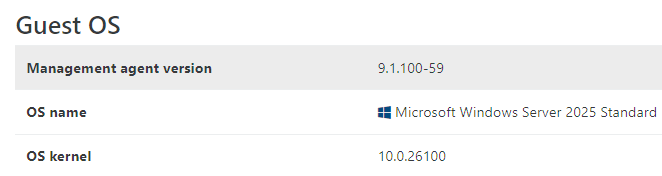
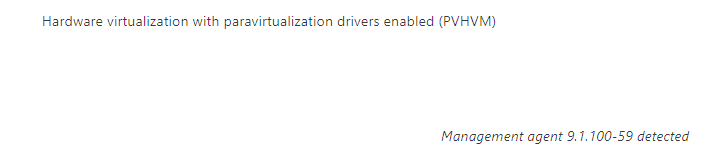
Management Agent not installederror under the Used Memory column when using the9.1driver (this was also an issue with the previous9.0version).Although, XOA does show that it's installed. Is this a known issue?
XCP-ng Center:


XOA:
VM using XenServer's version, for comparison:
Management agent9.4.2-178

-
@Johny said in XCP-ng Windows PV tools announcements:
Although, XOA does show that it's installed. Is this a known issue?
Yes it's a known issue, only cosmetic and the next driver update will fix it

-
@olivierlambert thanks for the quick reply!
-
@probain said in XCP-ng Windows PV tools announcements:
No problem... If you ever decide to have the .exe-file as a separate item. Not bundled within the zip-file. Then I would be even happier. But until then, thanks for everything!
The guest agent EXE is just one part of the tools package (and actually may not have the same version as the MSI file), therefore I don't think it should be relied upon for versioning. I recommend using the product_id method instead.
@Johny said in XCP-ng Windows PV tools announcements:
Both versions of XCP-ng Center are returning a
Management Agent not installederror under the Used Memory column when using the9.1driver (this was also an issue with the previous9.0version).Although, XOA does show that it's installed. Is this a known issue?
Looks like XCP-ng Center decided to detect the guest agent in a different way, namely checking for the feature "feature-static-ip-setting" which is XenServer specific (and, as indicated by the name, should not be used for management agent version checking). Please open an issue on the XCP-ng Center repo for this.
The cosmetic issue about management agent version disappearing after migration/resume has already been fixed in 9.1.100.
-
@dinhngtu Seems like an issue for this already exists: https://github.com/xcp-ng/xenadmin/issues/260
Added what I wrote above as a comment.
-
Just wanted to add a comment:
Thanks for continuing to release the drivers in an ISO. I was having some slowness with the 9.0.9 versions that are currently included with XCP-ng, this is a new Windows 11 25h2 that I'm working with to prototype a workflow in my lab. I just grabbed the 9.1.x ISO from Github and copied it to my ISO SR and installed. There seems to be a slight performance increase in this Win11 VM. That said, 25h2 is horribly bloated with junk, so much so that I think I'm going to need to strip a bunch out before I put this version into production. This might be a condition for MicroWin customization.
Or maybe add a couple of things to the LTSC version (we have licensing for this at work).
-
@Greg_E said in XCP-ng Windows PV tools announcements:
Just wanted to add a comment:
Thanks for continuing to release the drivers in an ISO. I was having some slowness with the 9.0.9 versions that are currently included with XCP-ng, this is a new Windows 11 25h2 that I'm working with to prototype a workflow in my lab. I just grabbed the 9.1.x ISO from Github and copied it to my ISO SR and installed. There seems to be a slight performance increase in this Win11 VM. That said, 25h2 is horribly bloated with junk, so much so that I think I'm going to need to strip a bunch out before I put this version into production. This might be a condition for MicroWin customization.
Or maybe add a couple of things to the LTSC version (we have licensing for this at work).
Download the full Windows 11 ISO then use Microsoft Windows ADK. To customise, strip down unwanted parts, including appx provision packages and slipstream in drivers and/or msi installers.
If your using a high enough edition of Windows 11 version 25H2 don’t forget the new GroupPolicy option to remove default packages!
-
I'll have to update group policy and check that out, would be a time saver. Everything I use is an Enterprise level of some kind, using EDU in production right now, and Pro/Enterprise evaluation in the lab.
I was looking at running a post imaging script to prevent some of the bloat, but a GPO might be easier.
-
@Greg_E said in XCP-ng Windows PV tools announcements:
I'll have to update group policy and check that out, would be a time saver. Everything I use is an Enterprise level of some kind, using EDU in production right now, and Pro/Enterprise evaluation in the lab.
I was looking at running a post imaging script to prevent some of the bloat, but a GPO might be easier.
You can use Windows ADK to customise the installation media and build a custom ISO. That file can then be placed on your ISO SR. The GPO is especially effective when combined with a custom ISO built using Windows ADK.
I have tried this myself and it’s very effective doing it this way, the Windows ADK tool is very powerful but will require time to learn. Will save time with all of the extra installations, if you use a custom ISO.
-
When it comes to the feature to disable time sync.
If you had previously installed a version of PV that did not have it, then install the newest version and enable the option to disable time sync.Should that remove it or do you have uninstall the old version first and install the new version?
-
@tsukraw There's no need to uninstall the old version, the upgrade is enough.
The feature to disable time sync is also just a convenience shortcut for setting the
TimeSyncModevalue inHKLM\SYSTEM\CurrentControlSet\Services\xenagentto a DWORD of 0. You can set it manually or through Group Policy if you wish. (In fact, GPO might be a better solution on domain environments) -
Hello all,
The XCP-ng Standard VGA Display Driver for Windows v0.1.29.2216 has been releasedhttps://github.com/xcp-ng/win-xstdvgaThis driver provides high-resolution consoles and resolution switching for Windows VMs running on the XCP-ng hypervisor.
This is a beta release. This driver will eventually be integrated into the main Windows PV tools package.
Driver rereleased with bug fixes. See below
-
@dinhngtu said in XCP-ng Windows PV tools announcements:
Hello all,
The XCP-ng Standard VGA Display Driver for Windows v0.1.29.2216 has been releasedhttps://github.com/xcp-ng/win-xstdvgaThis driver provides high-resolution consoles and resolution switching for Windows VMs running on the XCP-ng hypervisor.
This is a beta release. This driver will eventually be integrated into the main Windows PV tools package.
Driver pulled for bug fixes. Will come back soon
Test on windows 11 vm no issues to report.
-
Hello all,
The XCP-ng Standard VGA Display Driver v0.1.34.2310 is released with important compatibility fixes for Windows Server.
Get it here: https://github.com/xcp-ng/win-xstdvga/releasesThis driver provides high-resolution consoles and resolution switching in Xen Orchestra for Windows VMs running on the XCP-ng hypervisor.
This is a beta release. This driver will eventually be integrated into the main Windows PV tools package.
Changelog:
- Add support for multiple VGA devices
- Fix compatibility with older versions of Windows Server
- Enable CET Shadow Stack support
- Add device name branding
-
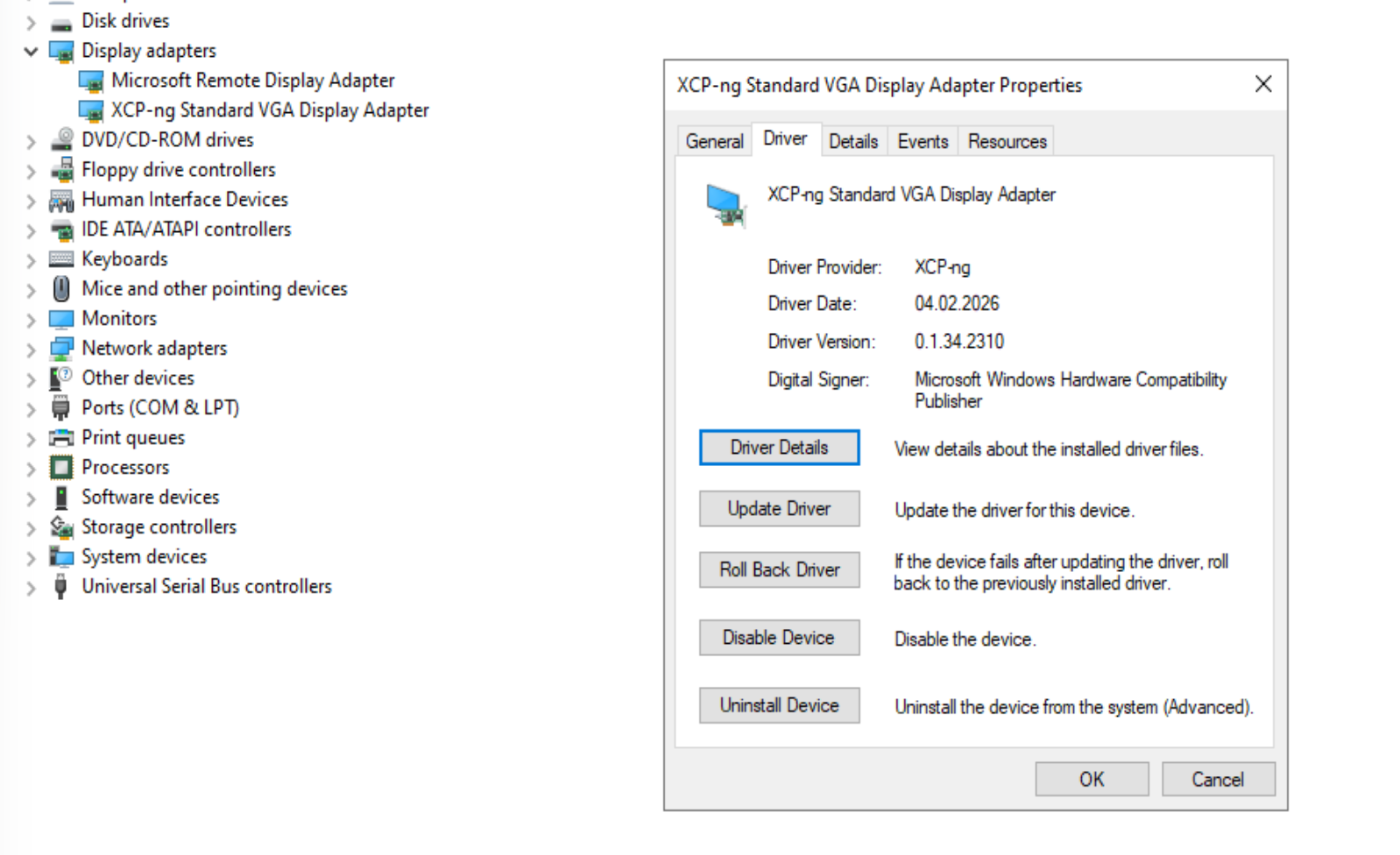
@dinhngtu downloaded on a windows server 2022, extracted and did the inf install. No visual feedback.
How do I know it was installed? -
Answering myself:
-
@dinhngtu tried on a Windows Server 2025 VM, UEFI BIOS
working well, no reboot needed


Hello! It looks like you're interested in this conversation, but you don't have an account yet.
Getting fed up of having to scroll through the same posts each visit? When you register for an account, you'll always come back to exactly where you were before, and choose to be notified of new replies (either via email, or push notification). You'll also be able to save bookmarks and upvote posts to show your appreciation to other community members.
With your input, this post could be even better 💗
Register Login