VM Pool To Pool Migration over VPN

-
I just kicked off a vm migration from one pool to another pool over vpn (1gb dedicated Verizon fiber). XO proxy is on the receiving end of this migration. The vm was shutdown when the process started. The migration is still in progress..

I am only getting about 200ish mbps is this expected depending on storage type such... This is probably something I wont need to do often but in the event I do should I go about this a different way?


-
@acebmxer That's a loaded question.
What type of connection do you have between the locations. From your edit - "(1gb dedicated Verizon fiber)"
What kind of networking components are in each pool and what type of NIC is the "Management" NIC on your pool master in each location?
200ish mbps is probably really good, but it could be horrible if you have 10gb fiber between the locations..
Is the underlying storage a NAS or some other shared storage that might have contention for IOPS?
-
@DustinB Updated post with more details. I would assume it would transfer faster. Both locations running Synology with 8 sata ssd's 10gb nics on all connections with internet being the limit of 1gb + vpn.
-
@acebmxer So you're getting about 1/5 of the expected throughput... how are the CPU's behaving on XO?
Are they pegged?
-
Think pictures are in correct order starting with sending host at top and receiving host bottom.
Normal vm operations i have no complaints. Just wanted to make sure there was no artificial limitations imposed by XOA or XO Proxy with going across pools or anything.


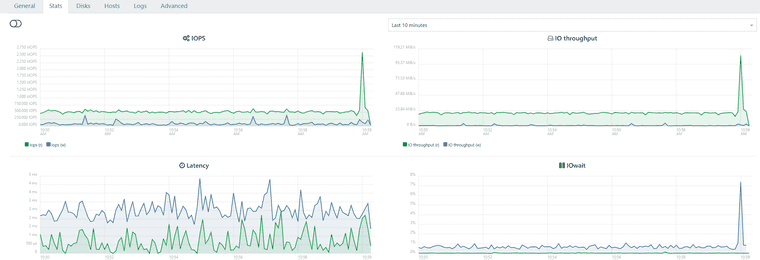

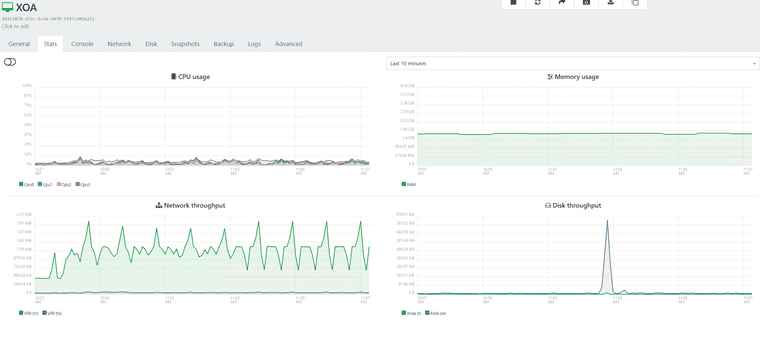
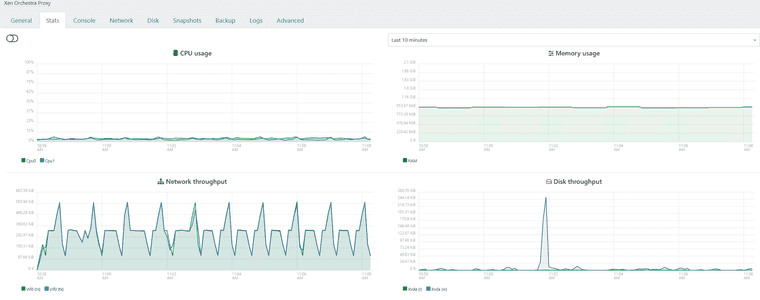
-
@acebmxer From the looks of it, I would assume you have a 1GB network interface somewhere in the mix. A switch or something...
But I don't think you should expect to get a full 1GB wire speed in this case either...
-
The 21.46MiB is per second, which is approximately 1/5 of a GB per second.
So that really all kind of tracks...
-
Switches between host on both side are 10gb switchs and nics. only 1gb connection is ISP on both locations. While I didnt expect it to be using the full 1gb i would have thought it would be higher then what it is. Maybe VPN overhead.
As stated this task is not something I would be doing on the regular. So i can live with those speeds. If anyone else has any other ideas to look into or other confirmation please let me know.
-
@acebmxer Yeah a ~15 minute VM migration isn't unacceptable either right? Like any DR plan can simply put that into effect.
But maybe someone else has some ideas.
-
Still going... And i got to move it back. It is only a test windows server... but

-
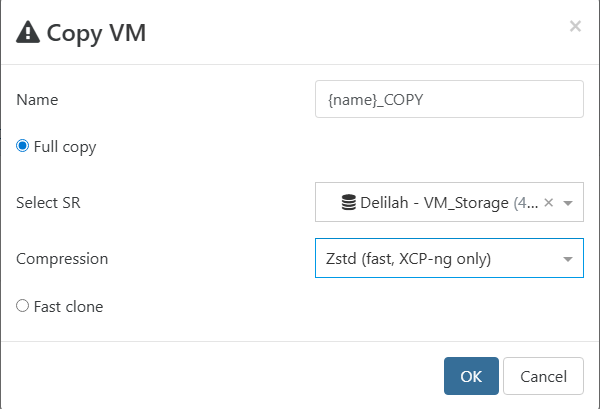
@acebmxer could you try a VM copy with compression enabled ? and benchmark it
-
-
That is much faster throughput wise. Time wise will seems about the same or longer.



-

-
@acebmxer did it ever finish? Did it work or was the vm shutdown'd?
-
@nikade
Doing the copy vm with compression moved at double the speed shown in above screenshots. And finish in half the time. Since it was a copy job it left a copy of the vm on both locations. However starting the copied vm from its original location showed no issues. I then deleted the vm no longer needed in other location.So question why did vm migration take so long vs vm copy. both instances the vm was powered off.
-
@acebmxer i noticed the différence but can't quite explain it...
need some Vates storage guru to enlighten us
-
Hi!
@team-storage will correct me but on top of my head:
- Live migration needs to continue to write locally while the VM runs while copying the blocks on destination. This takes some ressources and time, limiting the transfer speed
- Migration in general is limited by the Dom0 expert speed via tapdisk, which is a bottleneck. In real life, this allowed us to have migrations without disrupting day-to-day operations (not taking all IOPS), which is good for stability but not on purpose

- Copy with compression is faster because all blocks are compressed so you are sending more data for the same time (therefore, faster) at the cost of more CPU cycles. Which in general is worth it, as you've seen.
-
@acebmxer said in VM Pool To Pool Migration over VPN:
Maybe VPN overhead.
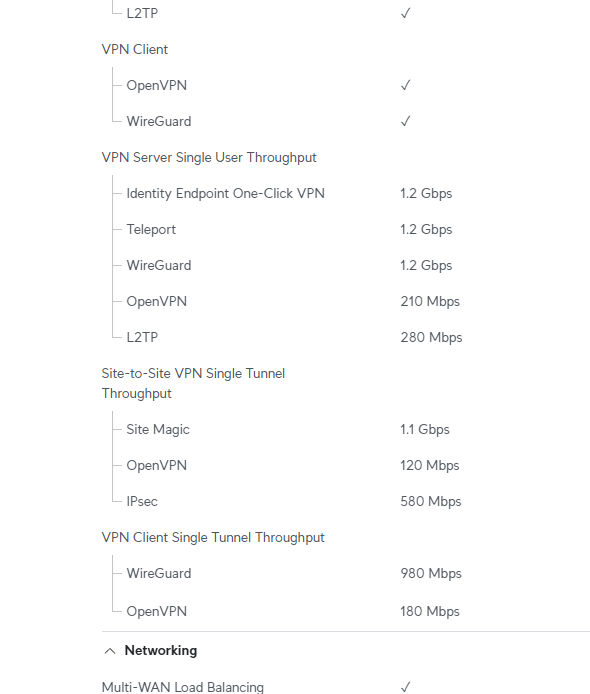
Have You checked the VPN capacity spec of Your firewalls?
-
@olivierlambert thank for that. Just to be clear the vm was not runing but shut down if that makes a difference.
@ph7 Both firewalls are Unifi Enterprise fortress gateways. - https://techspecs.ui.com/unifi/cloud-gateways/efg?subcategory=all-cloud-gateways
Both sites are setup with Site Magic VPN. So should be full 1.1gbps if accurate.



Hello! It looks like you're interested in this conversation, but you don't have an account yet.
Getting fed up of having to scroll through the same posts each visit? When you register for an account, you'll always come back to exactly where you were before, and choose to be notified of new replies (either via email, or push notification). You'll also be able to save bookmarks and upvote posts to show your appreciation to other community members.
With your input, this post could be even better 💗
Register Login