XCP-ng
    • Categories
    • Recent
    • Tags
    • Popular
    • Users
    • Groups
    • Register
    • Login

    VM Pool To Pool Migration over VPN

    Scheduled Pinned Locked Moved Management
    20 Posts 6 Posters 100 Views 5 Watching
    Loading More Posts
    • Oldest to Newest
    • Newest to Oldest
    • Most Votes
    Reply
    • Reply as topic
    Log in to reply
    This topic has been deleted. Only users with topic management privileges can see it.
    • D Offline
      DustinB @acebmxer
      last edited by

      @acebmxer From the looks of it, I would assume you have a 1GB network interface somewhere in the mix. A switch or something...

      But I don't think you should expect to get a full 1GB wire speed in this case either...

      D 1 Reply Last reply Reply Quote 0
      • D Offline
        DustinB @DustinB
        last edited by

        The 21.46MiB is per second, which is approximately 1/5 of a GB per second.

        So that really all kind of tracks...

        A 1 Reply Last reply Reply Quote 0
        • A Online
          acebmxer @DustinB
          last edited by

          @DustinB

          Switches between host on both side are 10gb switchs and nics. only 1gb connection is ISP on both locations. While I didnt expect it to be using the full 1gb i would have thought it would be higher then what it is. Maybe VPN overhead.

          As stated this task is not something I would be doing on the regular. So i can live with those speeds. If anyone else has any other ideas to look into or other confirmation please let me know.

          D P 2 Replies Last reply Reply Quote 0
          • D Offline
            DustinB @acebmxer
            last edited by

            @acebmxer Yeah a ~15 minute VM migration isn't unacceptable either right? Like any DR plan can simply put that into effect.

            But maybe someone else has some ideas.

            1 Reply Last reply Reply Quote 0
            • A Online
              acebmxer
              last edited by

              Still going... And i got to move it back. It is only a test windows server... but

              Screenshot 2026-01-05 112554.png

              P 1 Reply Last reply Reply Quote 0
              • P Online
                Pilow @acebmxer
                last edited by

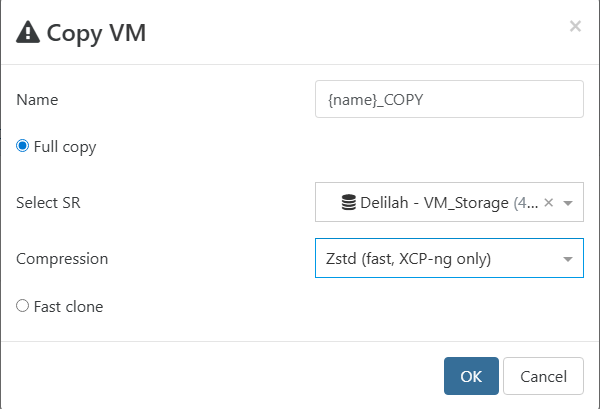
                @acebmxer could you try a VM copy with compression enabled ? and benchmark it

                A 1 Reply Last reply Reply Quote 0
                • A Online
                  acebmxer @Pilow
                  last edited by

                  @Pilow

                  Correct? this would be moving the VM back to its original location.

                  Screenshot 2026-01-05 113403.png

                  1 Reply Last reply Reply Quote 0
                  • A Online
                    acebmxer
                    last edited by acebmxer

                    That is much faster throughput wise. Time wise will seems about the same or longer.

                    Screenshot 2026-01-05 114520.png

                    Screenshot 2026-01-05 114603.png

                    Screenshot 2026-01-05 114631.png

                    1 Reply Last reply Reply Quote 0
                    • A Online
                      acebmxer
                      last edited by

                      Screenshot 2026-01-05 120212.png

                      nikadeN 1 Reply Last reply Reply Quote 0
                      • nikadeN Offline
                        nikade Top contributor @acebmxer
                        last edited by

                        @acebmxer did it ever finish? Did it work or was the vm shutdown'd?

                        A 1 Reply Last reply Reply Quote 0
                        • A Online
                          acebmxer @nikade
                          last edited by acebmxer

                          @nikade
                          Doing the copy vm with compression moved at double the speed shown in above screenshots. And finish in half the time. Since it was a copy job it left a copy of the vm on both locations. However starting the copied vm from its original location showed no issues. I then deleted the vm no longer needed in other location.

                          So question why did vm migration take so long vs vm copy. both instances the vm was powered off.

                          P 1 Reply Last reply Reply Quote 0
                          • P Online
                            Pilow @acebmxer
                            last edited by

                            @acebmxer i noticed the diffรฉrence but can't quite explain it...
                            need some Vates storage guru to enlighten us ๐Ÿ˜…

                            1 Reply Last reply Reply Quote 0
                            • olivierlambertO Offline
                              olivierlambert Vates ๐Ÿช Co-Founder CEO
                              last edited by

                              Hi!

                              @team-storage will correct me but on top of my head:

                              1. Live migration needs to continue to write locally while the VM runs while copying the blocks on destination. This takes some ressources and time, limiting the transfer speed
                              2. Migration in general is limited by the Dom0 expert speed via tapdisk, which is a bottleneck. In real life, this allowed us to have migrations without disrupting day-to-day operations (not taking all IOPS), which is good for stability but not on purpose ๐Ÿ˜„
                              3. Copy with compression is faster because all blocks are compressed so you are sending more data for the same time (therefore, faster) at the cost of more CPU cycles. Which in general is worth it, as you've seen.
                              1 Reply Last reply Reply Quote 1
                              • P Offline
                                ph7 @acebmxer
                                last edited by

                                @acebmxer said in VM Pool To Pool Migration over VPN:

                                Maybe VPN overhead.

                                Have You checked the VPN capacity spec of Your firewalls?

                                1 Reply Last reply Reply Quote 0
                                • A Online
                                  acebmxer
                                  last edited by

                                  @olivierlambert thank for that. Just to be clear the vm was not runing but shut down if that makes a difference.

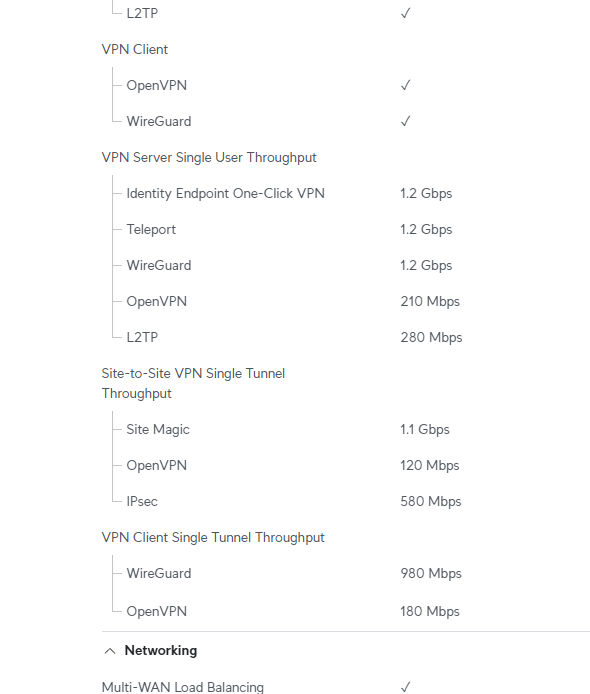
                                  @ph7 Both firewalls are Unifi Enterprise fortress gateways. - https://techspecs.ui.com/unifi/cloud-gateways/efg?subcategory=all-cloud-gateways

                                  Both sites are setup with Site Magic VPN. So should be full 1.1gbps if accurate.
                                  Screenshot 2026-01-06 081123.png

                                  1 Reply Last reply Reply Quote 0
                                  • First post
                                    Last post