vmware vm migration
-
Using XO-CE commit 2838b
esxi host 6.7.0 update 3Following these steps - https://docs.xen-orchestra.com/v2v-migration-guide
Perform the first migration attempt
Start the V2V migration in Xen Orchestra, without enabling the Stop Source option.
This will transfer the VM data up to the snapshot named vm without tools.
tip
You can safely close your browser while the migration runs.Monitor the migration progress using one of these methods:
Check the VM status in Xen Orchestra (it should show importing...).
Follow the disk transfer progress indicators.
Testing the migrated VM
Once the migration is complete:Start the migrated VM copy on your XCP-ng environment.
tip
Use an isolated network to avoid IP conflicts.
The VM state might be slightly inconsistent since memory and cache data aren't fully synced.
Check the following during testing:
The VM boots up without issues.
Network connectivity is working properly.
Xen Tools installs and runs correctly.
Document any fixes or adjustments required to stabilize the VM.
Remove the test copy
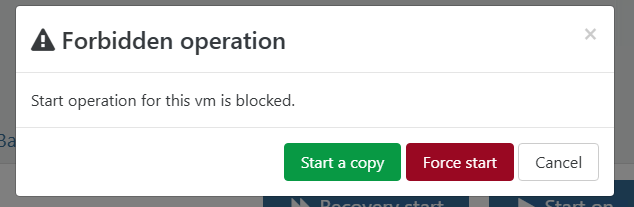
Once you’ve finished your checks and taken notes, delete the test VM. This will free up resources and prevent any confusion before the final migration.When I go to start the vm after first migration step i get the following error. I did set the wrong network for the vm and set to wrong SR. I can set that on final migration.
-
Hi,
Can you please reformat a bit your post, because it's very hard to understand as you copy pasted stuff in the middle of your questions. Thanks!
-
@acebmxer yes after the first migration, XO knwo that the migration is incomplete and that you may want to finish it later. But if you start this VM direvtly , it will write some data, thus it won't be in sync anymore with the Vmware snapshot. Then XO won't be able to resume
You can start a copy of the VM ( XO will handle it for you ) and delete the copy when you're done
My advice is to migrate this VM to the right SR and then do the resume. But keep in mind that the V2V tool is intended to target only one SR, so migrate all they disk to the same SR, and select the right one when resuming the V2V. You can change the network after
-
@olivierlambert said in vmware vm migration:
Hi,
Can you please reformat a bit your post, because it's very hard to understand as you copy pasted stuff in the middle of your questions. Thanks!
I fixed the formatting on the post.
-
@florent said in vmware vm migration:
@acebmxer yes after the first migration, XO knwo that the migration is incomplete and that you may want to finish it later. But if you start this VM direvtly , it will write some data, thus it won't be in sync anymore with the Vmware snapshot. Then XO won't be able to resume
You can start a copy of the VM ( XO will handle it for you ) and delete the copy when you're done
My advice is to migrate this VM to the right SR and then do the resume. But keep in mind that the V2V tool is intended to target only one SR, so migrate all they disk to the same SR, and select the right one when resuming the V2V. You can change the network after
My previous migration was successful with no issues. Previously test vm was fresh install so no vmtools installed. But I did shut the vm down myself prior to starting the migration. VM boots no issues no prompts.
This time I decided to follow the steps listed in the documentation as i have been following the changes and updates for the v2v migration. Following the steps as mention XO presented me with that prompt which was not mention in the documentation.
As i was typing the post to gather my information it was then i noticed i did not select the proper destination SR and the appropriate nic/vlan for networking. So I noted that in the post. With the assumption i could correct that on the final migration.
With that said the I guess the documentation should state - Start vm to test if boots, etc.. When prompted choose "Start a copy". When done shutdown vm and remove.



Hello! It looks like you're interested in this conversation, but you don't have an account yet.
Getting fed up of having to scroll through the same posts each visit? When you register for an account, you'll always come back to exactly where you were before, and choose to be notified of new replies (either via email, or push notification). You'll also be able to save bookmarks and upvote posts to show your appreciation to other community members.
With your input, this post could be even better 💗
Register Login