 main.xxx (azazel.xxx)

    Snapshot
    Start: 2026-04-10 00:03
    End: 2026-04-10 00:03
    Local storage (137.41 GiB free - thin) - legion.xxx
        transfer
        Start: 2026-04-10 00:03
        End: 2026-04-10 00:09
        Duration: 6 minutes
        Size: 17.08 GiB
        Speed: 47.42 MiB/s
    Start: 2026-04-10 00:03
    End: 2026-04-10 00:09
    Duration: 6 minutes

Start: 2026-04-10 00:03
End: 2026-04-10 00:09
Duration: 6 minutes
Type: full
 B
Offline
B
Offline
Posts
-
RE: VM backup fails with INVALID_VALUE
-
RE: VM backup fails with INVALID_VALUE
@olivierlambert Tonight, this replication job worked perfectly, as always. This may be because tonight was a full replication. Tomorrow will be a delta replication again, so we shall see.
-
RE: VM backup fails with INVALID_VALUE
@olivierlambert I apologize; that was not a backup, but rather a replication:
main.xxx (azazel.xxx) Snapshot Start: 2026-04-09 00:02 End: 2026-04-09 00:03 Local storage (136.91 GiB free - thin) - legion.xxx transfer Start: 2026-04-09 00:03 End: 2026-04-09 00:03 Duration: a few seconds Error: INVALID_VALUE(VCPU values must satisfy: 0 < VCPUs_at_startup ≤ VCPUs_max, 8)This is a XenServer/XCP-ng error Start: 2026-04-09 00:03 End: 2026-04-09 00:03 Duration: a few seconds Start: 2026-04-09 00:02 End: 2026-04-09 00:04 Duration: 2 minutes Type: delta -
RE: VM backup fails with INVALID_VALUE
@olivierlambert said:
We need a bit more context. What kind of backup exactly? XOA or XO sources? Which version?Sources, Xen Orchestra, commit d1736 Master, commit 8ecaa
uuid=260d5db3-99b8-7003-4875-678d4aa92044 | grep -i vcpu VCPUs-params (MRW): VCPUs-max ( RW): 8 VCPUs-at-startup ( RW): 8 allowed-operations (SRO): changing_dynamic_range; migrate_send; pool_migrate; changing_VCPUs_live; suspend; hard_reboot; hard_ shutdown; clean_reboot; clean_shutdown; pause; checkpoint; snapshot recommendations ( RO): <restrictions><restriction field="memory-static-max" max="1649267441664"/><restriction field="vcpus- max" max="32"/><restriction field="has-vendor-device" value="false"/><restriction field="allow-gpu-passthrough" value="1"/><restriction field="all ow-vgpu" value="1"/><restriction field="allow-network-sriov" value="1"/><restriction field="supports-bios" value="yes"/><restriction field="suppor ts-uefi" value="no"/><restriction field="supports-secure-boot" value="no"/><restriction max="255" property="number-of-vbds"/><restriction max="7" property="number-of-vifs"/></restrictions> VCPUs-number ( RO): 8 VCPUs-utilisation (MRO): 0: 0.088; 1: 0.087; 2: 0.064; 3: 0.096; 4: 0.072; 5: 0.076; 6: 0.072; 7: 0.088 other (MRO): platform-feature-xs_reset_watches: 1; platform-feature-multiprocessor-suspend: 1; has-vendor-device: 0; feature-vcpu-hotplug: 1; feature-suspend: 1; feature-reboot: 1; feature-poweroff: 1; feature-balloon: 1 -
VM backup fails with INVALID_VALUE
I recently increased the number of CPUs from 2 to 8 for this VM and rebooted it. The system is working correctly, and all 8 CPUs are detected. However, the nightly backup is now failing with the following error:
Error: INVALID_VALUE(VCPU values must satisfy: 0 < VCPUs_at_startup ≤ VCPUs_max, 8)Why is this happening, and how can I fix it?
-
Full or not?
I have a delta backup job with Full backup interval set to 7. If i look at the backup job results I get this:
xoce (legion)

    Snapshot
    Start: 2025-07-25 03:02
    End: 2025-07-25 03:02
    Fiend NFS
        transfer
        Start: 2025-07-25 03:02
        End: 2025-07-25 03:08
        Duration: 6 minutes
        Size: 23.78 GiB
        Speed: 73.01 MiB/s
        Clean VM directory
        cleanVm: incorrect backup size in metadata
        Start: 2025-07-25 03:08
        End: 2025-07-25 03:08
    Start: 2025-07-25 03:02
    End: 2025-07-25 03:08
    Duration: 6 minutes

Start: 2025-07-25 03:02
End: 2025-07-25 03:08
Duration: 6 minutes
Type: full
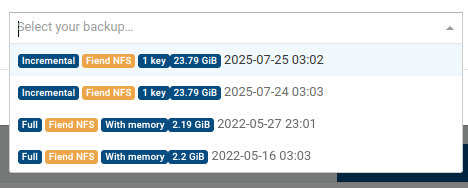
It says "full". If i go to backup -> restore, search for this vm, i see "full 2 delta 2" in "Available Backups" column. Yet if i press "restore" arrow i see that two full backups are of 2022 year and it looks dangerous. Documentation says about that setting "For example, with a value of 2, the first two backups will be a key and a delta, and the third will start a new chain with a full backup.". Yet, I see only VERY old full backups...
Xen Orchestra, commit 19412 Master, commit 6277a, but it seems that this happens for a long time (i recently updated it to this state and the problem seems to persist ever since I began to use Xen Orchestra in 2022).
Do I miss something? Do I really have fresh full backups and these a just labeled "incremental" or what?
-
RE: How do you manage multiple VMs outside of Xen Orchestra?
@Greg_E "if that host crashes" -- that's the problem. When the host is gone, VMs are gone. Not colored in red 'we are gone', there are none of them.
There is no problem running XO itself on other host.
The question is not how to keep VMs backed -- they are.
But right now, when host X is gone and its VMs are replicated to hosts Y and Z, how can i quickly see that VMs A,B,C and D are gone and E, F, G, etc are up? No way, because X is gone and its VMs gone too.
I have to monitor them via Zabbix to see if they are gone.
But syncing hundreds of VMs with Zabbix is tiresome, it's a lot of manual work.
-
RE: How do you manage multiple VMs outside of Xen Orchestra?
@olivierlambert Cool. Waiting for that feature

-
RE: How do you manage multiple VMs outside of Xen Orchestra?
Suppose I have a server with VMs replicated to 3 other different servers (weaker than the main one). Then the main server goes down. I need to assess quickly which copies I should start first. How do I quickly check all the VMs that went down? Some are not important, some are... Without a central list of VMs with their status, it's much trickier.
-
RE: How do you manage multiple VMs outside of Xen Orchestra?
@olivierlambert I mean if the server goes down, all VMs that were running on that server disappear from XO. Yes, I can create manual entries to monitor them in Zabbix and I do, but for hundreds of VMs, that's a lot of manual work.
Basically, I'd like to see something like a table of VMs showing their status, availability of their replications on other servers, number of backups, etc.
Currently, I'm really falling behind with my Zabbix setup because there's too much manual work involved in tracking all VM IP addresses and other details (especially if some VMs are not easily accessible by IP!). There are no automated tools to properly view the status of each VM - not just up/down status, but comprehensive XO data.
-
How do you manage multiple VMs outside of Xen Orchestra?
The major drawback of Xen Orchestra is that if the server goes down, all of its VMs are gone too. No clean list of VMs in 'clean' state. Yes, there are backups—lots of them—and replications, but it understandig what's wrong is difficult. If you have hundreds of VMs, how do you track the state of individual VMs: which server each one runs on, which servers have replications, and where backups are stored?
-
RE: VM migration within single server
@AtaxyaNetwork Yes, this worked. Thanks.
-
VM migration within single server
I've added two new disks to the server and created md0 raid1 array, as described here: https://xcp-ng.org/docs/guides.html#software-raid-storage-repository. It works. Now I have to move VMs from the main, single disk of the server. But when I click migrate arrow on this server's vm, it does not show the same server as the destination, only other servers.
Yes, I can migrate VMs to another server and back, selecting new raid storage. But it's kinda awkward to haul hefty data between local disks via external machine...
-
RE: Orange exclamation mark without errors
@olivierlambert No, it does not. Still, sometimes badge with patches blink... funny.
-
RE: Orange exclamation mark without errors
@olivierlambert Well, after erasing that file it appears again with the same "check_update" contents.
-
RE: Orange exclamation mark without errors
It seems to return
{"error": "The updater plugin is busy (current operation: check_update)"}all the time on that server.
-
RE: Orange exclamation mark without errors
@olivierlambert said in Orange exclamation mark without errors:
plugin=updater.py fn=check_update
Where can I run this command? On the host with missing patches?
-
RE: Orange exclamation mark without errors
@olivierlambert Anyway, I don't understand why XOA does not detect them at all
-
RE: Orange exclamation mark without errors
64 bytes from 172.16.1.46 (172.16.1.46): icmp_seq=1 ttl=62 time=3.88 ms
64 bytes from 172.16.1.46 (172.16.1.46): icmp_seq=2 ttl=62 time=4.40 ms
64 bytes from 172.16.1.46 (172.16.1.46): icmp_seq=3 ttl=62 time=4.67 ms