@olivierlambert yes i will! I think it has to do with the poolmaster not getting the right information from all the slaves but maybe i am wrong. We detached one host this morning because of a broken mainboard so maybe the clue is there but maybe support can help!
R
Offline
Posts
-
RE: SR stats show “No stats” in Xen Orchestra after latest XCP-ng 8.3 patches
-
RE: SR stats show “No stats” in Xen Orchestra after latest XCP-ng 8.3 patches
@olivierlambert no we are using normal shared storage woth regular vdi we see this on all shared storage types nfs and iscsi
-
SR stats show “No stats” in Xen Orchestra after latest XCP-ng 8.3 patches
Hi,
We have been running XCP-ng 8.3 for some time already, but after deploying the latest XCP-ng 8.3 patches, Storage → Stats in Xen Orchestra no longer shows any statistics for our SRs.
The page only displays “No stats”.Key points:
• This started after installing the most recent 8.3 updates, not immediately after upgrading to 8.3
• The issue affects SR stats only
• Host and VM stats are displayed correctly
• Storage itself is fully functional (VMs running, space usage correct)
• SR status is Connected (not partially connected)Anyone familiar with this issue?
Robin -
RE: Api actions like memory or disk
@olivierlambert Thank u, so for now these endpoinst are not in the restapi yet?
-
Api actions like memory or disk
Hi all,
I’m wondering if it’s possible to change VM settings over the REST API — things like memory, disk size, or CPU count.
I’ve checked the Swagger documentation, but it doesn’t seem to include those endpoints.From what I understand, XO6 is built on top of the same API that Xen Orchestra uses, so in theory these kinds of settings should be adjustable through the API as well.
Maybe I’m missing something, but I’d really appreciate if someone could point me in the right direction!Thanks,
Robin -
RE: CBT: the thread to centralize your feedback
@olivierlambert No never changed it. From what i understand from Jon it's default this where his words "and all these SRs have auto-scan enabled. This means every 30 seconds, the pool master will scan the entirety of every SR". We changed this and the problem is gone.
-
RE: CBT: the thread to centralize your feedback
Support found that automatic refresh of our sr every 30 seconds delayed this. It seems we had this for a longer time but now it’s more aggressive. Disabled this as this is not required. This resolves our issue here.
-
RE: CBT: the thread to centralize your feedback
@florent so not an option solving this inside xoa? Could be usefull for the short term.
-
RE: CBT: the thread to centralize your feedback
Anyone else experiencing this issue?
https://github.com/vatesfr/xen-orchestra/issues/8713it's a long time bug that i believe is pretty easy to fix and get CBT backups to get more robust. Would be great if this can be implemented!
-
RE: CBT: the thread to centralize your feedback
@olivierlambert ok, maybe u experience some differences as well, we were on 8.3 since February and did patch last friday, since the patching is see a decrease.
What i believe is happening is that GC processes are blocking other storage operations. So only if a coalece is done on an sr i see multiple actions like destroy, enable cbt and change block calculations being processed. As far as i know this was not the case before, they also could take some longer but it was not related to (or i have never noticed it).
Maybe we can confirm if this behavior is by design or not?
-
RE: CBT: the thread to centralize your feedback
Hi all,
We recently upgraded our production pools to the latest XCP-ng 8.3 release. After some struggles during the upgrade (mostly around the pool master), everything seems to be running fine now in general.
However, since upgrading, we’re seeing much longer durations for certain XAPI-related tasks, especially:
VDI.enable_cbt
VDI.destroy
VDI.list_changed_blocks (during backups)
In some cases, these tasks take up to 25 minutes to complete on specific VMs. Meanwhile, similar operations on other VMs are done in just a few minutes. The behavior is inconsistent but reproducible.
We’ve checked:
Storage performance is normal (LVM over local SSD)
No I/O bottlenecks on the hosts
No VM performance impact during these tasks
It seems to affect CBT-enabled VMs more strongly, but we’re only seeing this behavior since the upgrade to 8.3 — especially after upgrading the pool master.
Has anyone else seen this since upgrading?
Is there a known issue with CBT or coalesce interaction in 8.3?
Would love to hear if others experience this or have suggestions for tuning. -
Weird behavior on cpu usage
We patched all our hosts with the latest xcp-ng version, looking into live cpu usage of multiple pools we see this
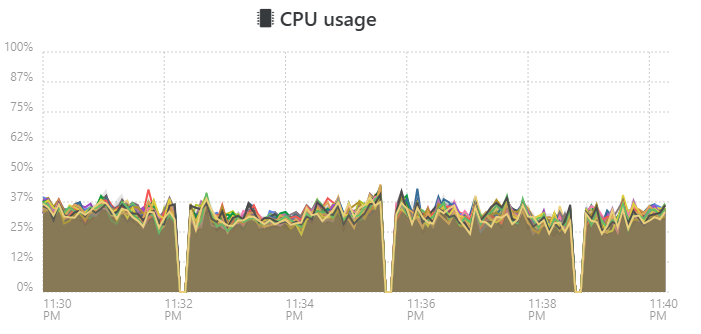
we see this on multiple pools with different setups. not shure if it's a glitch in the software showing incorrect information or that we are facing a real problem in the latest version.
Anyone else seeing this issue?
-
RE: CBT: the thread to centralize your feedback
@flakpyro i understand they did, but not shure if it is allready fixed or not. it had to do with the dedicated migration network being selected. maybe @olivierlambert is aware of the current status?
-
RE: VMware migration tool: we need your feedback!
On vmware u would need als vcenter for this kind of features. And as u can easy deploy an empty xoa, why would this be an issue?
-
RE: Feedback on immutability
@vkeven same problem here, we decided not to proceed with this as it would never work with an incremental delta without doing a full every few weeks. We are going to handle this with s3 and synology internal features.
-
RE: CBT: the thread to centralize your feedback
@FritzGerald 2 thing that i think could be causing, first check if u have set a dedicated nbd network on the pool.
Second u need to remove all snapshots from the vms and disable cbt on them. This will remove the cbt files and makes shure there will be a clean cbt chain.
-
RE: maybe a bug when restarting mirroring delta backups that have failed
@jshiells i believe this is by design for a mirror backup. it checks every vm to mirror (if no filter is selected that will be all on the SR), if there is no new recovery point it will not copy anything as it allready does have the latest version of that backup on the destination recovery point. When a filter is selected it checks every vm on the sr but it does not copy data.
-
RE: Migration over NAS and slow connection.
@Bzyk47 you would need a second host to do live migration/import. What u can do if u can affort any downtime is export your vms to ova of vmdk and rhe install xcp-ng on your vmware host and the import the vms. Its not possible to upgrade vmware to xcp-ng with the vms on it.
-
RE: Migration over NAS and slow connection.
@Bzyk47 This is relative easy, you install XCP-ng on your office host, install Xen Orchestra, migrate your vms. On your home location you can do 2 things.
- create a remote nfs share where Xen Ochetra can do vm backups to.
- Create a local XCP-ng installation where you replicate the vms to.
Both is fairly easy to deal with from within the standard settings in Xen Orchestra. The amount of data changed a day is only important for the slow connection in between for replication. i use 500mbit connections for this and that works pretty fast.
If u need anything else or need assistance with the setup just let me know!