Hi currently running xcp-ng 8.2 and within my small form factor I have 4 VMs. One of the VMs is currently virtualized pfsense. When xcp-ng boots I'd actually like the pfsense VM to start first. Is it possible to assign in XO or through the xcp-ng CLI itself the proposed boot order of the various VMs?
K
Offline
-
Is it possible to prioritize the booting of certain VMs over another when xcp-ng starts?
-
RE: XCP-ng Center: Future
Hey thanks for working on XCP-ng Center -- I find it a really useful tool.
Is this a README that describes how your project differs from XenCenter.
-
RE: New Rust Xen guest tools
Hey do you have actual instructions on how to compile from source? I trying to work with someone creating an arch linux AUR package and was looking for a little more input.
-
RE: Windows Server 2016 & 2019 freezing on multiple hosts
FWIW -- I had a similar problem with VMs going randomly down -- it wasn't windows but various BSD and Linux VM's. Sometimes they would run a few days, other times they would lock up every other day. Logs didn't help because when the VM locked, logs were not written. I even had the xcp-ng installation lock a few times, although it was usually on of the VMs. I started searching for faulty hardware and eventually SMART tested all the drives and mem86 the RAM. Turns out I had some bad RAM modules which I later RMA'd. With new RAM (after after thoroughly testing it), I haven't had any lock ups. I'm not sure this will help you at all.
-
RE: How to choose which specific NIC/port for Xen-Orchestra server to bind to?
@julien-f Thanks for explanation. Thank you
-
RE: Question regarding copying of VMs within storage pool
Well damn -- you're right.
Well VM now up and running. Just have to figure out how networking works in this new copied VM. Thanks for help.
-
RE: Installing patches in pool fails (fixed)
Not that you actually needed this reply, but confirmed patch works after upgrade this morning.
Thanks for update and the patch.
-
RE: HTTP to HTTPS redirection
@nikade Hey thanks for for the link. I ended up just using a LetsEncrypt cert rather than self signed. I think had to add a DNS host override on my router to associate the Local LAN address of the xo server with the domain name of the server contained in the certificate -- Like 10.0.1.50 ---> xo.example.com. Thanks for pointing me in the right direction on this one.
-
RE: VM trying to add serial console to examine boot process.
So I actually posted these findings to the ZFSBootMenu Discussion github: https://github.com/zbm-dev/zfsbootmenu/discussions/787
Looks like they have tested ZBM against KVM but not Xen.
Can Xen not handle a kernel being kexec'd?
-
RE: VM trying to add serial console to examine boot process.
@dinhngtu Thanks for suggestions.
I'm really delving into areas I haven't delved into before so thanks for help.
I'm going to include a few screen shots here as I think this is the best way to show what's going on. I'm not sure if you've ever used ZFSBootMenu but there isn't any grub involved, but I understand what you're saying about the kernel command line parameters.So I after some testing - I want to confirm the serial method does work.
To get serial console, ssh into DOM0:
xl vm-list ---> To get <ID number>
xl console -t serial <ID number>
***I'm not certain if this has anything to do with xcp-ng at all. Learning more about the issue and how zfsbootmenu works -- it's more a wrapper for kexec. ZFSBootMenu does allow for a chroot and from there you can issue a command line. Anyway I booted into the recovery console and typed the following:
kexec -l /boot/vmlinuz-linux-lts --initrd=/boot/initramfs-linux-lts.img --command-line="zfs=tank/sys/arch/ROOT/default loglevel=7 rw console=ttyS0 earlyprintk=serial,ttys0"
kexec -e
Unfortunately probably beyond this forum, I ended up getting a kernel panic:
Invalid physical address chosen!


Physical KASLR disabled: no suitable memory region!

[    0.000000] Linux version 6.12.58-1-lts (linux-lts@archlinux) (gcc (GCC) 15.2.1 20251112, GNU ld (GNU Binutils) 2.45.1) #1 SMP PREEMPT_DYNAMIC Fri, 14 Nov 2025 05:38:58 +0000
[    0.000000] Command line: zfs=tank/sys/arch/ROOT/default noresume rw loglevel=7 console=ttyS0 earlyprintk=serial,ttyS0
[    0.000000] BIOS-provided physical RAM map:
[    0.000000] BIOS-e820: [mem 0x0000000000000000-0x000000000009ffff] usable
[    0.000000] BIOS-e820: [mem 0x00000000000a0000-0x00000000000fffff] reserved
[    0.000000] BIOS-e820: [mem 0x0000000000100000-0x00000000ee8c0fff] usable
[    0.000000] BIOS-e820: [mem 0x00000000ee8c1000-0x00000000ee8c1fff] reserved
[    0.000000] BIOS-e820: [mem 0x00000000ee8c2000-0x00000000ee910fff] usable
[    0.000000] BIOS-e820: [mem 0x00000000ee911000-0x00000000ee91afff] ACPI data
[    0.000000] BIOS-e820: [mem 0x00000000ee91b000-0x00000000ef99afff] usable
[    0.000000] BIOS-e820: [mem 0x00000000ef99b000-0x00000000ef9f2fff] reserved
[    0.000000] BIOS-e820: [mem 0x00000000ef9f3000-0x00000000ef9fafff] ACPI data
[    0.000000] BIOS-e820: [mem 0x00000000ef9fb000-0x00000000ef9fefff] ACPI NVS
[    0.000000] BIOS-e820: [mem 0x00000000ef9ff000-0x00000000effdefff] usable
[    0.000000] BIOS-e820: [mem 0x00000000effdf000-0x00000000efffefff] reserved
[    0.000000] BIOS-e820: [mem 0x00000000effff000-0x00000000efffffff] usable
[    0.000000] BIOS-e820: [mem 0x00000000fc00b000-0x00000000fedfffff] reserved
[    0.000000] BIOS-e820: [mem 0x00000000fef00000-0x00000000ffffffff] reserved
[    0.000000] BIOS-e820: [mem 0x0000000100000000-0x000000020f7fffff] usable
[    0.000000] random: crng init done
[    0.000000] printk: legacy bootconsole [earlyser0] enabled
[    0.000000] NX (Execute Disable) protection: active
[    0.000000] APIC: Static calls initialized
[    0.000000] extended physical RAM map:
[    0.000000] reserve setup_data: [mem 0x0000000000000000-0x000000000009ffff] usable
[    0.000000] reserve setup_data: [mem 0x00000000000a0000-0x00000000000fffff] reserved
[    0.000000] reserve setup_data: [mem 0x0000000000100000-0x00000000ee8c0fff] usable
[    0.000000] reserve setup_data: [mem 0x00000000ee8c1000-0x00000000ee8c1fff] reserved
[    0.000000] reserve setup_data: [mem 0x00000000ee8c2000-0x00000000ee910fff] usable
[    0.000000] reserve setup_data: [mem 0x00000000ee911000-0x00000000ee91afff] ACPI data
[    0.000000] reserve setup_data: [mem 0x00000000ee91b000-0x00000000ef99afff] usable
[    0.000000] reserve setup_data: [mem 0x00000000ef99b000-0x00000000ef9f2fff] reserved
[    0.000000] reserve setup_data: [mem 0x00000000ef9f3000-0x00000000ef9fafff] ACPI data
[    0.000000] reserve setup_data: [mem 0x00000000ef9fb000-0x00000000ef9fefff] ACPI NVS
[    0.000000] reserve setup_data: [mem 0x00000000ef9ff000-0x00000000effdefff] usable
[    0.000000] reserve setup_data: [mem 0x00000000effdf000-0x00000000efffefff] reserved
[    0.000000] reserve setup_data: [mem 0x00000000effff000-0x00000000efffffff] usable
[    0.000000] reserve setup_data: [mem 0x00000000fc00b000-0x00000000fedfffff] reserved
[    0.000000] reserve setup_data: [mem 0x00000000fef00000-0x00000000ffffffff] reserved
[    0.000000] reserve setup_data: [mem 0x0000000100000000-0x000000020f7fa19f] usable
[    0.000000] reserve setup_data: [mem 0x000000020f7fa1a0-0x000000020f7fa21f] usable
[    0.000000] reserve setup_data: [mem 0x000000020f7fa220-0x000000020f7fffff] usable
[    0.000000] efi: EFI v2.7 by EDK II
[    0.000000] efi: ACPI=0xef9fa000 ACPI 2.0=0xef9fa014 SMBIOS=0xef9cb000 MEMATTR=0xee210798 RNG=0xef9f4f18 INITRD=0xee0f0998
[    0.000000] SMBIOS 2.8 present.
[    0.000000] DMI: Xen HVM domU, BIOS 4.17 10/21/2025
[    0.000000] DMI: Memory slots populated: 1/1
[    0.000000] Hypervisor detected: Xen HVM
[    0.000000] Xen version 4.17.
[    0.000000] platform_pci_unplug: Netfront and the Xen platform PCI driver have been compiled for this kernel: unplug emulated NICs.
[    0.000000] platform_pci_unplug: Blkfront and the Xen platform PCI driver have been compiled for this kernel: unplug emulated disks.
[    0.000000] You might have to change the root device
[    0.000000] from /dev/hd[a-d] to /dev/xvd[a-d]
[    0.000000] in your root= kernel command line option
[    0.030291] tsc: Fast TSC calibration using PIT
[    0.036454] tsc: Detected 2712.051 MHz processor
[    0.043153] tsc: Detected 2712.000 MHz TSC
[    0.048895] last_pfn = 0x20f800 max_arch_pfn = 0x400000000
[    0.061261] MTRR map: 4 entries (3 fixed + 1 variable; max 19), built from 8 variable MTRRs
[    0.074487] x86/PAT: Configuration [0-7]: WB  WC  UC- UC  WB  WP  UC- WT
Memory KASLR using RDRAND RDTSC...
[    0.086526] x2apic: enabled by BIOS, switching to x2apic ops
[    0.092575] last_pfn = 0xf0000 max_arch_pfn = 0x400000000
[    0.111076] Using GB pages for direct mapping
[    0.118548] Secure boot disabled
[    0.123286] RAMDISK: [mem 0x20a9cd000-0x20b7fffff]
[    0.131788] ACPI: Early table checksum verification disabled
[    0.141163] ACPI: RSDP 0x00000000EF9FA014 000024 (v02 Xen   )
[    0.148182] ACPI: XSDT 0x00000000EF9F90E8 000044 (v01 Xen    HVM      00000000      01000013)
[    0.161363] ACPI: FACP 0x00000000EF9F8000 0000F4 (v04 Xen    HVM      00000000 HVML 00000000)
[    0.174042] ACPI: DSDT 0x00000000EE911000 0092A3 (v02 Xen    HVM      00000000 INTL 20160527)
[    0.186753] ACPI: FACS 0x00000000EF9FE000 000040
[    0.194096] ACPI: APIC 0x00000000EF9F7000 000068 (v02 Xen    HVM      00000000 HVML 00000000)
[    0.207668] ACPI: HPET 0x00000000EF9F6000 000038 (v01 Xen    HVM      00000000 HVML 00000000)
[    0.219189] ACPI: WAET 0x00000000EF9F5000 000028 (v01 Xen    HVM      00000000 HVML 00000000)
[    0.231948] ACPI: Reserving FACP table memory at [mem 0xef9f8000-0xef9f80f3]
[    0.242019] ACPI: Reserving DSDT table memory at [mem 0xee911000-0xee91a2a2]
[    0.251672] ACPI: Reserving FACS table memory at [mem 0xef9fe000-0xef9fe03f]
[    0.261611] ACPI: Reserving APIC table memory at [mem 0xef9f7000-0xef9f7067]
[    0.275065] ACPI: Reserving HPET table memory at [mem 0xef9f6000-0xef9f6037]
[    0.286614] ACPI: Reserving WAET table memory at [mem 0xef9f5000-0xef9f5027]
[    0.297485] APIC: Switched APIC routing to: cluster x2apic
[    0.306415] No NUMA configuration found
[    0.311594] Faking a node at [mem 0x0000000000000000-0x000000020f7fffff]
[    0.321366] NODE_DATA(0) allocated [mem 0x20f7cf340-0x20f7fa07f]
[    0.330997] Zone ranges:
[    0.334797]   DMA      [mem 0x0000000000001000-0x0000000000ffffff]
[    0.344273]   DMA32    [mem 0x0000000001000000-0x00000000ffffffff]
[    0.353819]   Normal   [mem 0x0000000100000000-0x000000020f7fffff]
[    0.362229]   Device   empty
[    0.367131] Movable zone start for each node
[    0.373999] Early memory node ranges
[    0.378773]   node   0: [mem 0x0000000000001000-0x000000000009ffff]
[    0.390474]   node   0: [mem 0x0000000000100000-0x00000000ee8c0fff]
[    0.401444]   node   0: [mem 0x00000000ee8c2000-0x00000000ee910fff]
[    0.409440]   node   0: [mem 0x00000000ee91b000-0x00000000ef99afff]
[    0.417934]   node   0: [mem 0x00000000ef9ff000-0x00000000effdefff]
[    0.427208]   node   0: [mem 0x00000000effff000-0x00000000efffffff]
[    0.435979]   node   0: [mem 0x0000000100000000-0x000000020f7fffff]
[    0.444922] Initmem setup node 0 [mem 0x0000000000001000-0x000000020f7fffff]
[    0.464839] On node 0, zone DMA: 1 pages in unavailable ranges
[    0.664383] On node 0, zone DMA: 96 pages in unavailable ranges
[   11.987775] On node 0, zone DMA32: 1 pages in unavailable ranges
[   11.992954] On node 0, zone DMA32: 10 pages in unavailable ranges
[   12.000827] On node 0, zone DMA32: 100 pages in unavailable ranges
[   12.006762] On node 0, zone DMA32: 32 pages in unavailable ranges
[   12.024634] On node 0, zone Normal: 2048 pages in unavailable ranges
[   12.034858] ACPI: PM-Timer IO Port: 0xb008
[   12.040633] IOAPIC[0]: apic_id 1, version 17, address 0xfec00000, GSI 0-47
[   12.050352] ACPI: INT_SRC_OVR (bus 0 bus_irq 0 global_irq 2 dfl dfl)
[   12.060030] ACPI: INT_SRC_OVR (bus 0 bus_irq 5 global_irq 5 low level)
[   12.070986] ACPI: INT_SRC_OVR (bus 0 bus_irq 10 global_irq 10 low level)
[   12.080237] ACPI: INT_SRC_OVR (bus 0 bus_irq 11 global_irq 11 low level)
[   12.089886] ACPI: Using ACPI (MADT) for SMP configuration information
[   12.099440] ACPI: HPET id: 0x8086a201 base: 0xfed00000
[   12.107122] TSC deadline timer available
[   12.111961] CPU topo: Max. logical packages:   1
[   12.118536] CPU topo: Max. logical dies:       1
[   12.124758] CPU topo: Max. dies per package:   1
[   12.131268] CPU topo: Max. threads per core:   1
[   12.137904] CPU topo: Num. cores per package:     1
[   12.143768] CPU topo: Num. threads per package:   1
[   12.151213] CPU topo: Allowing 1 present CPUs plus 0 hotplug CPUs
[   12.159593] PM: hibernation: Registered nosave memory: [mem 0x00000000-0x00000fff]
[   12.170508] PM: hibernation: Registered nosave memory: [mem 0x000a0000-0x000fffff]
[   12.181623] PM: hibernation: Registered nosave memory: [mem 0xee8c1000-0xee8c1fff]
[   12.193092] PM: hibernation: Registered nosave memory: [mem 0xee911000-0xee91afff]
[   12.202372] PM: hibernation: Registered nosave memory: [mem 0xef99b000-0xef9fefff]
[   12.211854] PM: hibernation: Registered nosave memory: [mem 0xeffdf000-0xefffefff]
[   12.223405] PM: hibernation: Registered nosave memory: [mem 0xf0000000-0xffffffff]
[   12.233969] [mem 0xf0000000-0xfc00afff] available for PCI devices
[   12.243240] Booting paravirtualized kernel on Xen HVM
[   12.251069] clocksource: refined-jiffies: mask: 0xffffffff max_cycles: 0xffffffff, max_idle_ns: 6370452778343963 ns
[   12.273490] setup_percpu: NR_CPUS:8192 nr_cpumask_bits:1 nr_cpu_ids:1 nr_node_ids:1
[   12.285349] percpu: Embedded 67 pages/cpu s237568 r8192 d28672 u2097152
[   12.295893] Kernel command line: zfs=tank/sys/arch/ROOT/default noresume rw loglevel=7 console=ttyS0 earlyprintk=serial,ttyS0
[   12.314016] Unknown kernel command line parameters "zfs=tank/sys/arch/ROOT/default", will be passed to user space.
[   12.330535] Dentry cache hash table entries: 1048576 (order: 11, 8388608 bytes, linear)
[   15.191489] Inode-cache hash table entries: 524288 (order: 10, 4194304 bytes, linear)
[   15.203342] Fallback order for Node 0: 0
[   15.203347] Built 1 zonelists, mobility grouping on.  Total pages: 2094864
[   15.220969] Policy zone: Normal
[   15.225746] mem auto-init: stack:all(zero), heap alloc:on, heap free:off
[   15.235420] software IO TLB: area num 1.
[   15.267432] BUG: unable to handle page fault for address: 0000000000002fd8
[   15.279495] #PF: supervisor write access in kernel mode
[   15.287760] #PF: error_code(0x0002) - not-present page
[   15.295463] PGD 0 P4D 0
[   15.298645] Oops: Oops: 0002 [#1] PREEMPT SMP PTI
[   15.305787] CPU: 0 UID: 0 PID: 0 Comm: swapper Not tainted 6.12.58-1-lts #1 4a3b6be8628e50ea24aa79ad254248308dcf5cb0
[   15.321935] Hardware name: Xen HVM domU, BIOS 4.17 10/21/2025
[   15.330517] RIP: 0010:__free_pages_core+0x77/0x220
[   15.337143] Code: 48 83 c0 40 48 39 d0 75 eb 48 8b 45 00 48 89 c2 48 c1 e8 33 48 c1 ea 36 83 e0 07 48 69 c0 c0 06 00 00 48 8b 14 d5 60 a5 6d 94 <f0> 48 01 b4 02 98 00 00 00 41 bc 00 10 00 00 89 d9 48 89 ef 48 2b
[   15.368251] RSP: 0000:ffffffff93a03e20 EFLAGS: 00010002
[   15.376726] RAX: 0000000000002f40 RBX: 0000000000000008 RCX: 0000000000000008
[   15.390585] RDX: 0000000000000000 RSI: 0000000000000100 RDI: fffff6dd40004000
[   15.400332] RBP: fffff6dd40004000 R08: 0000000000100000 R09: ffffffff93a03e58
[   15.410724] R10: 00000000ee8c1000 R11: 0000000000000039 R12: ffffffff93a03e60
[   15.421491] R13: 0000000000000080 R14: 0000000000000200 R15: 0000000000000100
[   15.432930] FS:  0000000000000000(0000) GS:ffff88870f400000(0000) knlGS:0000000000000000
[   15.444655] CS:  0010 DS: 0000 ES: 0000 CR0: 0000000080050033
[   15.453221] CR2: 0000000000002fd8 CR3: 000000020da22001 CR4: 00000000000200b0
[   15.464104] Call Trace:
[   15.467862]  <TASK>
[   15.470559]  memblock_free_all+0x1b8/0x230
[   15.476299]  mem_init+0x1a/0x1d0
[   15.481736]  mm_core_init+0xfb/0x140
[   15.486818]  start_kernel+0x767/0x9e0
[   15.492324]  x86_64_start_reservations+0x24/0x30
[   15.496579]  x86_64_start_kernel+0x98/0xa0
[   15.501183]  common_startup_64+0x13e/0x141
[   15.507019]  </TASK>
[   15.509901] Modules linked in:
[   15.511979] CR2: 0000000000002fd8
[   15.517229] ---[ end trace 0000000000000000 ]---
[   15.522802] RIP: 0010:__free_pages_core+0x77/0x220
[   15.528278] Code: 48 83 c0 40 48 39 d0 75 eb 48 8b 45 00 48 89 c2 48 c1 e8 33 48 c1 ea 36 83 e0 07 48 69 c0 c0 06 00 00 48 8b 14 d5 60 a5 6d 94 <f0> 48 01 b4 02 98 00 00 00 41 bc 00 10 00 00 89 d9 48 89 ef 48 2b
[   15.553390] RSP: 0000:ffffffff93a03e20 EFLAGS: 00010002
[   15.561510] RAX: 0000000000002f40 RBX: 0000000000000008 RCX: 0000000000000008
[   15.571508] RDX: 0000000000000000 RSI: 0000000000000100 RDI: fffff6dd40004000
[   15.581418] RBP: fffff6dd40004000 R08: 0000000000100000 R09: ffffffff93a03e58
[   15.591445] R10: 00000000ee8c1000 R11: 0000000000000039 R12: ffffffff93a03e60
[   15.601914] R13: 0000000000000080 R14: 0000000000000200 R15: 0000000000000100
[   15.612522] FS:  0000000000000000(0000) GS:ffff88870f400000(0000) knlGS:0000000000000000
[   15.624495] CS:  0010 DS: 0000 ES: 0000 CR0: 0000000080050033
[   15.633191] CR2: 0000000000002fd8 CR3: 000000020da22001 CR4: 00000000000200b0
[   15.643140] Kernel panic - not syncing: Attempted to kill the idle task!
I guess it's my probably to fix at this point.
What's wierd is if I delete the efibootmgr entry for the zfsbootmenu and then attempt booting using systemd-boot, the system will boot.
-
VM trying to add serial console to examine boot process.
So long story short is that I was working with an arch-linux vm within xcp-ng and trying to debug why ZFSBootMenu wont work to boot my VM with my / partition on zfs. If interested the details or documented here: https://www.reddit.com/r/zfs/comments/1p1veqf/damn_struggling_to_get_zfsbootmenu_to_work/
Anyway one of the proposed methods of trying to debug the problem of why the ZFSBootMenu EFI wont boot the kernel was to try to add a serial port to the VM to gather output. Adding a serial port to a VM was something new to me and I actually tried two methods:
- SSH'd into the DOM image, I tried running the commands:
# xl vm-list  ---- This got me the VM id #
# xl console -t serial <ID #>
This didn't seem to produce any output so I went another method was to add a serial port that dumped it's output to a tcp port:
# xe vm-param-add uuid=<uuid> param-name=platform hvm_serial=tcp::7001,server,nodelayI then from a remote host tried to see to listed on tcp port 7001:
#nc -v <ip_address> 7001and yes that didn't work either in terms of producing any output.
I am going about this the correct way in terms of trying to attach a serial port? For the record if anyone has worked with ZFSBootMenu my parameters I'm adjusting here are the following:
# zfs set org.zfsbootmenu:commandline="spl.spl_hostid=$(hostid) loglevel=7 rw console=ttyS0" tank/sys/arch/ROOT/default -
RE: vm_fault: pager read error, pid 88715 (rrdtool)
Hmm - just got done running mem86+ - 4 passes -- all 14 tests. No RAM errors. I wonder the what would cause this error? I'll probably just save config and reinstall. So strange.
-
RE: vm_fault: pager read error, pid 88715 (rrdtool)
@DustinB I have time to run a ram check (luckily), and if not I'll just recreate VM. Luckily pfsense makes it pretty easy to reinstall from scratch by saving to a configuration file which can be imported to new version. I'll work on it later today or tomorrow and report back.
-
vm_fault: pager read error, pid 88715 (rrdtool)
I'm running pfsense version 2.8.0 virtualized on xcp-ng 8.3.0.
The host has 64 GB RAM (two 32 GB dual channel DDR4 modules) with a 1Tb Nvme drive and 1tb samsung SSD.
I have 5 virtualized systems on the xcp-ng host consuming a total of 30Gb of the 64 GB.
One of my virtualized hosts is pfSense 2.8.0. Recently the pfSense host is giving me consistent error messages such as the following:
Aug 25 07:46:28	kernel		vm_fault: pager read error, pid 24443 (rrdtool)
Aug 25 07:46:28	kernel		vm_fault: pager read error, pid 24443 (rrdtool)
Aug 25 07:46:28	kernel		vm_fault: pager read error, pid 24443 (rrdtool)
Aug 25 07:46:28	kernel		vm_fault: pager read error, pid 24443 (rrdtool)
Aug 25 07:46:28	kernel		vm_fault: pager read error, pid 24443 (rrdtool)
Aug 25 07:46:28	kernel		vm_fault: pager read error, pid 24443 (rrdtool)
Aug 25 07:46:28	kernel		vm_fault: pager read error, pid 24443 (rrdtool)
Aug 25 07:46:28	kernel		vm_fault: pager read error, pid 24443 (rrdtool)
Aug 25 07:46:28	kernel		vm_fault: pager read error, pid 24443 (rrdtool)
Aug 25 07:46:28	kernel		vm_fault: pager read error, pid 24443 (rrdtool)
Doing some reading on the error (https://www.reddit.com/r/opnsense/comments/1jlfshn/vm_fault_pager_read_error_pid_76098_rrdtool/), it could indicate a bad RAM module?? I'm just not sure. Is RAM presented to the pfsense host as virtual memory? Other than doing a mem86+ test on the RAM modules of the xcp-ng host, is there any other way to debug this error? I don't see errors from any other of the virtualized linux operating systems, however is there something I should be checking on the other virtualized systems or the host that would confirm a possible memory error as error (assuming its a memory error)?
Thanks for any input.
-
RE: New Rust Xen guest tools
So I managed to build with Cargo on arch (which also required clang as a dependency). Moved xen-guest-agent/target/debug/xen-guest-agent to /usr/sbin and also copied the basic xen-guest-agent/startup/xen-guest-agent.service file to /etc/systemd/system and enable/started the service.
And ahh -- success --
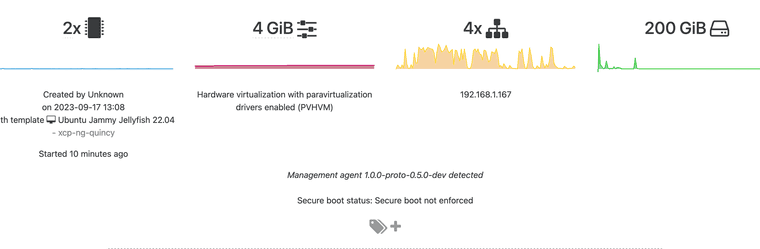
I guess my project for week is to figure out how to write a PKGBUILD file for this particular project. We'll see how that goes

I'm assuming since building from git repository (https://gitlab.com/xen-project/xen-guest-agent) there aren't going to be any file signatures to check against. I'm looking at cargo, clang, python-setuptools and xen as dependencies?
-
RE: New Rust Xen guest tools
When using this toolset, what network interface names does this match against? For example it will match against interface names starting with eth and I think enpS. I looked in the source code within the main branch but couldn't find the file where this search occurs.
-
RE: Xen Orchestra from source with Let's Encrypt certificates
-
RE: New Rust Xen guest tools
@yann Yes I tried compiling with cargo. Got along some of the way until I reached this:
  Failed to locate xenstore library:
  pkg-config exited with status code 1
  > PKG_CONFIG_ALLOW_SYSTEM_LIBS=1 PKG_CONFIG_ALLOW_SYSTEM_CFLAGS=1 pkg-config --libs --cflags xenstore

  The system library `xenstore` required by crate `xenstore-sys` was not found.
  The file `xenstore.pc` needs to be installed and the PKG_CONFIG_PATH environment variable must contain its parent directory.
  The PKG_CONFIG_PATH environment variable is not set.

  HINT: if you have installed the library, try setting PKG_CONFIG_PATH to the directory containing `xenstore.pc`.
Where do I get the xenstore library? I've searched the AUR and pacman official archives and I can't seem to find.