XCP-ng
    • Categories
    • Recent
    • Tags
    • Popular
    • Users
    • Groups
    • Register
    • Login
    1. Home
    2. tsukraw
    T
    Offline
    • Profile
    • Following 0
    • Followers 0
    • Topics 8
    • Posts 24
    • Groups 0

    tsukraw

    @tsukraw

    10
    Reputation
    8
    Profile views
    24
    Posts
    0
    Followers
    0
    Following
    Joined
    Last Online

    tsukraw Unfollow Follow

    Best posts made by tsukraw

    • RE: V2V - Stops at 99%

      @florent
      Thank you very much for your quick help on this one.
      The patch resolved the issue for both migrations we were struggling on.

      It is fantastic to see the teamwork and a resolution developed so quickly.
      Really makes us feel confident in knowing we made the right decision with going to XCP-ng for our clients.

      Thank you

      posted in Migrate to XCP-ng
      T
      tsukraw
    • RE: Application on VM causing BSOD

      Hot damn!!

      @flakpyro
      For kicks and giggles I tried what you had sent

      xe vm-param-add uuid=VM_UUID param-name=platform msr-relaxed=true
      

      And sure enough it worked!!
      Not exactly sure the technical details on what setting msr-relaxed=true does but hey if it works it works 🙂

      posted in Compute
      T
      tsukraw

    Latest posts made by tsukraw

    • RE: V2V Migration | Mixed Volumes VHD and QCOW

      We have submitted an official support request: Ticket#7758084

      The symptom continues to be that it appears the 2+ TB volume fully transfers, but the system disk which is 90GB fails almost immediately.

      posted in Migrate to XCP-ng
      T
      tsukraw
    • RE: V2V Migration | Mixed Volumes VHD and QCOW

      @Team-Storage

      Did you guys have any feedback on this one?
      On our side we have tried a handful different forum items we have found, but we have not found anything that appears to work.

      Each time we run the V2V migration, the larger qcow2 disk appears to fully transfer but the smaller vhd file does not.

      posted in Migrate to XCP-ng
      T
      tsukraw
    • V2V Migration | Mixed Volumes VHD and QCOW

      Hey guys,

      With qcow support hot off the press we are attempted a V2V with a 2+ TB volume.

      The system that we are testing with the system disk is less than 2TB in size and it is showing up as vhd and the data volume is greater than 2TB so it shows qcow

      93b35429-3720-4099-ae43-2cdf5807b844-image.jpeg

      The issue that we are running into is the system volume never transfers any data from what we can tell. Is there any known issues around importing VMs when the disks are different sizes causing one to be vhd and the other qcow?

      Looking in the xensource log file we see this which might be a clue as to the issue.

      [debug||641 /var/lib/xcp/xapi|VBD.create R:4257b476bd74|vbdops] Checking whether there's a migrate in progress...
      [error||628 HTTPS 10.1.1.203->:::80|Importing raw VDI R:b2be45fe8be8|vhd_tool_wrapper] vhd-tool failed, returning VDI_IO_ERROR
      [error||628 HTTPS 10.1.1.203->:::80|Importing raw VDI R:b2be45fe8be8|vhd_tool_wrapper] vhd-tool output: vhd-tool: Non-zero size required (either a pre-existing destination file or specified via --destination-size on the command line)\x0A
      [error||628 HTTPS 10.1.1.203->:::80|Importing raw VDI R:b2be45fe8be8|import] Caught exception: VDI_IO_ERROR: [ Device I/O errors ]
      [error||628 :::80|VDI.import D:476cc7b7bc5e|backtrace] Importing raw VDI R:b2be45fe8be8 failed with exception Server_error(VDI_IO_ERROR, [ Device I/O errors ])
      [error||628 :::80|VDI.import D:476cc7b7bc5e|backtrace] Raised Server_error(VDI_IO_ERROR, [ Device I/O errors ])
      
      posted in Migrate to XCP-ng
      T
      tsukraw
    • Understanding Auto Power On | Auto Start

      Hey guys,

      Looking for some help at understanding auto power on as the documentation possibly looks to need some refreshing.
      https://docs.xcp-ng.org/guides/autostart-vm/

      From the Xen Orchestra, the guide does not mention the pool level it is only under the CLI that it mentions the pool level.

      Just looking for some clarification.

      In order for auto power on to function, we need to enable it on the pool level, and then per VM correct?

      If you have auto power on enabled at the VM level and the pool level disabled, the VM level is ignored, correct?

      What is actually triggering the power on?
      Is it XOA or the host itself?
      I am assuming the host itself, just looking for clarification if XOA VM was part of the systems that went offline, should we expect to see it auto power back on if it is set to auto power on.

      What determines the start order for auto power on when you have multiple VMs on a host?

      Thank you!!

      posted in Management
      T
      tsukraw
    • RE: Question about Continuous Replication/ Backups always doing Full Backups

      @Andrew

      Thank you Andrew 🙂

      Such a noob here when it comes to XCP, learning as we go.
      I couldn't find any guide out there for configuration of CR so was shooting from the hp on how it worked.

      You were correct that NBD Connection was not setup on the Pool network.

      Since you seem to be an expert in this CR field. Mind if I ask a question.
      For the Full backup interval what do you typically set this to?
      In our case we have around 4TB of data (Approx 25VMs) we are going to have on CR over a 1Gbps link between locations, so we can't be doing full copies to often.

      posted in Backup
      T
      tsukraw
    • RE: Question about Continuous Replication/ Backups always doing Full Backups

      @kraken89
      Sorry, didn't mean to hijack your post 🙂

      posted in Backup
      T
      tsukraw
    • RE: Question about Continuous Replication/ Backups always doing Full Backups

      @Andrew

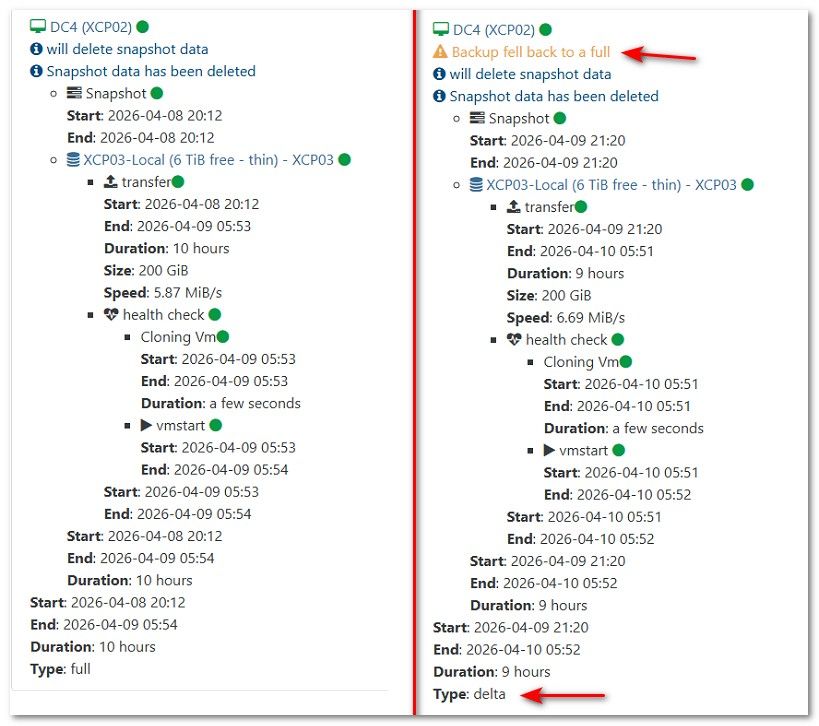
      But at the bottom it has Type: Delta
      Which I took as running a delta?

      Yes, I have NBD enabled. Should I try disabling it?
      Here a side-by-side comparison.

      I do see the message at the top saying "backup fell back to a full"
      Does this imply that the delta function didn't work, and it is truly a full again?

      00caacd6-8d1c-4f37-85e2-5a8d5b692eae-image.jpeg

      posted in Backup
      T
      tsukraw
    • RE: Question about Continuous Replication/ Backups always doing Full Backups

      I thought I was having a similar issue but mine might be slightly different.

      This is the first time I am trying to configure CR so it's very possible I am not setting things correctly. I have two separate pools currently.

      When I run the replication job, it shows type: Delta
      However, the size is the full size the VM each time which is 200GB.

      Since it is a delta shouldn't the size just be showing the change data?

      The two pools are physically at different sites, so the throughput is not optimal, but i never expected a delta run to take 8 hours. the full took the same 8 hours.

      d25bb348-ce3c-4deb-8de8-81bc5841e46c-image.jpeg

      posted in Backup
      T
      tsukraw
    • How to unbind trial license

      I am feeling kind of dumb here and hoping someone can set me straight.

      I have a client who had a XOA trail going, and they had bound the trial license to the pool.

      They have since purchased license; we can see the license under XOA | Licenses.
      It says "This license is active on this XOA (Not Installed).

      I for the life of me cannot figure out how to remove the Pool binding to the trail license and bind it to the purchased license.

      Any simple thoughts on this? Maybe a CLI way of doing it?

      posted in Management
      T
      tsukraw
    • RE: Application on VM causing BSOD

      @TeddyAstie

      Attached is the output you requested

      xen-cpuid -p.txt

      posted in Compute
      T
      tsukraw