• Weird issue with PCIe passthrough and XCP-NG/Xenserver

    16
    0 Votes
    16 Posts
    9k Views
    lessfoobarL
    @AlexanderK The server failed to handle your request, due to an internal error. The given message may give details useful for debugging the problem. message: xenopsd internal error: (Failure "Error from xenguesthelper: xenguest: xc_dom_build_image: [1] panic: xc_dom_boot.c:159: xc_dom_boot_domU_map: failed ") hpe dl360p gen8. So its HPE problem?
  • PCI Passthough not working

    4
    0 Votes
    4 Posts
    1k Views
    olivierlambertO
    xen-pciback.hide is precisely removing the devices from the Dom0. However, xen-cmdline --delete-dom0 will actually REMOVE the parameters you entered in the grub configuration file. In other words, xen-cmdline is a helper tool to edit Grub configuration file for Xen and Linux arguments (on boot). As it's written, xen-cmdline --set-dom0 will actually set parameters for the dom0, and xen-cmdline --delete-dom0 will remove them.
  • XCP-NG vm's extremly slow

    45
    0 Votes
    45 Posts
    25k Views
    A
    @fohdeesha lol :-). ok.... good to now :). Next optimization by decoupling harddisks and fans.... and always be quite on the datacenter :).
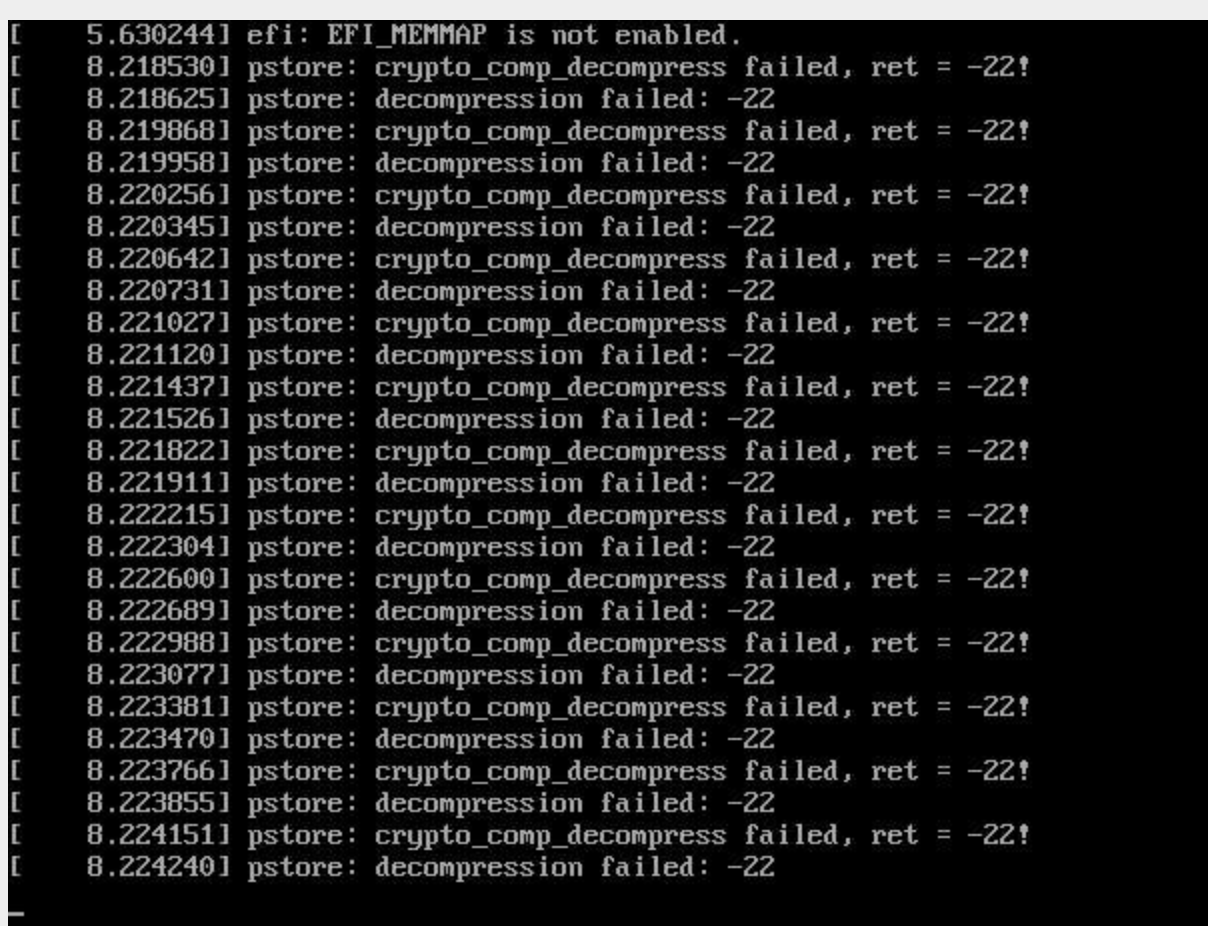
  • Weird "crypto_comp_decompress failed" messages during boot of XCP-ng

    6
    1
    0 Votes
    6 Posts
    2k Views
    P
    I don't really remeber about the solution, but assume I deleted the old logfiles too. I did never observe the same failure again. I'm also running xcp-ng on a Supermicro X11 with a XEON Silver 4210 CPU.
  • XCP simply hangs

    9
    0 Votes
    9 Posts
    2k Views
    olivierlambertO
    That would be interesting to get some pointers (like serial debug and so on). I wonder if there's already some resources for Xen Project somewhere
  • This topic is deleted!

    3
    3
    0 Votes
    3 Posts
    10 Views
  • Booting a XEN linux guest (boot device, initrd...)

    1
    0 Votes
    1 Posts
    735 Views
    No one has replied
  • 0 Votes
    3 Posts
    424 Views
    M
    Good afternoon @olivierlambert !) Most likely caused by the virtual machine itself. Because all the other VMs were fine) and the VMs are all on the same disks. According to the load and smart physical disks, everything was normal. Also, when restarting the problematic virtual machine, the problem did not disappear. We didn't want to recover from backup, because it would take a lot of time and it was decided to move the virtual machine to another physical disk.(After that, the VM load problem disappeared)
  • Host Crash Once In A Long While

    6
    0 Votes
    6 Posts
    1k Views
    planedropP
    @Andrew Good suggestion, might as well pick some up, thanks!
  • 0 Votes
    3 Posts
    847 Views
    R
    @Andrew thanks for your reply. I have more than enough cores and memory slots for one CPU so I guess I’ll put one of the CPUs in the drawer.
  • Passed Through GPU Crashes Host During Driver Install

    17
    0 Votes
    17 Posts
    4k Views
    planedropP
    @andyhhp well I took way longer than I said I would, but I promise I still wanna work on this lol. Here is the link to the thread that shows my crash reports. As a reminder, this crash happened on this host randomly and didn't seem directly related to PCI passthrough, or at least not the driver install part which I was having issues with. https://xcp-ng.org/forum/topic/5900/host-crash-once-in-a-long-while
  • Unable to access xcp-ng host

    5
    1
    0 Votes
    5 Posts
    2k Views
    F
    @Darkbeldin let hope I am lucky
  • Host CPU and Max vCPU on VM

    Solved
    14
    0 Votes
    14 Posts
    10k Views
    B
    @olivierlambert thank you Olivier. Indeed you are right, we need to change also the max vcpu limits in advanced. [image: 1653224017629-0cc87b88-9234-4671-bf18-4280acd996cd-image.png] Then is booting normally.
  • XCP 8.2 VCPUs-max settings

    9
    2
    0 Votes
    9 Posts
    4k Views
    olivierlambertO
    Hey thanks for the feedback
  • Custom BIOS/BootROM for aVM

    3
    0 Votes
    3 Posts
    969 Views
    P
    Sure, Another thing is that included iPXE is a version that does not support multipath SAN boot (I guess it would be nice to update it)
  • build a small home pc for XCP-ng?

    6
    0 Votes
    6 Posts
    4k Views
    C
    @AndreS That’s great thanks very much AndreS!
  • Error importing VM

    4
    0 Votes
    4 Posts
    882 Views
    DanpD
    If you have a valid XOA license, then you always have the option of opening a support ticket. Anything unusual / different about this VM? How many disks attached? P.S. I assume that you're aware that Windows 2008 isn't officially supported any longer.
  • passthrough two storage controllers to vm truenas

    1
    0 Votes
    1 Posts
    369 Views
    No one has replied
  • Snapshot chain too long in NFS SR

    17
    0 Votes
    17 Posts
    4k Views
    AnonabharA
    @alejandro-anv I have had problems like this on my NFS and iSCSI SR's previously. One thing that might help is to shutdown the VM's before doing a re-scan. If my memory serves me, it does a different kind of coalesce (online vrs offline) and this has a better chance of success. Also, be aware that from the time you re-scan and the time it actually starts to do work on the drives is 5 minutes. When I have a problem like this, I normally ssh into the pool master and tail the logfiles to watch it work. IE: tail -f /var/log/SMlog | grep SMGC Its boring.. But.. it gives me a bit of comfort between prayers 8-)
  • XCP-ng 8.2 hangs on shutdown

    8
    0 Votes
    8 Posts
    3k Views
    ForzaF
    @olivierlambert said in XCP-ng 8.2 hangs on shutdown: Yes that's what he said (ISO SR in a VM) Ah yes. I see that. Oups.