-
@archw xcp-ng tools are developed by Vates with many improvements over the citrix tools that align with xcp-ng.
"Dont forget to clean out the old citrix tools before installing." - https://github.com/xcp-ng/win-pv-drivers/releases
You can read more here:
https://xcp-ng.org/blog/2025/10/10/signed-windows-pv-drivers-now-available/
https://xcp-ng.org/blog/2025/07/29/windows-pv-drivers-update-and-roadmap/ -
@Henrik
Thanks for the advice! I just did one.....lots of rebooting required.After you run xclean, it then reboots. When it comes back, there is no mouse so, unless you can do everything from keystrokes, you have to reboot. When it comes back, you can then install the new drivers. It then reboots and now you can reset your original ip address (if it was a static IP address).
-
@archw and forgot to type "Not compatible with the "Manage Citrix PV drivers via Windows Update" option. You must disable this option before installing."
-
In regards to statement few posts above that XCP-ng tools are developed by Vates, does that mean that Vates builds them from scratch or modifies Citrix/XenServer ones?
I am thinking about switching to "XCP-ng windows guest tools 9.0.9137'', production is currently on "XenServer VM Tools for Windows 9.4.2".
-
@dom0 They are built from scratch using these components:
- Upstream Xen Project PV driver sources, which includes contributions from Citrix, Vates, Invisible Things Lab among others, and where we are one of the maintainers;
- The Rust guest agent, which is developed by us;
- The installer, packaging and tooling is completely our own.
The main repo is here: https://github.com/xcp-ng/win-pv-drivers
-
Hello all,
Version 9.1.100 Release Signed of the Windows PV tools has been released.
Download the latest release here: https://github.com/xcp-ng/win-pv-drivers/releases
It will be integrated into the XCP-ng built-in tools ISO after a test period of 2 weeks.
This release brings multiple bug fixes to all Windows drivers and guest tools components.
To download XenClean, click here. The installer downloads also includes a copy of XenClean and XenBootFix. Remember to carefully read XenClean docs before use.
Before installing
Thank you for using our Windows PV tools. Please carefully read the instructions below.
- Not compatible with the "Manage Citrix PV drivers via Windows Update" option. You must disable this option before installing.
- We recommend creating backups/snapshots before installing.
Changes since 9.0.9137
- NEW: Add installer option to disable time sync.
- NEW: SBOM is now included with the installation package.
- Improved: Better cleanup of Xenbus devices.
- Fixes: Driver symbols are now back after an accidental omission in 9.0.9137.
- Fixes: Fix restoration of network settings after uninstallation.
- Fixes: Fix XenClean in Safe Mode.
- Fixes: Fix system time drifting when time sync is enabled.
- Fixes: Fix display of Windows OS version.
- Fixes: Fix Xen Guest Agent reporting on VM resume.
- Fixes: Fix receive-side scaling.
- Fixes: Various driver stability fixes.
Help / Community support
If you encounter installation/uninstallation errors, please try again with one of the following commands:
For installing:
msiexec.exe /i XenTools-x64.msi /log install.log

For uninstalling:
msiexec.exe /x XenTools-x64.msi /log uninstall.log
Please include this log along with the file
C:\Windows\INF\setupapi.dev.login your bug report. These files will help us troubleshoot any installation issues.Additionally, please report any errors or BSOD you encounter during testing of this release. Your feedback is very appreciated.
- Discussion: https://xcp-ng.org/forum (preferred)
- Issue Tracker: https://github.com/xcp-ng/xcp/issues
- IRC: #xcp-ng and #xcp-ng-dev on irc.freenode.net
Full Changelog: https://github.com/xcp-ng/win-pv-drivers/compare/v9.0.9137...v9.1.100
-
D dinhngtu referenced this topic on
-
@dinhngtu Updated from previous version running on 8 Windows Server 2022 VM's across HomeLab & Office.
No issues.
-
Thank you for explanation!
My production servers are currently running XenServer VM Tools for Windows 9.4.2. Would you recommend switching to XCP-ng tools?
-
@dom0 Yes, the Vates tools are our recommended guest tools for XCP-ng going forward.
-
Would it be possible to either have direct links to the exe's without them being zipped? Or list the version number of the xen-guest-agent.exe?
I'm installing these through Ansible (see code below). And it would be way cleaner if either of those two wishes could be true.
- name: Install Xen Guest tools on Windows hosts when: ansible_system == "Win32NT" tags: xcp_ng block: - name: Install Xen Guest Tools when: ansible_virtualization_type == "xen" block: - name: Copy over Latest Xen PV drivers ansible.windows.win_copy: src: "XenTools-x64_{{ xen_guest_agent_version }}.msi" dest: "C:\\Users\\{{ ansible_user }}\\Downloads\\XenDrivers-x64.msi" force: true - name: Install XenDrivers if the version isnt already created ansible.windows.win_package: path: "C:\\Users\\{{ ansible_user }}\\Downloads\\XenDrivers-x64.msi" creates_path: C:\Program Files\XCP-ng\Windows PV Drivers\XenGuestAgent\xen-guest-agent.exe creates_version: "{{ xen_guest_agent_version }}" arguments: - /quiet -
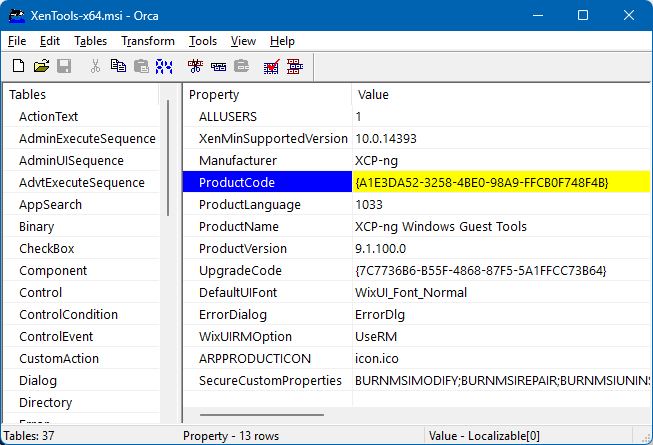
@probain The canonical way is to check the product_id instead https://docs.ansible.com/projects/ansible/latest/collections/ansible/windows/win_package_module.html#parameter-product_id The ProductCode changes every time a new version of XCP-ng Windows PV tools is released, and you can get it from each release's MSI:
-
Can we look forward to automatic updates arriving in the future as well?
-
We reserved a PCI ID (if I remember correctly), so it's more about asking Microsoft to put it in their update system. I have no idea if it's feasible for us.
-
I was thinking more of updating the entire set of the agent and drivers, similar to how XenServer VM Tools for Windows have it implemented. Using a scheduled job, they regularly check whether an update is available, and if so, they carry out the update of both the agent and the drivers themselves.
-
@dinhngtu said in XCP-ng Windows PV tools announcements:
@probain The canonical way is to check the product_id instead https://docs.ansible.com/projects/ansible/latest/collections/ansible/windows/win_package_module.html#parameter-product_id The ProductCode changes every time a new version of XCP-ng Windows PV tools is released, and you can get it from each release's MSI:
No problem... If you ever decide to have the .exe-file as a separate item. Not bundled within the zip-file. Then I would be even happier. But until then, thanks for everything!
-
Management Agent not installed in XCP-ng Center
v20.04.1and25.4.0Hi team,
Both versions of XCP-ng Center are returning a
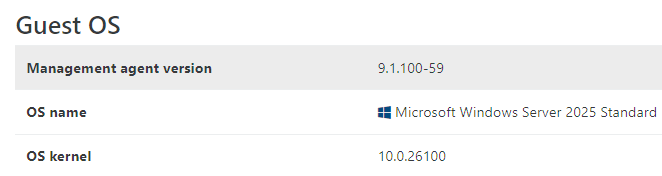
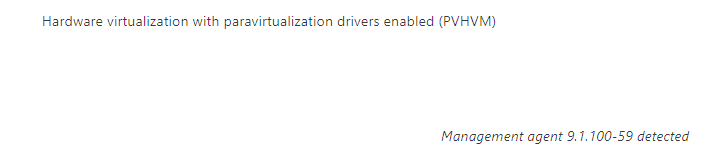
Management Agent not installederror under the Used Memory column when using the9.1driver (this was also an issue with the previous9.0version).Although, XOA does show that it's installed. Is this a known issue?
XCP-ng Center:


XOA:
VM using XenServer's version, for comparison:
Management agent9.4.2-178

-
@Johny said in XCP-ng Windows PV tools announcements:
Although, XOA does show that it's installed. Is this a known issue?
Yes it's a known issue, only cosmetic and the next driver update will fix it

-
@olivierlambert thanks for the quick reply!
-
@probain said in XCP-ng Windows PV tools announcements:
No problem... If you ever decide to have the .exe-file as a separate item. Not bundled within the zip-file. Then I would be even happier. But until then, thanks for everything!
The guest agent EXE is just one part of the tools package (and actually may not have the same version as the MSI file), therefore I don't think it should be relied upon for versioning. I recommend using the product_id method instead.
@Johny said in XCP-ng Windows PV tools announcements:
Both versions of XCP-ng Center are returning a
Management Agent not installederror under the Used Memory column when using the9.1driver (this was also an issue with the previous9.0version).Although, XOA does show that it's installed. Is this a known issue?
Looks like XCP-ng Center decided to detect the guest agent in a different way, namely checking for the feature "feature-static-ip-setting" which is XenServer specific (and, as indicated by the name, should not be used for management agent version checking). Please open an issue on the XCP-ng Center repo for this.
The cosmetic issue about management agent version disappearing after migration/resume has already been fixed in 9.1.100.
-
@dinhngtu Seems like an issue for this already exists: https://github.com/xcp-ng/xenadmin/issues/260
Added what I wrote above as a comment.

Hello! It looks like you're interested in this conversation, but you don't have an account yet.
Getting fed up of having to scroll through the same posts each visit? When you register for an account, you'll always come back to exactly where you were before, and choose to be notified of new replies (either via email, or push notification). You'll also be able to save bookmarks and upvote posts to show your appreciation to other community members.
With your input, this post could be even better 💗
Register Login