XCP-ng 8.3 updates announcements and testing
-
Hello, so I got access to the test environment back and was able to install this set of patches.
I actually installed them on the XCP-ng host before you guys released them to the stable repository.
I ran:
yum clean metadata --enablerepo=xcp-ng-testing,xcp-ng-candidates
yum update --enablerepo=xcp-ng-testing,xcp-ng-candidatesand rebooted the system.
Unfortunately I have to say that this is the first time that patches broke my system.
While the XCP-ng host is still able to boot, it is not longer able to mount my SRs.
I have 2 SR in this test environment:
- 1x Linstor vSAN iSCSI configured as QCOW2
- 1x TrueNAS Core NFSv3 configured as VHD
I spent some hours troubleshooting this and appearently it is caused by jumbo frames no longer working after applying these XCP-ng patches.
The hypervisor / storage network in this testing environment is using jumbo frames everywhere (all switches involved, all storage systems).
Prior to installing the updates everything was working fine.Now I can not ping the storage systems anymore using jumbo frames.
(ping -M do -s 8972 ...)Hence the tasks that are meant to mount the SRs are stuck forever:
[14:38 xcpng-test01 ~]# xe task-list
uuid ( RO)                : a6ba1324-bfe1-8aca-c5d1-d7cc57d37cca
          name-label ( RO): PBD.plug
    name-description ( RO):
              status ( RO): pending
            progress ( RO): 0.000


uuid ( RO)                : f9c76606-e516-553f-706c-ff52bc303e2d
          name-label ( RO): PBD.plug
    name-description ( RO):
              status ( RO): pending
            progress ( RO): 0.000
The interesting thing is that "ip a" is still showing MTU 9000:
[14:44 xcpng-test01 ~]# ip a
1: lo: <LOOPBACK,UP,LOWER_UP> mtu 65536 qdisc noqueue state UNKNOWN group default qlen 1000
    link/loopback 00:00:00:00:00:00 brd 00:00:00:00:00:00
    inet 127.0.0.1/8 scope host lo
       valid_lft forever preferred_lft forever
2: eth0: <NO-CARRIER,BROADCAST,MULTICAST,UP> mtu 1500 qdisc mq master ovs-system state DOWN group default qlen 1000
    link/ether ac:1f:6b:ad:2c:b2 brd ff:ff:ff:ff:ff:ff
3: eth1: <NO-CARRIER,BROADCAST,MULTICAST,UP> mtu 1500 qdisc mq master ovs-system state DOWN group default qlen 1000
    link/ether ac:1f:6b:ad:2c:b3 brd ff:ff:ff:ff:ff:ff
4: eth4: <BROADCAST,MULTICAST,UP,LOWER_UP> mtu 9000 qdisc mq master ovs-system state UP group default qlen 1000
    link/ether 80:61:5f:10:85:87 brd ff:ff:ff:ff:ff:ff
5: eth2: <NO-CARRIER,BROADCAST,MULTICAST,UP> mtu 1500 qdisc mq master ovs-system state DOWN group default qlen 1000
    link/ether ec:0d:9a:8c:00:fc brd ff:ff:ff:ff:ff:ff
6: eth3: <NO-CARRIER,BROADCAST,MULTICAST,UP> mtu 1500 qdisc mq master ovs-system state DOWN group default qlen 1000
    link/ether ec:0d:9a:8c:00:fd brd ff:ff:ff:ff:ff:ff
7: ovs-system: <BROADCAST,MULTICAST> mtu 1500 qdisc noop state DOWN group default qlen 1000
    link/ether 4a:1c:22:40:4a:d2 brd ff:ff:ff:ff:ff:ff
8: xenbr2: <BROADCAST,MULTICAST,UP,LOWER_UP> mtu 1500 qdisc noqueue state UNKNOWN group default qlen 1000
    link/ether ec:0d:9a:8c:00:fc brd ff:ff:ff:ff:ff:ff
9: xenbr3: <BROADCAST,MULTICAST,UP,LOWER_UP> mtu 1500 qdisc noqueue state UNKNOWN group default qlen 1000
    link/ether ec:0d:9a:8c:00:fd brd ff:ff:ff:ff:ff:ff
10: xenbr4: <BROADCAST,MULTICAST,UP,LOWER_UP> mtu 9000 qdisc noqueue state UNKNOWN group default qlen 1000
    link/ether 80:61:5f:10:85:87 brd ff:ff:ff:ff:ff:ff
11: xenbr1: <BROADCAST,MULTICAST,UP,LOWER_UP> mtu 1500 qdisc noqueue state UNKNOWN group default qlen 1000
    link/ether ac:1f:6b:ad:2c:b3 brd ff:ff:ff:ff:ff:ff
12: xenbr0: <BROADCAST,MULTICAST,UP,LOWER_UP> mtu 1500 qdisc noqueue state UNKNOWN group default qlen 1000
    link/ether ac:1f:6b:ad:2c:b2 brd ff:ff:ff:ff:ff:ff
13: xapi1: <BROADCAST,MULTICAST,UP,LOWER_UP> mtu 9000 qdisc noqueue state UNKNOWN group default qlen 1000
    link/ether 80:61:5f:10:85:87 brd ff:ff:ff:ff:ff:ff
    inet 10.10.160.24/24 brd 10.10.160.255 scope global xapi1
       valid_lft forever preferred_lft forever
Can't start XO VM right now as it lives on one of the SR but XO Lite is also still showing jumbo frames being enabled:
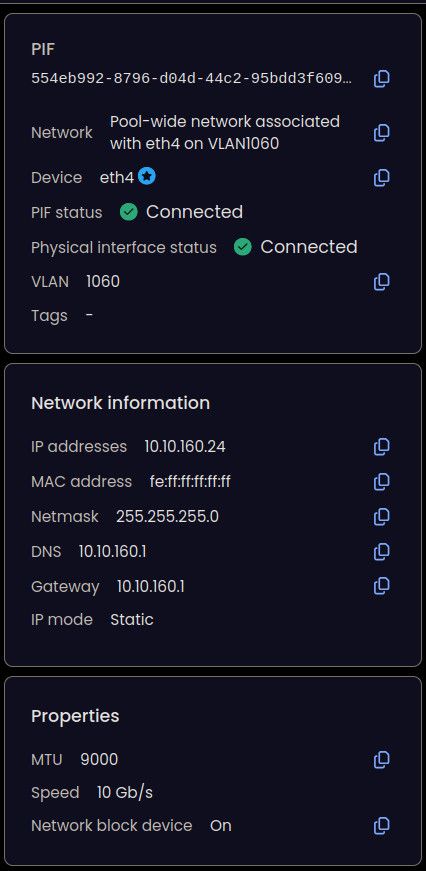
Was something changed in this set of patches that could cause this issue?
Thanks and best regards
-
Thank you everyone for your tests and your feedback!
The updates are live now: https://xcp-ng.org/blog/2026/08/18/august-2026-updates-1-for-xcp-ng-8-3-lts/
Installed on my prod pool and instantly got an SMART error. What a timing
 But other than that updates working withut issues.
 -
@MajorP93 Try first to fix the ping issue with jumboframe before anything. If the issue persists then:
what are the types of your SRs unable to be mounted? Is there any error in SMlog or xensouce.log? -
Hello @MajorP93,
Several things in your message raise questions for me.
First, this SR:
- 1x Linstor vSAN iSCSI configured as QCOW2
What is this storage and how is it configured?
Currently, we do not support QCOW2 on Linstor/Xostor. So, is it simply an iSCSI device to which you have applied the QCOW2 format, or is it a Xostor on the XCP-ng pool?Regarding jumbo frames, we do not use them internally and are not currently testing them. It is often recommended not to use them for the management interface, as indicated in the XCP-ng documentation: https://docs.xcp-ng.org/networking/
Non-standard MTUs (such as jumbo frames) are not supported on management interfaces. Using them can lead to serious issues, including failed pool member joins or unexpected network outages.Is that the case here?
-
@majorp93 no, these updates should not change anything on the MTU behavior. From your screenshots and
ip aoutput, I assume eth4 is the only link used, than your vlan1060 network is indeed your management network. I guess with some confidence that:- eth4 is your actual NIC
- xenbr4 is the pool-wide network without vlan using eth4
- xapi1 is the bridge for vlan1060
If that's right indeed on your host side, the MTUs are properly set.
As Gaël said, jumbo on management network is not officially supported, because we always end up in situation similar to yours, where something stops working for "some" reason

But as you said, when everything is setup properly, it does work.
I have test hosts at home up to date but no similar setup to yours for SR. I tried with a pool-wide and a pool-wide + vlan as management with 9000 and the
ping -M do -s 8972does work fine in both cases, so nothing I can see here.When it fails, what do you see? Message too long? mtu=1500 ? something else?
Do you have multiple hosts in that pool? Can you try that between the hosts as well and not toward the storage systems? I would also check on ovs with
ovs-vsctl list interfacethat each of eth4, xennbr4 and xapi1 report 9000 mtu.I know you said it was properly setup everywhere, but I would still be tempted to think there is a setup issue somewhere.
-
@anthoineb @gduperrey @bleader
Hi!Thank you very much for your responses.
I actually found the issue and it was not caused by the XCP-ng patches.
Appearently one of my switches had a malfunction and lost it's jumbo frames config on the ports involved...
It seems like this happened in the time frame between XCP-ng updates .
Last time I used this setup the jumbo frames / storage setup was working fine so I thought it might be related to these patches.Anyways sorry for taking your time in this regard-
Best regards
-
for the latest updates. the test pool didnt move the vms when i went to reboot. so i moved them manually. rebooted master, move vms back patched and reboot 2nd test server in the pool.
Skipped trying rolling reboot in prod and followed the same process. both pools went well without other issues. -
New maintenance update candidates for XCP-ng 8.3 LTS
This batch of updates focuses on storage bug fixes and performance improvements.
What changed
Storage
-
blktap:
When CBT is enabled, an issue occurred where tapdisk opened cbtlog instead of the primary QCOW2 image. This previously caused commit operations (ENOTSUPP) and leaf-coalesce routines to fail, resulting in excessive storage consumption on the SR. Tapdisk now correctly bypasses the cbtlog image to allow proper coalescing. -
sm: Fix a bug where the coalesce on a secondary host of a QCOW2 VDI on LVMSR could corrupt LVM metadata and would need manual intervention to restore them. -
xapi:
- Migration speeds are now improved for sparse QCOW2-backed VDIs, as empty sectors are no longer transferred.
- Preserve VDI tags on migration. This is a foundational fix for kubernetes integration.
Versions
blktap: 3.55.5-9.3.xcpng8.3 -> 3.55.5-9.4.xcpng8.3sm: 3.2.12-23.4.xcpng8.3 -> 3.2.12-23.5.xcpng8.3xapi: 26.1.16-1.1.xcpng8.3 -> 26.1.16-1.2.xcpng8.3
Test on XCP-ng 8.3
yum clean metadata --enablerepo=xcp-ng-testing,xcp-ng-candidates
yum update --enablerepo=xcp-ng-testing,xcp-ng-candidates
reboot
The usual update rules apply: pool coordinator first, etc.
What to test
As usual, normal use and anything else you want to test.
Test window before official release of the updates
~24 hrs
We would like to thank users who shared feedback since our last call for testing: @Andrew, @JeffBerntsen, @MajorP93, @XCP-ng-JustGreat, @acebmxer, @bufanda, @flakpyro
-
-
@gleh installed on my lab pool. Haven’t seen any issues so far.
-
Installed...
Updated: blktap.x86_64 0:3.55.5-9.4.xcpng8.3 forkexecd.x86_64 0:26.1.16-1.2.xcpng8.3 message-switch.x86_64 0:26.1.16-1.2.xcpng8.3 qcow-stream-tool.x86_64 0:26.1.16-1.2.xcpng8.3 rrdd-plugins.x86_64 0:26.1.16-1.2.xcpng8.3 sm.x86_64 0:3.2.12-23.5.xcpng8.3 sm-cli.x86_64 0:26.1.16-1.2.xcpng8.3 sm-fairlock.x86_64 0:3.2.12-23.5.xcpng8.3 squeezed.x86_64 0:26.1.16-1.2.xcpng8.3 varstored-guard.x86_64 0:26.1.16-1.2.xcpng8.3 vhd-tool.x86_64 0:26.1.16-1.2.xcpng8.3 wsproxy.x86_64 0:26.1.16-1.2.xcpng8.3 xapi-core.x86_64 0:26.1.16-1.2.xcpng8.3 xapi-nbd.x86_64 0:26.1.16-1.2.xcpng8.3 xapi-rrd2csv.x86_64 0:26.1.16-1.2.xcpng8.3 xapi-storage-script.x86_64 0:26.1.16-1.2.xcpng8.3 xapi-tests.x86_64 0:26.1.16-1.2.xcpng8.3 xapi-xe.x86_64 0:26.1.16-1.2.xcpng8.3 xcp-networkd.x86_64 0:26.1.16-1.2.xcpng8.3 xcp-rrdd.x86_64 0:26.1.16-1.2.xcpng8.3 xenopsd.x86_64 0:26.1.16-1.2.xcpng8.3 xenopsd-cli.x86_64 0:26.1.16-1.2.xcpng8.3 xenopsd-xc.x86_64 0:26.1.16-1.2.xcpng8.3 -
@gleh Installed those RC packages in my test environment.
Tested basic operation. Looks good so far.
(Booted, all 3 SR connected, VMs able to start, both VHD and QCOW2)
Best regards -
Installed on my usual hosts without issues. I am only making limited use of QCOW2 however.
-
Thank you everyone for your tests and your feedback!
The updates are live now: https://xcp-ng.org/blog/2026/08/27/august-2026-updates-2-for-xcp-ng-8-3-lts/
-
@gduperrey Installed and running. Rolling pool update worked.
-
First time rolling update worked for my pool. Woot!
-
Spoke to soon. While the updates succeeded, one of the nodes is rebooting every few minutes due to an HA self-fence.
-
This is a new one:
Updated all our 3 pools:
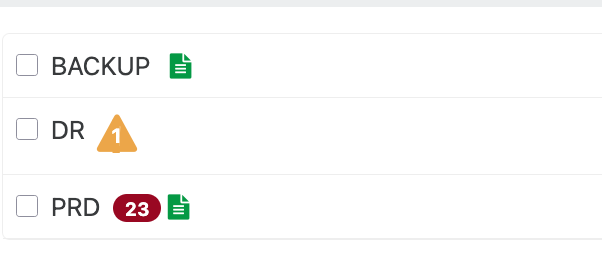
Backup via CLI, runs XOAThen DR.
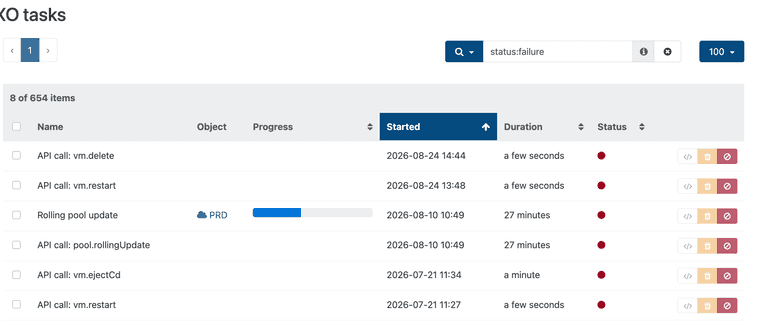
Tasks showed RPU on pool PRD instead of DR. RPU finished just fine but task stayed.Then RPU on PRD. Task did not change. Finished also fine. task stayed.
-
@manilx If the pools are up to date, I would try restarting the XO VM to see if the task persists.
If it does persist, it might be best to open a separate topic for the XO team.
-
@gduperrey Restarted and the task persisted. Deleted it from the list.
-
1 out of 3 pools at work failed rolling pool update.
When I try to put host 2 into maintence mode to finish updates i get this error...
Support Ticket - Ticket#7763405
host.setMaintenanceMode
{
  "id": "60701efd-089c-4822-97c0-1a1057f3f9aa",
  "maintenance": true
}
{
  "code": "VM_REQUIRES_SR",
  "params": [
    "OpaqueRef:841e7606-d545-cb71-f67c-e48b5114a1e8",
    "OpaqueRef:0f356ee4-62f7-9608-8be5-df68d9a5cbb2"
  ],
  "task": {
    "uuid": "a24f5565-b2cb-f392-8095-1beceb7a4a17",
    "name_label": "Async.host.evacuate",
    "name_description": "",
    "allowed_operations": [],
    "current_operations": {},
    "created": "20260828T19:57:29Z",
    "finished": "20260828T19:57:29Z",
    "status": "failure",
    "resident_on": "OpaqueRef:43c121e7-4ba4-193b-1e41-08c0f7e15690",
    "progress": 1,
    "type": "<none/>",
    "result": "",
    "error_info": [
      "VM_REQUIRES_SR",
      "OpaqueRef:841e7606-d545-cb71-f67c-e48b5114a1e8",
      "OpaqueRef:0f356ee4-62f7-9608-8be5-df68d9a5cbb2"
    ],
    "other_config": {},
    "subtask_of": "OpaqueRef:NULL",
    "subtasks": [],
    "backtrace": "(((process xapi)(filename ocaml/xapi/xapi_host.ml)(line 629))((process xapi)(filename hashtbl.ml)(line 159))((process xapi)(filename hashtbl.ml)(line 165))((process xapi)(filename hashtbl.ml)(line 170))((process xapi)(filename ocaml/xapi/xapi_host.ml)(line 625))((process xapi)(filename ocaml/libs/xapi-stdext/lib/xapi-stdext-pervasives/pervasiveext.ml)(line 24))((process xapi)(filename ocaml/libs/xapi-stdext/lib/xapi-stdext-pervasives/pervasiveext.ml)(line 39))((process xapi)(filename ocaml/xapi/rbac.ml)(line 228))((process xapi)(filename ocaml/xapi/rbac.ml)(line 238))((process xapi)(filename ocaml/xapi/server_helpers.ml)(line 78)))"
  },
  "message": "VM_REQUIRES_SR(OpaqueRef:841e7606-d545-cb71-f67c-e48b5114a1e8, OpaqueRef:0f356ee4-62f7-9608-8be5-df68d9a5cbb2)",
  "name": "XapiError",
  "stack": "XapiError: VM_REQUIRES_SR(OpaqueRef:841e7606-d545-cb71-f67c-e48b5114a1e8, OpaqueRef:0f356ee4-62f7-9608-8be5-df68d9a5cbb2)
    at Function.wrap (file:///usr/local/lib/node_modules/xo-server/node_modules/xen-api/_XapiError.mjs:16:12)
    at default (file:///usr/local/lib/node_modules/xo-server/node_modules/xen-api/_getTaskResult.mjs:13:29)
    at Xapi._addRecordToCache (file:///usr/local/lib/node_modules/xo-server/node_modules/xen-api/index.mjs:1229:24)
    at file:///usr/local/lib/node_modules/xo-server/node_modules/xen-api/index.mjs:1263:14
    at Array.forEach (<anonymous>)
    at Xapi._processEvents (file:///usr/local/lib/node_modules/xo-server/node_modules/xen-api/index.mjs:1253:12)
    at Xapi._watchEvents (file:///usr/local/lib/node_modules/xo-server/node_modules/xen-api/index.mjs:1460:14)"
}
SR are not connected to master host after reboot from updates. When try to connect them i get error...
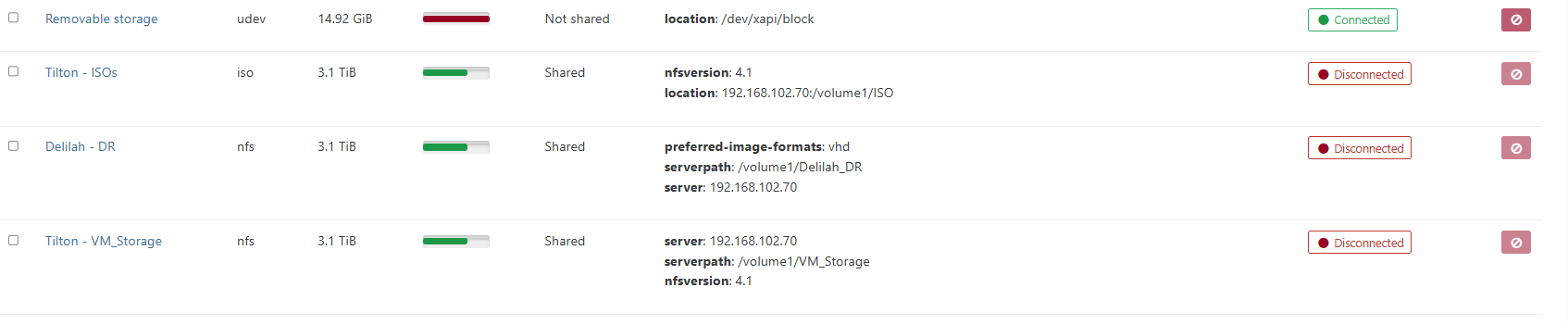
pbd.connect
{
  "id": "e96ec5d8-c70f-c877-4263-f2cf763e7048"
}
{
  "code": "SR_BACKEND_FAILURE_108",
  "params": [
    "",
    "Unable to detect an NFS service on this target.",
    ""
  ],
  "task": {
    "uuid": "5574bfe5-1874-35f8-f53b-c9fc1abaebb5",
    "name_label": "Async.PBD.plug",
    "name_description": "",
    "allowed_operations": [],
    "current_operations": {},
    "created": "20260828T20:03:19Z",
    "finished": "20260828T20:03:22Z",
    "status": "failure",
    "resident_on": "OpaqueRef:43c121e7-4ba4-193b-1e41-08c0f7e15690",
    "progress": 1,
    "type": "<none/>",
    "result": "",
    "error_info": [
      "SR_BACKEND_FAILURE_108",
      "",
      "Unable to detect an NFS service on this target.",
      ""
    ],
    "other_config": {},
    "subtask_of": "OpaqueRef:NULL",
    "subtasks": [],
    "backtrace": "(((process xapi)(filename ocaml/xapi-idl/storage/storage_interface.ml)(line 455))((process xapi)(filename src/lib/idl.ml)(line 558))((process xapi)(filename ocaml/xapi/storage_utils.ml)(line 148))((process xapi)(filename lib/backtrace.ml)(line 251))((process xapi)(filename ocaml/xapi/xapi_pbd.ml)(line 196))((process xapi)(filename ocaml/xapi/message_forwarding.ml)(line 141))((process xapi)(filename ocaml/libs/xapi-stdext/lib/xapi-stdext-pervasives/pervasiveext.ml)(line 24))((process xapi)(filename ocaml/libs/xapi-stdext/lib/xapi-stdext-pervasives/pervasiveext.ml)(line 39))((process xapi)(filename ocaml/xapi/message_forwarding.ml)(line 6061))((process xapi)(filename ocaml/xapi/rbac.ml)(line 228))((process xapi)(filename ocaml/xapi/rbac.ml)(line 238))((process xapi)(filename ocaml/xapi/server_helpers.ml)(line 78)))"
  },
  "message": "SR_BACKEND_FAILURE_108(, Unable to detect an NFS service on this target., )",
  "name": "XapiError",
  "stack": "XapiError: SR_BACKEND_FAILURE_108(, Unable to detect an NFS service on this target., )
    at Function.wrap (file:///usr/local/lib/node_modules/xo-server/node_modules/xen-api/_XapiError.mjs:16:12)
    at default (file:///usr/local/lib/node_modules/xo-server/node_modules/xen-api/_getTaskResult.mjs:13:29)
    at Xapi._addRecordToCache (file:///usr/local/lib/node_modules/xo-server/node_modules/xen-api/index.mjs:1229:24)
    at file:///usr/local/lib/node_modules/xo-server/node_modules/xen-api/index.mjs:1263:14
    at Array.forEach (<anonymous>)
    at Xapi._processEvents (file:///usr/local/lib/node_modules/xo-server/node_modules/xen-api/index.mjs:1253:12)
    at Xapi._watchEvents (file:///usr/local/lib/node_modules/xo-server/node_modules/xen-api/index.mjs:1460:14)"
}
Update - bad port on switch.......
Update 2 - After updating synology to latest version i am no longer able to mount nfs 4.1 shares. I can not create one using 4.1. I will let me create with 4.0 not 4.1 How to remount NFS that were mounted as 4.1 now as 4.0?
ALl VMS down at this location currently.
Update 3 - Resolved... Synology update broke NFS 4.1. I had to ssh into synology and edit /etc/nfs/syno_nfs_conf and add nfs_minor_ver_enable=1 Now SR's mounted.
Update 4 - Found Patch notes about NFS version change. -
Version: 7.0.1-42218
NFSv4.1 and related advanced functions (multipathing) are no longer supported on Synology NAS models with the following package architectures: Alpine, Alpine4k, armada38x, Avoton, Braswell, Bromolow, Cedarview, Grantley, Monaco. If you had previously enabled NFSv4 and NFSv4.1, the maximum NFS protocol is set to NFSv4 by default after the update. For more information about the package architecture of your model, please refer to this article.Our unit - RS1219+ Intel Atom C2538 Avoton






Hello! It looks like you're interested in this conversation, but you don't have an account yet.
Getting fed up of having to scroll through the same posts each visit? When you register for an account, you'll always come back to exactly where you were before, and choose to be notified of new replies (either via email, or push notification). You'll also be able to save bookmarks and upvote posts to show your appreciation to other community members.
With your input, this post could be even better 💗
Register Login