Backup error with space available
-
-
You are welcome, let us know if you need more assistance on setting the "remote"/backup repo

-
I have the backup setup now for my NFS share. The NFS remote tests fine and the backup job has some success. I am getting the below failures though on 5 VM's. I am posting one example, let me know if I should post the entire log.
Security Onion (gamakbase) Snapshot Start: Apr 22, 2022, 04:03:48 PM End: Apr 22, 2022, 04:03:58 PM xcp-ng-backup transfer Start: Apr 22, 2022, 04:04:02 PM End: Apr 22, 2022, 04:38:03 PM Duration: 34 minutes Error: HTTP connection has timed out Start: Apr 22, 2022, 04:03:58 PM End: Apr 22, 2022, 04:38:03 PM Duration: 34 minutes Error: HTTP connection has timed out Start: Apr 22, 2022, 04:03:48 PM End: Apr 22, 2022, 04:45:18 PM Duration: 42 minutes Error: HTTP connection has timed out Type: full -
@Bane See this thread for solution to HTTP timeouts -- https://xcp-ng.org/forum/topic/5769/keep-getting-http-connection-has-timed-out-on-my-delta-backup?_=1650710290869
-
I applied the fix mentioned in that thread, and now I have more VM's that succeed. However I still have a few that fail with the same HTTP timeout. Is there anything else I should look at?
-
Maybe the huge number of DNS requests could also cause issues. What about testing it? (it's merged on
mastersince recently, be sure to be on the latest commit!) -
@olivierlambert Can you point me to instructions for that?
Thanks
-
If you installed XO from our doc, then it's trivial: https://xen-orchestra.com/docs/installation.html#updating
-
@olivierlambert I updated to the master as you mentioned and I still get the http timeout error on 4 of my VM's.
-
Okay so you are on latest commit? (the commit should be
3ecf099)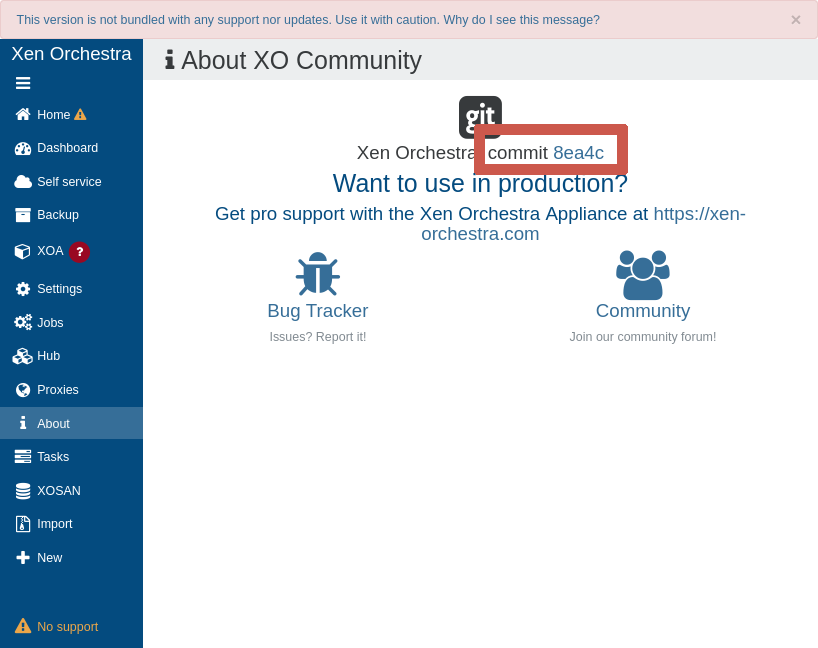
-
I'm using the trial with pro support included right now. So, I don't see the commit string in my about section. Is there another way to verify the commit string?
-
Okay, so go on
latestrelease channel and wait for tomorrow's release to make the update
-
When I run the below, I get destination 'xen-orchestra' already exisits.
git clone -b latest https://github.com/vatesfr/xen-orchestra
I'm not an expert so forgive me if this seems like a basic question.
-
-
If you use XOA, then you just have to click on "Update" by using the "latest" release channel. No command line.
-
If you use XO from the source, then please follow the instructions: https://xen-orchestra.com/docs/installation.html#fetching-the-code
-
-
Ok, after updating now the backup fails with with:
SESSION_AUTHENTICATION_FAILED(root, Authentication failure)
I can log into the xcp-ng server with root from the XOA VM. So, I don't understand what is taking place here.
-
Are you sure about the password? This error is clearly an auth issue
-
I deleted my server out and re-added it. I no longer have the authentication error. So back to the backup...
-
I still have HTTP timeouts on the backup. The quantity is less however.
-
@Bane Have you tried increasing the timeout length?
-
Yes, that has been done. The most recent builds Olivierlambert suggested have reduced the issue, just not fixed it completely.


Hello! It looks like you're interested in this conversation, but you don't have an account yet.
Getting fed up of having to scroll through the same posts each visit? When you register for an account, you'll always come back to exactly where you were before, and choose to be notified of new replies (either via email, or push notification). You'll also be able to save bookmarks and upvote posts to show your appreciation to other community members.
With your input, this post could be even better 💗
Register Login