I/O errors on file restore
-
Hi, I wanted to do a file restore via XOA (Premium) but had some issues with it.
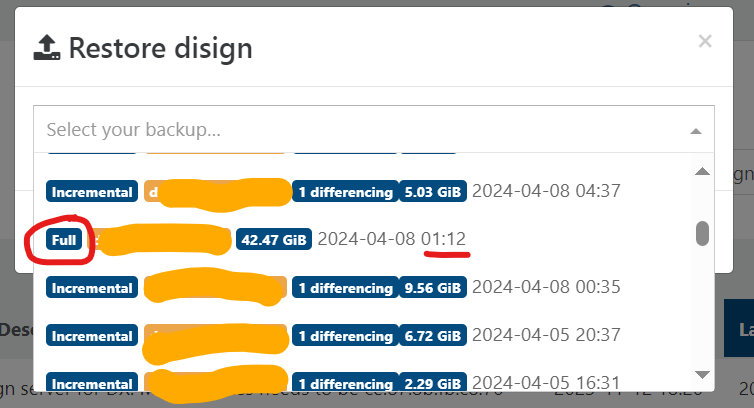
- First I notice that file restore only lists incremental backups, not full backups.
- I chose an incremental backup and chose tar.gz restore of one directory (about 3GiB uncompressed), but it failed (the download stopped and I got an empty file)
- I tried the export again as a zip file which worked good.
The VM guest OS is Windows 10 with NTFS.
NBD is enabled, but I think it is only used for incremental backups.I had a look in XOA and dmesg has a few errors that look very much like the ones in this old thread https://xcp-ng.org/forum/topic/7519/file-restore-on-large-backups-ends-in-print_req_error-i-o-error-s
[  +4.563750] loop: module loaded
[Apr 8 09:44] print_req_error: I/O error, dev loop0, sector 82242200
[Apr 8 09:45] print_req_error: I/O error, dev loop0, sector 0
[ +15.000803] print_req_error: I/O error, dev loop0, sector 82242200
[  +0.001002] Buffer I/O error on dev loop0, logical block 10280275, async page read
[ +15.002638] print_req_error: I/O error, dev loop0, sector 0
[Apr 8 09:46] print_req_error: I/O error, dev loop0, sector 60079896
[ +15.002314] print_req_error: I/O error, dev loop0, sector 0
[ +15.002160] print_req_error: I/O error, dev loop0, sector 60079896
[  +0.001001] Buffer I/O error on dev loop0, logical block 7509987, async page read
[Apr 8 09:47] print_req_error: I/O error, dev loop0, sector 0
[ +30.002121] print_req_error: I/O error, dev loop0, sector 41011136
[ +15.002544] print_req_error: I/O error, dev loop0, sector 0
[Apr 8 09:48] print_req_error: I/O error, dev loop0, sector 41011136
[  +0.000987] Buffer I/O error on dev loop0, logical block 5126392, async page read
[ +15.002323] print_req_error: I/O error, dev loop0, sector 0
[ +30.001776] print_req_error: I/O error, dev loop0, sector 37880256
[  +0.001019] Buffer I/O error on dev loop0, logical block 4735032, async page read
[Apr 8 09:49] print_req_error: I/O error, dev loop0, sector 82242200
[  +0.001025] Buffer I/O error on dev loop0, logical block 10280275, async page read
[ +15.002031] print_req_error: I/O error, dev loop0, sector 60079896
[  +0.001019] Buffer I/O error on dev loop0, logical block 7509987, async page read
[ +15.001864] print_req_error: I/O error, dev loop0, sector 41011136
[  +0.001374] Buffer I/O error on dev loop0, logical block 5126392, async page read
[ +15.001471] print_req_error: I/O error, dev loop0, sector 0
[Apr 8 09:50] print_req_error: I/O error, dev loop0, sector 37880256
[  +0.001082] Buffer I/O error on dev loop0, logical block 4735032, async page read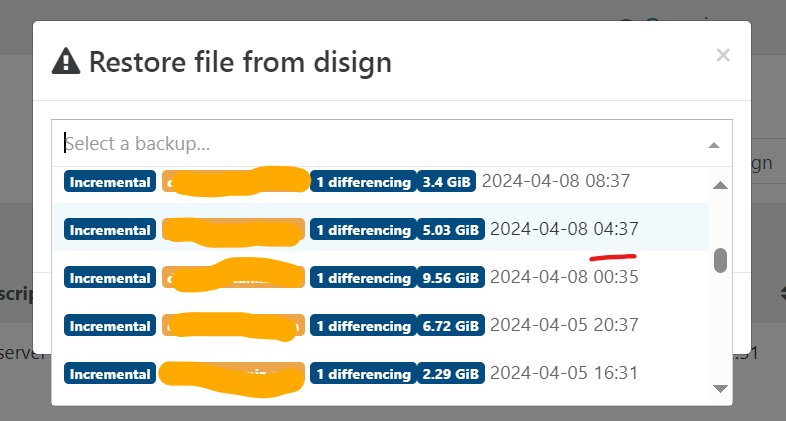
-
Hi,
If you have a support subscription (you said XOA Premium, right?), it's better to create a ticket

-
@olivierlambert said in I/O errors on file restore:
Hi,
If you have a support subscription (you said XOA Premium, right?), it's better to create a ticket
Yes I do. I could open the ticket there instead. It was not "urgent" so I thought the advise from the community instead.
-
At least it means that the file or the support of the file (the BR/remote under it) got issues to be read

-
@olivierlambert Ticket created.
It could be a problem of the backup file. I am attempting a normal restore now to see if the full disk can be restored. Could the issue be related to NBD and multiple blocks transfer?
-
I don't see why it could cause that. I'm more thinking about the BR itself.
-
You mean errors on the backup server? I have no error there and have been able to read all files (cat >/dev/null) without issue. The server is using Btrfs with RAID1c3 so it verifies checksums on all reads.
-
I/O error on a sector is usually due to something between your XOA and the BR. It could be many things though.
-
@olivierlambert said in I/O errors on file restore:
I/O error on a sector is usually due to something between your XOA and the BR. It could be many things though.
I did further testing and found that I can reproduce the issue. While the file-restore dialogue is open, it is possible to access the files via XOA console in /tmp/<xxxx mountpoint>/, but as soon as you press "OK" the access to the disk disappears and all processes trying the mount point freeze. I reported the exact details in the ticket.
-
@Forza Did you ever get to the bottom of this? I am experiencing the same issue currently.
-
@flakpyro said in I/O errors on file restore:
@Forza Did you ever get to the bottom of this? I am experiencing the same issue currently.
No. I still have an open support ticket on this.
-
@Forza I'm also experiencing the same problem (when trying to restore a file, the machine freezes). To get out of it, I have to restart the XOA service. I'm a bit embarrassed, but did you finally get a solution from support?
-
@chr1st0ph9 Hi, I have not so far. However, I didn't test this again recently.
-
I re-checked again but the issue is unfortunately not resolved. It does not happen on all VMs and files, so maybe there is something wrong somehow in the VDI?


Hello! It looks like you're interested in this conversation, but you don't have an account yet.
Getting fed up of having to scroll through the same posts each visit? When you register for an account, you'll always come back to exactly where you were before, and choose to be notified of new replies (either via email, or push notification). You'll also be able to save bookmarks and upvote posts to show your appreciation to other community members.
With your input, this post could be even better 💗
Register Login