XCP-ng
    • Categories
    • Recent
    • Tags
    • Popular
    • Users
    • Groups
    • Register
    • Login

    🛰️ XO 6: dedicated thread for all your feedback!

    Scheduled Pinned Locked Moved Xen Orchestra
    174 Posts 44 Posters 20.9k Views 36 Watching
    Loading More Posts
    • Oldest to Newest
    • Newest to Oldest
    • Most Votes
    Reply
    • Reply as topic
    Log in to reply
    This topic has been deleted. Only users with topic management privileges can see it.
    • A Online
      acebmxer @benapetr
      last edited by

      @benapetr

      If you are still having issues you can try the script i created to install XO from sources. I would advise not running in production, But i have been using it for a few weeks in my home lab and havent ran into many issues.

      https://github.com/acebmxer/install_xen_orchestra

      1 Reply Last reply Reply Quote 0
      • B Offline
        benapetr @MajorP93
        last edited by

        @MajorP93 yes it's running behind a reverse proxy (nginx) maybe that's the reason I will test it without proxy later

        olivierlambertO 1 Reply Last reply Reply Quote 1
        • olivierlambertO Online
          olivierlambert Vates 🪐 Co-Founder CEO @benapetr
          last edited by

          @benapetr Check you have websocket support enabled. That's probably it.

          1 Reply Last reply Reply Quote 0
          • D Offline
            darthkitty8
            last edited by

            XO6 is looking great so far.

            However, there is one thing I hope there may be an option to change in the future. Currently, in the tree view, VMs are shown under whichever host they are on. This works fine for a few nodes, but quickly becomes a pain with larger clusters (I operate clusters with 8+ nodes) because I have to check each host to find the VM. Is there any possibility of having an option to switch to a view similar to what VMware has, where the hosts are all at the top of the list, and then the VMs are all below it, regardless of which host they are on? I have attached a slightly modified version of an example vCenter screenshot to show better what I mean. I think this would make it much, much easier to find VMs in large clusters. Ideally, folders and/or resource groups with VMs nested under them could also be shown here, but that would require more work. Anyway, looking forward to how XO 6 progresses.
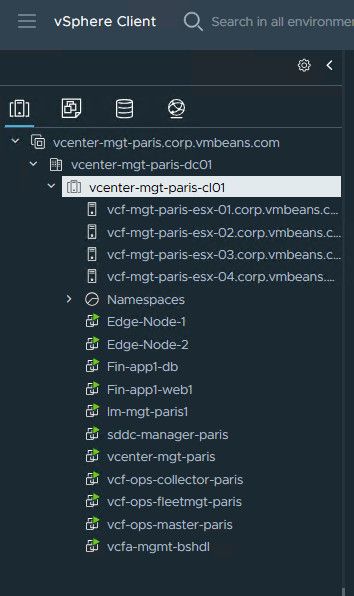
            793383b2-ea0c-4373-8089-16567241dd9e-image.jpeg

            1 Reply Last reply Reply Quote 2
            • olivierlambertO Online
              olivierlambert Vates 🪐 Co-Founder CEO
              last edited by

              Hi @darthkitty8 !

              Thanks for the feedback and idea, can you create it at https://feedback.vates.tech and use the "XO 6" tag? Thank you very much!

              D B 2 Replies Last reply Reply Quote 0
              • D Offline
                DustinB @olivierlambert
                last edited by

                @olivierlambert https://feedback.vates.tech/posts/49/pool-view-rather-than-host-view

                J 1 Reply Last reply Reply Quote 1
                • J Offline
                  john.c @DustinB
                  last edited by john.c

                  @DustinB said:

                  @olivierlambert https://feedback.vates.tech/posts/49/pool-view-rather-than-host-view

                  So you’re interested in having it a bit more like when using VMware vSphere while, regarding VMs, hosts and pools? That could work, but still need a hosts view for each member of the pool. In the host’s view it needs to be able to see, what VMs are running on it.

                  Also needs to be compatible with https://github.com/vatesfr/xen-orchestra/issues/9430. If not already synced with NetBox, the pool and hosts should be linked by UUID when synced. So in other words the structure needs to be pool is linked by UUID to host by its UUID and then the same for VMs. So the VMs are linked by UIID to the host UUID.

                  matiasst created this issue in vatesfr/xen-orchestra

                  open Link VMs to Host Devices via UUID in NetBox Plugin #9430

                  D 1 Reply Last reply Reply Quote 0
                  • D Offline
                    DustinB @john.c
                    last edited by

                    @john.c said:

                    @DustinB said:

                    @olivierlambert https://feedback.vates.tech/posts/49/pool-view-rather-than-host-view

                    So you’re interested in having it a bit more like when using VMware vSphere while, regarding VMs, hosts and pools? That could work, but still need a hosts view for each member of the pool. In the host’s view it needs to be able to see, what VMs are running on it.

                    Also needs to be compatible with https://github.com/vatesfr/xen-orchestra/issues/9430. If not already synced with NetBox, the pool and hosts should be linked by UUID when synced. So in other words the structure needs to be pool is linked by UUID to host by its UUID and then the same for VMs. So the VMs are linked by UIID to the host UUID.

                    Nothing in my post would restrict the view to only seeing VMs within a specific Pool, the view should be flexible enough to shows VMs in a pool.

                    As it is now, you see all VMs that are running under a given host and then pool.

                    This in and of itself could become tedious to manage/dig through.

                    The potential remedy here would be to show all VMs in a pool, and on the given VM show the host where it's running.

                    eed2974b-314b-4e25-a36a-15d88f8899a9-image.jpeg

                    matiasst created this issue in vatesfr/xen-orchestra

                    open Link VMs to Host Devices via UUID in NetBox Plugin #9430

                    J 1 Reply Last reply Reply Quote 0
                    • J Offline
                      john.c @DustinB
                      last edited by john.c

                      @DustinB said:

                      @john.c said:

                      @DustinB said:

                      @olivierlambert https://feedback.vates.tech/posts/49/pool-view-rather-than-host-view

                      So you’re interested in having it a bit more like when using VMware vSphere while, regarding VMs, hosts and pools? That could work, but still need a hosts view for each member of the pool. In the host’s view it needs to be able to see, what VMs are running on it.

                      Also needs to be compatible with https://github.com/vatesfr/xen-orchestra/issues/9430. If not already synced with NetBox, the pool and hosts should be linked by UUID when synced. So in other words the structure needs to be pool is linked by UUID to host by its UUID and then the same for VMs. So the VMs are linked by UIID to the host UUID.

                      Nothing in my post would restrict the view to only seeing VMs within a specific Pool, the view should be flexible enough to shows VMs in a pool.

                      As it is now, you see all VMs that are running under a given host and then pool.

                      This in and of itself could become tedious to manage/dig through.

                      The potential remedy here would be to show all VMs in a pool, and on the given VM show the host where it's running.

                      eed2974b-314b-4e25-a36a-15d88f8899a9-image.jpeg

                      Even in VMware vSphere there’s a hosts view, that shows things specific to a particular host. This includes VMs running on it, or are currently halted or suspended on it. As well as patches missing from the host, etc. Though it more roundabout to get to it under VMware vSphere.

                      matiasst created this issue in vatesfr/xen-orchestra

                      open Link VMs to Host Devices via UUID in NetBox Plugin #9430

                      D 1 Reply Last reply Reply Quote 0
                      • D Offline
                        DustinB @john.c
                        last edited by

                        @john.c This is already viewable under each hosts in the pool.
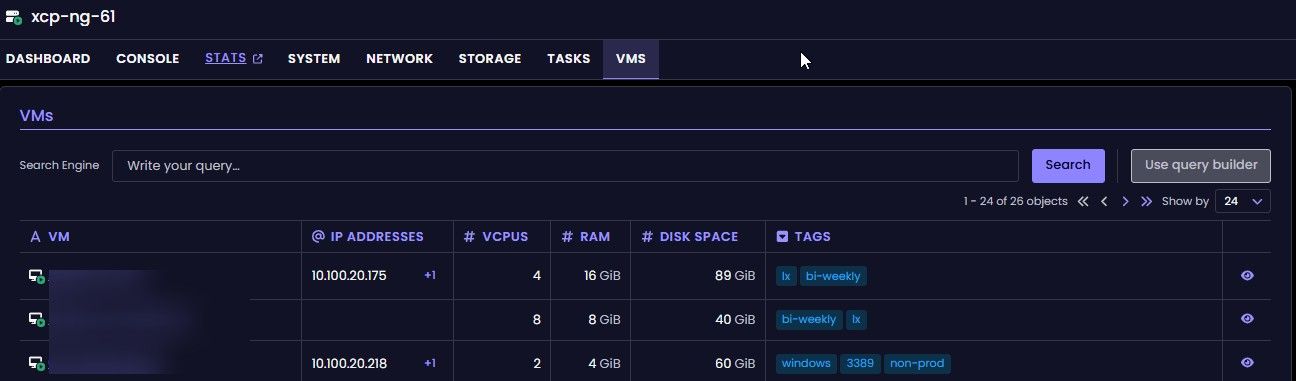
                        3eb9d466-59e6-423a-8733-b9655d734103-image.jpeg

                        J 1 Reply Last reply Reply Quote 0
                        • D Offline
                          DustinB
                          last edited by

                          Another suggestion, collapse non-running VMs into a single group, rather than having them listed individually.

                          https://feedback.vates.tech/posts/50/collapse-non-running-vms-into-group

                          1 Reply Last reply Reply Quote 0
                          • J Offline
                            john.c @DustinB
                            last edited by

                            @DustinB said:

                            @john.c This is already viewable under each hosts in the pool.

                            3eb9d466-59e6-423a-8733-b9655d734103-image.jpeg

                            Then in that case the pools based view restructure can go ahead. Was just concerned about ensuring that it’s still possible to access individual hosts.

                            1 Reply Last reply Reply Quote 0
                            • J Online
                              jr-m4
                              last edited by jr-m4

                              Small discrepancy: VDIS or VDIs? Which one is it? 😉

                              Red points out where it's called VDIS.
                              Green where it is called VDIs.

                              And as a bonus feedback/question. Why is it called "A VDIS" ?(marked with yellow)
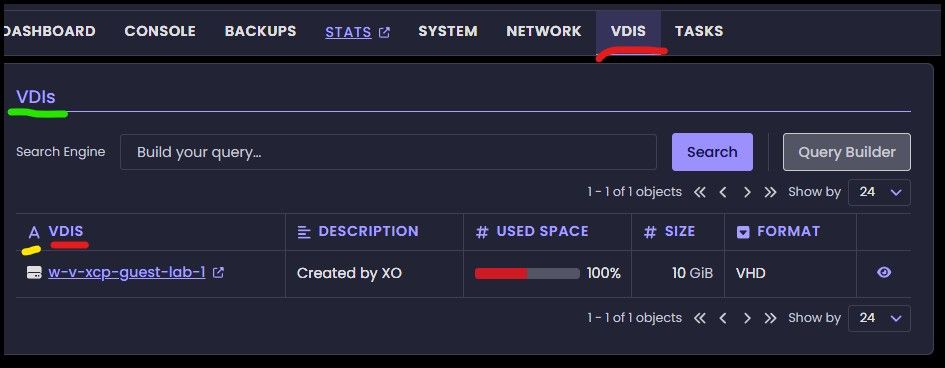
                              68958f81-21fb-4737-955d-bb90bd2f7b66-image.jpeg

                              1 Reply Last reply Reply Quote 1
                              • P Offline
                                Patrick
                                last edited by

                                missing the Health Overview dashboard. if you have 10 pools this was very usefull so I will go back to the old view for now.
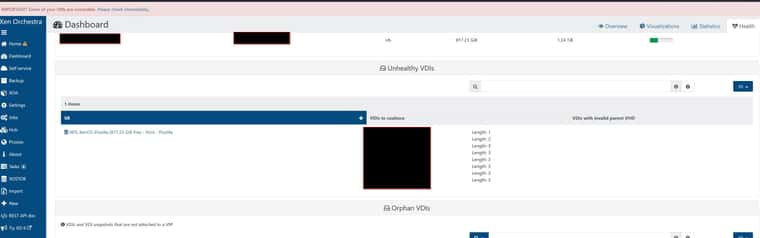
                                fe425af1-90b3-446e-9924-57372d211eae-image.jpeg

                                also restore a VM is missing only the Backup tab is visible.
                                if I click on the "eye" it still not there will this feature come in the future?

                                1 Reply Last reply Reply Quote 1
                                • B Offline
                                  benapetr @olivierlambert
                                  last edited by

                                  @olivierlambert said:

                                  Hi @darthkitty8 !

                                  Thanks for the feedback and idea, can you create it at https://feedback.vates.tech and use the "XO 6" tag? Thank you very much!

                                  Another option would be to just mimic XenCenter design to make it more "Xen native" and have Objects view where you have separate tree node for "Hosts" and then "VMs" so you group all hosts and vms together.

                                  1 Reply Last reply Reply Quote 1
                                  • AlexanderKA Offline
                                    AlexanderK
                                    last edited by

                                    is there any manual for xo6?
                                    I am trying to create a backup but i cannot find how to....

                                    S 1 Reply Last reply Reply Quote 0
                                    • S Offline
                                      skipthompson81 @AlexanderK
                                      last edited by

                                      @AlexanderK
                                      xo 6 is rolling out features regularly, for many functions, you must continue to use x05. backup is one of those at this time

                                      1 Reply Last reply Reply Quote 1
                                      • P ph7 referenced this topic
                                      • P Offline
                                        ph7
                                        last edited by

                                        After the work You put in fixing
                                        https://xcp-ng.org/forum/topic/12040/restore-only-showing-1-vm/18

                                        It seems like VDI-size in VMs VDIS is back to showing size of snapshot instead of size of VM.

                                        1 Reply Last reply Reply Quote 0
                                        • paramazoP Offline
                                          paramazo
                                          last edited by

                                          console view is unreadable even if fullscreen was selected. It was much more usable on XO5.

                                          Iam missing a lot of configurations in XO6 which are available on XO5. New interfaces already feel weird, thats normal habbit, but iam very confused with this one.

                                          Can i make /v5 the default interface on this version?

                                          1 Reply Last reply Reply Quote 0
                                          • olivierlambertO Online
                                            olivierlambert Vates 🪐 Co-Founder CEO
                                            last edited by

                                            What do you mean by "unreadable"? Can you be more specific?

                                            Also, more is coming to XO 6 progressively, we'll be on par this year. About /v5 by default, we documented it IIRC.


                                            paramazoP 1 Reply Last reply Reply Quote 0

                                            Hello! It looks like you're interested in this conversation, but you don't have an account yet.

                                            Getting fed up of having to scroll through the same posts each visit? When you register for an account, you'll always come back to exactly where you were before, and choose to be notified of new replies (either via email, or push notification). You'll also be able to save bookmarks and upvote posts to show your appreciation to other community members.

                                            With your input, this post could be even better 💗

                                            Register Login
                                            • First post
                                              Last post