XenOrchestra not showing VM Disks on Pool (on single Server working) - XCP-ng Center is showing them
-
Hi @all,
i noticed a strange behaviour in one environment with one pool (2 Hosts and NFS Storage) and 2 single node xcp-ng servers.
XenOrchestra from sources, connected directly to the pool and the 2 Servers.When i open a VM in XenOrchestra, resident on an a single node, i see the VM Disks in xo and similar in XCP-ng Center.
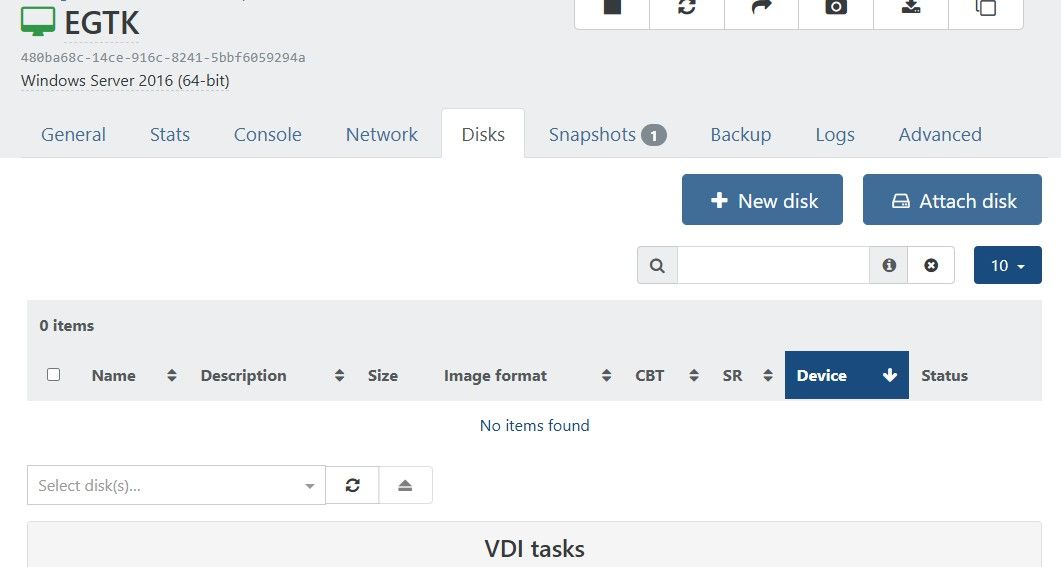
When i open a VM in the same XenOrchestra resident on the pool (no matter if disks are on nfs shared storage or local storage of a Host), i dont see the disks in XenOrchestra (looks like no disks attached).
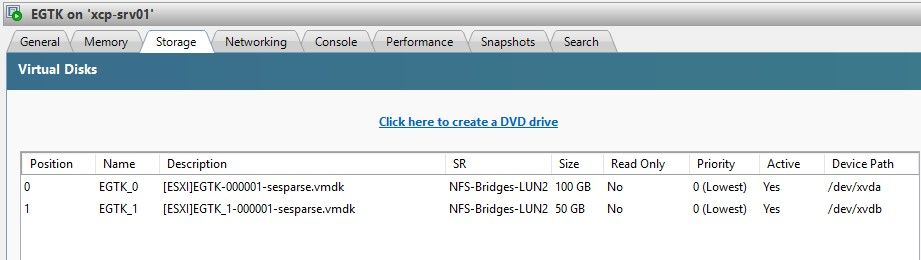
But in XCP-ng Center the disks are there and the VMs are running fine.I did a full update today of XenOrchestra to actual commit and also upgraded the pool today (rebootet master first, then slave).
But the issue is still the same.Is there anyone who has the same issue?
Screenshots of one of the VMs on the Pool:
in XenOrchestra
in XCP-ng Center
-
Ping @anthoineb because it might be related to an XCP-ng bug
-
@AlexD2006 could you check directly in the disks tab of the SR if all VDIs have a snapshot icon on them ?
-
@Pilow
Indeed.
Thats exactly the Point.
All my VMs that ran into my nightly Backups, have this.
To test it i created a new VM that didnt get a snapshop yet.
In the new VM i see the Disks. -
@AlexD2006 this is a current bug, not solved yet
you could try that on one VM : snapshot it, revert to snapshot (VDIs will re appear in the disk tab of the VM), then delete snapshot.
rince & repeat for each VM...problem of disappearing VDIs could come again.
There is no harm to the VMs, in XO6 you should see the VDIs are there (like in XCPNG Center).
xo-cli calls also work normal. -
@AlexD2006 see here, we're in the same boat
https://xcp-ng.org/forum/topic/11715/vdi-not-showing-in-xo-5-from-source. -
Thanks for your Reply.
Just one little correction.
Also in XO6, the Disks are missing in the VM-VDI Tab.
Its exactly the same in XO5 and XO6.
Only in XCP-ng Center i see the Disks.I noticed an additional thing.
In the Health-Dashboard, i see one orphaned "base copy" for each Disk that is adressed by this behaviour.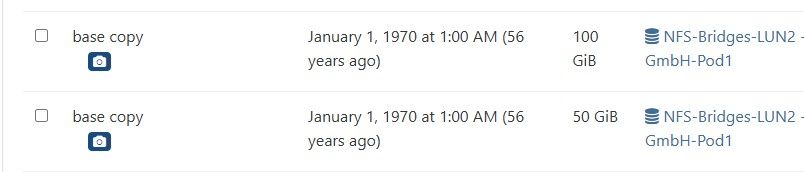
Exactly the amount of Disks of all my VMs with this problem.
(in the screenshot only the two of the VM of the former screenshots)
I am shure there are no orphaned VDIs, its just the base-copies of all my active Disks.I think this could be possibly extremely dangerous, if someone has the same problem and removes the orphanes at this point.
But maybe i am too paranoid here?
-
Yes while this can be a scarry situation there have been multiple post about his. @pilow has been dealing with it the longs I believe.
Some have tried @pilow suggestion and have been good since. I would see if you can create test vm or copy one of the existing ones to try with braking a production vm.
-
@AlexD2006 you are right, this is dangerous.
I also have them old & dusty base copies from the seventies

do not shoot them.
-
if you have other SRs, migrating VDIs/VMs is known to correct the "visual issue"
the bug just populates a metadata of the VDI making XOA Web UI believe it's a snapshot, and it is not...
a dev told us in another thread they are on it, but it will be a two phase remediation I believe, correcting the bug so that it doesn't reproduce and a way to script out this metadata on impacted VDIs
this is only guesses
-
Thanx for your replies.
And sorry, i havent seen your first reply between my last posts with the link to your existing Thread.So, i think this is some kind of a bigger thing.
Will handle with care, but i have to leave for today.
Maybe i have time to test the snapshot and revert workarounds on the weekend.
But these are all production VMs.
Have to coordinate.
I have 2 NFS-SRs in the Pool.
Will try to migrate VMs from one to the other and see if this helps.Kind Regards and thx again
Alex -
Same problem here. But I noticed it only appears with the latest updates from XCP-ng 8.3. The log file shows me the following packages were updated / installed on my host:
May 07 19:44:54 Updated: xen-libs-4.17.6-6.2.xcpng8.3.x86_64
May 07 19:44:54 Updated: gnutls-3.3.29-10.2.xcpng8.3.x86_64
May 07 19:44:54 Updated: 1:net-snmp-libs-5.9.3-8.2.xcpng8.3.x86_64
May 07 19:44:54 Updated: ipmitool-1.8.19-11.2.xcpng8.3.x86_64
May 07 19:44:54 Updated: openssh-9.8p1-1.2.3.xcpng8.3.x86_64
May 07 19:44:54 Updated: openssh-clients-9.8p1-1.2.3.xcpng8.3.x86_64
May 07 19:44:54 Updated: openssh-server-9.8p1-1.2.3.xcpng8.3.x86_64
May 07 19:44:54 Updated: 1:net-snmp-agent-libs-5.9.3-8.2.xcpng8.3.x86_64
May 07 19:44:55 Updated: 1:net-snmp-5.9.3-8.2.xcpng8.3.x86_64
May 07 19:44:55 Updated: blktap-3.55.5-6.7.xcpng8.3.x86_64
May 07 19:44:55 Updated: message-switch-26.1.3-1.10.xcpng8.3.x86_64
May 07 19:44:55 Updated: xcp-ng-xapi-plugins-1.16.0-1.xcpng8.3.noarch
May 07 19:44:55 Updated: xen-hypervisor-4.17.6-6.2.xcpng8.3.x86_64
May 07 19:44:55 Updated: xen-dom0-libs-4.17.6-6.2.xcpng8.3.x86_64
May 07 19:44:56 Updated: vhd-tool-26.1.3-1.10.xcpng8.3.x86_64
May 07 19:44:56 Updated: squeezed-26.1.3-1.10.xcpng8.3.x86_64
May 07 19:44:56 Updated: xen-tools-4.17.6-6.2.xcpng8.3.x86_64
May 07 19:44:56 Updated: xen-dom0-tools-4.17.6-6.2.xcpng8.3.x86_64
May 07 19:44:57 Updated: xcp-rrdd-26.1.3-1.10.xcpng8.3.x86_64
May 07 19:44:57 Updated: xapi-tests-26.1.3-1.10.xcpng8.3.x86_64
May 07 19:44:57 Updated: xo-lite-0.20.0-1.xcpng8.3.noarch
May 07 19:44:57 Updated: wsproxy-26.1.3-1.10.xcpng8.3.x86_64
May 07 19:44:58 Updated: xapi-storage-script-26.1.3-1.10.xcpng8.3.x86_64
May 07 19:44:58 Updated: xcp-networkd-26.1.3-1.10.xcpng8.3.x86_64
May 07 19:44:59 Updated: forkexecd-26.1.3-1.10.xcpng8.3.x86_64
May 07 19:44:59 Updated: sm-cli-26.1.3-1.10.xcpng8.3.x86_64
May 07 19:44:59 Updated: xapi-rrd2csv-26.1.3-1.10.xcpng8.3.x86_64
May 07 19:45:00 Updated: rrdd-plugins-26.1.3-1.10.xcpng8.3.x86_64
May 07 19:45:01 Updated: xapi-nbd-26.1.3-1.10.xcpng8.3.x86_64
May 07 19:45:01 Updated: sm-fairlock-3.2.12-17.8.xcpng8.3.x86_64
May 07 19:45:01 Updated: sm-3.2.12-17.8.xcpng8.3.x86_64
May 07 19:45:01 Updated: xenopsd-26.1.3-1.10.xcpng8.3.x86_64
May 07 19:45:01 Updated: xenopsd-cli-26.1.3-1.10.xcpng8.3.x86_64
May 07 19:45:02 Updated: xenopsd-xc-26.1.3-1.10.xcpng8.3.x86_64
May 07 19:45:05 Updated: xcp-ng-pv-tools-8.3-17.xcpng8.3.noarch
May 07 19:45:05 Installed: 3:traceroute-2.1.5-2.xcpng8.3.x86_64
May 07 19:45:05 Updated: xapi-xe-26.1.3-1.10.xcpng8.3.x86_64
May 07 19:45:05 Updated: qcow-stream-tool-26.1.3-1.10.xcpng8.3.x86_64
May 07 19:45:08 Updated: xapi-core-26.1.3-1.10.xcpng8.3.x86_64
May 07 19:45:08 Updated: xcp-ng-deps-8.3-14.noarch
May 07 19:45:08 Updated: gnutls-utils-3.3.29-10.2.xcpng8.3.x86_64
May 07 19:45:08 Updated: gnutls-devel-3.3.29-10.2.xcpng8.3.x86_64
May 07 19:45:09 Updated: varstored-guard-26.1.3-1.10.xcpng8.3.x86_64
May 07 19:45:12 Updated: kernel-4.19.19-8.0.46.2.xcpng8.3.x86_64So I guess one of these packages could be the culprit?
-
Another interesting observation. On a VM where we took a snapshot today (post Windows Update install) and deleted an older snapshot, the disk shows up (both v5 and v6).
-
Dug a little deeper. For a VM where the disks are not shown the following XO API call fails:
/rest/v0/vms/a519e879-3971-9210-51b6-7df14336e7b7/vdis
{
  "error": "no such VDI ac37700d-3157-4df7-b8e8-e1799a994591",
  "data": {
    "id": "ac37700d-3157-4df7-b8e8-e1799a994591",
    "type": [
      "VDI"
    ]
  }
}
Also the VDI cannot be retrieved over the XO API:
/rest/v0/vms/a519e879-3971-9210-51b6-7df14336e7b7
...
 "$VBDs": [
    "4ea8a3cd-0d1b-dc60-4d9c-fd70e060f06c",
    "9f4ca686-9fc2-35a9-c3e9-c871c9f68aba"
  ],
...
/rest/v0/vbds/9f4ca686-9fc2-35a9-c3e9-c871c9f68aba { "type": "VBD", "attached": false, "bootable": false, "device": "xvda", "is_cd_drive": false, "position": "0", "read_only": false, "VDI": "ac37700d-3157-4df7-b8e8-e1799a994591", "VM": "a519e879-3971-9210-51b6-7df14336e7b7", "id": "9f4ca686-9fc2-35a9-c3e9-c871c9f68aba", "uuid": "9f4ca686-9fc2-35a9-c3e9-c871c9f68aba", "$pool": "93d361b7-f549-53b7-a3aa-c9695bf0abe4", "$poolId": "93d361b7-f549-53b7-a3aa-c9695bf0abe4", "_xapiRef": "OpaqueRef:1d424d94-f540-2eb4-9e52-2a9b21ec0a19" }/rest/v0/vdis/ac37700d-3157-4df7-b8e8-e1799a994591 { "error": "no such VDI ac37700d-3157-4df7-b8e8-e1799a994591", "data": { "id": "ac37700d-3157-4df7-b8e8-e1799a994591", "type": "VDI" } }However the VDI can be listed using the xe cli:
$ xe vm-list uuid=a519e879-3971-9210-51b6-7df14336e7b7
uuid ( RO)           : a519e879-3971-9210-51b6-7df14336e7b7
     name-label ( RW): XXX
    power-state ( RO): halted
$ xe vbd-list vm-uuid=a519e879-3971-9210-51b6-7df14336e7b7 uuid ( RO) : 4ea8a3cd-0d1b-dc60-4d9c-fd70e060f06c vm-uuid ( RO): a519e879-3971-9210-51b6-7df14336e7b7 vm-name-label ( RO): XXX vdi-uuid ( RO): <not in database> empty ( RO): true device ( RO): xvdd uuid ( RO) : 9f4ca686-9fc2-35a9-c3e9-c871c9f68aba vm-uuid ( RO): a519e879-3971-9210-51b6-7df14336e7b7 vm-name-label ( RO): XXX vdi-uuid ( RO): ac37700d-3157-4df7-b8e8-e1799a994591 empty ( RO): false device ( RO): xvda$ xe vdi-list uuid=ac37700d-3157-4df7-b8e8-e1799a994591 uuid ( RO) : ac37700d-3157-4df7-b8e8-e1799a994591 name-label ( RW): XXX Disk 0 name-description ( RW): Created by XO sr-uuid ( RO): 977b7e63-bb84-57b2-3e0d-206afea553bf virtual-size ( RO): 34359738368 sharable ( RO): false read-only ( RO): falseSeems almost like something changed in the XCP-ng API which XO cannot consume.
-
Another confirmed data point, with package delta and the specific malformed field.
Host: XCP-ng 8.3.0, xapi 26.1 (build 26.1.4), Xen 4.17.6-9.
Setup: XO from sources (community). All VDIs vanished from the per-VM Disks tab (XO 5 and XO 6);
xeand the SR Disks tab show them fine; VMs run normally. Trigger was the 8.3 host update + reboot this morning — XO build unchanged since May 28, disks visible yesterday.Host update delta (today): all 26.1.3-1.10 → 26.1.4-3.1 (xapi-core, xenopsd, sm-cli, sm-fairlock, xapi-storage-script, vhd-tool, message-switch, etc.), plus sm 3.2.12-17.8 → 17.9 as an independent bump.
The malformed field. An affected live OS disk (VM running):
is-a-snapshot: false
snapshot-of:   <populated, points to another VDI>
snapshot-time: <populated>
A normal base VDI should have an empty
snapshot-of. After the update,snapshot-of/snapshot-timeare populated on real, non-snapshot base VDIs, and XO filters anything with a non-emptysnapshot-ofout of the per-VM Disks view — which is the disappearance.The VDI that
snapshot-ofpoints to is a legitimate base image in my environment (a heavily-reused Win2022 build template with a large genuine snapshot/clone lineage), so I can't tell from the host side whether the parentage links themselves changed or only thesnapshot-ofon live VDI labeling did. Either way, the consumer-visible effect is the same.REST confirms:
/rest/v0/vms/<uuid>/vdis→[]; /rest/v0/vdis/<uuid>→"no such VDI" for the VBD's referenced UUID, whilexe vdi-listshows it.Caution for others: since live disks now carry snapshot-like metadata, be careful with Health-dashboard "orphan" cleanup and snapshot deletion on affected VMs until this is understood.
Workaround that restored the per-VM Disks view: snapshot → revert → delete-snapshot (tested on a powered-off VM, immediate).
Happy to provide more diagnostics.
Quick Follow-up:
Additional symptom, same root cause: ISO-SR VDIs are also affected. Pre-existing ISOs disappeared from the XO ISO picker (only ISOs uploaded after the patch still show). An affected ISO's
vdi-param-listshows:is-a-snapshot: false snapshot-of: 937c3945-... (same anchor UUID as an affected VM disk on a different SR) snapshot-time: 19700101T00:00:00Z (Unix epoch — clearly synthetic)Notably the spurious
snapshot-ofon both an ISO VDI and an unrelated VM OS disk points to the same anchor UUID, with an epoch timestamp — so this looks like the update is stamping pre-existing VDIs with a bogussnapshot-ofrather than any real lineage. VHD chains/GC are clean (GC reports no work).Tagging a related GitHub Issue for easy correlation - https://github.com/vatesfr/xen-orchestra/issues/9578
-
@olivierlambert Any chance you can have someone please take a look at this thread? The issue persists and is creating problems for me. If someone out there has figured out the solution, kindly share, thanks.
-
Hi,
I think it's a known problem, let me ping @poddingue so he gives you a quick recap on the situation (or someone from the team storage)
-
@olivierlambert Thanks for the response, much appreciated.
I'm getting ready to file a bug report, as I noticed this morning that this issue is now causing a
VDI-IN-USEerror; preventing me from starting a VM. Fortunately, that VM isn't critical, so I want to report it and help with the troubleshooting that will lead to a fix before it spreads. -
Here's the short version: this looks like the known "VDIs show up as snapshots" bug, and you haven't done anything wrong.
What happens is a metadata flag on the VDI,is-a-snapshot, gets flipped to true after some of the recent 8.3 host updates, so XO (both 5 and 6) thinks those disks are snapshots and hides them from the per-VM Disks tab, even though the VDIs are fine andxe/ XCP-ng Center still show them.
A few older threads track the same thing, the main one is https://xcp-ng.org/forum/topic/11715/vdi-not-showing-in-xo-5-from-source . From what's said there, the fix is expected in two parts: stopping it from happening again, and a way to repair the flag on VDIs that are already affected.
I don't have a timeline and could be off on the details, so please don't take that as official.
In the meantime people have made the disks reappear by migrating the affected VDI to another SR, or snapshot then revert then delete the snapshot, but it's a visual fix and can come back.
The VDI_IN_USE you're now hitting on start does sound worth its own detailed report, so yes please file it with the xapi/sm versions and that malformedis-a-snapshotfield, and it'd be good to loop in @Team-Storage. Sorry you're stuck on this. -
@poddingue Thanks for the response. I got side tracked with another issue and didn't get that bug report filed, I'll do that as soon as possible.
It feels like I'm playing with a hand grenade...lol, quite scary!



Hello! It looks like you're interested in this conversation, but you don't have an account yet.
Getting fed up of having to scroll through the same posts each visit? When you register for an account, you'll always come back to exactly where you were before, and choose to be notified of new replies (either via email, or push notification). You'll also be able to save bookmarks and upvote posts to show your appreciation to other community members.
With your input, this post could be even better 💗
Register Login