XCP-ng
    • Categories
    • Recent
    • Tags
    • Popular
    • Users
    • Groups
    • Register
    • Login

    increase 24 hour timeout-limit on backup/copy

    Scheduled Pinned Locked Moved Solved Xen Orchestra
    24 Posts 5 Posters 8.2k Views 5 Watching
    Loading More Posts
    • Oldest to Newest
    • Newest to Oldest
    • Most Votes
    Reply
    • Reply as topic
    Log in to reply
    This topic has been deleted. Only users with topic management privileges can see it.
    • onurO Offline
      onur
      last edited by

      Is there any way to increase server timeout after 24 hours.

      I want to use Continuous Replication on my VM. The backup destination is off-site so I am stuck with 8 Mbps upload limit, and it roughly will take 30hours to complete initial backup.

      Thank you.

       transfer
      Start: Aug 30, 2020, 9:32:58 AM
      End: Aug 31, 2020, 9:33:40 AM
      Duration: a day
      Error: task has been destroyed before completion
      
      1 Reply Last reply Reply Quote 0
      • olivierlambertO Offline
        olivierlambert Vates πŸͺ Co-Founder CEO
        last edited by

        1. Please read this: https://xcp-ng.org/docs/api.html#_24h-task-timeout
        2. Alternative is to use a seed, also explained in our doc: https://xen-orchestra.com/docs/continuous_replication.html#manual-initial-seed
        onurO S 2 Replies Last reply Reply Quote 0
        • onurO Offline
          onur @olivierlambert
          last edited by

          @olivierlambert Awesome. The solution was in front of my nose. I did google search but it was all old and xen-server related.
          Thank you

          1 Reply Last reply Reply Quote 1
          • olivierlambertO Offline
            olivierlambert Vates πŸͺ Co-Founder CEO
            last edited by

            You are welcome πŸ™‚ Our docs (XO and XCP-ng) are in a relatively good shape now, so that should be the first step when you search something!

            And if it's not there, you can easily contribute to add it!

            onurO 1 Reply Last reply Reply Quote 1
            • onurO Offline
              onur @olivierlambert
              last edited by

              @olivierlambert said in increase 24 hour timeout-limit on backup/copy:

              You are welcome πŸ™‚ Our docs (XO and XCP-ng) are in a relatively good shape now, so that should be the first step when you search something!

              And if it's not there, you can easily contribute to add it!

              sure I will try to contribute and I did not expect the documentation was this great. Cheers!

              1 Reply Last reply Reply Quote 0
              • DanpD Danp referenced this topic on
              • mauzillaM Offline
                mauzilla
                last edited by

                Just another reason why XCP / XO is the best! Just ran into this exact same issue and boom, you guys have it sorted πŸ™‚

                1 question, must the XAPI change be setup on both hosts (so the sending and receiving server)?

                1 Reply Last reply Reply Quote 0
                • olivierlambertO Offline
                  olivierlambert Vates πŸͺ Co-Founder CEO
                  last edited by

                  Yes, if it takes more than 24h to export, it will take more than 24h to import and you'll have the same issue πŸ™‚

                  mauzillaM 1 Reply Last reply Reply Quote 0
                  • mauzillaM Offline
                    mauzilla @olivierlambert
                    last edited by olivierlambert

                    @olivierlambert Alright I created the conf file described here:

                    https://xcp-ng.org/docs/api.html#_24h-task-timeout

                    I then did a xe-toolstack-restart (which I assume is needed to updated the configuration). Restart had no errors, said "done" - but the toolstack isnt coming online, when I try and reconnect I get a connection refused, and accessing the host (https://10.1.3.8) also returns connection refused.

                    I then deleted the file created, and restarted the toolstack again:

                    [15:38 jerry xapi.conf.d]# xe-toolstack-restart
                    Executing xe-toolstack-restart
                    done.
                    [15:38 jerry xapi.conf.d]#
                    

                    Nothing appears give an indication that something is broken. Is there a log somewhere I can have a look at to see what error may have occurred?

                    1 Reply Last reply Reply Quote 0
                    • olivierlambertO Offline
                      olivierlambert Vates πŸͺ Co-Founder CEO
                      last edited by

                      It might be an unrelated bug πŸ€” Can you create a ticket so we can take a look remotely?

                      mauzillaM 1 Reply Last reply Reply Quote 0
                      • mauzillaM Offline
                        mauzilla @olivierlambert
                        last edited by

                        @olivierlambert strange one, thank you Olivier, I created a ticket 7714072

                        1 Reply Last reply Reply Quote 1
                        • mauzillaM Offline
                          mauzilla
                          last edited by

                          You guys are absolute rockstarts! Yannick connected and was able to resolve the issue, thank you again for all of your hard work!

                          1 Reply Last reply Reply Quote 1
                          • olivierlambertO Offline
                            olivierlambert Vates πŸͺ Co-Founder CEO
                            last edited by

                            \o/ Now you should be able to configure and enjoy a larger timeout on both sides πŸ™‚

                            1 Reply Last reply Reply Quote 0
                            • S Offline
                              sumansaha @olivierlambert
                              last edited by

                              @olivierlambert I've changed the value to 72 hours in source XCP-NG but it doesn't work at all.

                              1 Reply Last reply Reply Quote 0
                              • olivierlambertO Offline
                                olivierlambert Vates πŸͺ Co-Founder CEO
                                last edited by

                                Hi,

                                Without anything more "it doesn't work", it's hard to help you. Please provide more information.

                                S 1 Reply Last reply Reply Quote 0
                                • S Offline
                                  sumansaha @olivierlambert
                                  last edited by

                                  @olivierlambert ![alt text](Screenshot 2023-06-27 at 1.11.18 PM.png Screenshot 2023-06-27 at 1.09.30 PM.png image url)

                                  I'm sending the XCP-NG(Source) VM backup to another XCP-NG(Destination) storage using XOA. I've changed the value of pending_task_timeout to 72 hours in source XCP-NG. Still the backup ended just after 24 hours.

                                  florentF 1 Reply Last reply Reply Quote 0
                                  • florentF Offline
                                    florent Vates πŸͺ XO Team @sumansaha
                                    last edited by

                                    @sumansaha hi,

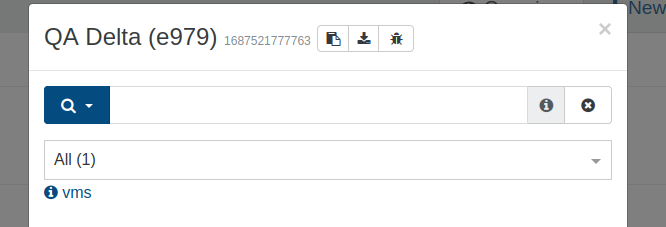
                                    can you post the backup log ? It the json file you can obtain by clicking on the bottom facing arrow here :
                                    bc639431-fe91-4d90-b51f-ad797c8a22e3-image.png

                                    S 1 Reply Last reply Reply Quote 0
                                    • S Offline
                                      sumansaha @florent
                                      last edited by

                                      @florent 2023-06-25T18_30_22.009Z - backup NG.txt

                                      the log file is attached according to your requirement.

                                      florentF 1 Reply Last reply Reply Quote 0
                                      • florentF Offline
                                        florent Vates πŸͺ XO Team @sumansaha
                                        last edited by florent

                                        @sumansaha is your XO up to date ? I see date in 2020 in the logs

                                        also, you can try NBD (enable it in the network used by the backups); it's not a xapi task and won't be killed by the xapi , but you won't have a progres bar on the tasks

                                        S 1 Reply Last reply Reply Quote 0
                                        • S Offline
                                          sumansaha @florent
                                          last edited by

                                          @florent XO is not updated.
                                          I was seeing progress when the backup process was running. 96% was completed . It has dropped on that status.
                                          How I can enable NBD.

                                          florentF olivierlambertO 2 Replies Last reply Reply Quote 0
                                          • florentF Offline
                                            florent Vates πŸͺ XO Team @sumansaha
                                            last edited by

                                            @sumansaha you'll need an up to date XO

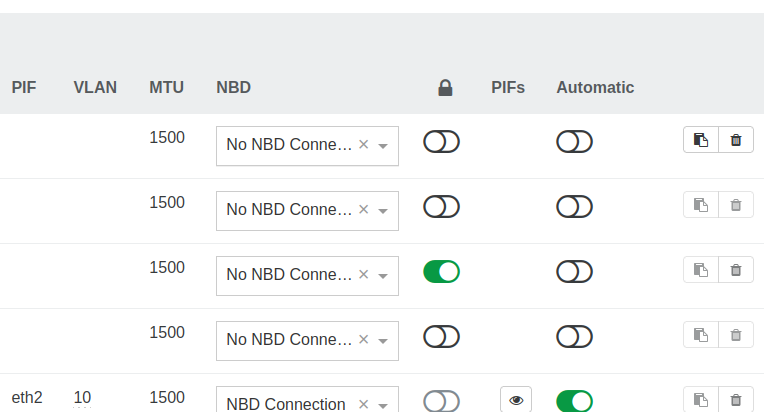
                                            then you go to pool -> network and there is a drop down menu to enable NDB
                                            3ed39b73-66f9-4e4b-8463-969f1cfe21ea-image.png

                                            (an older xo does not cause this issue, but gives us more tools to help)

                                            1 Reply Last reply Reply Quote 0

                                            Hello! It looks like you're interested in this conversation, but you don't have an account yet.

                                            Getting fed up of having to scroll through the same posts each visit? When you register for an account, you'll always come back to exactly where you were before, and choose to be notified of new replies (either via email, or push notification). You'll also be able to save bookmarks and upvote posts to show your appreciation to other community members.

                                            With your input, this post could be even better πŸ’—

                                            Register Login
                                            • First post
                                              Last post