XCP-ng
    • Categories
    • Recent
    • Tags
    • Popular
    • Users
    • Groups
    • Register
    • Login

    MESSAGE_METHOD_UNKNOWN(OpaqueRef:***.get_record)

    Scheduled Pinned Locked Moved Backup
    28 Posts 5 Posters 7.0k Views 4 Watching
    Loading More Posts
    • Oldest to Newest
    • Newest to Oldest
    • Most Votes
    Reply
    • Reply as topic
    Log in to reply
    This topic has been deleted. Only users with topic management privileges can see it.
    • R Offline
      runfi85 @runfi85
      last edited by

      It happens in both situations. If I run a new backup job, I get that error on most VMs, on other I get "write ECONNRESET" error.
      The strange thing is that the schedulet delta backups on the same storage worked without issues.
      There seems to be a problem with Disaster Recovery backups.. And it all happened after I updated to the latest master commit and restarting..

      1 Reply Last reply Reply Quote 0
      • DanpD Offline
        Danp Pro Support Team
        last edited by

        There are a few things that you could try --

        • Try to locate the problematic commit using git bisect. See this post for more details.

        • Try to replicate the problem using XOA. I'm sure @olivierlambert would extend your trial if needed. Just ask nicely. šŸ˜‰
          .

        • Build a new XO VM and retest to see if the problem persists.

        FWIW, I ran a DR backup on a single VM the other day and it worked as expected. In my case, the source and destination SR was the same.

        lawrencesystemsL 1 Reply Last reply Reply Quote 1
        • lawrencesystemsL Offline
          lawrencesystems Ambassador @Danp
          last edited by

          @runfi85

          I was getting this same error for full backups, updated to latest version in our lab when doing full backups. I updated to the latest commit db99a and the problem was solved.

          R 1 Reply Last reply Reply Quote 0
          • R Offline
            runfi85 @lawrencesystems
            last edited by

            @lawrencesystems I’m already at the latest commit 😭

            Thanks anyway

            lawrencesystemsL 1 Reply Last reply Reply Quote 0
            • lawrencesystemsL Offline
              lawrencesystems Ambassador @runfi85
              last edited by

              @runfi85
              Are you using this https://github.com/ronivay/XenOrchestraInstallerUpdater to do the builds and if so have you pulled the latest as that also has some recent updates for the build.

              R 1 Reply Last reply Reply Quote 0
              • R Offline
                runfi85 @lawrencesystems
                last edited by

                @lawrencesystems yes I’m using that bash script and the build is up to date to the latest commit

                1 Reply Last reply Reply Quote 0
                • C Offline
                  caponate
                  last edited by caponate

                  I was getting the same thing, after updating to the latest XO the issue was resolved. I will note my 8.3 beta system did not have this problem. Only our production 8.2 servers in the office.

                  R 1 Reply Last reply Reply Quote 0
                  • R Offline
                    runfi85 @caponate
                    last edited by

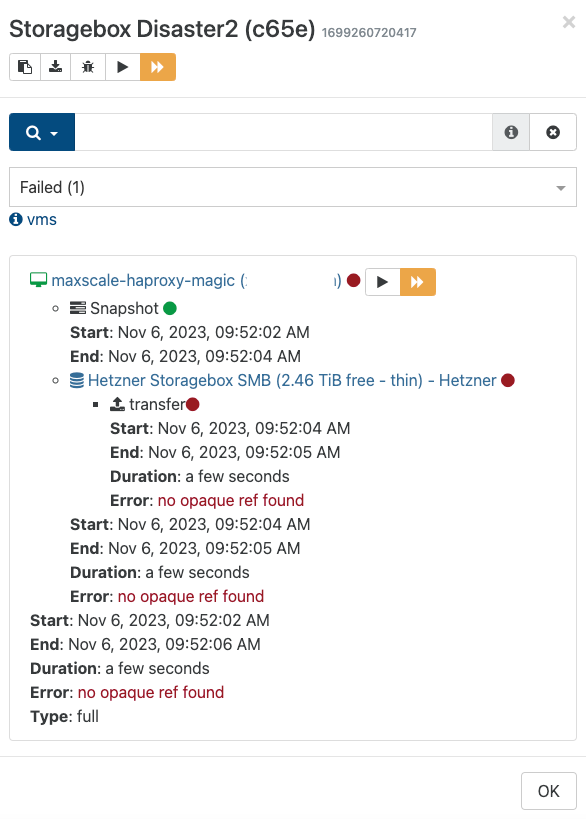
                    XO is updated and rebooted, but still getting the same error:
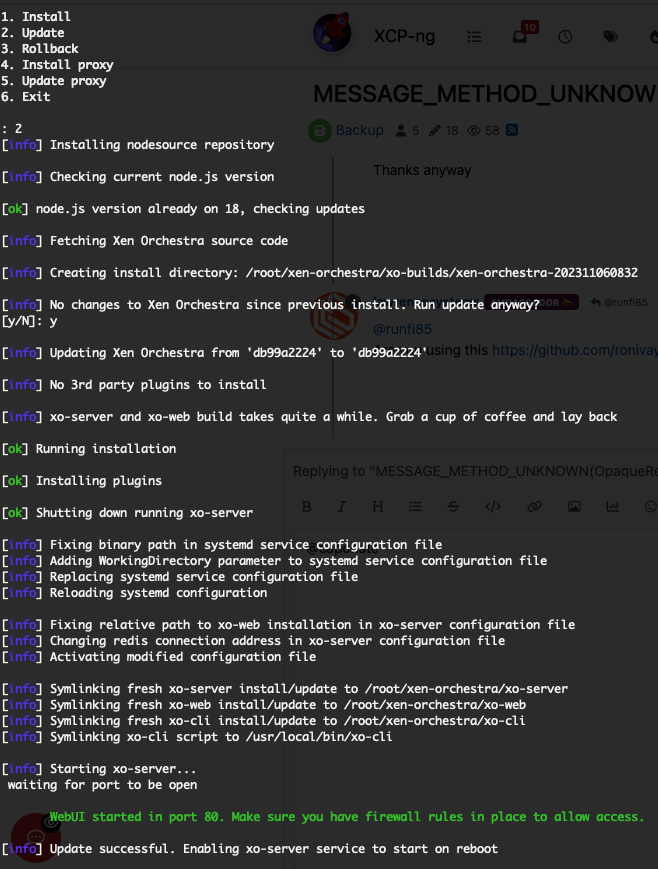
                    Screen Shot 2023-11-06 at 09.52.51.png

                    Screen Shot 2023-11-06 at 09.53.11.png

                    R 1 Reply Last reply Reply Quote 0
                    • R Offline
                      runfi85 @runfi85
                      last edited by

                      Hello, I updated XO to the latest commit 7af08 but still getting the same error.

                      Is this really happening only to me?

                      1 Reply Last reply Reply Quote 0
                      • olivierlambertO Offline
                        olivierlambert Vates 🪐 Co-Founder CEO
                        last edited by

                        Seems like, yes. That's why I bet on a build issue on environment issue on your side. Please try to build it following our documentation, from a fresh folder to be sure you are directly on the latest commit (you can check that in the About view)

                        R 1 Reply Last reply Reply Quote 0
                        • R Offline
                          runfi85 @olivierlambert
                          last edited by

                          @olivierlambert Done but still not working. Any way to install a trial of xenorchestra to troubleshoot the problem?

                          R 1 Reply Last reply Reply Quote 0
                          • R Offline
                            runfi85 @runfi85
                            last edited by

                            I think I found the issue, it seems that xen cannot connect to the SMB Storagebox used for backup destination. I need to investigate further, thank you

                            1 Reply Last reply Reply Quote 1
                            • olivierlambertO Offline
                              olivierlambert Vates 🪐 Co-Founder CEO
                              last edited by

                              Let me know if you need a free XOA trial šŸ™‚

                              R 1 Reply Last reply Reply Quote 0
                              • R Offline
                                runfi85 @olivierlambert
                                last edited by

                                Thank you @olivierlambert, after disconnecting and recreating the SMB Storage I could successfully complete the full backup.
                                Just one note: I suggest to show more detailed errors, for example: "backup error, Target SR not working"

                                1 Reply Last reply Reply Quote 0
                                • olivierlambertO Offline
                                  olivierlambert Vates 🪐 Co-Founder CEO
                                  last edited by olivierlambert

                                  I'm not sure it's trivial. In which state was your BR/remote in Settings/remote before removing it? Because if it's still view as connected, it's hard to know the real problem. If you can reproduce, that would be helpful.

                                  R 1 Reply Last reply Reply Quote 0
                                  • R Offline
                                    runfi85 @olivierlambert
                                    last edited by

                                    @olivierlambert it was connected, but when trying to rescan the virtual disks I got an error, I tried to disconnect and could not reconnect the servers.
                                    Maybe you could test the Target SR before starting the backup and check if is reachable?

                                    1 Reply Last reply Reply Quote 0
                                    • olivierlambertO Offline
                                      olivierlambert Vates 🪐 Co-Founder CEO
                                      last edited by

                                      Please try to reproduce the issue first, we won't change the code behavior on assumptions šŸ™‚

                                      1 Reply Last reply Reply Quote 0

                                      Hello! It looks like you're interested in this conversation, but you don't have an account yet.

                                      Getting fed up of having to scroll through the same posts each visit? When you register for an account, you'll always come back to exactly where you were before, and choose to be notified of new replies (either via email, or push notification). You'll also be able to save bookmarks and upvote posts to show your appreciation to other community members.

                                      With your input, this post could be even better šŸ’—

                                      Register Login
                                      • First post
                                        Last post