XCP-ng
    • Categories
    • Recent
    • Tags
    • Popular
    • Users
    • Groups
    • Register
    • Login

    Updated XOA with kernel >5.3 to support nconnect nfs option

    Scheduled Pinned Locked Moved Xen Orchestra
    34 Posts 5 Posters 9.2k Views 5 Watching
    Loading More Posts
    • Oldest to Newest
    • Newest to Oldest
    • Most Votes
    Reply
    • Reply as topic
    Log in to reply
    This topic has been deleted. Only users with topic management privileges can see it.
    • ForzaF Offline
      Forza @olivierlambert
      last edited by

      Changing nconnect requires restart of XOA (seems remount doesn't take a new value for nconnect), and I am heading home now, so I will try some additional benchmarks later in the week. 🙂

      Btw, does xcp-ng 8.3 support nconnect? 8.2 that I am using does not.

      1 Reply Last reply Reply Quote 0
      • olivierlambertO Offline
        olivierlambert Vates 🪐 Co-Founder CEO
        last edited by

        Nope, it will be just for the traffic between XO and the Backup Repo (BR)

        ForzaF 1 Reply Last reply Reply Quote 0
        • ForzaF Offline
          Forza @olivierlambert
          last edited by

          Ah, that's a shame, but reasonable for a point release. Maybe next major release?

          This was an interesting read regarding nconnect on Azure https://learn.microsoft.com/en-us/azure/storage/files/nfs-performance

          1 Reply Last reply Reply Quote 0
          • olivierlambertO Offline
            olivierlambert Vates 🪐 Co-Founder CEO
            last edited by

            Yes, XCP-ng 9.x will likely able to use it 🙂

            ForzaF 1 Reply Last reply Reply Quote 0
            • ForzaF Offline
              Forza @olivierlambert
              last edited by Forza

              @olivierlambert

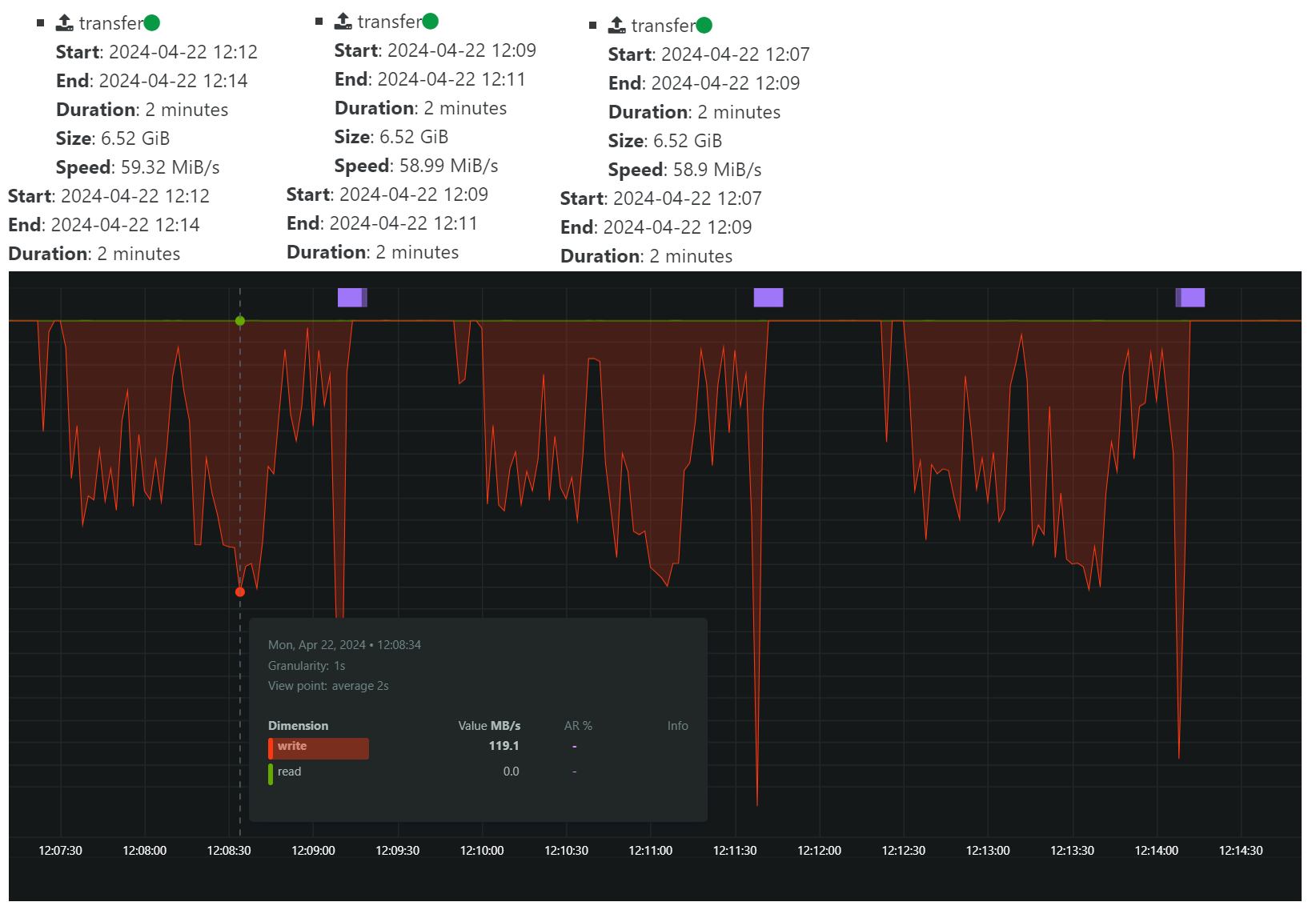
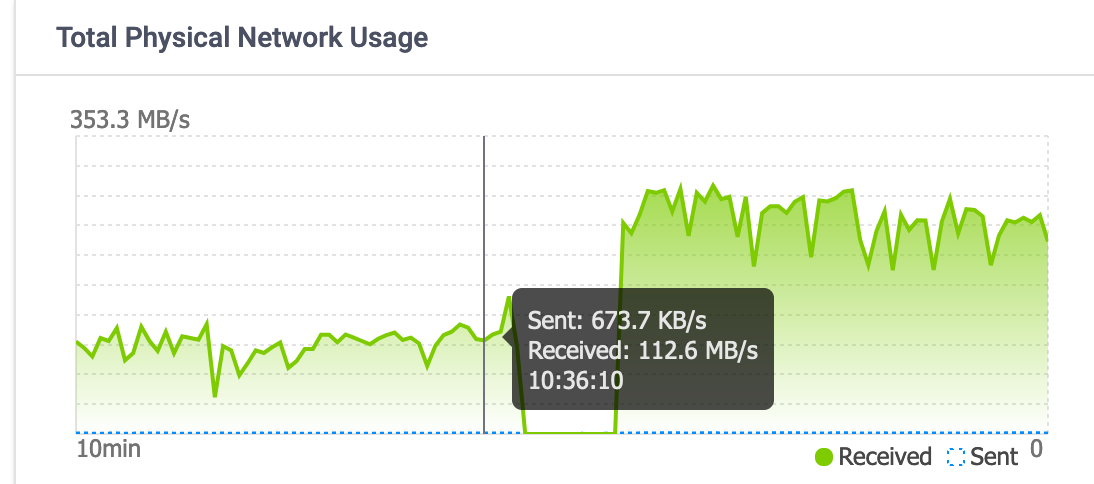
              I did a 3 x backup of a single VM hosted on an SSD drive on the same host as XOA is running, which is also pool master.

              This is with nconnect=1:
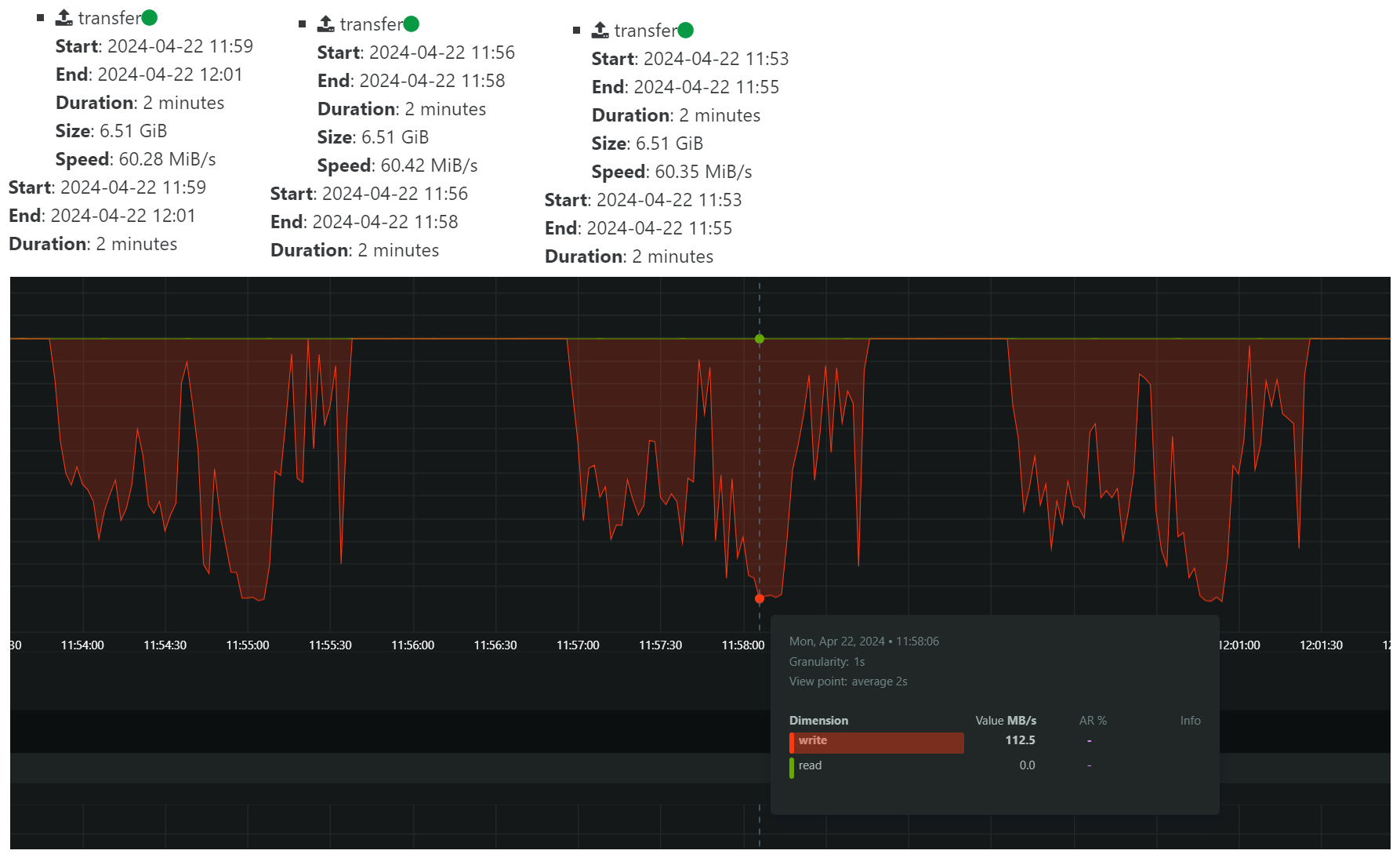
              a46273be-551b-443e-a3cc-4a15a11e1341-image.png

              This is with nconnect=16:
              1885cf86-af94-4383-ba56-10d458a7009e-image.png

              The transfer speed according to XOA is slightly less, but looking at the bandwidth graph, it looks like the LACP bonded network on the storage server is reaching a higher max throughput.

              I will test some more with incremental backups and see if there's a difference with them.

              If we ignore the nconnect for a second, and just look at the graphs, it seems we have a lot of possibilities to improve the backup performance if we could make the transfer more even. What is causing this type of pattern? I do not believe any coalesce was happening during this test.

              florentF 1 Reply Last reply Reply Quote 0
              • olivierlambertO Offline
                olivierlambert Vates 🪐 Co-Founder CEO
                last edited by

                That's a question for @florent

                1 Reply Last reply Reply Quote 0
                • florentF Offline
                  florent Vates 🪐 XO Team @Forza
                  last edited by

                  On the read side :

                  • the legacy mode : xapi build an expor from the vhd chain
                  • NBD : we read individual block on the storage repository

                  On the write Side :

                  • the default file mode : we write 1 big file per disk
                  • block mode : we write a compressed block per 2MB data

                  We don't have a lot of room on the legacy mode. The NBD + block gives us more freedom, and , instinctively , should gain more from nconnect, since we will read and write multiple small blocks in parallel

                  What mode are you using ?

                  @Forza said in Updated XOA with kernel >5.3 to support nconnect nfs option:

                  @olivierlambert

                  I did a 3 x backup of a single VM hosted on an SSD drive on the same host as XOA is running, which is also pool master.

                  This is with nconnect=1:
                  a46273be-551b-443e-a3cc-4a15a11e1341-image.png

                  This is with nconnect=16:
                  1885cf86-af94-4383-ba56-10d458a7009e-image.png

                  The transfer speed according to XOA is slightly less, but looking at the bandwidth graph, it looks like the LACP bonded network on the storage server is reaching a higher max throughput.

                  I will test some more with incremental backups and see if there's a difference with them.

                  If we ignore the nconnect for a second, and just look at the graphs, it seems we have a lot of possibilities to improve the backup performance if we could make the transfer more even. What is causing this type of pattern? I do not believe any coalesce was happening during this test.

                  ForzaF 1 Reply Last reply Reply Quote 0
                  • ForzaF Offline
                    Forza @florent
                    last edited by

                    @florent hi, for the full backup test above, I used normal mode with zstd enabled. There were no snapshots of the source VM and it was stored on local ssd storage on the pool master.

                    florentF 1 Reply Last reply Reply Quote 0
                    • A Offline
                      acomav
                      last edited by

                      Just replying to thank you for pointing this out. I have been having very poor backup speeds for over a month and this sorted it out.
                      I have only used nconnect=4 and 6 for my NFS shares.

                      1 Reply Last reply Reply Quote 0
                      • olivierlambertO Offline
                        olivierlambert Vates 🪐 Co-Founder CEO
                        last edited by

                        Hi @acomav

                        Can you give more details on your setup and the result before/after? We might use this to update our XO guide with the new values 🙂

                        A 1 Reply Last reply Reply Quote 0
                        • A Offline
                          acomav @olivierlambert
                          last edited by

                          @olivierlambert Hi Olivier. I'll see what I can do. I've spent the weekend cleaning up my backups and catching up on mirror transfers. Once completed, I'll do a few custom backups at various nconnect values.

                          1 Reply Last reply Reply Quote 2
                          • florentF Offline
                            florent Vates 🪐 XO Team @Forza
                            last edited by

                            @Forza said in Updated XOA with kernel >5.3 to support nconnect nfs option:

                            @florent hi, for the full backup test above, I used normal mode with zstd enabled. There were no snapshots of the source VM and it was stored on local ssd storage on the pool master.

                            can you test a backup on an empty remote with block mode ?

                            M 1 Reply Last reply Reply Quote 0
                            • M Offline
                              manilx @florent
                              last edited by

                              @florent Did a test on my 8.3 homelab.
                              Using XO on a Debian 12 VM.

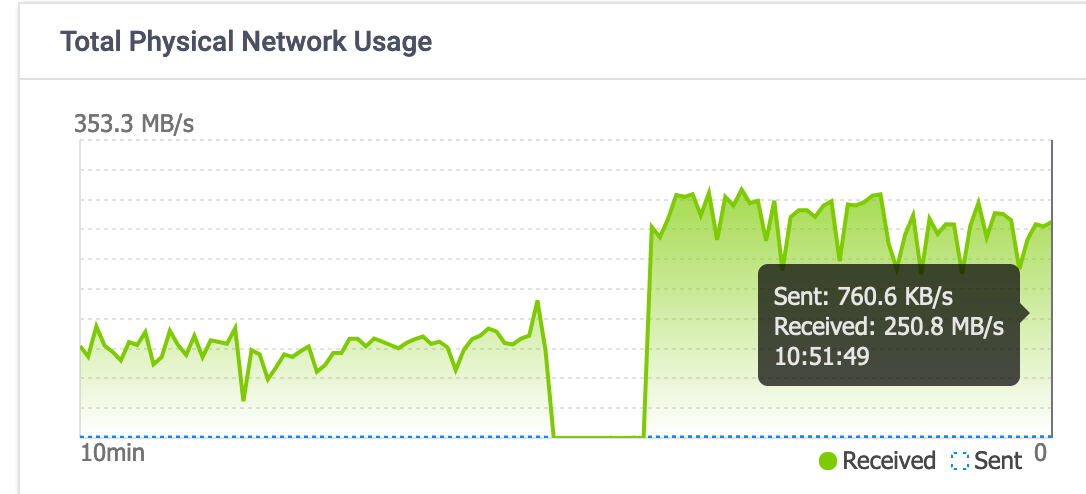
                              2 full (delta) backups using "nconnect=6" of all my 10 VM's

                              With block defined at remote:

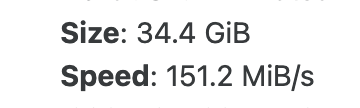
                              ScreenShot 2024-04-29 at 10.38.11.png
                              ScreenShot 2024-04-29 at 10.52.12.png

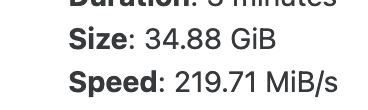
                              without block (my normal mode):
                              ScreenShot 2024-04-29 at 10.56.04.png
                              ScreenShot 2024-04-29 at 10.51.57.png

                              1 Reply Last reply Reply Quote 0
                              • olivierlambertO Offline
                                olivierlambert Vates 🪐 Co-Founder CEO
                                last edited by

                                I'm not sure to get it with your graph. Can you write down the average values for each scenario?

                                M 1 Reply Last reply Reply Quote 0
                                • M Offline
                                  manilx @olivierlambert
                                  last edited by

                                  @olivierlambert

                                  with block: 100-150 MB/s approx
                                  without: 200-300 MB/s

                                  Values from observed NAS traffic.

                                  ForzaF 1 Reply Last reply Reply Quote 0
                                  • ForzaF Offline
                                    Forza @manilx
                                    last edited by

                                    @manilx Do you mean block as NBD mode?

                                    M 1 Reply Last reply Reply Quote 0
                                    • M Offline
                                      manilx @Forza
                                      last edited by manilx

                                      @Forza Did another test:

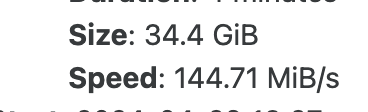
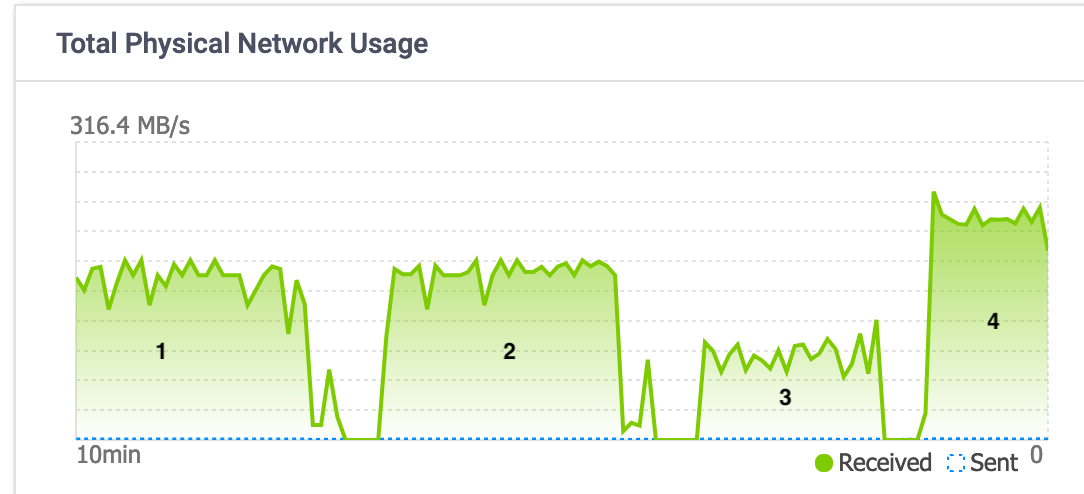
                                      A: Remote as nfs share with "Store backup as multiple data blocks"
                                      B: same but without multiple data blocks

                                      1st backup to A,"Backup"
                                      ScreenShot 2024-04-29 at 13.45.47.png
                                      2nd backup to B, "Backup"
                                      ScreenShot 2024-04-29 at 13.45.57.png
                                      3rd backup to A, "Backup"
                                      ScreenShot 2024-04-29 at 13.46.04.png
                                      4th backup to B, "Delta Backup"
                                      ScreenShot 2024-04-29 at 13.46.10.png

                                      ScreenShot 2024-04-29 at 13.44.27.png

                                      M 1 Reply Last reply Reply Quote 0
                                      • M Offline
                                        manilx @manilx
                                        last edited by

                                        @manilx This was just one VM. Did not use NBD (forgot to turn on)

                                        1 Reply Last reply Reply Quote 0
                                        • olivierlambertO Offline
                                          olivierlambert Vates 🪐 Co-Founder CEO
                                          last edited by

                                          I'm a bit confused, you are comparing block based vs VHD, but did you also change the nconnect option between run or kept it to a specific number? (in case, which one)

                                          M 1 Reply Last reply Reply Quote 0
                                          • M Offline
                                            manilx @olivierlambert
                                            last edited by

                                            @olivierlambert allbackups done with nfs option "nconnect=6"

                                            M 1 Reply Last reply Reply Quote 0

                                            Hello! It looks like you're interested in this conversation, but you don't have an account yet.

                                            Getting fed up of having to scroll through the same posts each visit? When you register for an account, you'll always come back to exactly where you were before, and choose to be notified of new replies (either via email, or push notification). You'll also be able to save bookmarks and upvote posts to show your appreciation to other community members.

                                            With your input, this post could be even better 💗

                                            Register Login
                                            • First post
                                              Last post