XCP-ng 8.3 updates announcements and testing
-
@acebmxer Hello,
The error
VDI_CBT_ENABLEDmeans that the XAPI doesn't want to move the VDI to not break the CBT chain.
You can disable the CBT on the VDI before migrating the VDI but if you have snapshots with CBT enabled it can be complicated and it might necessitate to remove them before moving the VDI.
We have changes planned to improve the CBT handling in this kind of case. -
@Andrew Hello Andrew,
Thank you for reporting.
It appear that the CBT on FileSR-based SR is not working in addition to data-destroy (the option that allow to remove the VDI content and only keep the CBT).
Can you confirm that you are using a FileSR (ext or nfs)?
Is it possible to disable purge data on the CR job? -
@dthenot Yes, VHD files on both local disk and NFS, same problem.
Testing one VM, I removed the snapshot, disk CBT setting, and removed the destination replica. First CR run does a full backup without issue (same NBD/CBT/purge enabled). Second run has the same problem (fell back to full). So, clearing out things does not fix it (with the same original setup).
Testing several combinations, just disabling the backup purge snapshot option makes the delta CR backup work again (NBD/CBT still enabled). It does a full backup the first run (fell back to full), but then does delta after that.
-
I have been able to migrate all vms over to qcow2. Think shutting down the vms and booting backup. Alos if anything from this thread might have had an impact. https://xcp-ng.org/forum/topic/12087/backups-with-qcow2-enabled/9
-
@Andrew Hello,
I have been able to find the problem and make a fix, it's in the process of being packaged.
I can confirm it only happen for file based SR when using purge snapshots.
For some reason, the vdi type of CBT_metadata is cbtlog for FileSR but stays the image format it was for LVMSR
And it would make a condition fail during thelist_changed_blockscall. -
Nice catch @dthenot !
-
@dthenot Great! I'm happy I was able to help test it. I look forward to the update release.
Interesting note, CR is faster when the snapshots are not deleted.... or CR is faster because of the update, I'll test again after the fix.
-
Feature fixes, security and maintenance update candidates for you to test!
This release batch contains fixes on the major storage feature previously announced,
read the RC2 announcement for QCOW2 image format support for 2TiB+ images.The whole platform has been hardened with back-porting security patches from the latest version of OpenSSH.
An additional driver fix is part of this minor package set.
What changed
Storage
QCOW2 image format support is the major feature of this release batch,
check related announcement in forum.Some fixes have been applied to fix issues found during the testing phase. Many thanks go to @Andrew who found a CBT-related bug on file-based SRs!
sm: 3.2.12-17.5- Fix a regression on CBT (Changed block tracking) on file-based SRs (EXT, NFS, ...), causing backup jobs using the "purge snapshot data when using CBT" option to create full backups each time instead of deltas.
- Deactivate unused LVM snapshot base before deletion to prevent LVM leak. This fix is not related to the QCOW2 feature, but is important and localized enough for us to provide it in addition the other changes.
- Minor fix that prevents a warning when updating the package.
blktap: 3.55.5-6.5- Fix install warning when triggering mdadm to generate a udev rule.
Network
openssh: Update to 9.8p1-1.2.3- Two vulnerabilities disclosed along with the OpenSSH 10.3 release have been fixed.
- In authorized_keys, when principals="" was defined along with a CA with a common CA, an interpretation error occurred, which could lead to unauthorized access.
- When one ECDSA algorithm was active, it activated all others regardless of their configuration. (By default, all ECDSA algorithms are active.)
- For more details please track the upcoming Vates Security Advisories.
- Two vulnerabilities disclosed along with the OpenSSH 10.3 release have been fixed.
Drivers updates
More information about drivers and current versions is maintained on the drivers wiki page.
qlogic-fastlinq-alt: 8.74.6.0-1- Fixes 2 issues in the qede module driver:
- Driver does not retain configured MAC and MTU post reset recovery
- Driver does not recover from TX timeout error
- Fixes 2 issues in the qede module driver:
Versions:
blktap: 3.55.5-6.4.xcpng8.3 -> 3.55.5-6.5.xcpng8.3openssh: 9.8p1-1.2.2.xcpng8.3 -> 9.8p1-1.2.3.xcpng8.3sm: 3.2.12-17.2.xcpng8.3 -> 3.2.12-17.5.xcpng8.3
Optional packages:
qlogic-fastlinq-alt: 8.70.12.0-1.xcpng8.3 -> 8.74.6.0-1.xcpng8.3
Test on XCP-ng 8.3
If you are using XOSTOR, please refer to our documentation for the update method.
yum clean metadata --enablerepo=xcp-ng-testing,xcp-ng-candidates
yum update --enablerepo=xcp-ng-testing,xcp-ng-candidates
reboot
The usual update rules apply: pool coordinator first, etc.
What to test
The most important change is related to storage: adding QCOW2 support also affects the codebase managing VHD disks. What matters here is, above all, to detect any regression on VHD support (we tested it deeply, but on this matter there's no such thing as too much testing). Of course, you are also welcome to test the QCOW2 image format support.
See the dedicated thread for more information.
Other significant changes requiring attention:
- SSH connectivity
And, as usual, normal use and anything else you want to test.
Test window before official release of the updates
~4 days
We would like to thank users who reported feedback on the QCOW RC2 release: @acebmxer, @andrew, @bufanda, @flakpyro, @jeffberntsen, @ph7
-
installed updates will report back.
Update - I had migrated vms back over to vhd prior to update release. I have migrated 2 vms back over to qcow2 and the initial backup ran successfull. Ran a second delta backup and that as well was successful with out issues. Backups happen very quickly now. But it appears the % and progress bar are working.
When CBT is enabled on the vm vdi. They show up as needing to be coalesced. VMs without CBT enabled the vdis are coalesced.
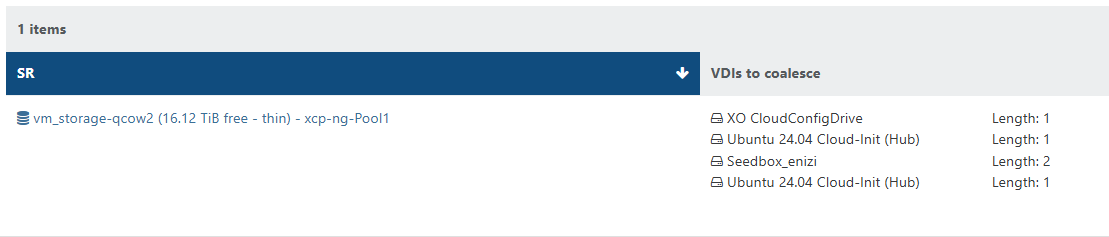
Will continue to monitor.
Once the coalesence hits 2 for the vm. The vm is skipped form future backups until cleared. (shutting down the vm will allow the coalescence to happen.
2026-04-23T19_52_34.694Z - backup NG.txt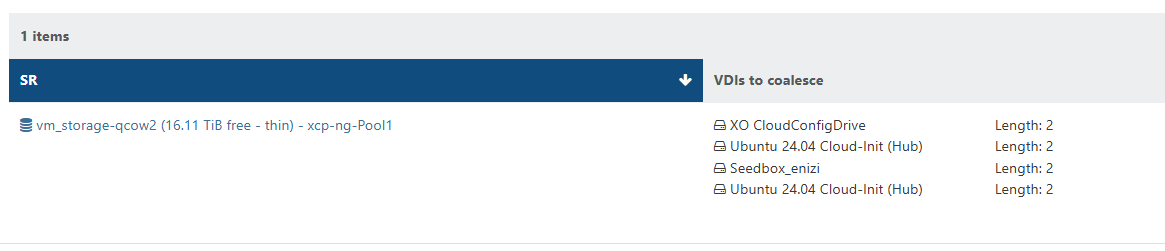

-
@rzr XCP 8.3 pools updated and running.
CR delta backup snapshot problem corrected and working now.
SSH from old system to XCP displays the warning (per documentation).
-
I thought i pressed save after editing the backup job to enable the purge snapshot when using cbt.
After re-enabling and clicking save. All is good now. No errors no stuck coalescence after backups.
-
This post is deleted! -
I updated my test environment and performed a few tests:
- migrating VMs back and forth between VHD based NFS SR and QCOW2 based iSCSI SR --> VMs got converted between VHD and QCOW2 just fine, live migration worked
- creation of rather big QCOW2 based VMs (2.5+ TB)
- NBD-enabled delta backups of a mixed set of VMs (small, big, QCOW2, VHD)
All tests worked fine so far. Only thing that I noticed: When converting VHD-based VMs to QCOW2 format I was not able to storage migrate more than 2 VMs at a time. XO said something about "not enough memory". That might be related to my dom0 in test environment only having 4GB of RAM. Maybe not related to VHD to QCOW2 migration path. I never saw this error in my live environment where all node's dom0 have 8GB RAM.
Update candidate looks good so far from my point of view.
-
New update candidates for you to test!
We are continuing to refine the next batch of update with planned fixes. This release batch contains fixes on the major storage feature previously announced, read the RC2 announcement for QCOW2 image format support for 2TiB+ images.
What changed
Storage
QCOW2 image format support is the major feature of this release batch, check related announcement in forum.
Some fixes have been applied to fix issues found during the testing phase.
-
sm: 3.2.12-17.6-
Limit QCOW2 VDI max size to be 16TiB with metadata to allow compatibility with EXTSR (EXTSR is limited to 16TiB unique file size)
-
If a full QCOW2 VDI is allocated, XCP-ng would not be able to migrate it to an EXTSR with this limitation.
-
In the future, while EXTSR will remain limited to this maximum size, other SR types will evolve towards higher limits. For this, we'll have to work on the existing assumption that all SR which support the QCOW2 image-format share the same maximum size limit for VDIs, and to catch migration attempts towards SRs whic cannot receive disks bigger than their maximum limit.
-
-
-
blktap: 3.55.5-6.6- Update the package's license.
Versions:
blktap: 3.55.5-6.5.xcpng8.3 -> 3.55.5-6.6.xcpng8.3sm: 3.2.12-17.5.xcpng8.3 -> 3.2.12-17.6.xcpng8.3
Test on XCP-ng 8.3
If you are using XOSTOR, please refer to our documentation for the update method.
yum clean metadata --enablerepo=xcp-ng-testing,xcp-ng-candidates
yum update --enablerepo=xcp-ng-testing,xcp-ng-candidates
reboot
The usual update rules apply: pool coordinator first, etc.
What to test
The most important change is related to storage: adding QCOW2 support also affects the codebase managing VHD disks. What matters here is, above all, to detect any regression on VHD support (we tested it deeply, but on this matter there's no such thing as too much testing). Of course, you are also welcome to test the QCOW2 image format support.
See the dedicated thread for more information.
And, as usual, normal use and anything else you want to test.
Test window before official release of the updates
~3 days
We would like to thank users who reported feedback since our last call for testing, in less than 24h: @acebmxer, @Andrew, @MajorP93.
-
-
Installed on my usual test hosts without issues. However i am not using the qcow2 disk format anywhere yet
-
@rzr Installed latest update and no issues to report. I dont hvae any 2tb+ drives in my vms. converting from vhd to qcow2 and backups all working.
-
@rzr Updates running. VHD use only.
-
Installed on my usual lab setup works fine so far although I have the "Fell back to full backup" message for qcow2 VMs
-
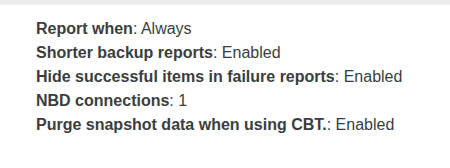
@bufanda Make sure you have enable the purge snapshot when using CBT, if you are using CBT. After the previous update that fixed fell back to full backup issue for me..
Maybe also try running a manual full backup to reset the VDI chain.
-
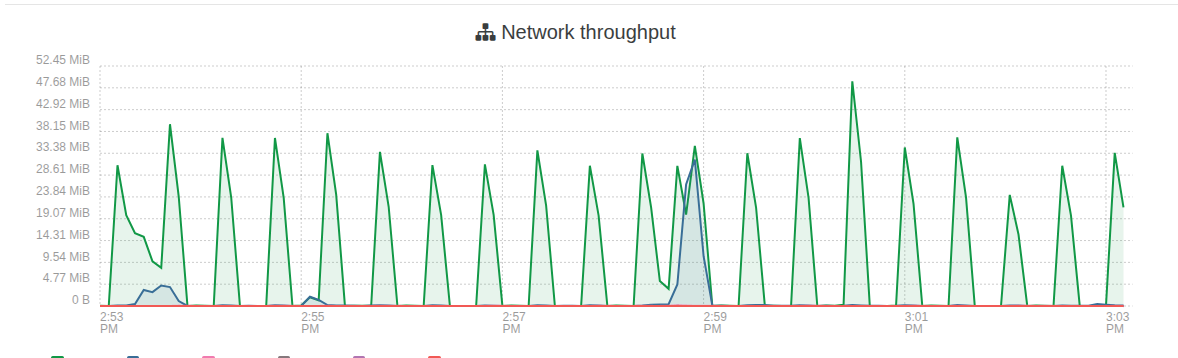
One thing i am noticing after this updates. Is i am seeing alot more traffic on my truenas. The gaps are me shutting down vms and starting each one to find the problem vms but it seems to be any vm. I didnt notice any performance issues just noticed the graph in truenas when its usally flat line there the occasional spike here and there not the big mess to the left in first screenshot. 5 vms running
My xoa is on local storage on master host. and used for these test.
All vms are powered off except xoa and xo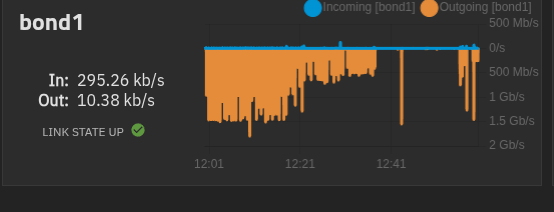
Here i booted the xo vm and left it idle. The spike after is me live migrate back to vhd SR and then left idle.
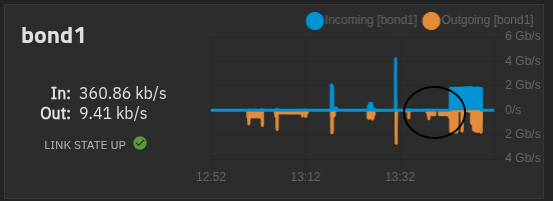
The gap in the middle is xo idle on vhd only SR.
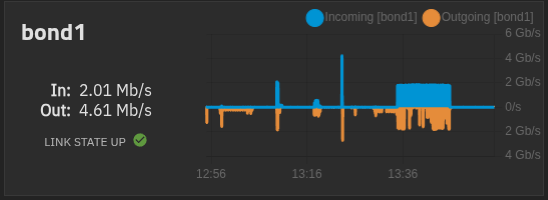
live Migrate xo back to qcow2 only SR
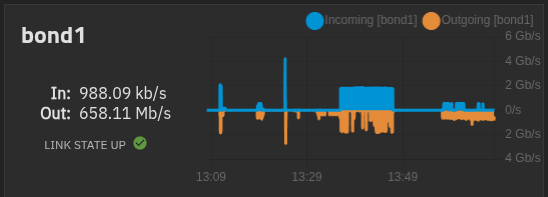
Migration back to qcow2 completed
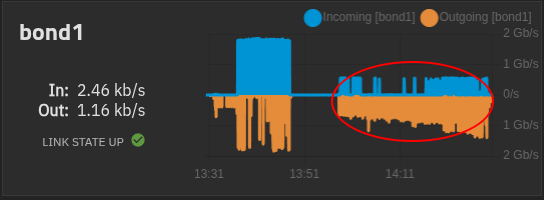
Left xo ldle after migration to qcow2 sr.
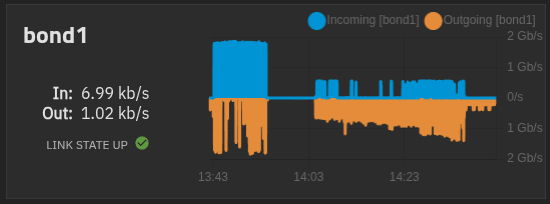
Again all vms booted and idle....
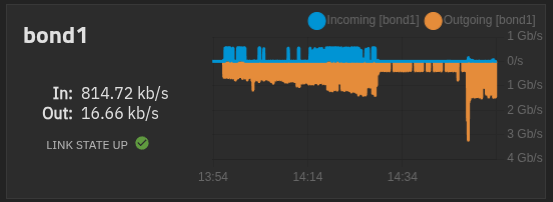
From master host.




Hello! It looks like you're interested in this conversation, but you don't have an account yet.
Getting fed up of having to scroll through the same posts each visit? When you register for an account, you'll always come back to exactly where you were before, and choose to be notified of new replies (either via email, or push notification). You'll also be able to save bookmarks and upvote posts to show your appreciation to other community members.
With your input, this post could be even better 💗
Register Login