XCP-ng 8.3 updates announcements and testing
-
@vxgmichel The new dom0 kernel version installed fine on my lab pool and everything appears to be running well.
-
@vxgmichel Installed on 10 lab hosts (mostly older hardware - Dell, HP, Fujitsu), no issues.
-
@vxgmichel Update installed and running. Rolling pool reboot failed waiting to evacuate an empty host, I can't blame the update.
Interesting. Worth a report to XO team?
-
Installed on my test hosts, no issues.
-
Updates are live now
Thank you everyone for your tests and your feedback!
This includes updates that you have tested, as well as security updates that were under embargo.
Check out the blog post for the full list of fixes and any post-update steps: https://xcp-ng.org/blog/2026/11/10/november-2026-security-updates-3-for-xcp-ng-8-3-lts/
If you installed the kernel from our last call for testing, please read on. You can check with
rpm -q kernel.The released kernel is not the
4.19.19-8.0.49.3you tested, but4.19.19-8.0.46.16. Its release number is lower, so a regular update will leave your hosts on4.19.19-8.0.49.3. We identified some issues in4.19.19-8.0.49.3.To downgrade and install
kernel-4.19.19-8.0.46.16, run the following commands:yum clean metadata yum downgrade --setopt=protected_packages= kernel-4.19.19-8.0.46.16.xcpng8.3 yum update rebootThe usual update rules apply: pool coordinator first, etc.
We expect to release a new kernel in a few days, and it will install as a normal update from either version.
-
=======================================================================================================================================================
 Package                      Arch                         Version                                          Repository                            Size
=======================================================================================================================================================
Downgrading:
 kernel                       x86_64                       4.19.19-8.0.46.16.xcpng8.3                       xcp-ng-updates                        29 M

Transaction Summary
=======================================================================================================================================================
Downgrade  1 Package

Total download size: 29 M
Is this ok [y/d/N]: y
Downloading packages:
kernel-4.19.19-8.0.46.16.xcpng8.3.x86_64.rpm                                                                                    |  29 MB  00:00:07
Running transaction check
Running transaction test
Transaction test succeeded
Running transaction
  Installing : kernel-4.19.19-8.0.46.16.xcpng8.3.x86_64                                                                                            1/2
depmod: WARNING: /lib/modules/4.19.0+1/kernel/crypto/authencesn.ko needs unknown symbol memcpy_sglist
  Cleanup    : kernel-4.19.19-8.0.49.3.xcpng8.3.x86_64                                                                                             2/2
  Verifying  : kernel-4.19.19-8.0.46.16.xcpng8.3.x86_64                                                                                            1/2
  Verifying  : kernel-4.19.19-8.0.49.3.xcpng8.3.x86_64                                                                                             2/2

Removed:
  kernel.x86_64 0:4.19.19-8.0.49.3.xcpng8.3

Installed:
  kernel.x86_64 0:4.19.19-8.0.46.16.xcpng8.3
Updated: forkexecd.x86_64 0:26.1.21-1.4.xcpng8.3 message-switch.x86_64 0:26.1.21-1.4.xcpng8.3 qcow-stream-tool.x86_64 0:26.1.21-1.4.xcpng8.3 rrdd-plugins.x86_64 0:26.1.21-1.4.xcpng8.3 sm-cli.x86_64 0:26.1.21-1.4.xcpng8.3 squeezed.x86_64 0:26.1.21-1.4.xcpng8.3 varstored-guard.x86_64 0:26.1.21-1.4.xcpng8.3 vhd-tool.x86_64 0:26.1.21-1.4.xcpng8.3 wsproxy.x86_64 0:26.1.21-1.4.xcpng8.3 xapi-core.x86_64 0:26.1.21-1.4.xcpng8.3 xapi-nbd.x86_64 0:26.1.21-1.4.xcpng8.3 xapi-rrd2csv.x86_64 0:26.1.21-1.4.xcpng8.3 xapi-storage-script.x86_64 0:26.1.21-1.4.xcpng8.3 xapi-tests.x86_64 0:26.1.21-1.4.xcpng8.3 xapi-xe.x86_64 0:26.1.21-1.4.xcpng8.3 xcp-networkd.x86_64 0:26.1.21-1.4.xcpng8.3 xcp-rrdd.x86_64 0:26.1.21-1.4.xcpng8.3 xenopsd.x86_64 0:26.1.21-1.4.xcpng8.3 xenopsd-cli.x86_64 0:26.1.21-1.4.xcpng8.3 xenopsd-xc.x86_64 0:26.1.21-1.4.xcpng8.3 Complete! -
@gduperrey Updates installed. RPU mostly worked... Every host was updated. All VMs moved and returned.
Waiting before re-enabling the load balancertask is stuck waiting... -
I did a RPR early this morning just to start fresh and then kicked off an RPU 15 minutes ago. The RPU evacuated all the VMs from the master successfully but the RPU is stuck at 0% (as seen in Pool Tasks). I will allow the process to time out (or restart XO if the wait is too long), promote another node to master, and retry the RPU.
-
Did my 3 host production pool, only glitches were a few users that were logging in right as vms were migrating. Had a compressed day and had to just Yolo this morning instead of waiting until slower times. Getting paranoid about exploits, and it was Windows patch day too, so just jammed a bunch of stuff together this morning.
-
Waiting before re-enabling the load balancer task is stuck waiting...
Was it stuck for longer than 30 minutes? If it simply appeared in the task list with a pending status for less than 30 minutes that's actually expected. I ran an RPU on some hosts of my own and made a screenshot for comparison, you can see how the task should look when it's pending and when it's completed.
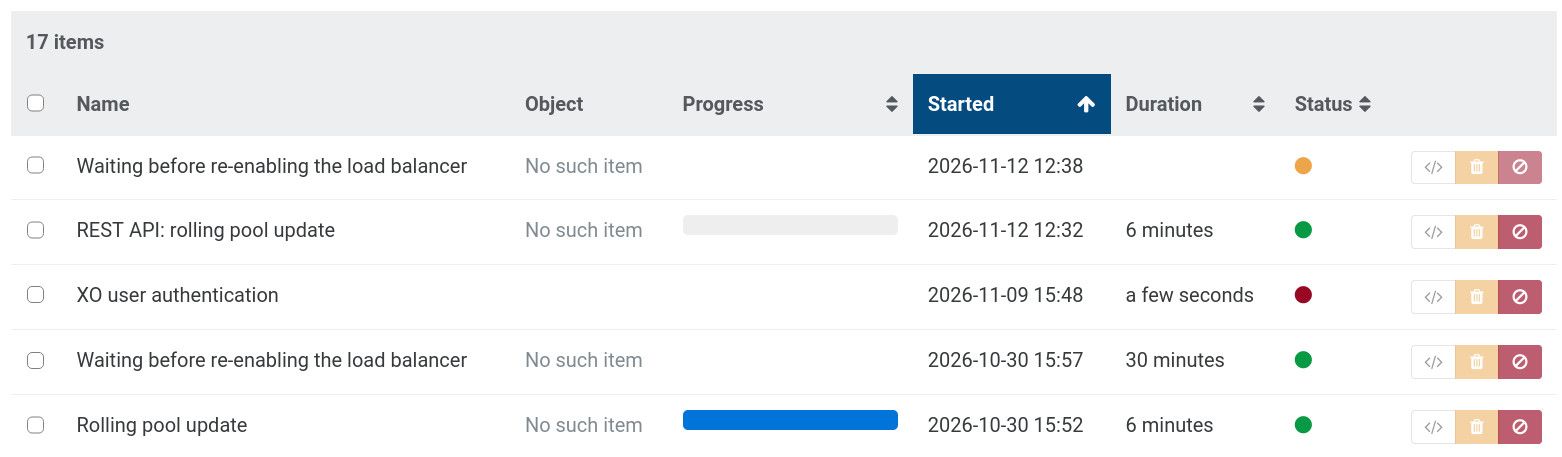
This task has been introduced in XO 6.7.0 (2026-07-30) by the way, so it's fairly new:
[RPU] Re-enable the load balancer after a configurable safe delay (30 minutes by default) when a rolling pool update ends (PR #10111)
Please let us know if you notice something wrong with it.
-
The RPU evacuated all the VMs from the master successfully but the RPU is stuck at 0% (as seen in Pool Tasks).
Thanks for the report, we have an item in our issue tracker that matches your description. It should be fixed in the upcoming
26.1.23-2.1xapi version that will be part of the next maintenance update. Please let us know if it keeps happening after the next maintenance update. -
@Andrew could you send us logs over a support ticket so we can understand why the RPR failed ? Thanks





Hello! It looks like you're interested in this conversation, but you don't have an account yet.
Getting fed up of having to scroll through the same posts each visit? When you register for an account, you'll always come back to exactly where you were before, and choose to be notified of new replies (either via email, or push notification). You'll also be able to save bookmarks and upvote posts to show your appreciation to other community members.
With your input, this post could be even better 💗
Register Login