XCP-ng 8.3 updates announcements and testing
-
@acebmxer
I did mine tonight over a remote connection, only took about 20 minutes total for all three hosts. If it's taking much longer then there might be something to look at.I also used the slow externally connected XO sources box, which is pretty common for me when doing updates, that way the XO can't "get lost" as it migrates around the system. The external XO only has a gigabit connection, an old HP T630 with either 4gb or maybe 8gb of ram. That device has been in use since my first lab over 5 years ago, and still seems valuable.
-
Aaaaand it happened for the next VM.
Apart from updating XO I did not change anything...
It looks like RPU is failing on every single VM that has DMC enabled...
To me it looks like a regressionHi, did you manage to sort it out ? if not your logs will help us to troubleshoot see related documentation as shared earlier:
https://docs.xcp-ng.org/troubleshooting/log-files/#produce-a-status-report -
@gduperrey @rzr Hello!
Sorry for the delayed response and thanks a lot for raising that topic internally.
Due to these security patches being very critical/important I disabled DMC for all VMs that showed this issue (I think it was 6 Windows VMs) and patched the pool manually.
After that everything worked perfectly fine.
I wanted to react fast due to these security vulnerabilities and did not take the time to look at logs in /var/log etc.
Interestingly for the second update you guys published one day after (the kernel TCP vulnerability patch) RPU worked without any issues.
For now everything is stable and I will leave DMC disabled for these Windows VMs for now.
I was just suprised because this exact configuration, that included DMC was working stable for quite a few months.
However I can live without DMC on these VMs and am happy that everything is running stable.
Thank you very much for reacting fast on these security vulnerabilities!
I think you guys have a great process when it comes to this.Best regards
-
New maintenance update candidates for XCP-ng 8.3 LTS
This update is focused on security fixes.
What changed
-
edk2:
Sync with XenServer edk2-20220801-1.7.13. The update fixes vulnerabilities allowing an unauthenticated attacker on the local network to compromise a VM during PXE boot, or enable a guest VM administrator to bypass Secure Boot. See below the list of the corresponding CVEs:- CVE-2026-97631
- CVE-2024-38796
- CVE-2024-38797
- CVE-2019-14560
- CVE-2022-36763
- CVE-2022-36764
- CVE-2026-45447
- CVE-2026-111497
Versions
edk2: 20220801-1.7.11.2.xcpng8.3 -> 20220801-1.7.13.1.xcpng8.3
Test on XCP-ng 8.3
yum clean metadata --enablerepo=xcp-ng-testing,xcp-ng-candidates
yum update --enablerepo=xcp-ng-testing,xcp-ng-candidates
reboot # not mandatory but recommended for testing
The usual update rules apply: pool coordinator first, etc.
What to test
As usual, normal use and anything else you want to test.
Additionally, a cold boot (shutdown and start) of the UEFI VMs would also help testing the
edk2fix.Test window before official release of the updates
About 4 days
We would like to thank users who shared feedback since our last call for testing: @acebmxer, @jr-m4, @bufanda, @flakpyro, @Andrew, @MajorP93, @JeffBerntsen, @manilx, @XCP-ng-JustGreat, @john205, @Greg_E.
We are aware of the frequency of these updates and strive to batch packages as much as possible. However, recent unplanned security updates require immediate attention. While drafting this message, we received another security update that we will release shortly.
-
-
installed updates no issues.... shutdown and cold booted windows 11 vm and a few linux vms no issues found.
Update - Applying the linux kernel update to work hosts now. The host 1 in Tilton pool took about 5 min to reconnect to xoa/xoproxy after console showed host booted. Host 2 swapped vms and started its update and rebooted. It took about 1-2 min to reconnect.
Host 1 does show more output prior to the console fully loading then compared to host 2. I did not get a picture of the output. When I can reboot host again will try to catch the output.
-
@lmolina Update seems good. Booted all UEFI VMs normally. Booted Secure UEFI Windows 10 fine.
-
@lmolina Latest update candidate edk2 fix applied without issue to my four host home lab pool. I tested one BitLocker encrypted Windows 11 VM with full shutdown and restart. What surprised me is that the VM booted back up fine. I was expecting that anything that changed the Tiano UEFI guest firmware might bork BitLocker unless it was suspended prior to applying the hypervisor host fix. (e.g. PowerShell Suspend-BitLocker -MountPoint "C:" -RebootCount 0 suspends BitLocker for an infinite number of guest reboots until it is explicitly resumed.) Apparently, this particular update doesn't alter any part of the guest firmware that causes a noticeable change to BitLocker. As a result, the boot volume unlocks and boots normally. Note that a firmware update on a physical machine generally is noticed by BitLocker. This is the reason the OEM's firmware installer suspends BitLocker with RebootCount 1 before performing the update's finishing reboot.
-
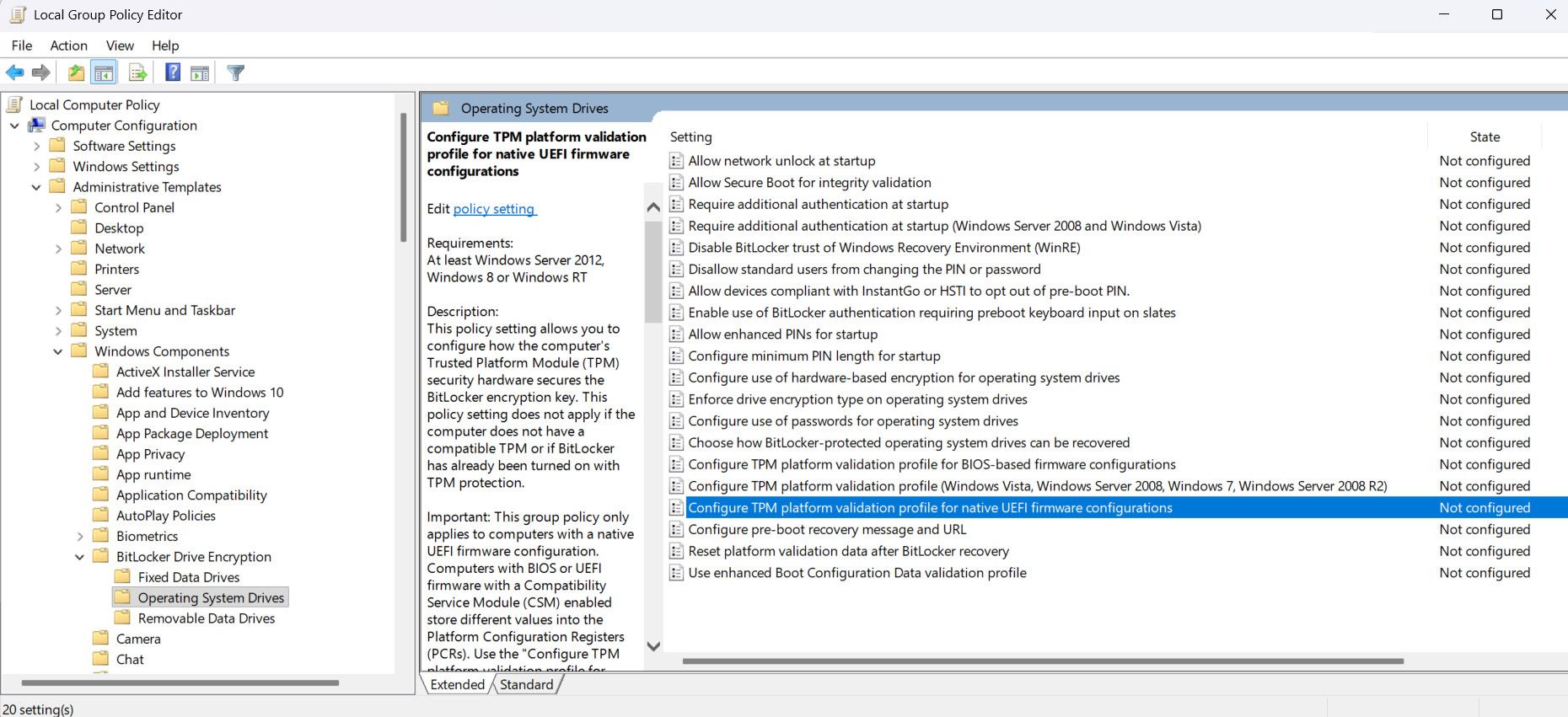
@XCP-ng-JustGreat Windows VMs will pass the Measured Boot check even after an edk2 update if BitLocker is set up to only use Secure Boot for integrity validation (see the "Configure TPM platform validation profile for native UEFI firmware configurations" policy, PCRs 7 and 11)
-
@dinhngtu Thank you for bringing the TPM platform validation profile to my attention. I see that there is yet another nuance to the firmware boot process I didn't fully understand. I'm going to dig into those TPM group policies to see what that's all about. (Later on . . .) Found them, here:
-
New
kernelversion inxcp-ng-testingfor the next XCP-ng 8.3 LTS security updateWe're adding a new kernel version to the security update we're planning for tomorrow.
What changed
kernel:- Security fixes in the Xen netback and blkback drivers, XSA-526, XSA-527 and XSA-528.
- Synchronization with XenServer release 4.19.19-8.0.49. In this release, the XCP-ng patches for CVE-2026-98432 (possible race condition occurring during concurrent processing of re-transmitted TCP connection requests) have been removed as they are now part of the XenServer release. Also included are patches for CVE-2026-31431, a vulnerability in the Linux kernel's cryptographic interface known as "Copy Fail" that could allow unprivileged accounts to gain root privileges. As a mitigation, the authencesn module was disabled in the previous XCP-ng kernel release. It is now re-enabled. Finally, it includes patches for CVE-2021-47103, a use-after-free vulnerability in the TCP IP protocol.
- Fixes for the following CVEs are also included:
- CVE-2026-31659
- CVE-2026-31678
- CVE-2026-43502
- CVE-2026-52912
- CVE-2026-52923
- CVE-2026-52924
- CVE-2026-68376
- CVE-2026-74480
- CVE-2026-74957
- CVE-2026-80714
- CVE-2026-52929
- CVE-2026-63834
- CVE-2026-43042
- CVE-2026-72255
Versions
kernel: 4.19.19-8.0.46.14.xcpng8.3 -> 4.19.19-8.0.49.3.xcpng8.3
Test on XCP-ng 8.3
yum clean metadata --enablerepo=xcp-ng-testing,xcp-ng-candidates
yum update --enablerepo=xcp-ng-testing,xcp-ng-candidates
reboot
The usual update rules apply: pool coordinator first, etc.
What to test
As usual, normal use and anything else you want to test.
Test window before official release of the updates
1 day
We would like to thank users who shared feedback since our last call for testing:
@acebmxer, @Andrew, @XCP-ng-JustGreat




Hello! It looks like you're interested in this conversation, but you don't have an account yet.
Getting fed up of having to scroll through the same posts each visit? When you register for an account, you'll always come back to exactly where you were before, and choose to be notified of new replies (either via email, or push notification). You'll also be able to save bookmarks and upvote posts to show your appreciation to other community members.
With your input, this post could be even better 💗
Register Login