XCP-ng 8.3 updates announcements and testing
-
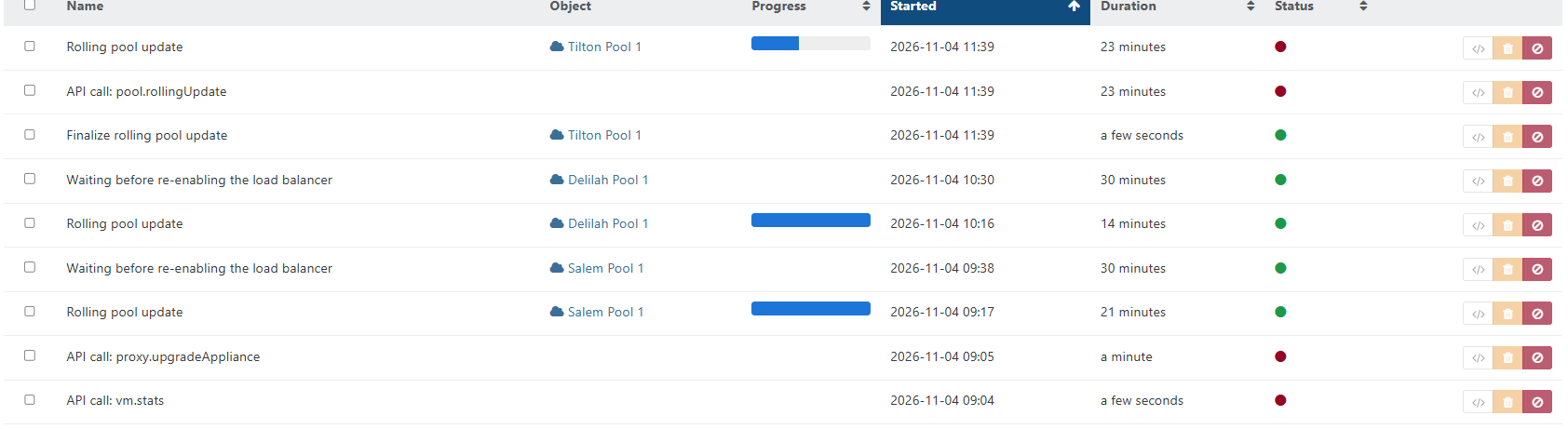
Correct. Sorry yes did have to press rolling pool update after the Finalize. The first host was not connecting to the pool after 2-3 min from reboot. I disabled and renabled the pool got host 1 connected again. waiting for host2 to start it didnt so i then put into maintenance mode and applied the updates and rebooted.
rpu-64466023-8ef0-f5de-54ed-57e30eca644b-20261104T163948197Z.ndjson.txt
rpu-finalize-64466023-8ef0-f5de-54ed-57e30eca644b-20261104T163942579Z.ndjson.txthttps://drive.google.com/drive/folders/1wIBRm-8P5lqSOZmhX1ACWdSFLt3wbAQ9?usp=drive_link - to the other logs.
-
@acebmxer thanks, the trace explains it. After the Finalize, the new RPU patched Host 1 and rebooted it at 11:42 your time, then waited for it to come back. When you disabled and re-enabled the pool in XO (I assume Settings > Servers?), XO dropped the connection the RPU was using and opened a new one. The running RPU kept watching the old connection, so it never saw Host 1 come back, and it failed on the 20 minute timeout at 12:02. That's also why it never started on Host 2. The stop you sent at 11:51 didn't cut that wait short either, which we'll look at on our side.
So next time, leave the pool connected during an RPU even if the master takes a few minutes to come back. XO reconnects on its own and gives each host 20 minutes.
The bugtool isn't needed for this run. Can you confirm two things: was "disable and re-enable" the toggle in Settings > Servers, and is Tilton Host 1 the pool master?
-
@acebmxer So next time, leave the pool connected during an RPU even if the master takes a few minutes to come back. XO reconnects on its own and gives each host 20 minutes. Can you confirm two things: was "disable and re-enable" the toggle in Settings > Servers, and is Tilton Host 1 the pool master?
Ok next time I wil just wait longer. yes that is correct. Only other thing to note if wasnt caught in the logs the pool is connected via xo-proxy.
-
I will recommend a local monitor you can attach during RPU to make sure you can see what's happening. You can also go into the IPMI console and watch.
I'm old school, I still have a KVM switch on my stuff and used it during a recent move from temporary building back to permanent home. XCP2 didn't start up as expected and I had some fooling around to do. The KVM is often quicker than the IPMI option for me.
Probably going to do this update in the afternoon when things slow down a little, didn't realize we had more high priority bugs to fix. Damn AI! Have a firewall update I need to get done, and need to check Windows for the Paint update (yes paint has an exploit).
-
these are Dell servers and yes i was connected over ipmi and saw it sitting at the main console screen with no errors visitable. Before i decided to take action and disconnect and reconnect the pool.
Again next update I will wait longer. Usually they are fast to reconnect i know the remote pools tend to take little longer but. its hard to wait.

-
 A acebmxer referenced this topic
-
@gduperrey @lmolina All, While I sympathize with @manilx 's point regarding the rapid-fire updates, we are living in the age of AI agent attacks at the inhuman speed of automation. With that in mind, I am personally appreciative of your zest for releasing critical updates as soon as possible. My security group released a compliance notice today regarding CVE-2026-98432 and I was grateful to be able to tell them that the fix had been released yesterday. Keep on keeping on, Vates!
-
@acebmxer
I did mine tonight over a remote connection, only took about 20 minutes total for all three hosts. If it's taking much longer then there might be something to look at.I also used the slow externally connected XO sources box, which is pretty common for me when doing updates, that way the XO can't "get lost" as it migrates around the system. The external XO only has a gigabit connection, an old HP T630 with either 4gb or maybe 8gb of ram. That device has been in use since my first lab over 5 years ago, and still seems valuable.
-
Aaaaand it happened for the next VM.
Apart from updating XO I did not change anything...
It looks like RPU is failing on every single VM that has DMC enabled...
To me it looks like a regressionHi, did you manage to sort it out ? if not your logs will help us to troubleshoot see related documentation as shared earlier:
https://docs.xcp-ng.org/troubleshooting/log-files/#produce-a-status-report -
@gduperrey @rzr Hello!
Sorry for the delayed response and thanks a lot for raising that topic internally.
Due to these security patches being very critical/important I disabled DMC for all VMs that showed this issue (I think it was 6 Windows VMs) and patched the pool manually.
After that everything worked perfectly fine.
I wanted to react fast due to these security vulnerabilities and did not take the time to look at logs in /var/log etc.
Interestingly for the second update you guys published one day after (the kernel TCP vulnerability patch) RPU worked without any issues.
For now everything is stable and I will leave DMC disabled for these Windows VMs for now.
I was just suprised because this exact configuration, that included DMC was working stable for quite a few months.
However I can live without DMC on these VMs and am happy that everything is running stable.
Thank you very much for reacting fast on these security vulnerabilities!
I think you guys have a great process when it comes to this.Best regards
-
New maintenance update candidates for XCP-ng 8.3 LTS
This update is focused on security fixes.
What changed
-
edk2:
Sync with XenServer edk2-20220801-1.7.13. The update fixes vulnerabilities allowing an unauthenticated attacker on the local network to compromise a VM during PXE boot, or enable a guest VM administrator to bypass Secure Boot. See below the list of the corresponding CVEs:- CVE-2026-97631
- CVE-2024-38796
- CVE-2024-38797
- CVE-2019-14560
- CVE-2022-36763
- CVE-2022-36764
- CVE-2026-45447
- CVE-2026-111497
Versions
edk2: 20220801-1.7.11.2.xcpng8.3 -> 20220801-1.7.13.1.xcpng8.3
Test on XCP-ng 8.3
yum clean metadata --enablerepo=xcp-ng-testing,xcp-ng-candidates
yum update --enablerepo=xcp-ng-testing,xcp-ng-candidates
reboot # not mandatory but recommended for testing
The usual update rules apply: pool coordinator first, etc.
What to test
As usual, normal use and anything else you want to test.
Additionally, a cold boot (shutdown and start) of the UEFI VMs would also help testing the
edk2fix.Test window before official release of the updates
4 days
We would like to thank users who shared feedback since our last call for testing: @acebmxer, @jr-m4, @bufanda, @flakpyro, @Andrew, @MajorP93, @JeffBerntsen, @manilx, @XCP-ng-JustGreat, @john205, @Greg_E.
We are aware of the frequency of these updates and strive to batch packages as much as possible. However, recent unplanned security updates require immediate attention. While drafting this message, we received another security update that we will release shortly.
-



Hello! It looks like you're interested in this conversation, but you don't have an account yet.
Getting fed up of having to scroll through the same posts each visit? When you register for an account, you'll always come back to exactly where you were before, and choose to be notified of new replies (either via email, or push notification). You'll also be able to save bookmarks and upvote posts to show your appreciation to other community members.
With your input, this post could be even better 💗
Register Login