Hi,
There is a bug in the blog post:
https://xcp-ng.org/blog/2026/11/04/november-2026-security-updates-2-for-xcp-ng-8-3-lts/
"apply the iptables-based mitigation described below"
but no mitigation is described!
Thanks,
John
Hi,
There is a bug in the blog post:
https://xcp-ng.org/blog/2026/11/04/november-2026-security-updates-2-for-xcp-ng-8-3-lts/
"apply the iptables-based mitigation described below"
but no mitigation is described!
Thanks,
John
Ok migration of W2K8R2 with 6.2 drivers from XCP-ng 7.5 to XCP-ng 7.5 failed with msg:
Storage_Interface.Does_not_exist(_)
It also crashed the VM.
I think this could be related to https://bugs.xenserver.org/browse/XSO-785 as there is only 10GB free on the source storage repository so I don't think I can actually do the migration because of that (it's recommended to have 2x space available to migrate a VM, something that becomes increasingly harder with large VMs!).
Hi,
There is a bug in the blog post:
https://xcp-ng.org/blog/2026/11/04/november-2026-security-updates-2-for-xcp-ng-8-3-lts/
"apply the iptables-based mitigation described below"
but no mitigation is described!
Thanks,
John
@DwightHat I am using xoa from sources and i updated it to the latest commit which seemed to fix it for me..
@Greg_E neither. 8.2 is still LTS currently! They haven't switched it yet, but presumably it will be soon!
Woohoo it worked! I updated to latest commit and the backup completed this time. Thanks, and apologies for the noise!
Hi,
I have a CR job that backups a VM. The VM was running low in disk so I resized it up to 100GB from 50GB. Following this resize the backup job for this VM has been failing with Error: VDI_IO_ERROR(Device I/O errors).
Is this a known or expected issue following a resize? Do I need to setup a new backup replication job for this?
Thanks,
John
@florent said in Mirror backup with Continuous Replication:
Backup from Storage Repository 2 to Backup Repository (Remote)
We are looking at a similar setup. We currently do continuous replication from one host to another host and then want to take a weekly backup off from SR2 effectively to a NAS.
Looking at one of these jobs, there is 31 days retention, and a fullbackup every 20 days. Is there a way I can match only the latest backup automatically so I can off-site just that to the NAS, and it come out as a full-backup, as I don't need to take 31 days worth, just the latest. I could adjust the full-backup interval perhaps to help with this and just take the most recent full backup although I don't think there is a tag for those?
SR2 on the second host also has live VM's running on it as well as being a CR target.
Or is there another way I can achieve this? I could take a backup directly from the running VM/SR1 direct to the NAS but I think that would interfere with the CR snapshot chain?
Thanks,
John
Hi,
I have a VM that uses continuous replication to a backup host, it runs nightly, and has 31days of retention. The backup host needs more disk space so I was planning on adding some more disks and configuring the raid array and creating a new SR then storage migrating the VDI's running on here across to the new storage repository, including the CR backups for this VM.
I'm not quite sure how to storage migrate the CR snapshot chain which appears as 31 shutdown VM's on the backup host, without breaking the chain. I could migrate each individual VDI but I imagine that might create a full disk on the SR?
I'd like to reclaim the disks from the old SR quickly to reuse them, so ideally don't want to wait 31days..
Is there a way I should be going about doing this?
Thanks,
John
Hi,
I am watching a VM that is doing a disk restore and it's Disk throughput stats graph seem to flip / flop between positive and negative values. It did the same for a different partition as well which was restored before this one. Other graphs seem to all be positive. Any known cause of this?
Built from sources:
xo-server 5.124.0
xo-web 5.126.0
Xen Orchestra, commit 99e36
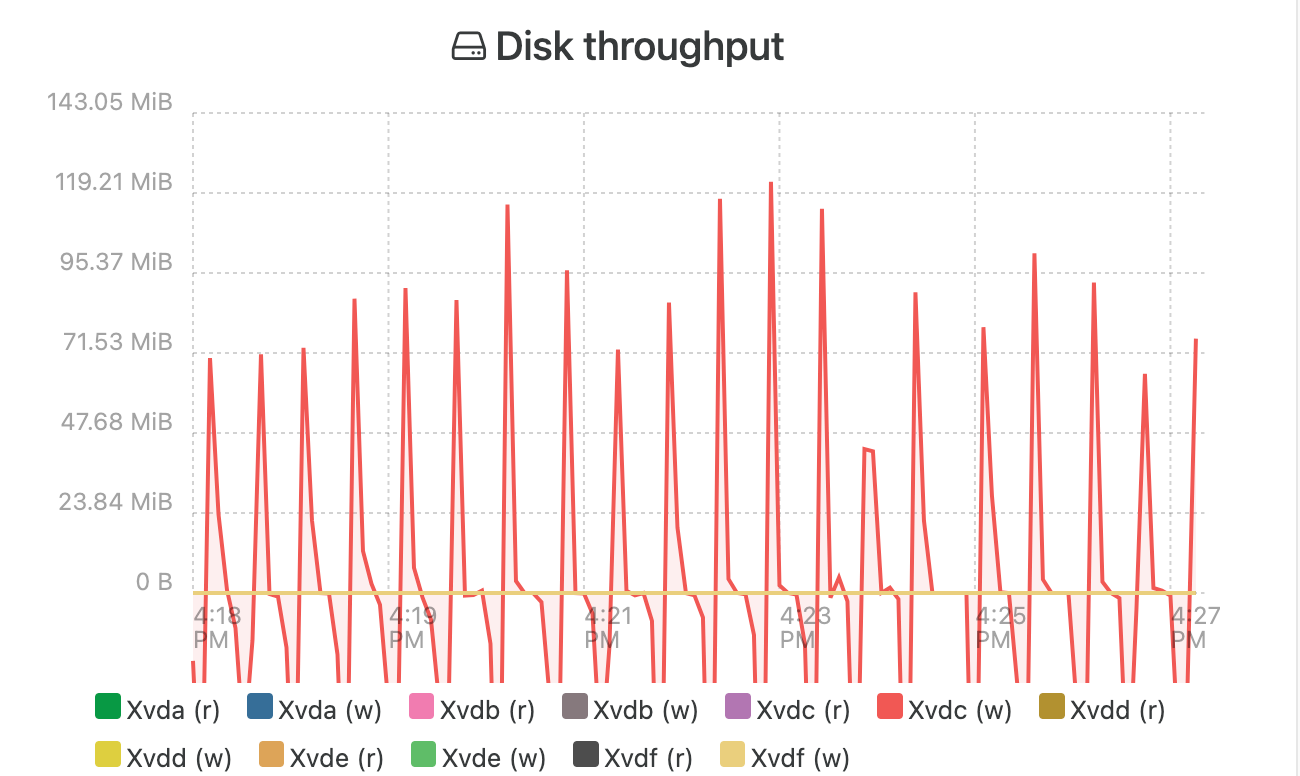
Thanks,
John
@Gheppy cool thanks. Good to see some real-world experience with a similar setup!
@olivierlambert Testing is a pain due to the resources required for this (!) and duplicating the setup, particularly as its something we were looking at as a proposal to the client atm.
I meant corruption could occur on boot up of the replicated VM as if it didn't have memory included then it would be booted like it had crashed effectively so there could be some corruption potentially from that effect.
Where does the saving of the memory occur to if its 180GB?! I.e. where do we need that 180GB of resource? Is the VM 'paused' whilst the memory is saved?
cheers
john