Installed on 3xDell PowerEdge R350 in HA. And so far, I haven't noticed anything out of the ordinary.
J
Offline
-
RE: XCP-ng 8.3 updates announcements and testing
-
RE: Building from source, now introduces local changes in typed-router.d.ts?
I noticed you merged https://github.com/vatesfr/xen-orchestra/pull/9787
I just tried it. And it does seem to fix my original issue!
Thank you! I am always impressed by you guys. Making testing and reporting upstream (to you guys) a good experience!
-
RE: Backblaze as Remote error Unsupported header 'x-amz-checksum-mode' received for this API call.
I submitted this as a GitHub issue last week.
TL;DR: Backblaze aparently doesn't support those flags that are enabled by default
"Backblaze does not yet accept these headers, so we recommend downgrading to AWS Javascript 3.x SDK version 3.728.0." -
RE: Enable Maintenance Mode = Host Not Enough Memory
@poddingue
Our HA-pool is a 3 host system, yes.I'll add a note about our plans to go paid in that feedback-item. Thanks for the tip.
In the meantime, I'm testing and reporting as much as I can. In order to hopefully help the product be better for all.Cheers!
-
RE: Enable Maintenance Mode = Host Not Enough Memory
Huh.. Good catch.
I set all of the VMs torestart, and now it does make maintenance mode possible, on the host.However, when we go into licensed/paid production (soon tm). It would be an absolute nightmare to try and find one VM that might not be on the right HA-plan... And it does kind of feel that Maintenance-mode should be compatible with whatever HA-plan is chosen regardless.
Perhaps there could be a way to assign a global/pool-wide HA-plan along with enabling HA alltogether?
Update: Shining light on that there is already a feedback-item, wishing for this kind of mass-operation for HA.
https://feedback.vates.tech/posts/45/bulk-operation-for-setting-vm-ha-option -
RE: [V2V] Without VDDK problems
Thanks for a fantasticly quick answer, and detailed as well. I will test this immediately!
Update:
I can confirm that this was indeed the problem! -
RE: Support for newer Emulex LPe37xxx amd LPe36xxx Fiber channel adapters on XCP-ng 8.3 - your testing is needed
@jr-m4 thank you so much for testing this updated driver.
Just to make sure, I understand now that you confirm the driver is working as expected and the issues you had were not related to it? Or are there any problems still with this new driver?
Many thanks again for spending the time to test and report.
Hi
Yes. I believe I was chasing a red herring of my own doing. I have not found anything actually problematic with this driver at all.
-
RE: XCP-ng 8.3 updates announcements and testing
3 pools updated. RPU went fine, where one is HA. A couple of test-backups went fine as well.
-
RE: XCP-ng 8.3 updates announcements and testing
Updated both test-pools:
old-xcp-dev&new-xcp-devBackups seem to be working fine. But I'm noticing some warnings now (See below). However, these can very well be the result of clumsy and crude troubleshooting with fixing the previous test-release symptoms.
Dashboard/Health doesn't report any issues. And I'm not seing issues with the VMs in their running state.
Backups are seemingly clearing HealthChecks as well.I will update this post in a living matter. So to not spam the forum-thread with many small posts.
Symptom 1:
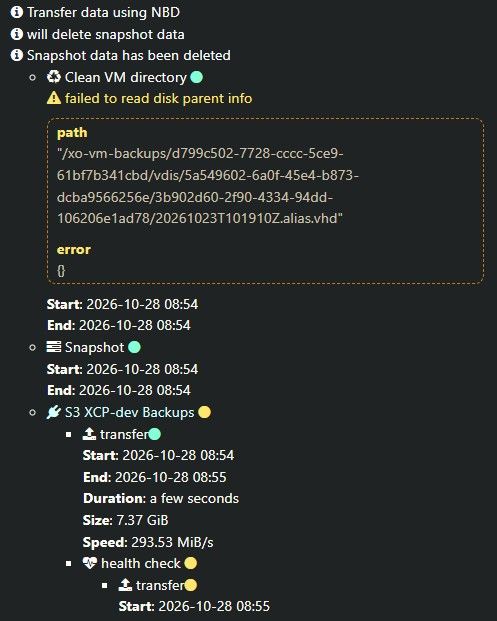
Update 1:
So the only way I could "solve" the issue, was to delete all of the backups for the VM in question. Afterwards it started behaving as expected. I haven't found anything else problematic so far. -
RE: XCP-ng 8.3 updates announcements and testing
@flakpyro Hello,
It would be preferred to use another method.
You can use theresetvdis.pyscript in the/opt/xensource/sm/to reset values instead,
usingvdi-forgetis unadvised in this case, it can cause issues by losing information that are stored in XAPI about VDIs./opt/xensource/sm/resetvdis.py single <VDI UUID>I was just about to look at maybe doing what @flakpyro suggested. More likely I would've just restored from backup. As this is dev-instances, and non-important.
But your
resetvdis.pysuggestion solved it entirely! Thanks for the quick tip!
-
RE: Rolling pool update
Are you running a pool with only 1 host inside? If so, then I believe Rolling Pool Update (RPU) isn't available.
The point of it is to have a automated way to let XO migrate VMs in the pool to the other hosts. And when the intended host (master first) is empty, it will place it in maintenance mode, and afterwards reboot it. This will then re-iterate until all hosts in the pool have been updated.
More can be found here:
https://docs.xcp-ng.org/management/updates/#from-xen-orchestra -
RE: XCP-ng 8.3 updates announcements and testing
3 pools updated. RPU went fine, where one is HA. A couple of test-backups went fine as well.
-
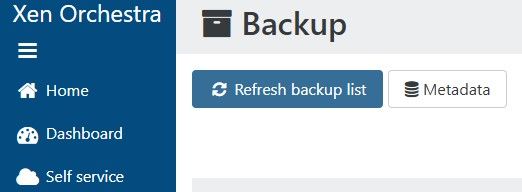
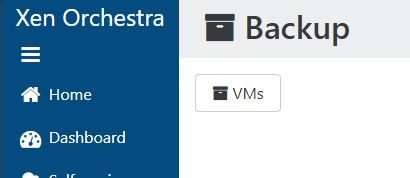
[XO5] Small UI inconsitency in Backup restore - Missing "Refresh backup list" when in Metadata-section
When you're in the
Metadatasection of the restore The button forRefresh backup listdisapears.I'm kind of expecting this to not be worked on. Due to it being so small, and in XO5. But for the interest of reporting things. I wanted to share anyways.
VS
-
RE: XCP-ng 8.3 updates announcements and testing
Updated both test-pools:
old-xcp-dev&new-xcp-devBackups seem to be working fine. But I'm noticing some warnings now (See below). However, these can very well be the result of clumsy and crude troubleshooting with fixing the previous test-release symptoms.
Dashboard/Health doesn't report any issues. And I'm not seing issues with the VMs in their running state.
Backups are seemingly clearing HealthChecks as well.I will update this post in a living matter. So to not spam the forum-thread with many small posts.
Symptom 1:
Update 1:
So the only way I could "solve" the issue, was to delete all of the backups for the VM in question. Afterwards it started behaving as expected. I haven't found anything else problematic so far. -
RE: XCP-ng 8.3 updates announcements and testing
Now trying to see if pool works with generic operations.
Trying to do a RPR on new-xcp-dev. And I'm met with
Ofcourse there are no backups being run. They are even disabled right now. And the only active task happening is "Garbage collection" on the main SR.
pool.rollingReboot
{
  "pool": "1f16dad2---------------6c8b8b7",
  "bypassBackupCheck": false,
  "shutdownPinnedVms": false
}
{
  "code": "CANNOT_EVACUATE_HOST",
  "params": [
    "VM_LACKS_FEATURE,OpaqueRef:aa5210c4-a------------1b80-9bca5d0d0f8d|OPERATION_BLOCKED,OpaqueRef:c7a08---------------a0--------------9306,VM migration is blocked during backup"
  ],
  "call": {
    "duration": 23,
    "method": "host.assert_can_evacuate",
    "params": [
      "* session id *",
      "OpaqueRef:0145019c-2a32-13bb-5951-3bca9e59e63a"
    ]
  },
  "message": "CANNOT_EVACUATE_HOST(VM_LACKS_FEATURE,OpaqueRef:aa52-----------------------9bca5d0d0f8d|OPERATION_BLOCKED,OpaqueRef:c7a0------------------------306,VM migration is blocked during backup)",
  "name": "XapiError",
  "stack": "XapiError: CANNOT_EVACUATE_HOST(VM_LACKS_FEATURE,OpaqueRef:aa521-------------------8d|OPERATION_BLOCKED,OpaqueRef:c7a08c--------------------------9306,VM migration is blocked during backup)
    at XapiError.wrap (file:///opt/xen-orchestra/packages/xen-api/_XapiError.mjs:16:12)
    at file:///opt/xen-orchestra/packages/xen-api/transports/json-rpc.mjs:38:21
    at runNextTicks (node:internal/process/task_queues:65:5)
    at processImmediate (node:internal/timers:541:9)"
}
Update:
I believe this might be related due to a VDI being orphaned, and trying to delete it results inVDI_NOT_MANAGED-error. Trying a new rescan of disks on the SR, and hopefully garbage collection will finish until Monday. Otherwise I will somehow try to forcefully destroy this VDI.Update 2:
Managed to do a RPR now.
Seems that the flag "Prevent Migration" was applied to one of the VMs. My guess is that this is applied when backups are taken. And since the backups broke with the updates. The flag never got cleared.
I did a quick visual confirmation to see that my guess of this behaviour seems correct. And it indeed sets the "Prevent migration"-flag whilst the backup runs.Running backups on my pools to see if functionality is working as intended again.
Update 3:
Maybe related, maybe not. But my backup-tests are piling up with lots ofVBD.unplug_force, that have gone on for <=30 minutes. And this is on both pools. And it seems very much so that the backup-jobs doesn't complete properly. This could also be entirely XO-related, since there has been several commits towards backups as well.Update 4:
Updated XO from source to the latest commitd2ffe, and things have not improved.
Pretty much, many actions with VDIs are problematic. I'll happily provide logs. But will only do so if I get somewhere to upload them to.
I'll be taking the weekend now. So won't be able to respond before monday, -
RE: XCP-ng 8.3 updates announcements and testing
@flakpyro Hello,
It would be preferred to use another method.
You can use theresetvdis.pyscript in the/opt/xensource/sm/to reset values instead,
usingvdi-forgetis unadvised in this case, it can cause issues by losing information that are stored in XAPI about VDIs./opt/xensource/sm/resetvdis.py single <VDI UUID>I was just about to look at maybe doing what @flakpyro suggested. More likely I would've just restored from backup. As this is dev-instances, and non-important.
But your
resetvdis.pysuggestion solved it entirely! Thanks for the quick tip! -
RE: XCP-ng 8.3 updates announcements and testing
Rebooting hosts and/or VMs doesn't solve the problems.
As @andrew said. This one got ugly. But this is also why we test stuffUpdate:
Doing a "Rescan all disks" on the SR (lvmohba), seems to help out a little bit. But not everything.
Some VMs were able to be started again. But others are still showing problems and erroring out"The VDI is not available [opterr=['MAP_DUPLICATE_KEY', 'VDI', 'sm_config', 'OpaqueRef:7---------2c1b', 'activating']]", -
RE: Support for newer Emulex LPe37xxx amd LPe36xxx Fiber channel adapters on XCP-ng 8.3 - your testing is needed
@jr-m4 thank you so much for testing this updated driver.
Just to make sure, I understand now that you confirm the driver is working as expected and the issues you had were not related to it? Or are there any problems still with this new driver?
Many thanks again for spending the time to test and report.
Hi
Yes. I believe I was chasing a red herring of my own doing. I have not found anything actually problematic with this driver at all.
-
RE: XCP-ng 8.3 updates announcements and testing
jr-m4 said:
Updated two dev-pools successfully!
new-xcp-dev: 2x Dell Inc. PowerEdge R650xs
old-xcp-dev: 3x Dell Inc. PowerEdge R350 (HA)I even mistankenly did a wrong updating order on old-xcp-dev. And neglected to disable HA before updating, leading to two hosts being updated and promoting the next master. And by chance the last master was the non-updated one. Here I disabled HA, but couldn't promote another master (not unexpected)... Post update, and everything seems to be good anyways. And HA re-enabled successfully
Note:
No further testing other than the hosts booting and showing good life signs have been done, yet.I'm now also seeing issues with backups being stuck for multiple hours.
Update: Correction. I'm now having issues with almost everything on both pools.- migrations
- snapshots
- changing status e.g. rebooting or hard shut down of VMs
-
RE: XCP-ng 8.3 updates announcements and testing
Updated two dev-pools successfully!
new-xcp-dev: 2x Dell Inc. PowerEdge R650xs
old-xcp-dev: 3x Dell Inc. PowerEdge R350 (HA)I even mistankenly did a wrong updating order on old-xcp-dev. And neglected to disable HA before updating, leading to two hosts being updated and promoting the next master. And by chance the last master was the non-updated one. Here I disabled HA, but couldn't promote another master (not unexpected)... Post update, and everything seems to be good anyways. And HA re-enabled successfully
Note:
No further testing other than the hosts booting and showing good life signs have been done, yet.