Subcategories

  • VMs, hosts, pools, networks and all other usual management tasks.

    427 Topics
    3k Posts
    P
    @stormi I really appreciate the continued help. I'm not sure it works. On my single-host pool master—the one I want to join into my half-upgraded pool—I run the command: xe host-emergency-disable-tls-verification It returns with no errors. If I do xe host-param-list and look through the parameters for my host, I see: tls-verification-enabled ( RO): false This is the only thing I see documented that can turn off TLS verification. If some other command like pool-uninstall-ca-certificate would have the effect of disabling TLS verification, I can't see that documented anywhere. In fact, even though xe pool-uninstall-ca-certificate appears to be a valid command that my xe binary knows about, I can't find that particular command documented at all. Even after the emergency-disable-tls-verification, if I attempt to join that host to the half-upgraded pool (using xe pool-join...) I get: Error code: POOL_JOINING_HOST_TLS_VERIFICATION_MISMATCH It seems like even though the host has TLS verification off, the fact that its pool has verification enabled is blocking the action.
  • ACLs, Self-service, Cloud-init, Load balancing...

    97 Topics
    818 Posts
    olivierlambertO
    October release fixed it
  • All XO backup features: full and incremental, replication, mirrors...

    438 Topics
    4k Posts
    P
    Hi, Latest XOA, with fully patched XCP 8.3 here. I'm fiddling around again with NBD+CBT in backup jobs (was avoiding CBT for a time, to reliably control my backups and avoid unnecessary KEY points) in the context of THICK SRs to spare some space. I know that CBT is reset when migrating from one SR to another. But here is what I encounter : VM has no CBT enabled on its VDIs, it is on a SHARED SR in a pool of 3 hosts backup option changed for NBD+CBT, was only NBD before CBT is enabled on the next run by the backup job, I get a delta (was expecting a FULL ?) next run, delta, as expected i migrate this VM on another HOST, without changing its SR CBT is immediatly disabled ? why ?? next run of backup it tries a delta, but "fall back to a full" (normal as CBT has been disabled...), and do a KEY point on the remote next run is a delta as expected does this mean if I do a rolling pool update or host maintenance that will move the all VMs around, all CBT will be disabled and I should expect a FALL BACK TO FULL on all my NBD+CBT enabled backup jobs ??! why disabling CBT on a change of HOST and no move of SR ?
  • Everything related to Xen Orchestra's REST API

    74 Topics
    567 Posts
    olivierlambertO
    But giving your feedback on how you solved it might help many people in the future Thanks!
  • Terraform, Packer or any tool to do IaC

    45 Topics
    424 Posts
    olivierlambertO
    The roadmap depends a lot on the feedback we have on it More demand/popular, faster we'll implement stuff
  • Some questions to VM and XO and so on

    4
    2
    0 Votes
    4 Posts
    756 Views
    M
    @olivierlambert said in Some questions to VM and XO and so on: remote in Xen Orchestra is the place Thank you so much! to 3. I think I just go with mounting the NFS or SMB share to a VM to store some data in it. to 4. Was just interested if it works @Darkbeldin Thank you for sharing this tool
  • Best Way to Backup XCP NG

    2
    0 Votes
    2 Posts
    2k Views
    DarkbeldinD
    @gojjily Hi Gojjily, Not sure i fully understand your question so let me clarify some points and perhaps you can ask some questions after that. XO allow you to make backups to what we call a remote, this remote is a network share (or local but not recommended) inside the XCP network where you can store your backups. You can also backup XCP metadata this allow you in case of a major crash of one of your host to restore the host configuration. Once your backups are setup you can restore them directly from your XO. If you want to protect further your data you could copy your backup to another place but it's not directly include in XO even if you could set two remotes for the same backup job and have you backups directly replicated hope this clarify a bit.
  • can you convert from xo compiled to XOA when ready?

    4
    0 Votes
    4 Posts
    455 Views
    olivierlambertO
    As I said, we can extend it, just ask us
  • web-hooks Keeps giving errors

    2
    0 Votes
    2 Posts
    376 Views
    olivierlambertO
    Check the Settings/logs view for more details.
  • Backup timeout with compresion

    6
    0 Votes
    6 Posts
    497 Views
    GheppyG
    Is there any option to set for timeout value? I say this because, monitoring the process, everything seems to be going well until the moment when it starts to check the free space. XCP-NG is 8.2 up to date, the disk on which the VM is it is formated as local ext. The connection to the backup server is on NFS on the LAN at a speed of 1Gb. On the iotop it seems that the space check goes with speed 650Gbits +.
  • Migrating VM fails with DUPLICATE_VM error part2

    47
    0 Votes
    47 Posts
    20k Views
    A
    @darkbeldin For the record, both vm's were running on the same esxi host when exported. This may or may not be a factor (I suspect it is).
  • Slow XOA VM download (~250KBps)

    7
    0 Votes
    7 Posts
    2k Views
    B
    @olivierlambert I've dug into the issue a bit more, and it just gets stranger. Downloading to my Macbook on the same network gets ~4MB/s. This means there is something strange going on with the control domain around remote downloads. When I test the disk speed (which is an Samsung NVMe), the speed is 1.7GB/s: [14:31 xcp-host ~]# dd if=/dev/zero of=testfile oflag=direct bs=1M count=5000 status=progress 4998561792 bytes (5.0 GB) copied, 3.000607 s, 1.7 GB/s 5000+0 records in 5000+0 records out 5242880000 bytes (5.2 GB) copied, 3.15049 s, 1.7 GB/s When I test the network speed with Ookla's speedtest-cli it confirms a 1G connection, and a 1G transit to Europe (checked this twice because 1G Atlantic transits are rare): [14:44 xcp-host ~]# speedtest -s 2023 Speedtest by Ookla Server: LaFibre.info - Lyon (id = 2023) ISP: Bell Canada Latency: 108.05 ms (0.49 ms jitter) Download: 960.47 Mbps (data used: 1.5 GB ) Upload: 172.11 Mbps (data used: 293.4 MB ) Packet Loss: 0.0% Result URL: https://www.speedtest.net/result/c/b8f1da9f-5c57-4ad8-ad3b-729e1625affe On my Macbook (on 802.11ac) I can download an Ubuntu image at ~14MB/s ➜ wget http://ubuntu.mirrors.ovh.net/ubuntu-releases/21.10/ubuntu-21.10-desktop-amd64.iso --2021-11-16 14:49:41-- http://ubuntu.mirrors.ovh.net/ubuntu-releases/21.10/ubuntu-21.10-desktop-amd64.iso Resolving ubuntu.mirrors.ovh.net (ubuntu.mirrors.ovh.net)... 213.32.5.7 Connecting to ubuntu.mirrors.ovh.net (ubuntu.mirrors.ovh.net)|213.32.5.7|:80... connected. HTTP request sent, awaiting response... 200 OK Length: 3116482560 (2.9G) [application/octet-stream] Saving to: ‘ubuntu-21.10-desktop-amd64.iso’ ubuntu-21.10-desktop-amd64.iso 3%[=> ] 107.27M 14.4MB/s eta 4m 14s However on the control domain the download speed is considerably lower: [14:52 xcp-host ~]# wget http://ubuntu.mirrors.ovh.net/ubuntu-releases/21.10/ubuntu-21.10-desktop-amd64.iso --2021-11-16 14:53:03-- http://ubuntu.mirrors.ovh.net/ubuntu-releases/21.10/ubuntu-21.10-desktop-amd64.iso Resolving ubuntu.mirrors.ovh.net (ubuntu.mirrors.ovh.net)... 213.32.5.7 Connecting to ubuntu.mirrors.ovh.net (ubuntu.mirrors.ovh.net)|213.32.5.7|:80... connected. HTTP request sent, awaiting response... 200 OK Length: 3116482560 (2.9G) [application/octet-stream] Saving to: ‘ubuntu-21.10-desktop-amd64.iso.1’ 3% [==> ] 106,910,815 3.20MB/s eta 16m 47s Have you ever see something like this before? I saw you had some discussion on another thread regarding slow writes in a VM, but this looks like it affects the control domain as well: https://xcp-ng.org/forum/topic/4865/slow-disk-writes-inside-vm-on-8-2
  • Host Time with wront time, but timezone is OK

    4
    0 Votes
    4 Posts
    1k Views
    olivierlambertO
    Well, it's a bit hard to tell you directly what to do vs XOA, because on XOA you are already on a validated OS (Debian) with some packages installed. On which OS did you install Xen Orchestra in the first place?
  • Interrupted backups left on destination

    Solved
    3
    0 Votes
    3 Posts
    522 Views
    julien-fJ
    Sorry for the huge delay, I just stumbled on this thread It's indeed the case now, XO automatically check the integrity and clean any unused files in VM directory on a remote when that VM is backed up.
  • After reboot all vms hanged.

    2
    0 Votes
    2 Posts
    414 Views
    olivierlambertO
    Hi, Try to disable/enable back the auto power on for one VM, and try again.
  • Commands in Xen Orchestra Jobs no longer working

    5
    0 Votes
    5 Posts
    1k Views
    T
    @olivierlambert said in Commands in Xen Orchestra Jobs no longer working: The best solution is to rely on XOA, you know I agree with @olivierlambert! Personally, I'm using XO from sources in my home lab environment -- nothing is "production" and I'm mostly having fun trying to give back to the open source community.
  • always getting "unhealthy VDI chain"

    3
    0 Votes
    3 Posts
    959 Views
    I
    @Danp - thank you. Yes, I did, but that was not helping in this case. Found the solution: Both machines are on a hostserver, which has NOT all networks. So the real reason must be a network problem, therefore a quite missleading error message After moving both VMs to the master of this pool (which is connected to the same network where the xoa resides), everything went fine. Same storage, same vhds.
  • Backing up to NFS share on ZFS

    9
    0 Votes
    9 Posts
    2k Views
    IndyJI
    @indyj The file restore issue was due to installing XO on FreeBSD (fine for VM restores, not file extraction). I then installed XO on Ubuntu 20, and this worked for restoring files from Linux VMs but not Windows VMs. Then I installed on CentOS 8 and had the same problem as Ubuntu. I then installed on Fedora 34 and everthing works fine.
  • Backblaze B2 as a backup remote

    7
    0 Votes
    7 Posts
    2k Views
    olivierlambertO
    Just hold on for this month release
  • Automatic backup verification

    feature in backlog
    11
    1 Votes
    11 Posts
    2k Views
    julien-fJ
    Yes, it should be safe enough to try importing the backup, then starting the VM without network (ie VIFs) and see if it stays up for a few minutes. I think we could start by adding a manual feature and then see in a second step how we could automate it.
  • XOCE Integration with OpenLDAP

    41
    0 Votes
    41 Posts
    15k Views
    olivierlambertO
    Also, the user will be created only on first connection. Maybe you are thinking about the plugin in a way that's not how it behave.
  • Restored Backups Do Not Boot

    backup
    8
    0 Votes
    8 Posts
    2k Views
    olivierlambertO
    Sure, please keep us posted on your experiments If it's a bug, we'll have more info to be able to work on it!
  • XOA Report

    3
    0 Votes
    3 Posts
    623 Views
    A
    @olivierlambert many thanks for the very quick response, it is indeed XO from sources. I think the burst explanation makes sense. Also, thanks for you and your teams continued development and support with both XCP-NG and XO.
  • Backups failed after changing masters?

    6
    0 Votes
    6 Posts
    996 Views
    olivierlambertO
    Source: https://github.com/vatesfr/xen-orchestra/issues/5969 olivierlambert created this issue in vatesfr/xen-orchestra closed Save all associated host IPs to a pool and use them as fallback for XAPI connection #5969
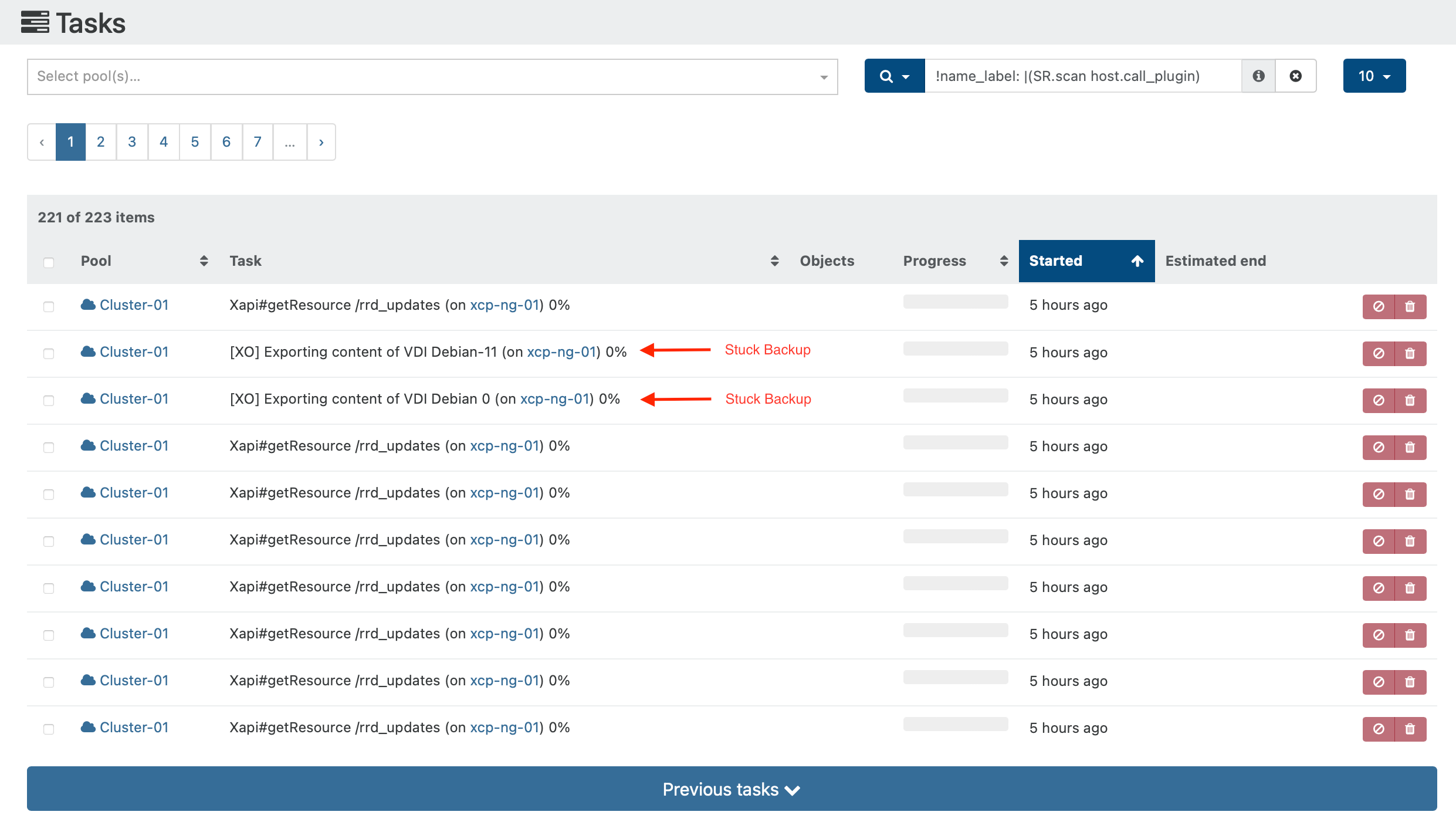
  • Lots of Tasks: Xapi#getResource /rrd_updates (on **masterhost**) 0%

    19
    0 Votes
    19 Posts
    3k Views
    stormiS
    And the IRC channel is #xcp-ng on oftc.net if you prefer IRC.