XCP-ng 8.3 updates announcements and testing
-
Great Idea!
Post updated !
Update: I also added 'Automatic Backup' which backs up your original file in case something goes wrong.
-
New security and maintenance update candidates for you to test!
Security vulnerabilities have been detected and fixed for xen and varstored. We also publish other non-urgent updates which we had in the pipe for the next update release.
Security updates:
-
xen:- XSA-477 / VSA-2026-001: A buffer overflow in the Xen shadow tracing code could allow a DomU virtual machine to crash Xen, or potentially escalate privileges.
- XSA-479 / VSA-2026-003: Some Xen optimizations to avoid clearing internal CPU buffers when not required could allow one guest to leak data of another guest. A mitigation can be applied without the fix by rebooting vulnerable Xen with "spec-ctrl=ibpb-entry=hvm,ibpb-entry=pv" on the Xen command line at the cost of decreased performances.
-
varstored:- XSA-478 / VSA-2026-002: Within varstored, there were insufficient compiler barriers, creating TOCTOU issues with data in the shared buffer. An attacker with kernel level access in a VM can escalate privilege via gaining code execution within varstored.
Maintenance updates:
-
guest-templates-json:- Update VM template labels
- Sync RHEL10 template with XenServer's
-
intel-microcode:- Update to publicly released microcode-20251111
- Updates for multiple functional issues
-
kernel: Bug fixes in the NFS and NBD stacks for various deadlocks and other race conditions. -
qemu: Backport for CVE-2021-3929, fixing a DMA reentrancy flaw in NVMe emulation, that could lead to use-after-free from a malicious guest and potential arbitrary code execution. -
smartmontools: Update to minor release 7.5 -
swtpm: Synchronize with release 0.7.3-12 from XenServer. No functional changes. -
xapi: Fix regression on dynamic memory management during live migration, causing VMs not to balloon down before the migration. -
xcp-ng-release: Prevent remote syslog from being overwritten by system updates.
XOSTOR
In addition to the changes in common packages, the following XOSTOR-specific packages received updates:drbd: Reduces the I/O load and time during resync.drbd-reactor: Misc improvements regarding drbd-reactor and eventslinstor:- Resource delete: Fixed rare race condition where a delayed DRBD event causes "resource not found" ErrorReports
- Misc changes to robustify LINSTOR API calls and checks
If you are using Xostor, please refer to our documentation for the update method.
Test on XCP-ng 8.3
yum clean metadata --enablerepo=xcp-ng-testing,xcp-ng-candidates
yum update --enablerepo=xcp-ng-testing,xcp-ng-candidates
reboot
The usual update rules apply: pool coordinator first, etc.
Versions:
guest-templates-json: 2.0.15-1.1.xcpng8.3intel-microcode: 20251029-1.xcpng8.3kernel: 4.19.19-8.0.44.1.xcpng8.3qemu: 4.2.1-5.2.15.2.xcpng8.3smartmontools: 7.5-1.xcpng8.3swtpm: 0.7.3-12.xcpng8.3xapi: 25.33.1-2.3.xcpng8.3xcp-ng-release: 8.3.0-36xcp-python-libs: 3.0.10-1.1.xcpng8.3xen: 4.17.5-23.2.xcpng8.3varstored: 1.2.0-3.5.xcpng8.3
XOSTOR
drbd: 9.33.0-1.el7_9drbd-reactor: 1.9.0-1kmod-drbd: 9.2.16-1.0.xcpng8.3linstor: 1.33.0~rc.2-1.el8linstor-client: 1.27.0-1.xcpng8.3python-linstor: 1.27.0-1.xcpng8.3xcp-ng-linstor: 1.2-4.xcpng8.3
What to test
Normal use and anything else you want to test.
Test window before official release of the updates
2 days max.
-
-
Installed on my usual selection of hosts. (A mixture of AMD and Intel hosts, SuperMicro, Asus, and Minisforum). No issues after a reboot, PCI Passthru, backups, etc continue to work smoothly
-
@gduperrey Standard XCP 8.3 pools updated and running.
-
Thank you everyone for your tests and your feedback!
The updates are live now: https://xcp-ng.org/blog/2026/01/29/january-2026-security-and-maintenance-updates-for-xcp-ng-8-3-lts/
-
D dcskinner referenced this topic on
-
@gduperrey updated 2 hosts @home. 5 @office.
Had to run yum clean metadata ; yum update on cli (cancelling to run RPU in XO) for updates to appear. -
@gduperrey we had the XOA update alert, upgraded to XOA 6.1.0
but no sign of XCP hosts updates ?
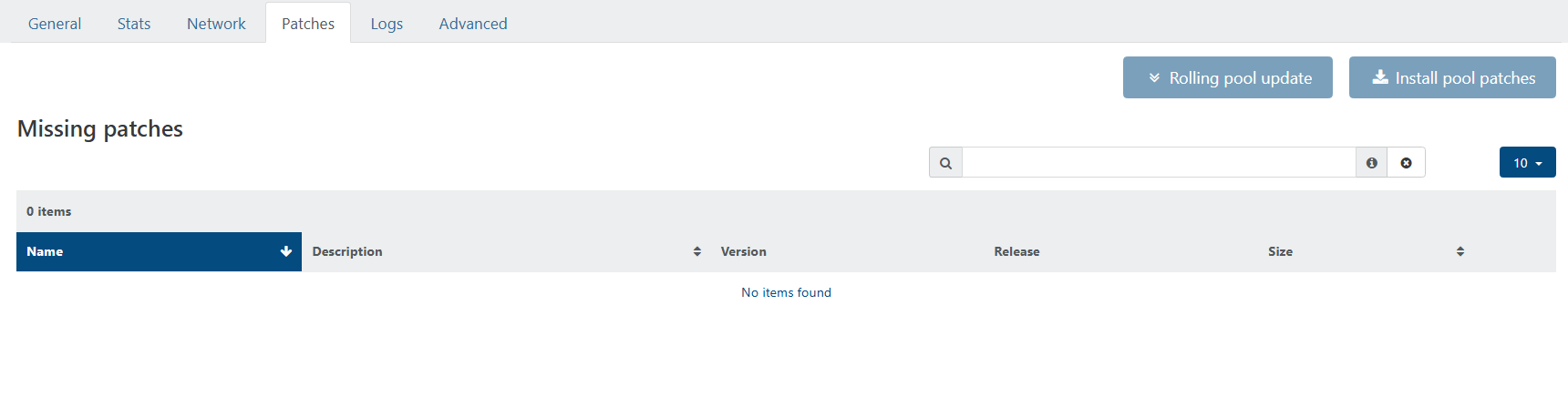
When patches are available, it usually pops up on its own, is there something to do on cli now ?
EDIT : my bad, we had a DNS resolution problem... I now see a bunch of updates available...
-
Yesterday, from memory: Up-to-date XO (CE) said there were Pool updates available, but the three individual XCP-ng hosts showed nothing available. I went to https://xcp-ng.org/blog/tag/security/ and did not see any new patches published for January, and I feared that the previous updates from October had somehow not been fully installed. I put hosts into Maintenance Mode and rebooted them, and patches were seemingly installed as part of the reboot. I don't recall if I rebooted (and therefore patched) the Master first or not as you are supposed to do. This was a bit unsettling.
As of this morning, Central Time US, for our three-node XS 8.4 Pool also managed by the same XO (CE), I see patches available in XO both at the Pool level and at the Host level as expected. (Yesterday, I did not see any patches reported by XO for our XS 8.4 Pool.)
-
@robertblissitt You can check
/var/log/yum.logon the XCP-ng hosts to see when the updates were actually applied, but there isn't anything in a standard installation of XO / XCP-ng that would trigger an "automated" update of missing patches. -
@Danp Thank you, and I could easily be misremembering how the patches got installed - I may have clicked a button (at the Host level?) to install them even though I could not see any to install. The other events I mention, however, I am more certain of.
-
applied latest patches to my two host pool without issue.
-
currently having heavy issues with a production cluster of 3 hosts
RPU launched, all VMs except one did evacuate the Master. we managed to shutdown this VM/restart it on another host
we had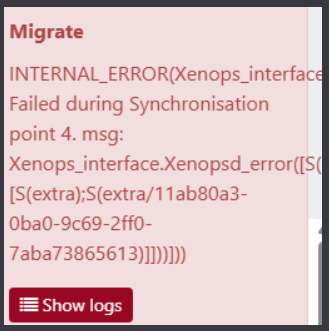
Master patch & reboot proceeded
Then RPU tried to evacuate a slave host and all VM are now locked we can't shutdown/hard shutdown them,
we have a critical VM on this host that is still running, we tried to snapshot it in case of need of hard reboot of the host, but OPERATION NOT SUPPORTED DURING AN UPGRADE
we manually install patches on the host without reboot and then snapshot proceeded
I hope this VM is secured by this snapshot...ticket is open with pro support but quite stalled for now... no news since yesterday Ticket#7751752
-
That's a weird one
 Ping @Team-Hypervisor-Kernel
 -
@olivierlambert shoutout to @danp that did a takeover of the incident ticket
he headed me the right way to resolution of the problem, my production pool is back up & running with its VMs.
there was indeed a diff between what was seen by "xl list"/"xenops-cli list" and what was seen by XOA in the web ui.
a couple "xl destroy pid" to destroy zombie VMs, and toolstack restarts later, all is now up.I don't know how the hell a simple RPU did get me in this situation though...
-
Oh wow. Indeed, that's strange. And big kudos to @danp then!!
-
@Pilow I've been wondering lately if I should do a Rolling Pool Reboot before any Rolling Pool Update. This might allow me to identify problems in advance and I would also be installing the patches on freshly-rebooted hosts.
-
@robertblissitt yup, afterward this seems to be a good best practice...
my hosts were up for 4 month, and because of DNS resolution problem had 77 patches to catch up (80 for one with advanced telemetry enabled)a rolling reboot would have probably put in front the initial migration/evacuation problem (and subsequent zombies VMs)
and no patches applied, and no pool in a semi upgraded state
note to my future self, try a rolling reboot first.
-
New security and maintenance update candidates for you to test!
The whole platform has been hardened with crypto libraries updates.
We also publish other non-urgent updates which we had in the pipe for the next update release.Important notice
 ️ Xen Orchestra's
 sdn_controllerusers should be aware that OpenSSL was updated to major version 3, causing XCP-ng to reject previously generated self-signed certificates for the SDN Controller: they must be updated manually, accordingly to the guide's procedure.User feedback is valuable to all, feel free to report success or ask for clarification in the related forum thread.
What changed
OpenSSL and OpenSSH major version update
openssl: Update to 3.0.9- The OpenSSL 3 upgrade is improving the security and maintainability of the system, but has impact regarding certificates generation in
sdn_controller, as documented above. - To enable backward compatibility with older deprecated APIs, a new package,
openssl-compat-10has been introduced.
- The OpenSSL 3 upgrade is improving the security and maintainability of the system, but has impact regarding certificates generation in
openssh: Update to 9.8p1- Note that older ssh-clients (with weak ciphers) will need to update, if connection is rejected.
libssh2: Update to 1.11.0
Maintenance updates
Virtualization & System
xen: Update to 4.17.6qemu: Bug fixes- qemu would crash when a framebuffer is relocated on a migrated HVM guest.
- A race condition could cause events to be sent before capabilities negotiation.
varstored: Update to 1.3.1- No further functional change from 1.2.0-3.5 (Fixes for XSA-478 / CVE-2025-58151 were backported).
- Just syncing with XenServer, rebuilt with openssl-3.
Control plane
xapi: Update to 26.1.3- User agents of clients are now tracked. Fetchable by using
Host.get_tracked_user_agents. - Now it's possible to delete a VM with a snapshot that has a vTPM associated.
- Speed up exports for mostly empty disks.
- Now the tags of VDIs are copied when they are cloned or snapshotted done.
- Fixed RPU scenario where pool members don't get enabled.
- Added API for controlling NTP.
- Fixed falling back to full backups instead of delta backups in cases where a VM was hosted in a local SR with more than 256 disks. This could also cause migrations to fail.
- Added API to limit the number of VNC connections to a single VM.
- User agents of clients are now tracked. Fetchable by using
UI
xolite: Update to 0.19.0- [VM/New] Added vTPM support.
- [VM/New] Fix wording in "Memory" section.
- [TreeView] Scroll to current item in list view.
- ChangeLog
Storage
sm: Bug fixes- Improve Robustness FileSR GC when a host is offline.
- Ensure LVM VDI is always active before relink.
- Remove GC flag DB_GC_NO_SPACE when necessary to avoid errors.
- Improve error messages when vdi_type is missing on LVM VDIs.
blktap: Bug fix- Fixes a crash happening when scanning a SR with corrupt VHDs.
lvm2: Update to 2.02.180- Add scini device support (Dell PowerFlex).
Network
netsnmp: Update to 5.9.3openvswitch:- Rebuild with openssl-3 plus minor maintenance change.
gnutls: Remove dane tool
Misc
xcp-ng-release: UX improvement- The shell command history now record timestamps to improve consumer support.
createrepo_c: Update to 0.21.1krb5: Synchronized with XenServer 8.4 and rebuilt for OpenSSL 3.ipmitool: Update to 1.8.19libarchive: Update to 3.6.1trousers: Update to 0.3.15 and rebuild for OpenSSL 3.- This version includes security fixes for known vulnerabilities in earlier upstream version, deemed not exploitable realistically on XCP-ng.
wget: Update to 1.21.4
Note that libraries updates (libopenssl, notably) impacted several other packages which had to be rebuilt (some had to be patched too). Refer to the package list below.
Drivers updates (check details below)
More information about drivers and current versions is maintained on the drivers wiki page.
broadcom-bnxt-en: Update to v1.10.3_237.1.20.0- No functional changes expected.
intel-i40e: Update to 2.25.11- PTP-related kernel crash bugfixes for Intel i40e driver version 2.25.11.
- ️ Google for the "intel <model-name> compatibility matrix" and make sure to update the non-volatile memory in NIC with the matching NVM version, after updating the driver.
- This is also applicable for the
intel-i40e-altflavour of the driver package.
intel-ixgbe: Update to 6.2.5- More Ethernet PCI Express 10 Gigabit Intel NIC devices are handled (E600 et E610 series).
XOSTOR
In addition to the changes in common packages, the following XOSTOR-specific packages received updates:
drbd: Reduce the I/O load and time during resync.drbd-reactor: Misc improvements regarding drbd-reactor and events.linstor:- Resource delete: Fixed rare race condition where a delayed DRBD event causes "resource not found.
- Misc changes to improve robustness LINSTOR API calls and checks.
sm:- Wait for DRBD UpToDate state during LINSTOR VDI resize.
- Improve LINSTOR error messages in the case of an excessively long VDI resize.
- Simplify LINSTOR SR scan logic removing XAPI calls.
- Use worker threads during LINSTOR SR's scan to improve performance.
- Ensure a XOSTOR volume can't be destroyed if used by any process (outside of the SMAPI environment).
- Use
ssto obtain the controller IP: it's a significant improvement to avoid relying on DRBD commands or XAPI plugins. - Avoid issuing errors if the size of a LINSTOR volume cannot be fetched after a bad delete call.
python-linstor: updated to version 1.27.1. LINBIT's changelog:- "Added api method to check the controller’s current encryption state (locked/unlocked/unset)"
linstor-client: updated to version 1.27.1. LINBIT's changelog:- "Added new alias
--drbd-disklessto commandr tdto mimic the option fromr c. - "Added new sub-command
encryption statusto show the current locked-state of the controller.
- "Added new alias
Versions:
bind: 32:9.9.4-61.el7_5.1 -> 32:9.9.4-63.1.xcpng8.3blktap: 3.55.5-6.1.xcpng8.3 -> 3.55.5-6.3.xcpng8.3broadcom-bnxt-en: 1.10.3_232.0.155.5-1.xcpng8.3 -> 1.10.3_237.1.20.0-8.1.xcpng8.3coreutils: 8.22-21.el7 -> 8.22-22.xcpng8.3createrepo_c: 0.10.0-6.el7 -> 0.21.1-3.xcpng8.3curl: 8.9.1-5.1.xcpng8.3 -> 8.9.1-5.2.xcpng8.3gnutls: 3.3.29-9.el7_6 -> 3.3.29-10.1.xcpng8.3gpumon: 24.1.0-71.1.xcpng8.3 -> 24.1.0-83.2.xcpng8.3intel-i40e: 2.25.11-2.xcpng8.3 -> 2.25.11-4.xcpng8.3intel-ixgbe: 5.18.6-1.xcpng8.3 -> 6.2.5-1.xcpng8.3intel-microcode: 20251029-1.xcpng8.3 -> 20260115-1.xcpng8.3ipmitool: 1.8.18-7.el7 -> 1.8.19-11.1.xcpng8.3iputils: 20160308-10.el7 -> 20160308-10.1.xcpng8.3krb5: 1.15.1-19.el7 -> 1.15.1-22.1.xcpng8.3libarchive: 3.3.3-1.1.xcpng8.3 -> 3.6.1-4.1.xcpng8.3libevent: 2.0.21-4.el7 -> 2.0.21-4.1.xcpng8.3libssh2: 1.4.3-10.el7_2.1 -> 1.11.0-1.xcpng8.3libtpms: 0.9.6-3.xcpng8.3 -> 0.9.6-3.1.xcpng8.3lvm2: 7:1.02.149-18.2.1.xcpng8.3 -> 7:2.02.180-18.3.1.xcpng8.3mdadm: 4.0-13.el7 -> 4.2-5.xcpng8.3net-snmp: 1:5.7.2-52.1.xcpng8.3 -> 1:5.9.3-8.1.xcpng8.3openssh: 7.4p1-23.3.3.xcpng8.3 -> 9.8p1-1.2.1.xcpng8.3openssl: 1:1.0.2k-26.2.xcpng8.3 -> 1:3.0.9-2.0.1.3.xcpng8.3openvswitch: 2.17.7-2.1.xcpng8.3 -> 2.17.7-4.1.xcpng8.3python: 2.7.5-90.el7 -> 2.7.5-92.1.xcpng8.3python3: 3.6.8-18.el7 -> 3.6.8-20.xcpng8.3python-pycurl: 7.19.0-19.el7 -> 7.19.0-19.1.xcpng8.3qemu: 2:4.2.1-5.2.15.2.xcpng8.3 -> 2:4.2.1-5.2.17.1.xcpng8.3rsync: 3.4.1-1.1.xcpng8.3 -> 3.4.1-1.2.xcpng8.3samba: 4.10.16-25.2.xcpng8.3 -> 4.10.16-25.3.xcpng8.3sm: 3.2.12-16.1.xcpng8.3 -> 3.2.12-17.1.xcpng8.3ssmtp: 2.64-14.el7 -> 2.64-14.1.xcpng8.3stunnel: 5.60-4.xcpng8.3 -> 5.60-5.xcpng8.3sudo: 1.9.15-4.1.xcpng8.3 -> 1.9.15-5.1.xcpng8.3swtpm: 0.7.3-12.xcpng8.3 -> 0.7.3-12.1.xcpng8.3tcpdump: 14:4.9.2-3.el7 -> 14:4.9.2-3.1.xcpng8.3trousers: 0.3.14-2.el7 -> 0.3.15-11.1.xcpng8.3varstored: 1.2.0-3.5.xcpng8.3 -> 1.3.1-2.1.xcpng8.3wget: 1.14-15.el7_4.1 -> 1.21.4-1.1.xcpng8.3xapi: 25.33.1-2.3.xcpng8.3 -> 26.1.3-1.3.xcpng8.3xcp-featured: 1.1.8-3.xcpng8.3 -> 1.1.8-6.xcpng8.3xcp-ng-release: 8.3.0-36 -> 8.3.0-37xen: 4.17.5-23.2.xcpng8.3 -> 4.17.6-2.1.xcpng8.3xo-lite: 0.17.0-1.xcpng8.3 -> 0.19.0-1.xcpng8.3
XOSTOR:
linstor: 1.33.1-1.el7_9linstor-client: 1.27.1-1.xcpng8.3python-linstor: 1.27.1-1.xcpng8.3xcp-ng-linstor: 1.2-6.xcpng8.3
Optional packages:
iperf3: 3.9-13.1.xcpng8.3ldns: 1.7.0-21.1.xcpng8.3socat: 1.7.4.1-6.1.xcpng8.3
Test on XCP-ng 8.3
If you are using XOSTOR, please refer to our documentation for the update method.
If you are using XenOrchestra's SDN controller please apply the OpenSSL upgrade procedure.
yum clean metadata --enablerepo=xcp-ng-testing,xcp-ng-candidates
yum update --enablerepo=xcp-ng-testing,xcp-ng-candidates
reboot
The usual update rules apply: pool coordinator first, etc.
What to test
- XAPI tests:
- Check that the NTP servers used by hosts are set to Factory, test changing them to DHCP, or Custom.
- Check that the console limit is 0 by default, test changing it to 1, and set a timeout.
- System: Check updated tools (ssh, wget, samba, mdadm...)
- Normal use and anything else you want to test.
Test window before official release of the updates
~1 week
-
 R rzr referenced this topic on
-
Installed on my usual selection of hosts. (A mixture of AMD and Intel hosts, SuperMicro, Asus, and Minisforum). No issues after a reboot, PCI Passthru, backups, etc continue to work smoothly. Also installed on a HP GL325 Gen 10 with no issues after reboot.
-
Well I was and still is on v0.19.0:
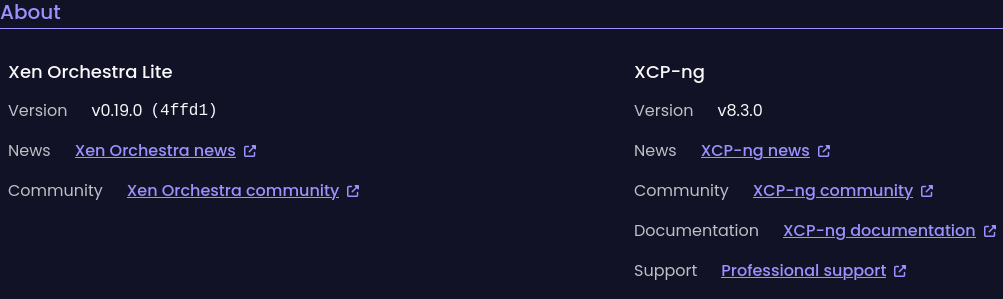
I am running an old AMD Ryzen 5 2400GE homelab with NFS
no XOSTOR or SDN.
Tested NTP Def and dhcp, ssh, wget, cont. repl. ...
all worked fine so far.





Hello! It looks like you're interested in this conversation, but you don't have an account yet.
Getting fed up of having to scroll through the same posts each visit? When you register for an account, you'll always come back to exactly where you were before, and choose to be notified of new replies (either via email, or push notification). You'll also be able to save bookmarks and upvote posts to show your appreciation to other community members.
With your input, this post could be even better 💗
Register Login