XCP-ng
    • Categories
    • Recent
    • Tags
    • Popular
    • Users
    • Groups
    • Register
    • Login

    Trying to enable v2v and difficulty adding nbdinfo on xo 6

    Scheduled Pinned Locked Moved Migrate to XCP-ng
    15 Posts 6 Posters 441 Views 5 Watching
    Loading More Posts
    • Oldest to Newest
    • Newest to Oldest
    • Most Votes
    Reply
    • Reply as topic
    Log in to reply
    This topic has been deleted. Only users with topic management privileges can see it.
    • DanpD Offline
      Danp Pro Support Team @edsilber
      last edited by Danp

      @edsilber said:

      you have held broken packages

      Have you tried running yum clean and then retrying the install process?

      You are running XO from sources, correct? What OS version?

      Edit:

      Oh, I see you are running a very old deployment of XOA. Deploy a new instance of the appliance and then the package issues will be resolved.

      acebmxerA 1 Reply Last reply Reply Quote 1
      • acebmxerA Offline
        acebmxer @Danp
        last edited by acebmxer

        Found issue in my script all seems to be working now for me just no vmware vm to test import on 😞

        C 1 Reply Last reply Reply Quote 1
        • C Offline
          CGB @acebmxer
          last edited by

          Hi, I have the same problem. Everything is installed but still the error for importing VM from VMware. I've updated my XOv5 to the last version but i'm still blocked.

          acebmxerA E 2 Replies Last reply Reply Quote 0
          • olivierlambertO Offline
            olivierlambert Vates 🪐 Co-Founder CEO
            last edited by

            Hi,

            Can you be more specific on the error you have?

            1 Reply Last reply Reply Quote 0
            • acebmxerA Offline
              acebmxer @CGB
              last edited by

              @CGB
              Are you using XOA or XO from sources? If from sources, who's script did you use to deploy? Also if from source what commit are you on?

              1 Reply Last reply Reply Quote 0
              • acebmxerA acebmxer referenced this topic
              • E Offline
                edsilber @CGB
                last edited by

                @CGB Just refreshing XOA and the console didn't do it. I had to redeploy the XO appliance. Newer debian and binaries. export your config.toml and follow the steps like you are deploying a new xoa

                1 Reply Last reply Reply Quote 0
                • C Offline
                  CGB
                  last edited by

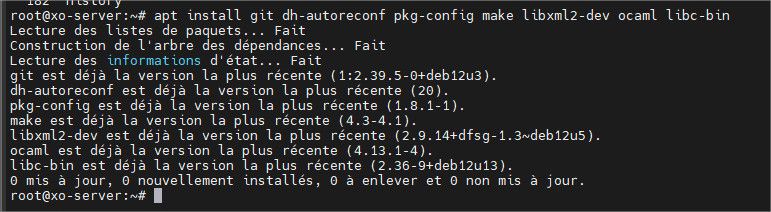
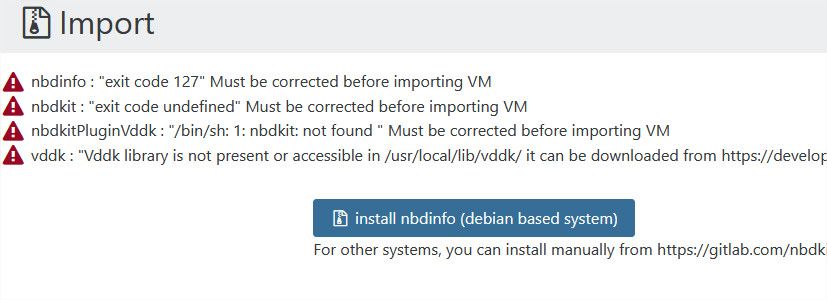
                  @olivierlambert It looks like I cant' use the VM from VMware option because it can't see that the dependencies are already installed.
                  15293415-8c29-4081-bd19-eeee9ad90abe-image.jpeg
                  77805d17-0e05-4d7c-8e4a-175c9bc79c3f-image.jpeg

                  @acebmxer I use XO from sources on Debian 12.

                  @edsilber I will try something before, and if it doesn't work, I'll do what you say. Thank you

                  P 1 Reply Last reply Reply Quote 0
                  • P Offline
                    pierrebrunet Vates 🪐 XO Team @CGB
                    last edited by

                    @CGB Hi, are you running XO from source with root or another user?
                    If it is another user, it may be not accessible from it

                    acebmxerA 1 Reply Last reply Reply Quote 0
                    • acebmxerA Offline
                      acebmxer @pierrebrunet
                      last edited by acebmxer

                      @pierrebrunet said:

                      @CGB Hi, are you running XO from source with root or another user?
                      If it is another user, it may be not accessible from it

                      That is what i was able to determine what is going on with my script. - https://xcp-ng.org/forum/post/105965

                      when using root user button works just fine. If using non-root user the button will never work as it assumes root will use it. I am not sure how other scripts handle this issue.

                      1 Reply Last reply Reply Quote 0
                      • C Offline
                        CGB
                        last edited by

                        Hi, everyone

                        Thank you for your help.

                        I had a flux that was blocked by our firewall. The button worked after that.

                        But it doesn't explain why I lost this configuration and had to reinstall it.

                        Thanks again.

                        1 Reply Last reply Reply Quote 0

                        Hello! It looks like you're interested in this conversation, but you don't have an account yet.

                        Getting fed up of having to scroll through the same posts each visit? When you register for an account, you'll always come back to exactly where you were before, and choose to be notified of new replies (either via email, or push notification). You'll also be able to save bookmarks and upvote posts to show your appreciation to other community members.

                        With your input, this post could be even better 💗

                        Register Login
                        • First post
                          Last post