XCP-ng
    • Categories
    • Recent
    • Tags
    • Popular
    • Users
    • Groups
    • Register
    • Login

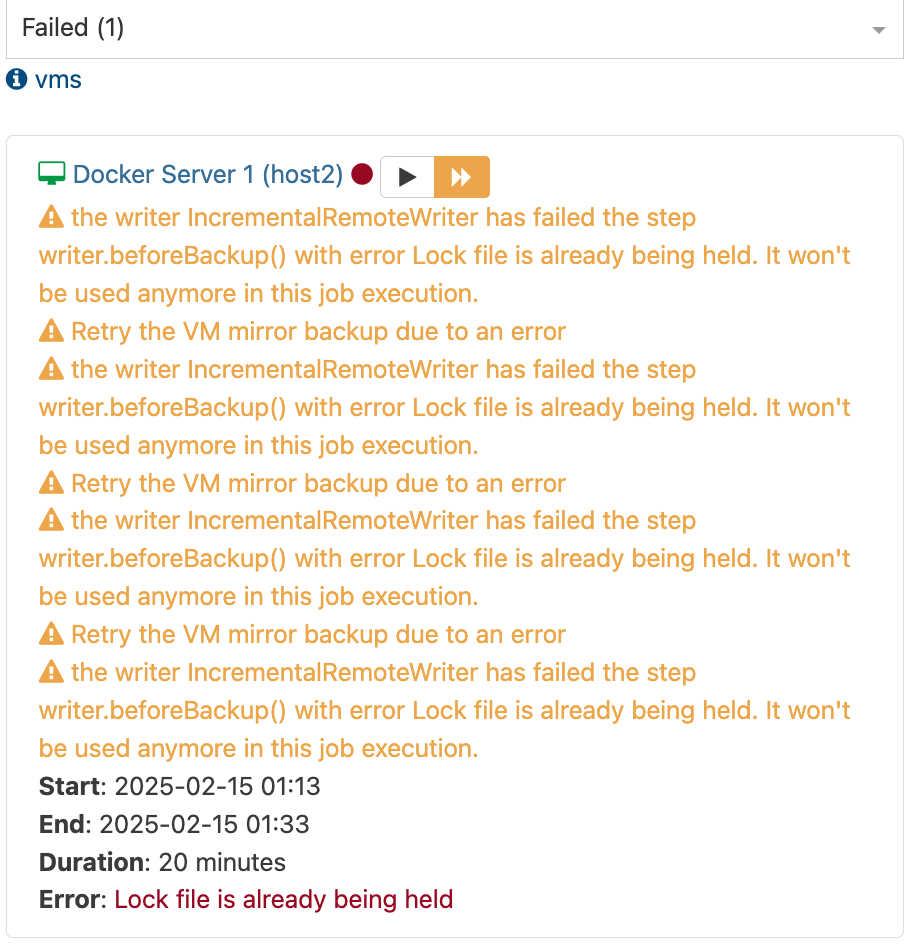
    the writer IncrementalRemoteWriter has failed the step writer.beforeBackup() with error Lock file is already being held. It won't be used anymore in this job execution.

    Scheduled Pinned Locked Moved Backup
    35 Posts 6 Posters 9.6k Views 5 Watching
    Loading More Posts
    • Oldest to Newest
    • Newest to Oldest
    • Most Votes
    Reply
    • Reply as topic
    Log in to reply
    This topic has been deleted. Only users with topic management privileges can see it.
    • olivierlambertO
      olivierlambert Vates 🪐 Co-Founder CEO
      last edited by olivierlambert

      I'm not sure to understand, why two different commit numbers?

      M 1 Reply Last reply
      Reply Quote 0
      • M
        manilx @olivierlambert
        last edited by

        @olivierlambert That's the last update I did yesterday.....

        Just updated now to latest: Xen Orchestra, commit ef636
        Master, commit ef636

        1 Reply Last reply
        Reply Quote 0
        • olivierlambertO
          olivierlambert Vates 🪐 Co-Founder CEO
          last edited by

          Do you have the issue on XOA?

          M 1 Reply Last reply
          Reply Quote 0
          • M
            manilx @olivierlambert
            last edited by manilx

            @olivierlambert @Business with XOA no. Only HomeLab with XO but it has been rockstable until this.

            1 Reply Last reply
            Reply Quote 0
            • florentF
              florent Vates 🪐 XO Team
              last edited by

              this happens when 2 backup jobs are working on the same VM , or a backup and a background merge worker .
              If it's the first case, you can use a job sequence to ensure the backup run one after another

              If it's the latter, you have a check box to ensure the merge is done directly inside the job (bottom of the advanced settings of the backup job ), instead of doing this in a background job. It will slow down a little the job, but ensure it's completely done.

              M 1 Reply Last reply
              Reply Quote 0
              • M
                manilx @florent
                last edited by

                @florent No other backup is running as I mentioned!

                And "Merge backups synchronously" is on as mentioned.

                This is not it.....

                florentF 1 Reply Last reply
                Reply Quote 0
                • florentF
                  florent Vates 🪐 XO Team @manilx
                  last edited by

                  @manilx are there multiple job running on the same VM ?

                  M 1 Reply Last reply
                  Reply Quote 0
                  • M
                    manilx @florent
                    last edited by manilx

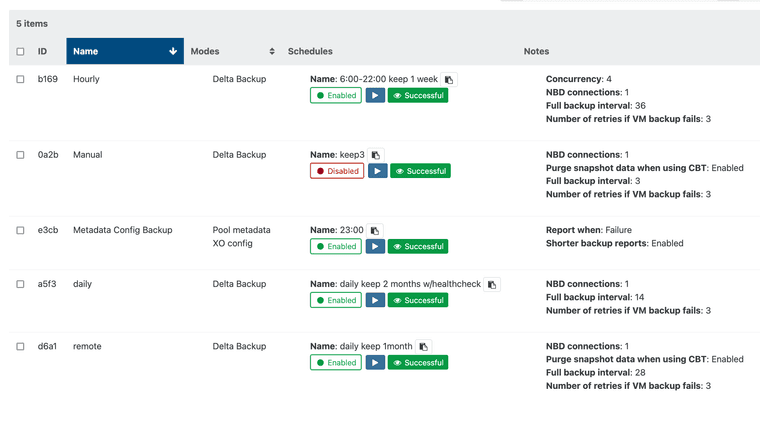
                    @florent Only one single backup job every 2hrs (multiple VM's). Running fore more than 1year without issues (not counting the initianl cbt stuff).

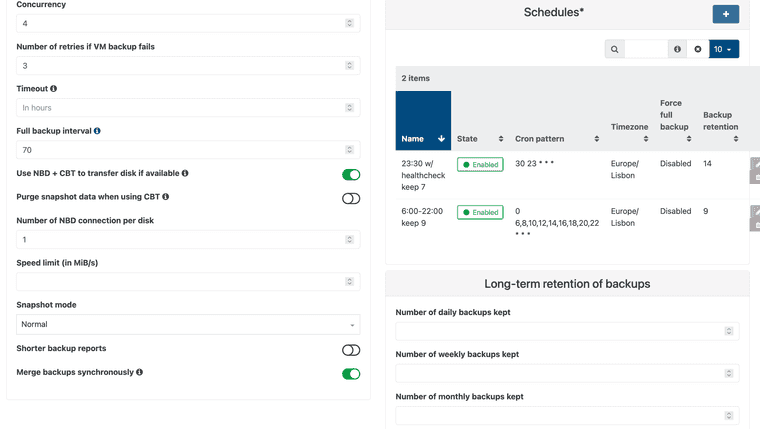
                    ScreenShot 2025-02-14 at 13.43.59.png

                    ScreenShot 2025-02-14 at 13.45.27.png

                    M 1 Reply Last reply
                    Reply Quote 0
                    • M
                      manilx @manilx
                      last edited by

                      @florent This make no sense. There has to be some leftover sometimes of a lock file.
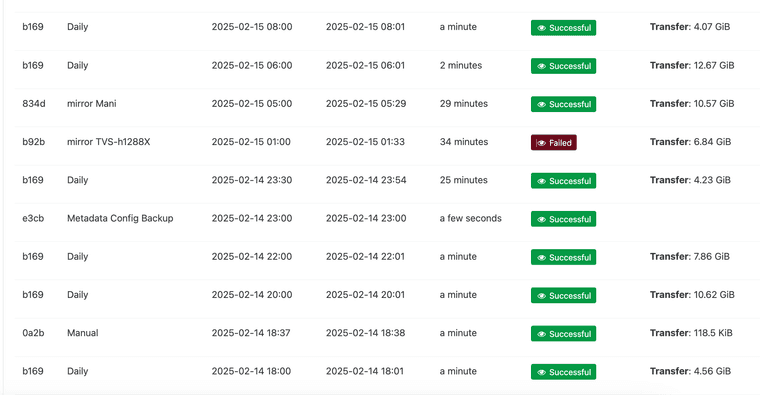
                      ScreenShot 2025-02-15 at 09.43.16.png ScreenShot 2025-02-15 at 09.43.25.png

                      1 Reply Last reply
                      Reply Quote 0
                      • SudoOracleS
                        SudoOracle
                        last edited by

                        So I started getting this a few days ago as well. My backups have been fine for over a year until now, they are constantly failing at random. They will usually succeed just fine if I restart the failed backup. I am currently on commit 494ea. I haven't had time to delve into this though. I just found this post when initially googling.

                        M 1 Reply Last reply
                        Reply Quote 0
                        • olivierlambertO
                          olivierlambert Vates 🪐 Co-Founder CEO
                          last edited by

                          That's interesting feedback, maybe a recently introduced bug. Could you try to go on an older commit to see if you can identify the culprit?

                          SudoOracleS 1 Reply Last reply
                          Reply Quote 0
                          • M
                            manilx @SudoOracle
                            last edited by

                            @SudoOracle Thx for chiming in!

                            Glad to know I'm not alone.

                            1 Reply Last reply
                            Reply Quote 0
                            • SudoOracleS
                              SudoOracle @olivierlambert
                              last edited by

                              @olivierlambert I went back to my prior version, which was commit 04dd9. And the very next backup finished successfully. Not sure if this was a fluke, but I have backups going every 2 hours and this was the first to finish successfully today without me clicking the button to retry the backup. I'll report tomorrow on whether they continue to work or not.

                              1 Reply Last reply
                              Reply Quote 0
                              • olivierlambertO
                                olivierlambert Vates 🪐 Co-Founder CEO
                                last edited by

                                Okay great, you can use git bisect to easily find the culprit. Now we also need to find the common situation between you and @manilx : type of backup, advanced options enabled, type of BR, and so on to also understand more about this.

                                M 1 Reply Last reply
                                Reply Quote 0
                                • M
                                  manilx @olivierlambert
                                  last edited by

                                  @olivierlambert I have changed my backup strategy because of that:

                                  Before:
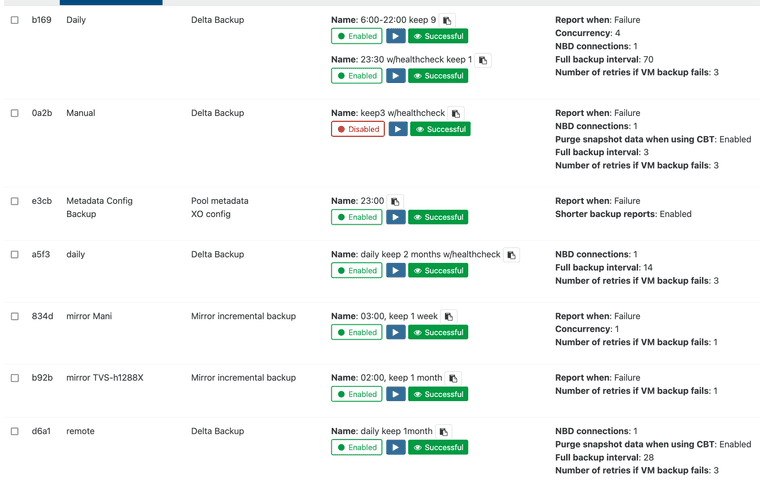
                                  ScreenShot 2025-02-17 at 10.41.02.png

                                  Now:
                                  ScreenShot 2025-02-17 at 10.41.58.png

                                  After this the problem did no longer occur.

                                  1 Reply Last reply
                                  Reply Quote 0
                                  • olivierlambertO
                                    olivierlambert Vates 🪐 Co-Founder CEO
                                    last edited by

                                    Can you sum up what you did? I admit I don't have enough time to investigate differences between 2 screenshots 😞

                                    M 1 Reply Last reply
                                    Reply Quote 0
                                    • M
                                      manilx @olivierlambert
                                      last edited by

                                      @olivierlambert Sure!

                                      I had a main backup job running 2 schedules, on bihourly and one last one at the end of the day, the latter one with healthcheck.

                                      Then I had 2 Mirror incremental ones running after that, one to a local NAS and one to a remote NAS @office.

                                      I now have separate backups for the bihourly, end of day and the 2 mirror ones (now they are delta backups directly to the NAS'es).

                                      I hope this explains it.

                                      1 Reply Last reply
                                      Reply Quote 0
                                      • olivierlambertO
                                        olivierlambert Vates 🪐 Co-Founder CEO
                                        last edited by

                                        Thanks. As soon the commit generating the error is identified, this will be very helpful for @florent 🙂

                                        M 1 Reply Last reply
                                        Reply Quote 0
                                        • M
                                          manilx @olivierlambert
                                          last edited by

                                          @olivierlambert I can then restore the config and retest once it's identified/fixed.... But just now I need the backups working without issues 😉

                                          1 Reply Last reply
                                          Reply Quote 0
                                          • SudoOracleS
                                            SudoOracle
                                            last edited by SudoOracle

                                            So since I went back to an older version, I have not had a single backup fail. I have 3 main backups that run. 2 of them daily (my pool metadata/XO config and a delta of 18vms) and then 1 every 2 hours (also a delta but only of 3 vms). ALL of them would fail in one way or another, even the metadata. Something I just noticed now is it looks like each backup is starting twice or at least there are failed logs indicating so. If they are actually running twice that would explain the errors. This would also explain why clicking the retry backup option would always succeed.
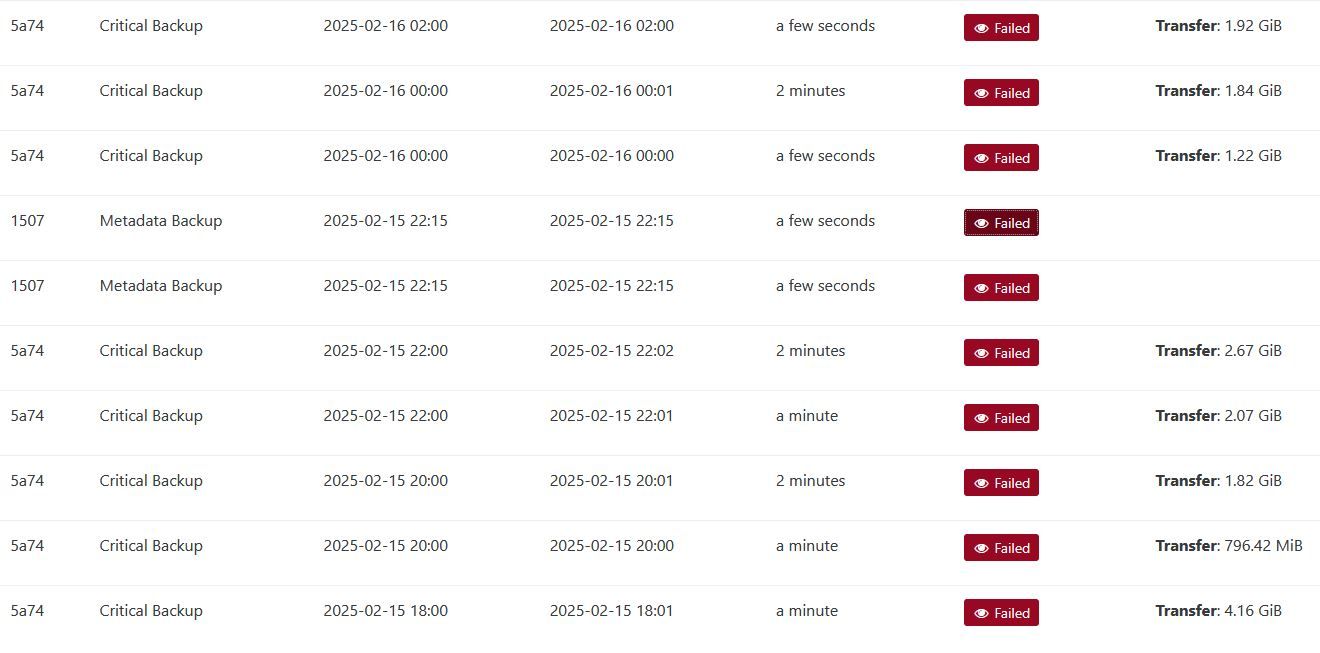
                                            failedBackups.JPG

                                            Error from the metadata backup:

                                            EEXIST: file already exists, open '/run/xo-server/mounts/c9199dfc-af05-4707-badb-8741e61daafb/xo-config-backups/f19069dd-f98b-4b41-9ca8-0e711fc75968/20250216T041500Z/data.json'

                                            
                                            1 Reply Last reply
                                            Reply Quote 0

                                            Hello! It looks like you're interested in this conversation, but you don't have an account yet.

                                            Getting fed up of having to scroll through the same posts each visit? When you register for an account, you'll always come back to exactly where you were before, and choose to be notified of new replies (either via email, or push notification). You'll also be able to save bookmarks and upvote posts to show your appreciation to other community members.

                                            With your input, this post could be even better 💗

                                            Register Login
                                            • First post
                                              Last post