🛰️ XO 6: dedicated thread for all your feedback!
-
@Mathieu said in
 ️ XO 6: dedicated thread for all your feedback!:
Has anyone tried to access XO 6 via a reverse proxy?
I'm using nginx proxy manager in a docker container to access my XO instance.
Everything is working fine with XO5 (both XOCE and XOA).
But when trying to access XO6 through the reverse proxy, it shows only a few info, with a circle loading on the top and nothing on the left bar:
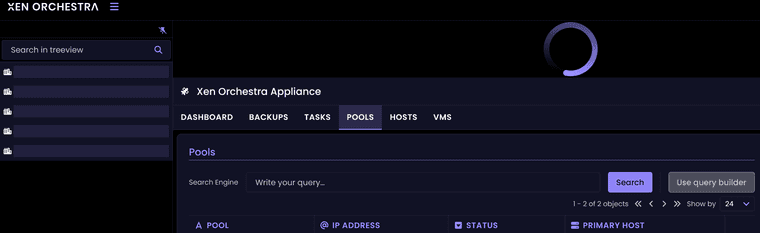
If I access XOCE and XOA v6 by their IP address, it's working as expected.
Websocket support and cache is activated on the reverse proxy, nothing else fancy on that side.
Thanks.
I haven't tried ngnix. But I access my though haproxy:443 - > xo:8443. And that works just fine. But there needed to be a couple of fixes upstream in master to iron out the quirks with non-443 ports and such.
-
@Mathieu I do use NGINX Proxy Manager and i have no issues accessing XO-CE via the new v6 default or the old v5 with working links.
As @probain has stated there have been quite a few updates pushed to fix most issues. My issues were related to the script i used to install XO-CE. The script creator had to update the script to the recent changes made.
Make sure you are on the latest commit and/or update your script and try again.
-
@acebmxer
I found the culprit:HTTP/2 support needs to be enabled on the SSL tab of npm for v6 to work fine behind the reverse proxy.
It's now working fine.
-
@Mathieu ok. Yeah I already had that enabled. Glad you got it working.
-
Windows guests Console - Reloads every 5-10s.
When trying to use the console for both my Windows 11 and Server 2025. The console reloads every 5-10s. This makes it borderline unusable. Since it resets the viewport/window scroll placement as well. Also the console seems to loose focus when this happens as well. Leading to have to click the console-section to get it in focus, to receive I am not seeing this behaviour in XO5 at all.
I do not see the same behaviour on Linux (Ubuntu 24.04) guests. But they are cli-only. No X/Wayland
Commit: b89c26459cfd301bb92adf0a98a0b2dbab57e487
node: 24.12.0
Management agent 9.1.100-59 on both VMsWindows 11 has GPU passthrough & bios
Windows Server 2025 - no GPU passthrough , uses uefi -
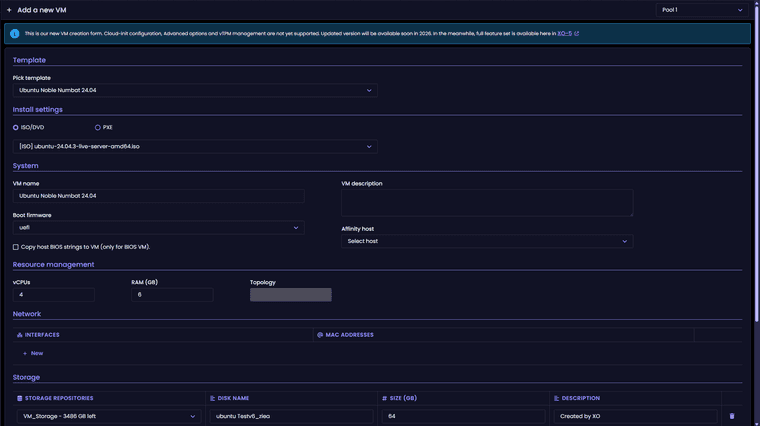
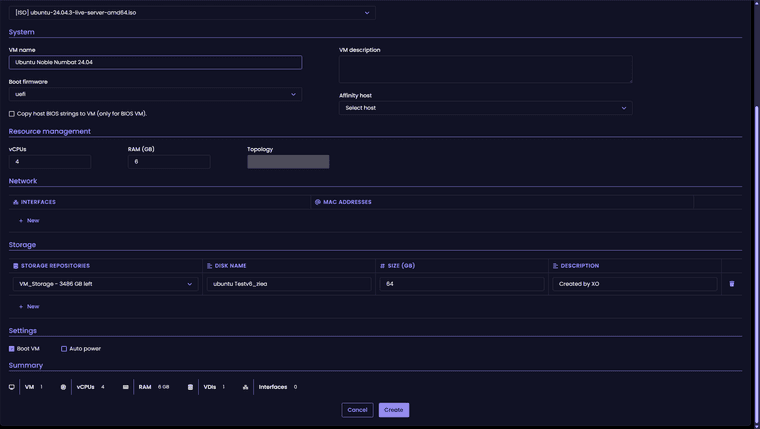
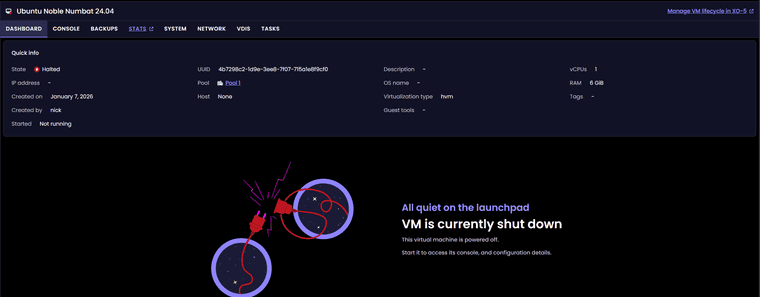
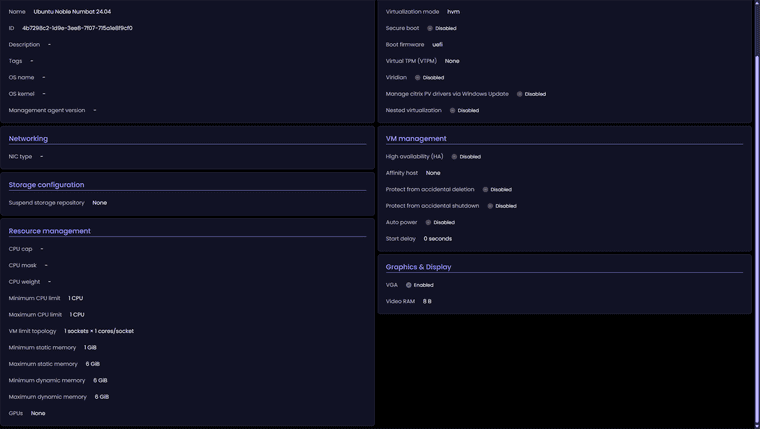
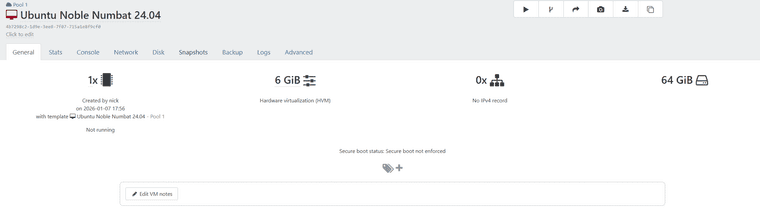
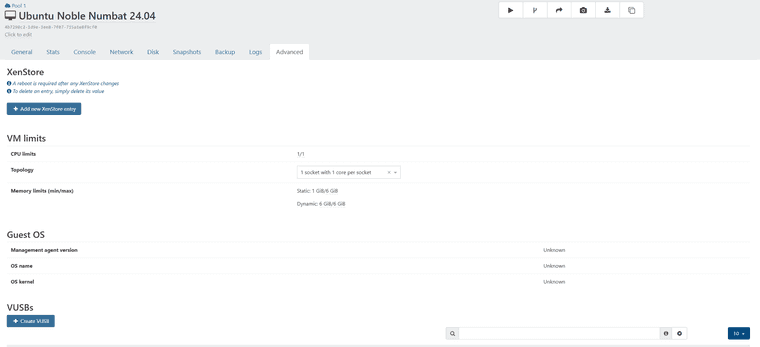
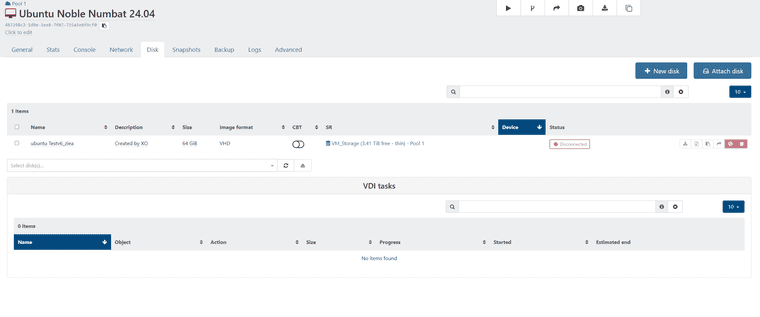
Just updated to latest commit - 8e2d9. Trying to create new VM in xov6 and a few issues to start.
New vm settings
- Ubuntu 24.04 template
- 4 cpu cores
- 6 gb of ram
- Ubuntu iso mounted
- No option to adjust topology for cpu cores.
VM was created with 1 cpu core no iso disk mounted
-
For me it's a bit confusing XO6.
For example, why are the icons so small and in such far corners, like New VM? It's like you want it to be hidden.

Isn't it more intuitive if they're at the top/bottom of this menu or in line with title (***-xen01)?

Another thing is the number of allocated processors. In my opinion it is misleading. It shows the total number of allocated processors even to VMs that are not started.
It is not better to be something like:
8 vCPUs running VMs / 4 vCPUs stopped VMs - total number allocated vCPUs 12/ Total CPUs 8.
And something like 8 - green / 4 -red - 12 orange/ 8 grey
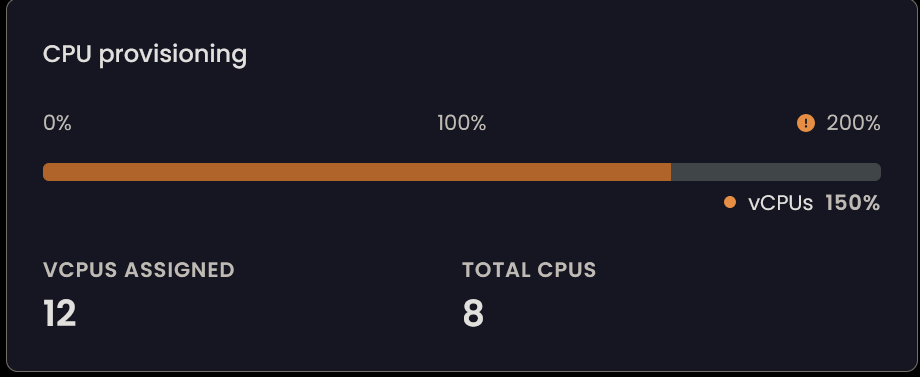
Running VM
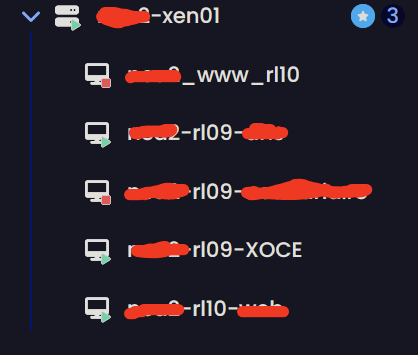
-
Clicking through the different parts in the leftmost pane has (what feels like) inconsistent landing pages. When in reality, it lands on the previous tab visited for that item.
Example.
If I click on Xen Orchestra Appliance I would expect to land on the Dashboard tab. But if I had previously looked inside the Pools tab, then that is where I would land.This behaviour is the same regardless of which item I click through. Be it Pool/Host/Guest..
I'll admit that it kind of makes a little bit of sense in thought. But it feel far more jarring and confusing when navigating. Since you never really know which tab you'll be met with when browsing. As each and every level/item is handled individually, separate from all others.
-
@jr-m4 Seems useful to me for the tabs to be sticky. If you are flipping back and forth between sections to compare or work on something, having it always default to the first tab can be annoying.
-
@dcskinner make it a user préférence, and we get the best of both worlds

-
said in
️ XO 6: dedicated thread for all your feedback!:Windows guests Console - Reloads every 5-10s.
When trying to use the console for both my Windows 11 and Server 2025. The console reloads every 5-10s. This makes it borderline unusable. Since it resets the viewport/window scroll placement as well. Also the console seems to loose focus when this happens as well. Leading to have to click the console-section to get it in focus, to receive I am not seeing this behaviour in XO5 at all.
.
.
.
.
Unfortunately this is still present in commit 0a0ae5dc7ea6608612d105f6338ffe72d8bd9ed1 as well..Update: I recorded the behaviour, for better clarification:
https://www.youtube.com/watch?v=PXpBFgSl31U -
Ping @team-xo-frontend : don't forget to provide answers in here

-
I was having similar focus issues with a Debian 12 VM today, switched to XO5 to get the work done. Every few seconds the green border would vanish, but when it came back nothing had reset so it was less painful, but still annoying enough to switch back to 5.
-
XOA6.0: In XO-5 I see 42 missing patches on Home->Pools page. In XO-6 I see that all is good. Is it bug or am I on the wrong page?
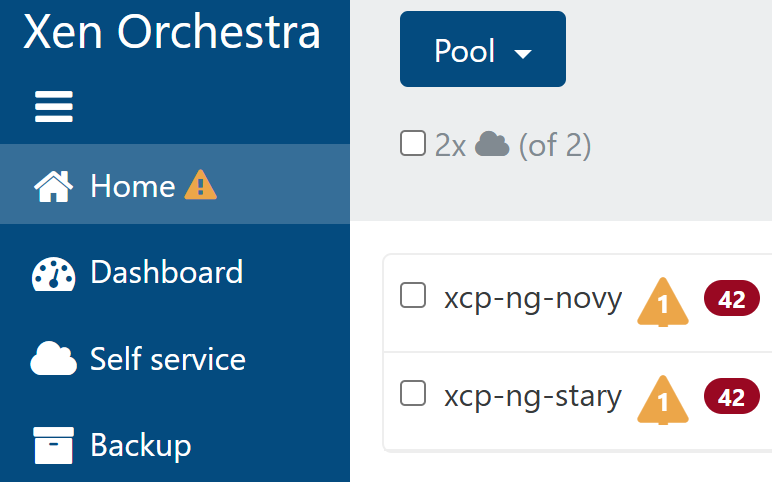

-
I probably am not allowed to post here because I don't use the paid version and use the one installed by the Gihub script mentioned somewhere instead, but maybe someone will explain this to me anyway.
Why does XO 6 look exactly the same as XO Lite? v5 looks like a real admin interface, but v6 gives me pre-alpha something vibes. Why did you change perfectly nice and user-friendly interface into this abomination? I also don't see half of the settings of v5. Is this maybe not finished after all? -
Hi!
Welcome here and congrats on being false on all your assumptions!
- We never prevented anyone to post here, it's a community forum. Everyone is free (and even more: welcome!) to provide constructive feedback
- In our last 12 or 15 XO release blog post (I truly invite you to take a look at them, they are a goldmine of information, and if you don't like to read, we even do a video and a podcast at each XO release!), we wrote and told out loud that XO 6 and XO Lite are sharing similar components, to make things more coherent but also simplify things to avoid doing the same work twice

- XO 6 isn't finished and we spent the last 3 or 4 release blog post to explain in details why and how to configure the interface of your choice by default. XO 5 won't disappear tomorrow.
- About the reasons of XO 6, we also wrote and spoke hours about it, so in the end, I think it's pretty good reason to stay tuned on our blog. And if don't want to catch up years of missed blog post, now any LLM will do a decent recap, especially if you point it to the XO Blog!
Let us know if you have constructive feedback to provide, happy to help!
-
@olivierlambert Well ok, it's just that last time I tried to ask about stuff I was politely told off because I used the installation script instead of paying (that's not the literal formulation but it's basically what the person responding meant).
I know nothing about any blogs, I just check the main xcp website (FFS I am not even allowed to post links, what a forum...) from time to time, so I have no idea. I just updated the admin interfce for the first time since moving over from ESXi, and was puzzled why it looked the same as the "castrated" lite version when previously (which means v5, apparently) it was full of features. I had no idea it wasn't a completed product.
TL;DR: I am just an idiot who installed this few months ago and has no idea about the details. shrug
-
@Octopuss said in
️ XO 6: dedicated thread for all your feedback!:@olivierlambert Well ok, it's just that last time I tried to ask about stuff I was politely told off because I used the installation script instead of paying (that's not the literal formulation but it's basically what the person responding meant).
I know nothing about any blogs, I just check the main xcp website (FFS I am not even allowed to post links, what a forum...) from time to time, so I have no idea. I just updated the admin interfce for the first time since moving over from ESXi, and was puzzled why it looked the same as the "castrated" lite version when previously (which means v5, apparently) it was full of features. I had no idea it wasn't a completed product.
TL;DR: I am just an idiot who installed this few months ago and has no idea about the details. shrug
You were told off if the script was 3rd party because officially, the scripts may have made changes to the Xen Orchestra source code prior to compilation. They have a set of steps, for building from source which are able to receive support in the forums for. Anyway getting paid support if an organisation is best as their pro support is top notch!
With the blogs which are being referred to are under the “News” links. Which detail releases and other news worthy information.
You can post links but it does take some work, also make sure you’ve read the rules, also going through the introduction training which a forum function bot runs. Doing this will eventually earn you more access and feature functionality. It’ll help you get used to the forums functions.
The XO 6 is a minimum viable product currently, but is growing from there as features from v5 transitions to v6. If there’s features missing from v5 and v6 that are needed please enter them on the Feedback portal, so they can be voted on. It’s link is in several XOA update and release news posts (especially 6.0 and 6.1).
Read both these posts along with others along the way, it will help you get caught up on all of the Xen Orchestra releases and updates.
-
I'd say XO-Lite was minimally viable almost a year ago, you could get real work done bouncing between it and the host console (still in XO-Lite).
Both are getting better, it's going to be a journey and I'm warming up to some of the features in XO 6.
As to the discussion about the third party scripts, maybe if the official method had a script to make it easier/quicker to install we could all be on the same page. I've used both, and failed many times with the official method (several years ago) and it could be easier for people setting up labs to install it. But maybe that's the idea, make it long and tedious.
I'm just going to say that things like the new dashboard have grown on me, but needing to flip back to 5 for some things is a pain. Trying to be patient and truthfully I don't spend a lot of time in my system now. Log in to check backups, do some updates once in a while, etc. My system has become fairly stable.
That said, I did recently upgrade my lab, and that will get a ton more use in XO when I get back to some testing I'm doing there. Probably going to wipe out my lab and start over, planning that now. and it may or may not be XCP this time so I can learn the basics of a different system.
-
@Greg_E You've got a point, actually several.
The scripts exist for a reason because the official way is way to complicated. I still use them, having converted to xcpng @home (scripts) and @business 3 yrs ago.
There should be an official script, definitely. So all are on the same page. They have nothing to loose, everything to gain! The more people use it the better and having a simple way to officially install XO would help that.
Regarding XO6, I don't personally like it at all, mainly because I have to hunt around to find stuff, where in XO5 it's already automatic (not talking about missing features which revert us to XO5).
I actually don't like the UI, it is cramped especially on smaller laptop screens... But this is a personal preference.....




Hello! It looks like you're interested in this conversation, but you don't have an account yet.
Getting fed up of having to scroll through the same posts each visit? When you register for an account, you'll always come back to exactly where you were before, and choose to be notified of new replies (either via email, or push notification). You'll also be able to save bookmarks and upvote posts to show your appreciation to other community members.
With your input, this post could be even better 💗
Register Login