@olivierlambert ah I see.. other than that!! it works.. Just like magic!! v cool
M
Offline
-
RE: VMware migration tool: we need your feedback!
-
RE: XCP-NG server crashes/reboots unexpectedly
@nvs Hi there, we had a similar issue with on our 5900x boxes. We have about a twenty of these and they have been generally greats hosts for xcp loads. However, one of them was constantly rebooting. While testing the ram the temp jumped to 90/90. They are running in 1U boxes so I expect heat but this seemed silly. We ramped the fans to max but this did not help.
We then used bios to drop down various cpu boost profiles and gadgets to lower the heat and re-applied paste to cpu..so far so good.
-
RE: Migrating an offline VM disk between two local SRs is slow
I think I am seeing a similar issue. Raid1 NVME copy to raid 10 4x2tb HDD on same host
a 300gb transfer is estimated at 7 hours. (11% done in 50 mins)
the vm is live.
according to the stats almost nothing is happening on this server or the 2 storage
-
RE: XO task watcher issue/CR broken
@olivierlambert actually.. just tried CR again... and this time it is working.. will test with a few more vms.
-
RE: "NOT_SUPPORTED_DURING_UPGRADE()" error after yesterday's update
-disable HA on pool level
-disable load balancer plugin
-upgrade master
-upgrade all other nodes
-restart toolstack on master
-restart toolstack on all other nodes
-live migrate all VMs running on master to other node(s)
-reboot master
-reboot next node (live migrate all VMs running on that particular node away before doing so)
-repeat until all nodes have been rebooted (one node at a time)
-re-enable HA on pool level
-re-enable load balancer pluginNever had any issues with that. No downtime for none of the VMs.
update time again. and same issue
I followed these steps
-upgrade master
-upgrade all other nodes
-restart toolstack on master
-restart toolstack on all other nodes
-live migrate all VMs running on master to other node(s)
-reboot masternow cant migrate anything else.
live migration : NOT_SUPPORTED_DURING_UPGRADE
warm migration: fails and VM shuts down immediately and needs to be forced back to life
CR backup to another server : NOT_SUPPORTED_DURING_UPGRADE -
RE: XCP-NG server crashes/reboots unexpectedly
@nvs Hi there, we had a similar issue with on our 5900x boxes. We have about a twenty of these and they have been generally greats hosts for xcp loads. However, one of them was constantly rebooting. While testing the ram the temp jumped to 90/90. They are running in 1U boxes so I expect heat but this seemed silly. We ramped the fans to max but this did not help.
We then used bios to drop down various cpu boost profiles and gadgets to lower the heat and re-applied paste to cpu..so far so good.
-
RE: Booting to Dracut (I trusted ChatGPT)
I know this is old but I had a similar issue. In the end I told dracut NOT to reassemble my raid array which allowed the system to boot perfectly after. I have no idea why it tries to assemble the same array two but on the second seems to be important
-
RE: "NOT_SUPPORTED_DURING_UPGRADE()" error after yesterday's update
@olivierlambert said in "NOT_SUPPORTED_DURING_UPGRADE()" error after yesterday's update:
Because doing an update without rebooting doesn't reload the updated main programs, like XAPI. A host in only updated after a full reboot.
Reply
Hi there
Is it just me or is this a chicken and egg situation.you upgrade the master... how the pool is in NOT_SUPPORTED_DURING_UPGRADE() stage. You cant move vms off the master so all you can do is close down vms.. reboot.. pray
then move the a non master.. you cant move the vms off here either NOT_SUPPORTED_DURING_UPGRADE(). So you have do the same..
needless to say I hit issues on each reboot which caused 30- 60 min delays in getting vms back up and running.
can you Warm migrate or is this dead also (to scared to test)
-
RE: Migrating an offline VM disk between two local SRs is slow
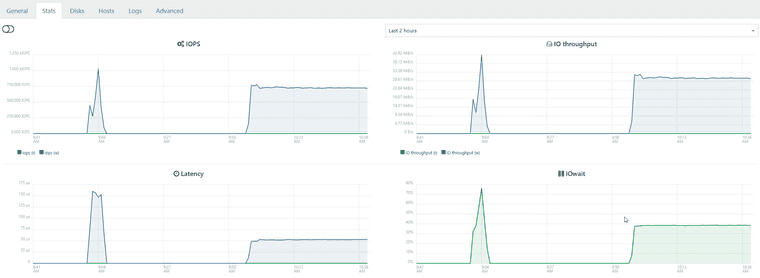
@Davidj-0 in my case there CPU activity is minimal. I think something is wrong with the software raid 10 setup. On an identical setup warm migration between to the raid 10 array between hosts is showing horrible iowait similar to the sr to sr transfer on the other host
-
RE: Migrating an offline VM disk between two local SRs is slow
I think I am seeing a similar issue. Raid1 NVME copy to raid 10 4x2tb HDD on same host
a 300gb transfer is estimated at 7 hours. (11% done in 50 mins)
the vm is live.
according to the stats almost nothing is happening on this server or the 2 storage
-
garbled console text
Hi there
I am steadily migrating VMs from exsi to xcp-ng.
I am using clonezilla destination to source and it could not be easer or quicker. So far so good.
However, I also migrated bare metal server (ubuntu 18). Initially on reboot the vm just showed a Hard disk found message.. so i switched from bios to uefi and it booted immediately. However, the console text is unreadable.
I have seen a few discussions around this related to the template settings. I have tested ubuntu 18 and 20 template but both have the same effect.
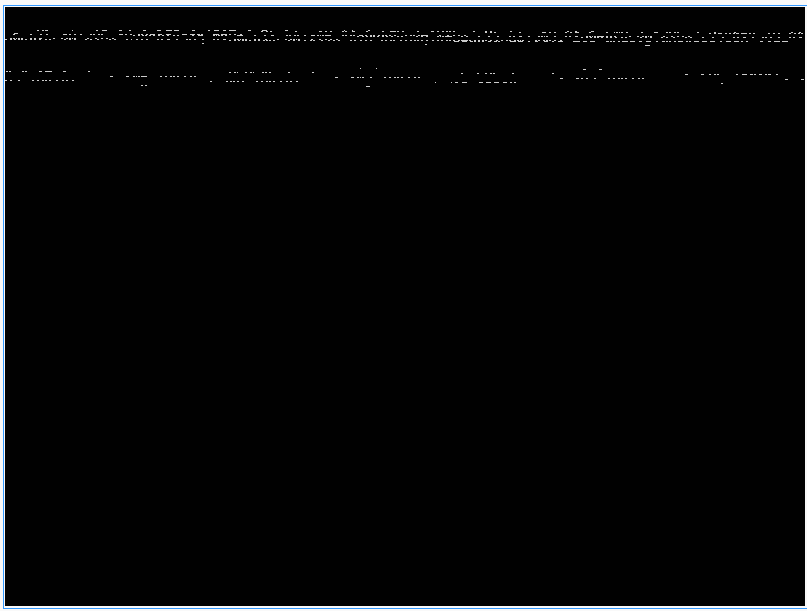
I cant edit any pre-boot options as nothing can be read..
The VM is running just fine.. but one day I am going to need to use that console. ..
Any ideas?
-
RE: XO task watcher issue/CR broken
@olivierlambert spoke too soon.. CR works in one direction but not the other
https://images.dx3webs.com/kgSC4E.png -
RE: XO task watcher issue/CR broken
@olivierlambert actually.. just tried CR again... and this time it is working.. will test with a few more vms.
-
RE: XO task watcher issue/CR broken
@Gheppy Yes.. putting that in place seemed to fix DR.. but not CR.