XCP-ng
    • Categories
    • Recent
    • Tags
    • Popular
    • Users
    • Groups
    • Register
    • Login
    1. Home
    2. ThasianXi
    3. Best
    T
    Offline
    • Profile
    • Following 0
    • Followers 0
    • Topics 2
    • Posts 22
    • Groups 0

    Posts

    Recent Best Controversial
    • RE: Enabling and using NBD backups

      @MrNaz I recommend reading the XO blog; updates are published monthly.

      NBD was introduced in the 5.76 release and the ability to enable in the Xen Orchestra UI was introduced in 5.79
      https://xen-orchestra.com/blog/xen-orchestra-5-76/
      https://xen-orchestra.com/blog/xen-orchestra-5-79/

      Also enhancements were released in 5.81
      https://xen-orchestra.com/blog/xen-orchestra-5-81/

      posted in Xen Orchestra
      T
      ThasianXi
    • RE: Xen Orchestra netbox sync error

      @sb2014 In the 5.85 release of XO there were updates to the Netbox plugin that now requires three objects in the UUID field.
      https://xen-orchestra.com/blog/xen-orchestra-5-85/

      Here are the ones you need:

      Virtualization > cluster
      Virtualization > virtual machine 
      Virtualization > interface
      
      posted in Advanced features
      T
      ThasianXi
    • RE: VM Boot Order via XO?

      @cichy This can be accomplished using vApps via the CLI.
      Check out this forum post in which a member shared the process: XCP-ng Pool Boot Order

      posted in Migrate to XCP-ng
      T
      ThasianXi
    • RE: very slow disk ssd support all vms xcp-ng8.2.1

      @comdirect
      Use this command: (replace sda in the command below with the relevant device)
      cat /sys/block/sda/queue/scheduler
      The active scheduler will be enclosed in brackets. e.g. noop deadline [cfq]

      For multiple drives use:
      grep "" /sys/block/*/queue/scheduler

      posted in Hardware
      T
      ThasianXi
    • RE: Xen Orchestra Container Storage Interface (CSI) for Kubernetes

      @jmara Thank you for the input. All pods are running with caveats. ⚠

      Prior to executing the installation, I updated the image name to ghcr.io/vatesfr/xenorchestra-csi:edge in the manifests.
      After executing the install, I had to manually edit the image name in the DaemonSet, from ghcr.io/vatesfr/xenorchestra-csi-driver:edge to ghcr.io/vatesfr/xenorchestra-csi:edge.
      After editing the DaemonSet, the node pods restarted and transitioned to running.

      However, the controller pod was still attempting to pull this image: ghcr.io/vatesfr/xenorchestra-csi-driver:edge and never transitioned to running.
      To correct that, I edited the image name in the Deployment, from ghcr.io/vatesfr/xenorchestra-csi-driver:edge to ghcr.io/vatesfr/xenorchestra-csi:edge.

      Thus after editing the DaemonSet and Deployment, the pods transitioned to running. ⛳

      kgp -nkube-system | grep csi*
      csi-xenorchestra-controller-b5b695fb-ts4b9               3/3     Running   0          4m8s
      csi-xenorchestra-node-27qzg                              3/3     Running   0          6m21s
      csi-xenorchestra-node-4bflf                              3/3     Running   0          6m20s
      csi-xenorchestra-node-8tb5m                              3/3     Running   0          6m20s
      csi-xenorchestra-node-t9m78                              3/3     Running   0          6m20s
      
      posted in Infrastructure as Code
      T
      ThasianXi
    • RE: Feedback: XO Cloud Controller Manager (CCM)

      @nathanael-h I have not yet tried the XO CSI driver, if I do I will leave feedback on the relevant thread. (I found the one started in 2025 November)

      posted in Infrastructure as Code
      T
      ThasianXi
    • Feedback: XO Cloud Controller Manager (CCM)

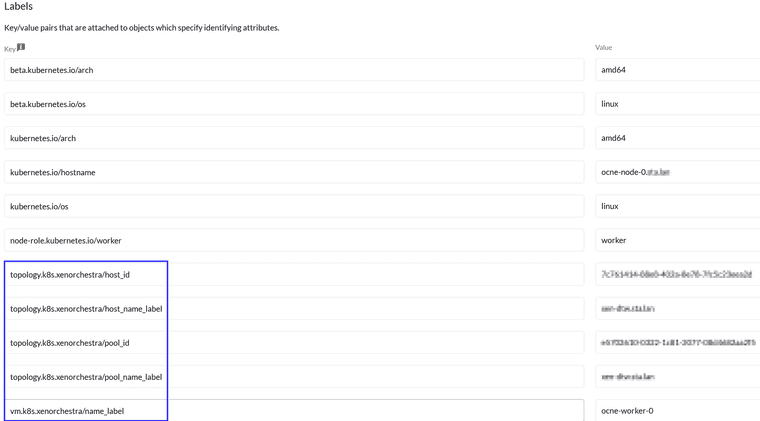
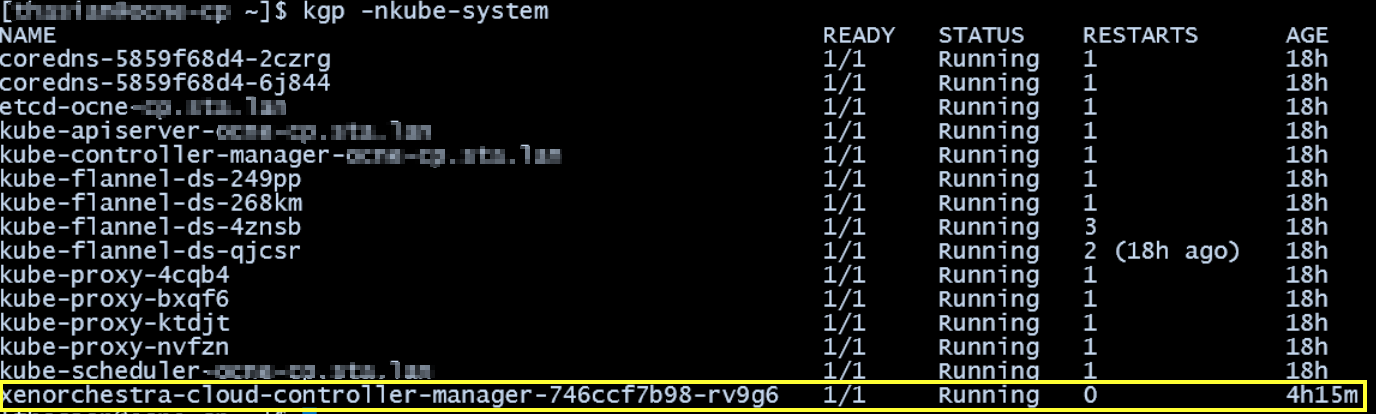
      Offering feedback that my implementation of the XO CCM (v1.0.0-rc.1) into my K8s cluster was successful; I validated that the nodes were labeled as expected. I attached screenshots from Rancher and the CLI.
      In my lab, I use OCNE 1.9 (Oracle Cloud Native Environment) on Oracle Linux 9.7.

      In my setup, I edited the kubeadm-config ConfigMap and on all nodes added the Kubelet argument for the cloud provider.
      I restarted the Kubelet on all nodes and then deployed the CCM via Method 1 per the documentation

      ⚗ From my setup to set the cloud-provider:

      kubectl edit cm kubeadm-config -n kube-system

      apiServer:
        extraArgs:
          cloud-provider: external
      controllerManager:
        extraArgs:
          cloud-provider: external
      

      sudo vim /etc/sysconfig/kubelet

      KUBELET_EXTRA_ARGS="--fail-swap-on=false --cloud-provider=external"
      

      sudo systemctl daemon-reload && sudo systemctl restart kubelet

      Rancher_XO_CCM_labels.png

      OCNE_XO-CCM_pod.png

      posted in Infrastructure as Code
      T
      ThasianXi
    • RE: Installation of XCP Guest tool frivers on RHEL9

      @Denson You can mount from the CD in Xen Orchestra on the Console tab or install from the EPEL repo. (I always install from EPEL)

      EPEL install:
      dnf install https://dl.fedoraproject.org/pub/epel/epel-release-latest-9.noarch.rpm -y

      Tool install:
      dnf install xe-guest-utilities-latest -y
      Be sure to enable and start after installing: systemctl enable --now xe-linux-distribution

      Doc ref: https://xcp-ng.org/docs/guests.html#linux

      posted in Compute
      T
      ThasianXi