XCP-ng
    • Categories
    • Recent
    • Tags
    • Popular
    • Users
    • Groups
    • Register
    • Login
    1. Home
    2. msupport
    msupportM Offline
    • Profile
    • Following 2
    • Followers 0
    • Topics 5
    • Posts 35
    • Groups 0

    msupport

    @msupport

    24
    Reputation
    52
    Profile views
    35
    Posts
    0
    Followers
    2
    Following
    Joined
    Last Online
    Age 52
    [[user:website]] www.msupport.ch
    [[user:location]] Lengnau

    msupport Unfollow Follow
    • RE: GPU support and Nvidia Grid vGPU

      Installation instructions XCP-NG (RC1) Nvidia M10 | A16 GPU

      1. install XCP-NG 8.3 RC1
      2. download XenServer Driver Nvidia 17.1 (NVIDIA-GRID-XenServer-8-550.54.16-550.54.15-551.78)
      3. unzip driver and copy host driver (NVIDIA-vGPU-xenserver-8-550.54.16.x86_64.iso) I used winscp to copy the driver to the tmp directory.
      4. download XenServer iso file (https://www.xenserver.com/downloads | XenServer8_2024-06-03.iso)
      5. copy the file (vgpu-7.4.13-1.xs8.x86_64.rpm) in the packages directory ! Do not use CitrixHypervisor-8.2.0-install-cd file vgpu-7.4.8-1.x86_64
      6. unpack file vgpu-7.4.13-1.xs8.x86_64
      7. copy the file \usr\lib64\xen\bin\vgpu (size 129KB) to \usr\lib64\xen\bin\ on your XCP-NG host (chmod 755)
      8. (putty) /tmp/ xe-install-supplemental-pack NVIDIA-vGPU-xenserver-8-550.54.16.x86_64.iso
      9. reboot
      10. install guest driver on the VM client (551.78_grid_win10_win11_server2022_dch_64bit_international.exe)
      11. token file from Nvidia (C:\Program Files\Nvidia Corporation\vGPU Licensing\ClientConfigToken*.tok)

      Nvidia drivers 17.2 and 17.3 do not work yet (Guest driver crashes)
      I will stay tuned and inform you about new findings

      Have fun

      posted in Compute
      msupportM
      msupport
    • RE: Veeam 13.1 Rocky9 Linux Appliance: Potential Data Loss with CBT and Workers with Expired Tokens

      our solution to the problem

      we want to share a post-incident analysis of a data-loss event on XCP-ng 8.3 LTS (shared block storage over FC, Veeam B&R 13.1 with CBT enabled on the pool) — consolidated from our own incident, topic 12402, the CBT feedback thread 9268, and the still-open blktap PR #17. The pieces fit together into one coherent failure chain, and we believe it may be worth a sticky/KB article.
      A note on the trigger, to be fair and complete: in our case the interrupted jobs (step 2) were caused by expired/invalid worker tokens on the XCP-ng hosts, so the backups died mid-run with the locks in place. We consider that our availability problem. However, an interrupted backup must never be able to damage production VM data — cleaning up VDI locks on job abort is the hypervisor's job, and that is the part that turned a backup hiccup into guest data loss.

      Failure chain (as we understand it)

      Veeam backup job with CBT runs and sets locks on VDIs — paused: true + host_OpaqueRef:xxx: RW entries in the VDI sm_config (XAPI state.db).
      The job is interrupted (timeout / crash / restart). The locks are never cleaned up → stale paused: true remains in sm_config. These entries are MRO, so xe vdi-param-remove can't clear them.
      A later leaf coalesce / commit runs into a cbtlog disk: per PR #17, tapdisk_vbd_first_image returns the cbtlog disk on td_commit, and the cbtlog driver has no commit action → commit fails early. Result: broken VDI chains, CBT metadata VDIs without a vhd parent, hundreds of orphaned VDIs, and .cbtlog files hanging coalesces (as reported in thread 9268).
      SR rescan believes a GC is already running and aborts; a host reboot was the only way to force the coalesce through (also reported in 9268).
      Storage cleaning freezes the VM disk briefly, but the un-freeze fails on the stale lock → failed to unpause tapdisk ... VMs using this tapdisk have lost access to the corresponding disk(s).
      The guest keeps writing on a frozen/lost disk → NTFS corruption inside the guest and, in our case, actual SQL Server data loss.
      Step 5 matches exactly the theory Veeam R&D is currently investigating ("storage cleaning freezes VM disks briefly during backup and sometimes fails to un-freeze them"). The stale paused:true lock appears to be the missing "why" behind the failed unpause.

      What helped us recover

      Patching the stale lock out of XAPI state.db (stop xapi, backup state.db, remove paused + host_OpaqueRef entries from the affected VDI's sm_config, start xapi).
      Then: reset CBT on the affected VDIs and trigger a full backup so CBT re-initializes cleanly — otherwise the next interrupted job re-creates the same situation.
      For the coalesce backlog: with the affected VMs powered off and CBT disabled, snapshot-create-then-delete to kick the GC, watch SMlog, iterate. (Same recipe a user documented in 9268.)

      posted in Backup
      msupportM
      msupport
    • Veeam 13.1 Rocky9 Linux Appliance: Potential Data Loss with CBT and Workers with Expired Tokens

      Veeam CBT on XCP-ng: Broken VHD chain causes tapdisk failure and filesystem corruption

      Hello everyone,

      We are experiencing a serious issue with Veeam CBT (Changed Block Tracking) on XCP-ng that has led to filesystem corruption on our production VMs. I want to share our analysis here in the hope that others have had similar experiences or that Veeam developers can provide some insights.

      WHAT HAPPENED?

      Two of our production VMs (a SQL Server and a File Server) suffered corrupted filesystems (NTFS) after a regular backup job. The VMs had to be stopped and restored from backup. Both VMs had CBT (Changed Block Tracking) enabled.

      THE SYMPTOMS

      When you look at the VM configuration on XCP-ng, you find so-called "CBT metadata" VDIs for each disk with CBT enabled. These are thin snapshot VDIs that Veeam creates to track changed blocks for incremental backups. So far, so normal.

      The problem: These CBT metadata VDIs have a VHD parent reference that points to a VDI UUID which NO LONGER EXISTS in the XCP-ng database. The VHD chain is broken:

      Base-VDI -> CBT metadata VDI (Snapshot) -> Parent = DOES NOT EXIST

      When XCP-ng tries to unpause the tapdisk after the backup snapshot operation, it cannot resolve the VHD chain. This results in the error:

      ".SR-Name: failed to unpause tapdisk"
      "Failed to unpause tapdisk for VDI <UUID>, VMs using this tapdisk have lost access to the corresponding disk(s)"

      The VM then loses disk access -> I/O errors -> NTFS becomes corrupt.

      Additionally, both VMs have a VBD (Virtual Block Device) that points to a VDI which shows "<not in database>" — also orphaned.

      THE TRIGGER

      We were able to trace the trigger back:

      1. On August 2nd, Veeam installed a package update on our Windows backup repository. This triggered an automatic server restart.

      2. During the restart, the Veeam vPower NFS Service (VeeamNFSSvc) failed to start — Error 1920. This is a known MSI bug: the installer tries to start the service before the installation is fully complete. After a manual restart, the service ran again.

      3. But during the ~40 minutes without vPower NFS, Veeam's "Configuration Resynchronize" failed. It ran for 8 hours (19:59 to 04:03) and ended with "Failed".

      4. As a result, the Updater tokens of all 3 Veeam Worker VMs expired. The workers could no longer authenticate with the VBR server — every refresh attempt was rejected with 401 "Your session has expired". This persisted for 3+ days.

      5. Despite the expired worker tokens, Veeam executed the backup job on August 5th and reported it as "Success". The job created CBT snapshots, but the consolidation (Transform) ran with broken worker infrastructure.

      THE RESULT

      The CBT metadata VDIs remain as snapshots, but their VHD parent references point to nothing. The tapdisk crashes, the VM loses disk access, the filesystem becomes corrupt.

      For VM-A (SQL Server), both disks (60GB + 80GB) have broken CBT snapshots. virtual-size=0, physical-utilisation=0.

      For VM-B (File Server), the 80GB disk has a broken CBT snapshot. Interestingly: virtual-size=85899345920 (80GB, same as the base disk) and physical-utilisation=8388608 (8MB). This is different behavior from VM-A — possibly a different code path in the CBT lifecycle.

      THE BACKUP REPORTS "SUCCESS"

      The frustrating part: The Veeam session log shows NO errors. The backup is reported as "Success" with:

      • isTaskSuccess=true
      • isJobSuccess=true
      • isTaskWarning=false

      The DeletePointTransformSpec (OperationType=3, EnableIntegrityChecks=false) cleanly progresses through states 6 -> 5 -> 0 (Complete). Only afterwards, when XCP-ng tries to unpause the tapdisk, it fails — but Veeam doesn't notice.

      RESTORE ALSO FAILS

      The attempt to restore VM-B from backup also failed:

      • "Unable to write data to the transport connection: Broken pipe"
      • "unable to restore the disk in the HotAdd mode. Restoring disk using the Import functionality"

      SCALE

      We found over 200 CBT metadata VDIs across the entire XCP-ng pool, from dozens of different backup jobs. We don't yet know how many of them have broken parent references, but it could affect significantly more VMs than just the 2 that are already corrupt.

      OUR QUESTIONS

      1. Has anyone else used CBT on XCP-ng with Veeam v13.1 and observed similar issues?

      2. Is it known that the DeletePointTransformSpec can destroy VHD parent references?

      3. Why does Veeam report "Success" when the worker tokens are expired? Shouldn't the job at least give a warning?

      4. Is the Error 1920 (vPower NFS during MSI install) a known issue? Is there a fix for it?

      5. Has anyone found a way to safely verify whether CBT metadata VDIs have valid parent references?

      6. Is there a best practice for periodically resetting CBT (Active Full) without the risk of a broken VHD chain?

      OUR WORKAROUND

      • Deleted affected CBT metadata VDIs (xe vdi-destroy)
      • Restored VMs from backup
      • Disabled CBT on all VMs until the issue is understood
      • Restarted Veeam Backup Service (worker tokens reset)
      • Scheduled Active Full instead of incremental

      Thank you for any feedback and insights.


      WARNING!
      This issue has already completely destroyed 4 VMs.
      Additional VMs are currently being checked.

      posted in Backup
      msupportM
      msupport
    • RE: GPU support and Nvidia Grid vGPU

      @olivierlambert
      I have found the solution. I will test the whole thing again tomorrow with a clean installation with rc1.

      posted in Compute
      msupportM
      msupport
    • RE: nVidia Tesla P4 for vgpu and Plex encoding

      @olivierlambert

      1. Install XCP-NG Version 8.2.1 (8.3 did not work)
      2. Install all update yum update
      3. reboot
      4. Download NVIDIA vGPU drivers for XenServer 8.2 from NVIDIA site. Version NVIDIA-vGPU-CitrixHypervisor-8.2-550.54.10.x86_64 (Version 17.0)
      5. Unzip and install rpm from Host-Drivers
      6. reboot again
      7. Download free CitrixHypervisor-8.2.0-install-cd.iso from Citrix site
      8. Open CitrixHypervisor-8.2.0-install-cd.iso with 7-zip, then unzip vgpu binary file from Packages->vgpu....rpm->vgpu....cpio->.->usr->lib64->xen->bin
        9.Upload vgpu to XCP-ng host to /usr/lib64/xen/bin and made it executable chmod +x /usr/lib64/xen/bin/vgpu
      9. Deployed VM with vGPU and it started without any problems
      10. Copy License File from Nvidia License Portal (*.tok) to C:\program files\Nvidia Corperation\vGPU Licensing\ClientConfigToken
      11. Install Windows Nvidia Driver on Windows 10 VM (need connection to api.dis.licensing.nvidia.com Port TCP 443, use Nvidia Control Panel to set the hostname and port for Licensing the Nvidia Card)

      Works fine for me


      If you want to install the NVidia driver on XCP-NG 8.3. Manipulate /etc/xensource-inventory (line PRODUCT_VERSION from 8.3.0 to 8.2.0) during the installation. Then xe-install-supplental-pack NVIDIA-vGPU-CitrixHypervisor-8.2-550.54.16.x86_64.iso.
      After installation, change PRODUCT_VERSION back to 8.3.0
      The driver now also works in version XCP-NG 8.3
      Do not forget to copy the vgpu file to /usr/lib64/xen/bin/vgpu. (change the chmod to 755)


      Nvidia vGPU M10 | A16 on XCP-NG 8.3 Beta2 only work without XCP-NG updates. After the update, the error message "An emulator required to run this VM failed to start" appears. It must be due to one of the 76 updates that can be installed. I am trying to find out which update is causing this problem.


      22.07.2024 [NEW]

      Installation XCP-NG RC1 Nvidia 17.1 GPU

      install XCP-NG 8.3 RC1
      download XenServer Driver Nvidia 17.1 (NVIDIA-GRID-XenServer-8-550.54.16-550.54.15-551.78)
      unzip driver and copy host driver (NVIDIA-vGPU-xenserver-8-550.54.16.x86_64.iso) I used winscp to copy the driver to the tmp directory.
      download XenServer iso file (https://www.xenserver.com/downloads | XenServer8_2024-06-03.iso)
      copy the file (vgpu-7.4.13-1.xs8.x86_64.rpm) in the packages directory ! Do not use CitrixHypervisor-8.2.0-install-cd file vgpu-7.4.8-1.x86_64
      unpack file vgpu-7.4.13-1.xs8.x86_64
      copy the file \usr\lib64\xen\bin\vgpu (size 129KB) to \usr\lib64\xen\bin\ on your XCP-NG host (chmod 755)
      (putty) /tmp/ xe-install-supplemental-pack NVIDIA-vGPU-xenserver-8-550.54.16.x86_64.iso
      reboot
      install guest driver on the VM client (551.78_grid_win10_win11_server2022_dch_64bit_international.exe)
      token file from Nvidia (C:\Program Files\Nvidia Corporation\vGPU Licensing\ClientConfigToken*.tok)
      Nvidia drivers 17.2 and 17.3 do not work yet (Guest driver crashes) Test with Windows 11 23H2


      My environment:
      16x Hosts HPE DL380
      6x Hosts HPE DL380 with vGPU Nvidia M10 and A16
      5x HPE 3PAR Storage and 1x HPE MSA 2050 Storage
      2x 96 port fibre channel switch

      I have migrated from Vmware to XCP-NG with XOA.

      posted in Compute
      msupportM
      msupport
    • RE: Veeam 13.1 Rocky9 Linux Appliance: Potential Data Loss with CBT and Workers with Expired Tokens

      @MajorP93

      Last Message from Veeam:
      Veeam Support - Case # 08187386

      thank you for your email!
      We are currently waiting for R&D team conclusion, and a bit more time is required for the investigation. I am sorry for the possible inconveniences here!
      Best regards,
      Viktoria Nesmiyanova
      Technical Customer Support - EMEA
      Veeam Software

      posted in Backup
      msupportM
      msupport
    • RE: Veeam 13.1 Rocky9 Linux Appliance: Potential Data Loss with CBT and Workers with Expired Tokens

      @Danp

      I have sent detailed log files from XCP-NG, Veeam, and Windows related to the incident to Veeam; the issue has already been escalated, and it appears to be a major problem.
      We're already in touch with Olga from the Veeam team

      Regards
      Micha


      Hello,
      Thank you for contacting Veeam Technical Support! My name is Olga and I will be assisting you with the case from now on.
      Thank you for sharing the logging and the analysis! I will now review the data provided and I will keep you posted on the findings and the next steps.
      Have a nice day,
      Olga Demidova,
      Customer Support Engineer,
      Veeam Technical Support.

      Previous Communication


      2026-08-06 14:11:22 UTC - system Generated Message
      servicenow_email_separator_e8dd76512b2e031caf56f5f7f891bfa7_c79268ad93ea47508575fcffb903d6e9
      ---Do not reply below this line---


      Hello,
      thank you for uploading!
      I provided the files to our R&D team. They will need some time to review everything and I will revert to you as soon as I have any updates.
      Best regards,
      Viktoria Nesmiyanova
      Technical Customer Support - EMEA
      Veeam Software

      Previous Communication


      Hello team,
      hope my email finds you well!
      I would like to inform you that we are actively researching the logs and details with R&D team. I will update you on the investigation status on a regular basis and will let you know as soon as I have any news.
      Thank you!
      Best regards,
      Viktoria Nesmiyanova
      Technical Customer Support - EMEA
      Veeam Software


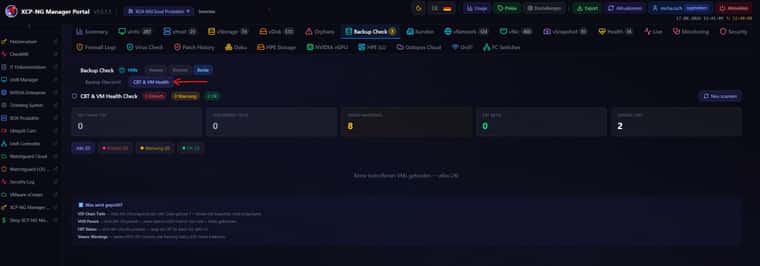
      Unfortunately, we still haven't received a response from Veeam. We have now integrated the CBT & VM Health button, which checks the following:

      CBT & VM Health Check
      What is checked (4 checks):

      1. VDI Chain Depth — XOA API: Number of snapshots per VDI. Chain > 1 = Veeam has not cleaned up snapshots
      2. VHD Parent — XOA API: VDI.parent — if parent UUID is not in the VDI list = chain broken (critical)
      3. CBT Status — XOA API: VDI.cbt_enabled — indicates whether Changed Block Tracking is active
      4. Veeam Warnings — Veeam REST API: Sessions with a warning status (CBT reset indicator)

      fdab9dad-e37f-4216-92eb-43d71440bbea-image.jpeg


      thank you for your patience!
      The R&D team is still investigating the issue and to proceed further they need to have additional information. Here is the list:

      1. Logs from DC1-XCP-PROD-01 (10.71.1.11)
        Files: /var/log/SMlog*, /var/log/xensource.log*, /var/log/daemon.log*, for Aug 3-8 (including rotated/.gz files).

      2. The output of the commands, executed on any XEN host:
        xe message-list name="failed to unpause tapdisk" params=all
        yum list installed sm xapi

      3. Output of the below command executed for each affected VM disk:
        xe vdi-param-get uuid=<vdi> param-name=sm-config
        VDI UUID should be available in the the storage view. Here is the screenshot from my lab fro the reference:

      4. Details about NTFS corruption: how was it confirmed?
        Please let us know if any of the following info is available: chkdsk output, Windows error codes, disk going read-only, SQL errors, etc. If anything is saved to the files, please attach them to the case.

      5. Windows event logs and SQL Server ERRORLOG from affected VMs for the period of August 1st - August 8th.
        Here is the KB on exporting Windows Event logs (please make sure to include LocaleMetaData): https://www.veeam.com/kb1873
        Additionally, could you please clarify the following points about affected VMs?

      • Do the guests have XCP-ng drivers installed, or generic ones?
      • Timeline: when was each VM's problem first noticed, and was it force-restarted before restoring from backup?
        Also, we would like to ask for your cooperation and not to remove any orphaned disks or leftover snapshots, since this could greatly support our investigation.
        Currently our developers suspect that the issue might be due to the storage cleaning process freezes VM disks briefly during backup, and sometimes fails to un-freeze them. This theory is not fully confirmed as of now, but for the time being we'd recommend to consider those changes, that may decrease the probability of that happening:
      • Increase Windows disk timeout inside affected VMs (registry: HKLM\SYSTEM\CurrentControlSet\Services\Disk\TimeOutValue).
      • Configure the backup jobs to process less VMs located on the same storage simultaneously.
        Please let me know if you have any questions and I will be happy to address them.
        Thank you!
        Best regards,
        Viktoria Nesmiyanova
        Technical Customer Support - EMEA
        Veeam Software

      Previous Communication


      2026-08-17 15:26:13 UTC - Viktoria Nesmiyanova Additional Comments
      Hello Sacha,
      I would like to inform you that R&D team needs a bit more time for investigation. I will keep you informed on the updates from them.

      Thank you!

      Best regards,


      In the meantime, we have installed the Windows version of Veeam 13.1 (latest version 13.1.1.18), which has been working without any issues so far. It is possible that the problem only occurs with the Linux Rocky 9 version.

      posted in Backup
      msupportM
      msupport
    • RE: nVidia Tesla P4 for vgpu and Plex encoding

      @high-voltages

      download XenServer iso file (https://www.xenserver.com/downloads | XenServer8_2024-06-03.iso)
      copy the file (vgpu-7.4.13-1.xs8.x86_64.rpm) in the packages directory ! Do not use CitrixHypervisor-8.2.0-install-cd file vgpu-7.4.8-1.x86_64
      unpack file vgpu-7.4.13-1.xs8.x86_64
      copy the file \usr\lib64\xen\bin\vgpu (size 129KB) to \usr\lib64\xen\bin\ on your XCP-NG host (chmod 755)

      posted in Compute
      msupportM
      msupport
    • RE: GPU support and Nvidia Grid vGPU

      @tjkreidl
      Nvidia licence server works perfectly so far

      posted in Compute
      msupportM
      msupport
    • RE: GPU support and Nvidia Grid vGPU

      @olivierlambert
      Thanks for the hint, that helped me a lot

      posted in Compute
      msupportM
      msupport
    • RE: Veeam 13.1 Rocky9 Linux Appliance: Potential Data Loss with CBT and Workers with Expired Tokens

      our solution to the problem

      we want to share a post-incident analysis of a data-loss event on XCP-ng 8.3 LTS (shared block storage over FC, Veeam B&R 13.1 with CBT enabled on the pool) — consolidated from our own incident, topic 12402, the CBT feedback thread 9268, and the still-open blktap PR #17. The pieces fit together into one coherent failure chain, and we believe it may be worth a sticky/KB article.
      A note on the trigger, to be fair and complete: in our case the interrupted jobs (step 2) were caused by expired/invalid worker tokens on the XCP-ng hosts, so the backups died mid-run with the locks in place. We consider that our availability problem. However, an interrupted backup must never be able to damage production VM data — cleaning up VDI locks on job abort is the hypervisor's job, and that is the part that turned a backup hiccup into guest data loss.

      Failure chain (as we understand it)

      Veeam backup job with CBT runs and sets locks on VDIs — paused: true + host_OpaqueRef:xxx: RW entries in the VDI sm_config (XAPI state.db).
      The job is interrupted (timeout / crash / restart). The locks are never cleaned up → stale paused: true remains in sm_config. These entries are MRO, so xe vdi-param-remove can't clear them.
      A later leaf coalesce / commit runs into a cbtlog disk: per PR #17, tapdisk_vbd_first_image returns the cbtlog disk on td_commit, and the cbtlog driver has no commit action → commit fails early. Result: broken VDI chains, CBT metadata VDIs without a vhd parent, hundreds of orphaned VDIs, and .cbtlog files hanging coalesces (as reported in thread 9268).
      SR rescan believes a GC is already running and aborts; a host reboot was the only way to force the coalesce through (also reported in 9268).
      Storage cleaning freezes the VM disk briefly, but the un-freeze fails on the stale lock → failed to unpause tapdisk ... VMs using this tapdisk have lost access to the corresponding disk(s).
      The guest keeps writing on a frozen/lost disk → NTFS corruption inside the guest and, in our case, actual SQL Server data loss.
      Step 5 matches exactly the theory Veeam R&D is currently investigating ("storage cleaning freezes VM disks briefly during backup and sometimes fails to un-freeze them"). The stale paused:true lock appears to be the missing "why" behind the failed unpause.

      What helped us recover

      Patching the stale lock out of XAPI state.db (stop xapi, backup state.db, remove paused + host_OpaqueRef entries from the affected VDI's sm_config, start xapi).
      Then: reset CBT on the affected VDIs and trigger a full backup so CBT re-initializes cleanly — otherwise the next interrupted job re-creates the same situation.
      For the coalesce backlog: with the affected VMs powered off and CBT disabled, snapshot-create-then-delete to kick the GC, watch SMlog, iterate. (Same recipe a user documented in 9268.)

      posted in Backup
      msupportM
      msupport
    • RE: Veeam 13.1 Rocky9 Linux Appliance: Potential Data Loss with CBT and Workers with Expired Tokens

      @Danp
      We encountered these issues with 4 VMs running different versions of Windows (2019–2022); one VM had the Rust Guest Agent, while the others had the Xen drivers. All VMs used VHD disks.

      posted in Backup
      msupportM
      msupport
    • RE: Veeam 13.1 Rocky9 Linux Appliance: Potential Data Loss with CBT and Workers with Expired Tokens

      @MajorP93

      Last Message from Veeam:
      Veeam Support - Case # 08187386

      thank you for your email!
      We are currently waiting for R&D team conclusion, and a bit more time is required for the investigation. I am sorry for the possible inconveniences here!
      Best regards,
      Viktoria Nesmiyanova
      Technical Customer Support - EMEA
      Veeam Software

      posted in Backup
      msupportM
      msupport
    • RE: Veeam 13.1 Rocky9 Linux Appliance: Potential Data Loss with CBT and Workers with Expired Tokens

      @Danp

      I have sent detailed log files from XCP-NG, Veeam, and Windows related to the incident to Veeam; the issue has already been escalated, and it appears to be a major problem.
      We're already in touch with Olga from the Veeam team

      Regards
      Micha


      Hello,
      Thank you for contacting Veeam Technical Support! My name is Olga and I will be assisting you with the case from now on.
      Thank you for sharing the logging and the analysis! I will now review the data provided and I will keep you posted on the findings and the next steps.
      Have a nice day,
      Olga Demidova,
      Customer Support Engineer,
      Veeam Technical Support.

      Previous Communication


      2026-08-06 14:11:22 UTC - system Generated Message
      servicenow_email_separator_e8dd76512b2e031caf56f5f7f891bfa7_c79268ad93ea47508575fcffb903d6e9
      ---Do not reply below this line---


      Hello,
      thank you for uploading!
      I provided the files to our R&D team. They will need some time to review everything and I will revert to you as soon as I have any updates.
      Best regards,
      Viktoria Nesmiyanova
      Technical Customer Support - EMEA
      Veeam Software

      Previous Communication


      Hello team,
      hope my email finds you well!
      I would like to inform you that we are actively researching the logs and details with R&D team. I will update you on the investigation status on a regular basis and will let you know as soon as I have any news.
      Thank you!
      Best regards,
      Viktoria Nesmiyanova
      Technical Customer Support - EMEA
      Veeam Software


      Unfortunately, we still haven't received a response from Veeam. We have now integrated the CBT & VM Health button, which checks the following:

      CBT & VM Health Check
      What is checked (4 checks):

      1. VDI Chain Depth — XOA API: Number of snapshots per VDI. Chain > 1 = Veeam has not cleaned up snapshots
      2. VHD Parent — XOA API: VDI.parent — if parent UUID is not in the VDI list = chain broken (critical)
      3. CBT Status — XOA API: VDI.cbt_enabled — indicates whether Changed Block Tracking is active
      4. Veeam Warnings — Veeam REST API: Sessions with a warning status (CBT reset indicator)

      fdab9dad-e37f-4216-92eb-43d71440bbea-image.jpeg


      thank you for your patience!
      The R&D team is still investigating the issue and to proceed further they need to have additional information. Here is the list:

      1. Logs from DC1-XCP-PROD-01 (10.71.1.11)
        Files: /var/log/SMlog*, /var/log/xensource.log*, /var/log/daemon.log*, for Aug 3-8 (including rotated/.gz files).

      2. The output of the commands, executed on any XEN host:
        xe message-list name="failed to unpause tapdisk" params=all
        yum list installed sm xapi

      3. Output of the below command executed for each affected VM disk:
        xe vdi-param-get uuid=<vdi> param-name=sm-config
        VDI UUID should be available in the the storage view. Here is the screenshot from my lab fro the reference:

      4. Details about NTFS corruption: how was it confirmed?
        Please let us know if any of the following info is available: chkdsk output, Windows error codes, disk going read-only, SQL errors, etc. If anything is saved to the files, please attach them to the case.

      5. Windows event logs and SQL Server ERRORLOG from affected VMs for the period of August 1st - August 8th.
        Here is the KB on exporting Windows Event logs (please make sure to include LocaleMetaData): https://www.veeam.com/kb1873
        Additionally, could you please clarify the following points about affected VMs?

      • Do the guests have XCP-ng drivers installed, or generic ones?
      • Timeline: when was each VM's problem first noticed, and was it force-restarted before restoring from backup?
        Also, we would like to ask for your cooperation and not to remove any orphaned disks or leftover snapshots, since this could greatly support our investigation.
        Currently our developers suspect that the issue might be due to the storage cleaning process freezes VM disks briefly during backup, and sometimes fails to un-freeze them. This theory is not fully confirmed as of now, but for the time being we'd recommend to consider those changes, that may decrease the probability of that happening:
      • Increase Windows disk timeout inside affected VMs (registry: HKLM\SYSTEM\CurrentControlSet\Services\Disk\TimeOutValue).
      • Configure the backup jobs to process less VMs located on the same storage simultaneously.
        Please let me know if you have any questions and I will be happy to address them.
        Thank you!
        Best regards,
        Viktoria Nesmiyanova
        Technical Customer Support - EMEA
        Veeam Software

      Previous Communication


      2026-08-17 15:26:13 UTC - Viktoria Nesmiyanova Additional Comments
      Hello Sacha,
      I would like to inform you that R&D team needs a bit more time for investigation. I will keep you informed on the updates from them.

      Thank you!

      Best regards,


      In the meantime, we have installed the Windows version of Veeam 13.1 (latest version 13.1.1.18), which has been working without any issues so far. It is possible that the problem only occurs with the Linux Rocky 9 version.

      posted in Backup
      msupportM
      msupport
    • Veeam 13.1 Rocky9 Linux Appliance: Potential Data Loss with CBT and Workers with Expired Tokens

      Veeam CBT on XCP-ng: Broken VHD chain causes tapdisk failure and filesystem corruption

      Hello everyone,

      We are experiencing a serious issue with Veeam CBT (Changed Block Tracking) on XCP-ng that has led to filesystem corruption on our production VMs. I want to share our analysis here in the hope that others have had similar experiences or that Veeam developers can provide some insights.

      WHAT HAPPENED?

      Two of our production VMs (a SQL Server and a File Server) suffered corrupted filesystems (NTFS) after a regular backup job. The VMs had to be stopped and restored from backup. Both VMs had CBT (Changed Block Tracking) enabled.

      THE SYMPTOMS

      When you look at the VM configuration on XCP-ng, you find so-called "CBT metadata" VDIs for each disk with CBT enabled. These are thin snapshot VDIs that Veeam creates to track changed blocks for incremental backups. So far, so normal.

      The problem: These CBT metadata VDIs have a VHD parent reference that points to a VDI UUID which NO LONGER EXISTS in the XCP-ng database. The VHD chain is broken:

      Base-VDI -> CBT metadata VDI (Snapshot) -> Parent = DOES NOT EXIST

      When XCP-ng tries to unpause the tapdisk after the backup snapshot operation, it cannot resolve the VHD chain. This results in the error:

      ".SR-Name: failed to unpause tapdisk"
      "Failed to unpause tapdisk for VDI <UUID>, VMs using this tapdisk have lost access to the corresponding disk(s)"

      The VM then loses disk access -> I/O errors -> NTFS becomes corrupt.

      Additionally, both VMs have a VBD (Virtual Block Device) that points to a VDI which shows "<not in database>" — also orphaned.

      THE TRIGGER

      We were able to trace the trigger back:

      1. On August 2nd, Veeam installed a package update on our Windows backup repository. This triggered an automatic server restart.

      2. During the restart, the Veeam vPower NFS Service (VeeamNFSSvc) failed to start — Error 1920. This is a known MSI bug: the installer tries to start the service before the installation is fully complete. After a manual restart, the service ran again.

      3. But during the ~40 minutes without vPower NFS, Veeam's "Configuration Resynchronize" failed. It ran for 8 hours (19:59 to 04:03) and ended with "Failed".

      4. As a result, the Updater tokens of all 3 Veeam Worker VMs expired. The workers could no longer authenticate with the VBR server — every refresh attempt was rejected with 401 "Your session has expired". This persisted for 3+ days.

      5. Despite the expired worker tokens, Veeam executed the backup job on August 5th and reported it as "Success". The job created CBT snapshots, but the consolidation (Transform) ran with broken worker infrastructure.

      THE RESULT

      The CBT metadata VDIs remain as snapshots, but their VHD parent references point to nothing. The tapdisk crashes, the VM loses disk access, the filesystem becomes corrupt.

      For VM-A (SQL Server), both disks (60GB + 80GB) have broken CBT snapshots. virtual-size=0, physical-utilisation=0.

      For VM-B (File Server), the 80GB disk has a broken CBT snapshot. Interestingly: virtual-size=85899345920 (80GB, same as the base disk) and physical-utilisation=8388608 (8MB). This is different behavior from VM-A — possibly a different code path in the CBT lifecycle.

      THE BACKUP REPORTS "SUCCESS"

      The frustrating part: The Veeam session log shows NO errors. The backup is reported as "Success" with:

      • isTaskSuccess=true
      • isJobSuccess=true
      • isTaskWarning=false

      The DeletePointTransformSpec (OperationType=3, EnableIntegrityChecks=false) cleanly progresses through states 6 -> 5 -> 0 (Complete). Only afterwards, when XCP-ng tries to unpause the tapdisk, it fails — but Veeam doesn't notice.

      RESTORE ALSO FAILS

      The attempt to restore VM-B from backup also failed:

      • "Unable to write data to the transport connection: Broken pipe"
      • "unable to restore the disk in the HotAdd mode. Restoring disk using the Import functionality"

      SCALE

      We found over 200 CBT metadata VDIs across the entire XCP-ng pool, from dozens of different backup jobs. We don't yet know how many of them have broken parent references, but it could affect significantly more VMs than just the 2 that are already corrupt.

      OUR QUESTIONS

      1. Has anyone else used CBT on XCP-ng with Veeam v13.1 and observed similar issues?

      2. Is it known that the DeletePointTransformSpec can destroy VHD parent references?

      3. Why does Veeam report "Success" when the worker tokens are expired? Shouldn't the job at least give a warning?

      4. Is the Error 1920 (vPower NFS during MSI install) a known issue? Is there a fix for it?

      5. Has anyone found a way to safely verify whether CBT metadata VDIs have valid parent references?

      6. Is there a best practice for periodically resetting CBT (Active Full) without the risk of a broken VHD chain?

      OUR WORKAROUND

      • Deleted affected CBT metadata VDIs (xe vdi-destroy)
      • Restored VMs from backup
      • Disabled CBT on all VMs until the issue is understood
      • Restarted Veeam Backup Service (worker tokens reset)
      • Scheduled Active Full instead of incremental

      Thank you for any feedback and insights.


      WARNING!
      This issue has already completely destroyed 4 VMs.
      Additional VMs are currently being checked.
      posted in Backup
      msupportM
      msupport
    • RE: Veeam for Xen Orchestra has been release today 13.1

      @acebmxer You need two Disk with 300GB

      posted in Backup
      msupportM
      msupport
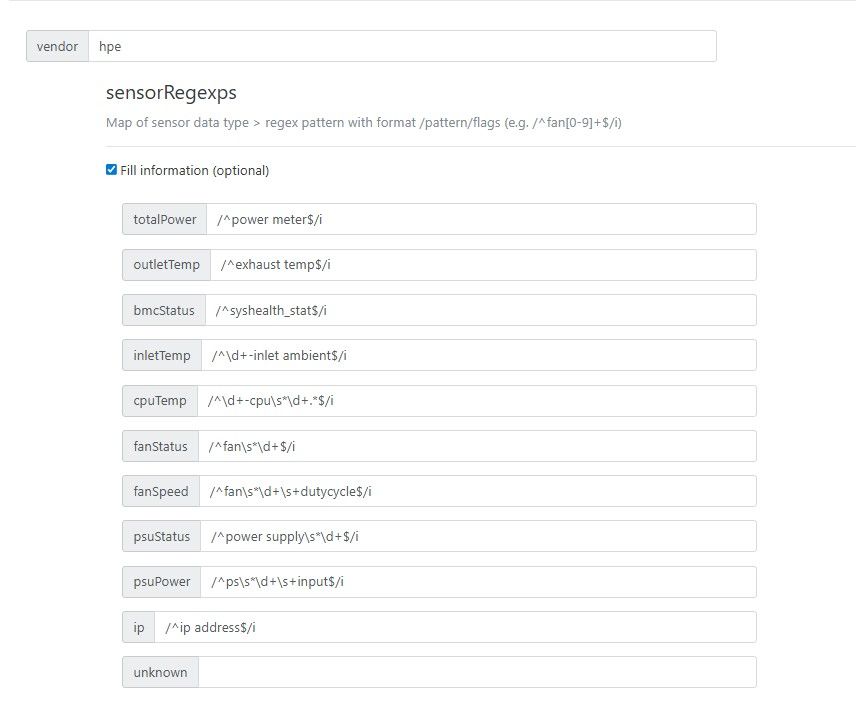
    • IPMI Plug-In for HPE DL380 Gen10 ILO5

      vendor: hpe

      sensorRegexps:
      totalPower: /^power meter$/i
      outletTemp: /^(exhaust temp|outlet temp)$/i
      bmcStatus: /^(bmc_status|syshealth_stat)$/i
      inletTemp: /^\d+-inlet ambient$/i
      cpuTemp: /^\d+-cpu\s*\d+(\s+pkgtmp)?$/i
      fanStatus: /^fan\s*\d+$/i
      fanSpeed: /^fan\s*\d+\s+dutycycle$/i
      psuStatus: /^power supply\s*\d+$/i
      psuPower: /^ps\s*\d+\s+input$/i
      ip: /^ip address$/i

      027dd33e-e949-4d42-9c21-07ae82272065-image.jpeg

      posted in Management
      msupportM
      msupport
    • XCP-NG Kubernetes micro8k

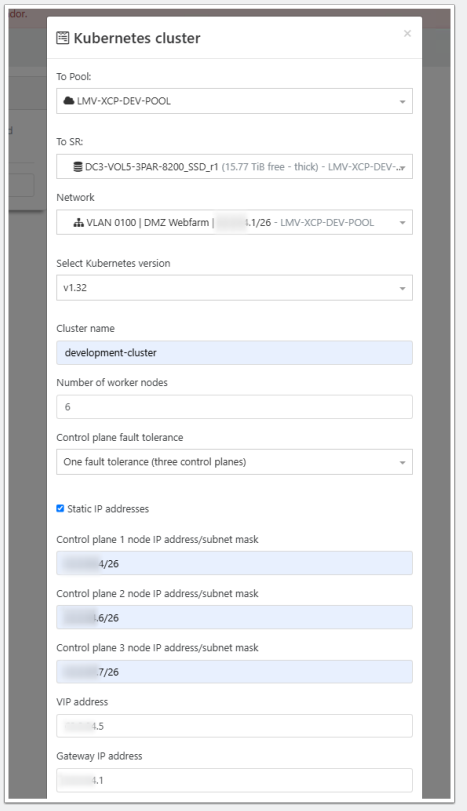
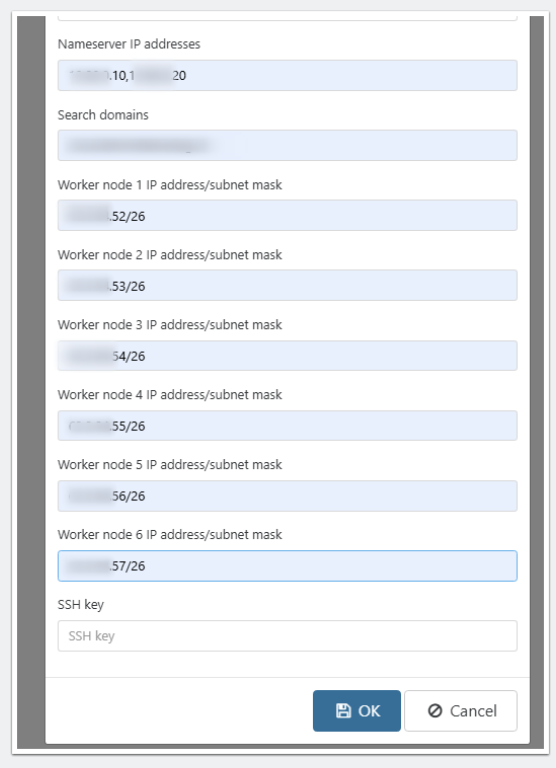
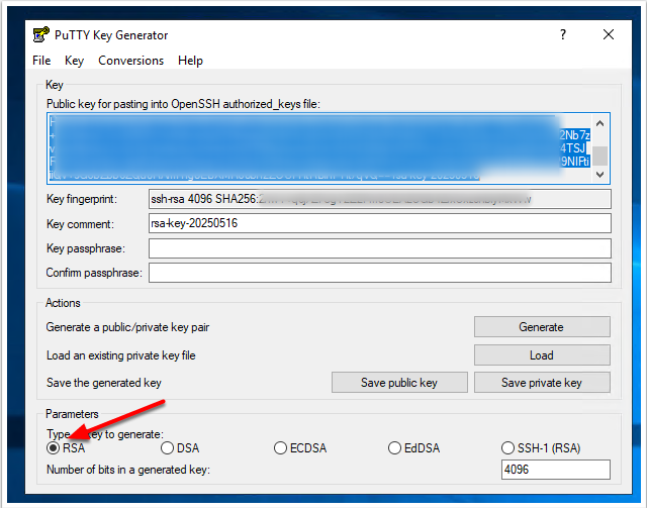
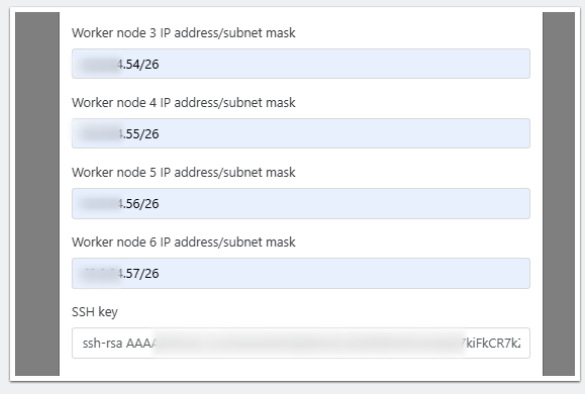
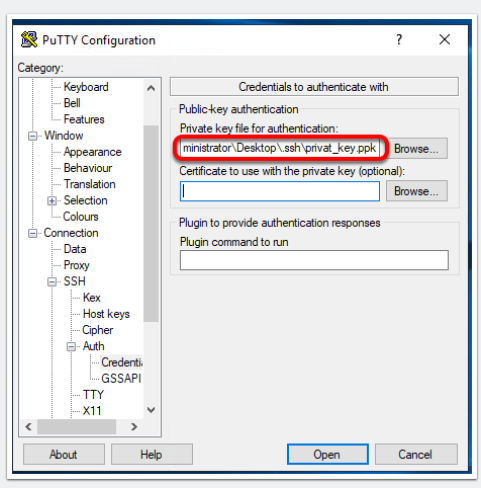
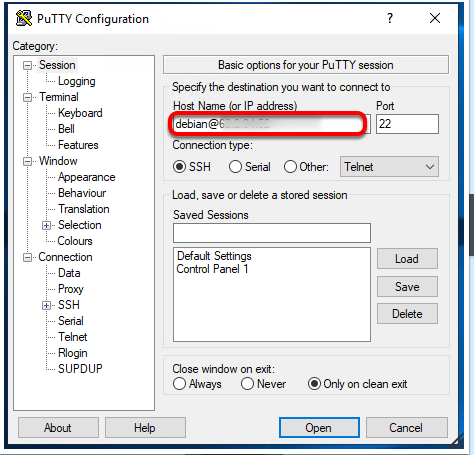
      I have tried to install the XCP-NG Kubernetes. Here are my installation instructions (created with the help of ChatGPT):

      ba6c85b8-d136-4ea6-8257-6761d836a8c4-image.png

      cd07394b-7864-45a2-a114-ed738eb289a7-image.png

      0e040711-6754-42d3-b2b4-cabd6be121ea-image.png

      1a43c449-1665-402e-a076-920c8a1f7369-image.png

      0f716844-ffd9-4b2b-8239-32201e3d3682-image.png

      7b492bf3-493c-4213-be33-0fc973b95073-image.png

      d5d3e58c-aa2c-4f9d-a116-9199870d43bf-image.png

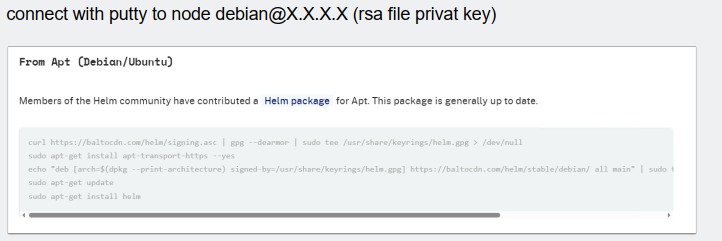
      sudo apt update
      sudo apt install curl -y
      sudo curl https://baltocdn.com/helm/signing.asc | gpg --dearmor | sudo tee /usr/share/keyrings/helm.gpg > /dev/null
      sudo apt-get install apt-transport-https --yes
      echo "deb [arch=$(dpkg --print-architecture) signed-by=/usr/share/keyrings/helm.gpg] https://baltocdn.com/helm/stable/debian/ all main" | sudo tee /etc/apt/sources.list.d/helm-stable-debian.list
      sudo apt-get update
      sudo apt-get install helm
      sudo snap install helm --classic
      sudo snap install kubeadm --classic
      sudo snap install kubectl --classic
      sudo snap install kubelet --classic
      sudo apt install git
      sudo helm create xcpng-csi
      cd ..
      cd xcpng-csi
      sudo git clone https://github.com/ArturoGuerra/xcpng-csi.git

      sudo apt-get update
      sudo apt-get install -y apt-transport-https ca-certificates curl
      curl -fsSL https://packages.cloud.google.com/apt/doc/apt-key.gpg | sudo apt-key add -
      sudo bash -c 'cat <<EOF >/etc/apt/sources.list.d/kubernetes.list
      deb https://apt.kubernetes.io/ kubernetes-xenial main
      EOF'
      sudo apt-get update

      sudo apt-get update
      sudo apt-get install -y ca-certificates
      sudo update-ca-certificates

      kubectl apply -f https://raw.githubusercontent.com/coreos/flannel/master/Documentation/kube-flannel.yml
      kubeadm init --pod-network-cidr=x.x.x.x/26

      sudo apt-get update
      sudo apt-get install -y apt-transport-https ca-certificates curl
      curl -fsSL https://packages.cloud.google.com/apt/doc/apt-key.gpg | sudo apt-key add -
      sudo bash -c 'cat <<EOF >/etc/apt/sources.list.d/kubernetes.list
      deb https://apt.kubernetes.io/ kubernetes-xenial main
      EOF'
      sudo apt-get update

      sudo curl -LO https://dl.k8s.io/release/v1.27.1/bin/linux/amd64/kube-apiserver
      sudo chmod +x kube-apiserver
      sudo mv kube-apiserver /usr/local/bin/

      sudo nano /etc/systemd/system/kube-apiserver.service

      EDITOR
      [Unit]
      Description=Kubernetes API Server
      Documentation=https://kubernetes.io/docs/
      After=network.target

      [Service]
      ExecStart=/usr/local/bin/kube-apiserver
      --advertise-address=0.0.0.0
      --allow-privileged=true
      --authorization-mode=Node,RBAC
      --client-ca-file=/etc/kubernetes/pki/ca.crt
      --kubelet-client-certificate=/etc/kubernetes/pki/apiserver-kubelet-client.crt
      --kubelet-client-key=/etc/kubernetes/pki/apiserver-kubelet-client.key
      --service-account-key-file=/etc/kubernetes/pki/sa.pub
      --service-cluster-ip-range=x.x.x.0/26
      --tls-cert-file=/etc/kubernetes/pki/apiserver.crt
      --tls-private-key-file=/etc/kubernetes/pki/apiserver.key
      --etcd-servers=https://127.0.0.1:2379
      --etcd-cafile=/etc/kubernetes/pki/etcd/ca.crt
      --etcd-certfile=/etc/kubernetes/pki/apiserver-etcd-client.crt
      --etcd-keyfile=/etc/kubernetes/pki/apiserver-etcd-client.key
      Restart=always
      RestartSec=10

      [Install]
      WantedBy=multi-user.target
      EDITOR

      sudo systemctl daemon-reload
      sudo systemctl enable kube-apiserver
      sudo systemctl start kube-apiserver

      posted in XCP-ng
      msupportM
      msupport
    • RE: Omnissa/Citrix VDI Alternative-ish

      @nick.lloyd
      UDS version 3.5 had a 10 user version for free
      For version 3.6 und 4.0 you have to pay

      posted in Compute
      msupportM
      msupport
    • RE: Omnissa/Citrix VDI Alternative-ish

      https://udsenterprise.com/en/
      Works great with xcp-ng

      posted in Compute
      msupportM
      msupport