Subcategories

  • VMs, hosts, pools, networks and all other usual management tasks.

    461 Topics
    4k Posts
    M
    @Pilow Yeah maybe but I hoped that XOA is somewhat aligned with XO from sources users. At least in a way that XO-CE users have the option to use the same Node version that Vates declares as most stable to use. With the introduction of disk-cli this is not the case anymore. //EDIT: at least when using the common scripts or docker containers maintained by community for running XO-CE. Those scripts / Dockerfiles could be edited to exclude disk-cli. Then it would still be possible to run XO on Node 20 I guess.
  • ACLs, Self-service, Cloud-init, Load balancing...

    102 Topics
    853 Posts
    I
    @simonp - Can you reshare the dashboards. The link says json is not available for any of these dashboards,
  • All XO backup features: full and incremental, replication, mirrors...

    491 Topics
    5k Posts
    P
    @TechGrips Hi, Unused XVA means a XVA file is not linked to any metadata (to remove a backup, we first remove the metadata file linked to it, then we remove the XVA), it should be removed by clean vm step. It is not an issue, just an information. For the second warning "XVA might be broken", this is because the compressed file seems to be corrupted but we cannot be sure. We prefer to warn the user there may be an issue in the file. This should encourage to remake a backup.
  • Everything related to Xen Orchestra's REST API

    84 Topics
    629 Posts
    K
    @olivierlambert & @mathieura thanks for the speedy response. Duly noted, very much appreciated.
  • Terraform, Packer or any tool to do IaC

    49 Topics
    463 Posts
    dalemD
    Version 1.4.0 is released: https://codeberg.org/NiXOA/system/releases/tag/v1.4.0 It includes significant changes and improvements, including: dedicated getting started section, migration to valkey, only needing to clone system, and helper scripts. the xen-orchestra-ce nixpkg now references the libvhdi nixpkg, and the core flake now references and pulls from the xen-orchestra-ce repo as an overlay. System (the user input flake) now uses the Core repo as an overlay, reducing the need to clone both locally AND allowing system to pull new updates and releases from core. XO, and libvhdi as needed. The next goal is: Make an xsconsole-like TUI Automate package updates for libvhdi and xen-orchestra-ce using CI/CD pipelines Submit libvhdi and xen-orchestra-ce as official nixpkgs
  • Addition of plugins to already installed XO

    2
    0 Votes
    2 Posts
    706 Views
    olivierlambertO
    Hi and welcome! Have you registered your XOA already? Enable the free trial to get all the plugins
  • Xen Orchestra installation on offline host

    5
    0 Votes
    5 Posts
    3k Views
    olivierlambertO
    We updated the image recently without updating the md5 (doing the modification now). If your sum is c3dd6102bef4d9aa2b7c5fc2c38c2bda that's fine
  • Failed S3 backup success, should recover

    4
    0 Votes
    4 Posts
    639 Views
    B
    We see occasional VM backup failures that match the above pattern (ENOENT on a "path" in a S3 bucket remote destination during a VM delta backup). We are running a backup of a large VM (200GB disk) to S3 bucket in Ceph Object Gateway. Our current XO is this commit https://github.com/vatesfr/xen-orchestra/commit/da51b1649c65d7d78a4eb25cc46c488ce2552800 from 2024-03-04. The failure is intermittent. Example failure log: { "data": { "mode": "delta", "reportWhen": "always" }, "id": "1712008868496", "jobId": "49c2634a-f281-46b7-9192-aea8c786f3d4", "jobName": "ZABBIX VM to ceph02 Delta Backup", "message": "backup", "scheduleId": "6b1280f0-21e7-475c-9af3-330726108568", "start": 1712008868496, "status": "failure", "infos": [ { "data": { "vms": [ "c020890b-c1a7-79cf-0b55-aa340ba9226b" ] }, "message": "vms" } ], "tasks": [ { "data": { "type": "VM", "id": "c020890b-c1a7-79cf-0b55-aa340ba9226b", "name_label": "zabbix" }, "id": "1712008870266", "message": "backup VM", "start": 1712008870266, "status": "failure", "tasks": [ { "id": "1712008870283", "message": "clean-vm", "start": 1712008870283, "status": "success", "end": 1712008872364, "result": { "merge": false } }, { "id": "1712008872791", "message": "snapshot", "start": 1712008872791, "status": "success", "end": 1712008873901, "result": "902d65f0-8c9b-2460-dad7-d041ceefebdc" }, { "data": { "id": "d8d6a743-8c15-4b9a-baf4-df5d7d379b6e", "isFull": false, "type": "remote" }, "id": "1712008873919", "message": "export", "start": 1712008873919, "status": "failure", "tasks": [ { "id": "1712008875215", "message": "transfer", "start": 1712008875215, "status": "success", "end": 1712009333076, "result": { "size": 35343973376 } }, { "id": "1712009335152", "message": "clean-vm", "start": 1712009335152, "status": "failure", "tasks": [ { "id": "1712009336153", "message": "merge", "start": 1712009336153, "status": "failure", "end": 1712009585029, "result": { "cause": { "name": "NoSuchKey", "$fault": "client", "$metadata": { "httpStatusCode": 404, "requestId": "tx00000c27bed21222dc684-00660b3170-302aa3c-s3", "attempts": 1, "totalRetryDelay": 0 }, "Code": "NoSuchKey", "BucketName": "xcp-ng-mama-pool-vm-backup", "RequestId": "tx00000c27bed21222dc684-00660b3170-302aa3c-s3", "HostId": "302aa3c-s3-s3", "message": "UnknownError" }, "code": "ENOENT", "path": "/xo-vm-backups/c020890b-c1a7-79cf-0b55-aa340ba9226b/vdis/49c2634a-f281-46b7-9192-aea8c786f3d4/378753c5-9072-47b7-b879-0488a86e85ba/data/b70bc690-28c7-440a-8147-bf6d61c179de.vhd/blocks/10/52", "message": "ENOENT: no such file or directory '/xo-vm-backups/c020890b-c1a7-79cf-0b55-aa340ba9226b/vdis/49c2634a-f281-46b7-9192-aea8c786f3d4/378753c5-9072-47b7-b879-0488a86e85ba/data/b70bc690-28c7-440a-8147-bf6d61c179de.vhd/blocks/10/52'", "name": "Error", "stack": "Error: ENOENT: no such file or directory '/xo-vm-backups/c020890b-c1a7-79cf-0b55-aa340ba9226b/vdis/49c2634a-f281-46b7-9192-aea8c786f3d4/378753c5-9072-47b7-b879-0488a86e85ba/data/b70bc690-28c7-440a-8147-bf6d61c179de.vhd/blocks/10/52'\n at S3Handler._copy (/opt/xo/xo-builds/xen-orchestra-202403041050/@xen-orchestra/fs/dist/s3.js:157:23)\n at process.processTicksAndRejections (node:internal/process/task_queues:95:5)" } } ], "end": 1712009585029, "result": { "cause": { "name": "NoSuchKey", "$fault": "client", "$metadata": { "httpStatusCode": 404, "requestId": "tx00000c27bed21222dc684-00660b3170-302aa3c-s3", "attempts": 1, "totalRetryDelay": 0 }, "Code": "NoSuchKey", "BucketName": "xcp-ng-mama-pool-vm-backup", "RequestId": "tx00000c27bed21222dc684-00660b3170-302aa3c-s3", "HostId": "302aa3c-s3-s3", "message": "UnknownError" }, "code": "ENOENT", "path": "/xo-vm-backups/c020890b-c1a7-79cf-0b55-aa340ba9226b/vdis/49c2634a-f281-46b7-9192-aea8c786f3d4/378753c5-9072-47b7-b879-0488a86e85ba/data/b70bc690-28c7-440a-8147-bf6d61c179de.vhd/blocks/10/52", "message": "ENOENT: no such file or directory '/xo-vm-backups/c020890b-c1a7-79cf-0b55-aa340ba9226b/vdis/49c2634a-f281-46b7-9192-aea8c786f3d4/378753c5-9072-47b7-b879-0488a86e85ba/data/b70bc690-28c7-440a-8147-bf6d61c179de.vhd/blocks/10/52'", "name": "Error", "stack": "Error: ENOENT: no such file or directory '/xo-vm-backups/c020890b-c1a7-79cf-0b55-aa340ba9226b/vdis/49c2634a-f281-46b7-9192-aea8c786f3d4/378753c5-9072-47b7-b879-0488a86e85ba/data/b70bc690-28c7-440a-8147-bf6d61c179de.vhd/blocks/10/52'\n at S3Handler._copy (/opt/xo/xo-builds/xen-orchestra-202403041050/@xen-orchestra/fs/dist/s3.js:157:23)\n at process.processTicksAndRejections (node:internal/process/task_queues:95:5)" } } ], "end": 1712009585031 } ], "end": 1712009585032 } ], "end": 1712009585032 } I know I should be on the current XO to report a problem. Not asking for a fix now, just trying to document that this defect still exists. 0 julien-f committed to vatesfr/xen-orchestra fix(xo-server/robots.txt): must not require authentication Introduced by a2c36c083 This file is intended for search engines, which, by definition are not signed in.
  • unable to login to XOA console

    9
    0 Votes
    9 Posts
    2k Views
    DanpD
    See the documentation for how to reset the SSH password -- https://xen-orchestra.com/docs/xoa.html#first-console-connection
  • [XOA] Problem with AltGr and space bar while installing a VM

    32
    0 Votes
    32 Posts
    8k Views
    M
    @Squall124 While being a bug and I understand it can be a pita but then there's a workaround, I still think you're making a storm in a waterglass by saying "really scary when we think about using this solution in production". Nobody is forcing you to this. We ourselves are more than happy, to say the least, to have made the switch from Vmware (with 2yrs of paid contract in place) to xcp-ng last year! The level of support and interaction you get, you can only dream about it getting it on the black side (even before the Broadcom debacle), puts up with this smaller nuisances by the ton. Just my 2 cents.
  • Export VM problem

    Solved
    4
    0 Votes
    4 Posts
    698 Views
    GheppyG
    @olivierlambert Thank you, this solve the problem
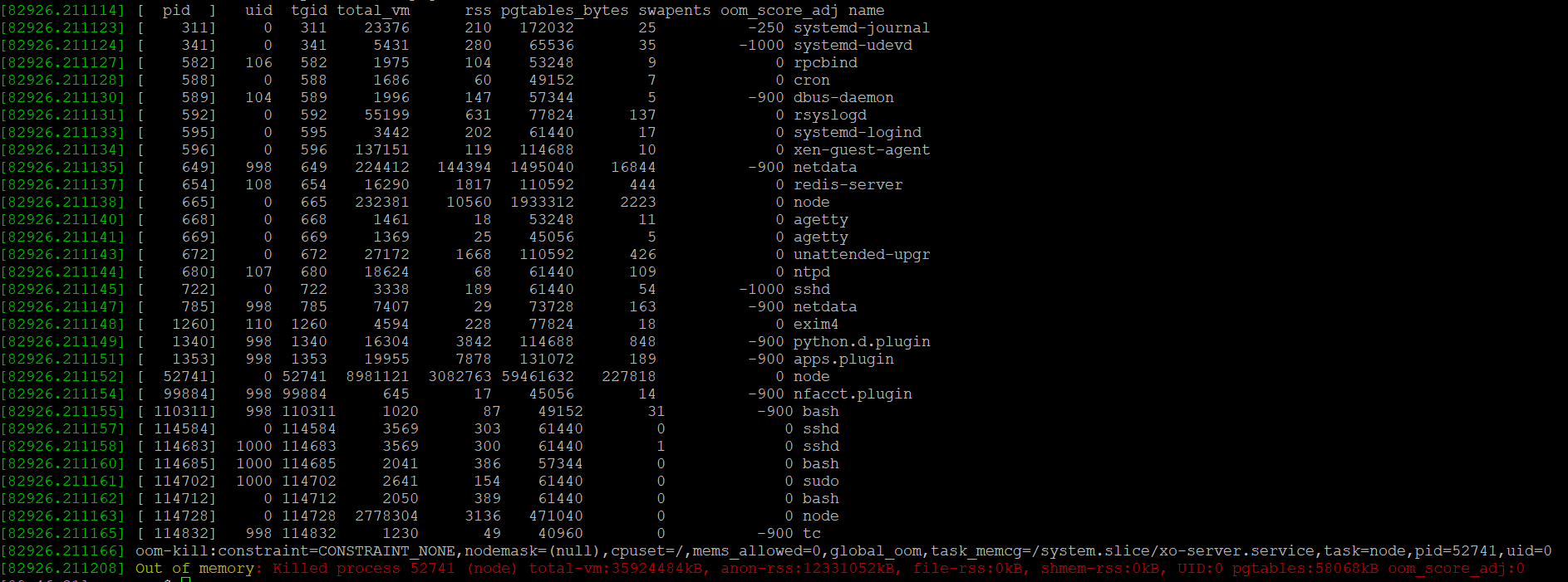
  • XOA 5.93 out of memory

    4
    1
    0 Votes
    4 Posts
    651 Views
    olivierlambertO
    Then you should open a support ticket, please
  • General Question

    10
    0 Votes
    10 Posts
    1k Views
    olivierlambertO
    Yes, you can create a group and provide ACLs on the group (IIRC). So all users in the group will have the same permissions.
  • 0 Votes
    12 Posts
    5k Views
    planedropP
    @waveguide This is a good solution, glad it's working.
  • Today's build fixed all my "certificate" issues! Great job

    Solved
    2
    0 Votes
    2 Posts
    221 Views
    olivierlambertO
    Message for @julien-f who both broke and fixed it
  • XO slow to display stats

    Solved
    9
    0 Votes
    9 Posts
    1k Views
    olivierlambertO
    It's not that I'm not happy, I'm just explaining why it makes more sense to post issues on the GitHub repo that you used to install XO in the first place What if a 3rd party installed is installing XO in the incorrect way? We have already many messages to deal with, adding potential 3rd party installer would make it even harder for us regarding our community support
  • Importing vm from VMware ESXi fails

    Solved
    7
    2
    0 Votes
    7 Posts
    2k Views
    A
    Solved by 583c728
  • continuous replication problems

    Solved
    17
    2
    0 Votes
    17 Posts
    3k Views
    GheppyG
    And I confirm this, the problem has disappeared. Thank you
  • XOA does not mount CloudConfigDrive

    5
    0 Votes
    5 Posts
    762 Views
    olivierlambertO
    This can happen since using the sources means also experiment some bugs, while on XOA, you should be safer because we do QA before each release. If you want stability and a production grade solution, go for XOA Anyway, the bug is now fixed, get the latest commit on master and try again, it should work!
  • 404 not found importing from VMware to XOA - workaround

    4
    0 Votes
    4 Posts
    862 Views
    florentF
    @paulorrockgit thanks paul for the bug report and exploration I propose this bugfix : https://github.com/vatesfr/xen-orchestra/pull/7504 and can deploy it on your XOA fbeauchamp opened this pull request in vatesfr/xen-orchestra closed fix(vwmare-explorer): handle raw cdrom #7504
  • OVA Import

    6
    0 Votes
    6 Posts
    2k Views
    B
    @olivierlambert I was able to get the import working by importing into vmware workstation, exporting to ovf and then converting to ova with vmwares command line tool.
  • SMB ISO share can't upload

    4
    0 Votes
    4 Posts
    1k Views
    M
    @Tristis-Oris said in SMB ISO share can't upload: @mohammadm looks like Truenas related issue. Check the account permissions. if it stop working after XO update, try to rollback previous commit. User – xcp-ng Read | Write | Execute For now I upload the ISO's through Windows SMB. Because it is accessible from XOA. Only uploading is not working.
  • Accessing XCP host outside of private network

    13
    0 Votes
    13 Posts
    5k Views
    U
    I'm using ZeroTier and access works, except for the console view.
  • How to install Windows Server 2022 with XO?

    9
    0 Votes
    9 Posts
    3k Views
    M
    @ckargitest You need to run: fs0: cd \efi\boot and then run the program which is in this folder. It took me a while as well to figure it out.
  • How to import from VMware when VM has RDM

    1
    0 Votes
    1 Posts
    465 Views
    No one has replied