XCP-ng
    • Categories
    • Recent
    • Tags
    • Popular
    • Users
    • Groups
    • Register
    • Login

    How to Setup IPMI in XO

    Scheduled Pinned Locked Moved Management
    41 Posts 13 Posters 4.4k Views 13 Watching
    Loading More Posts
    • Oldest to Newest
    • Newest to Oldest
    • Most Votes
    Reply
    • Reply as topic
    Log in to reply
    This topic has been deleted. Only users with topic management privileges can see it.
    • C Offline
      Chr57 @Chr57
      last edited by

      Tested this and it worked;

      [09:33 xcp-ng-01 ~]# ls /dev/ipmi*
      /dev/ipmi0
      [09:33 xcp-ng-01 ~]# ipmitool sensor
      CPU Temp         | 49.000     | degrees C  | ok    | na        | 5.000     | na                                                                   | na        | 100.000   | na
      Inlet Temp       | 24.000     | degrees C  | ok    | na        | 5.000     | na                                                                   | na        | 50.000    | na
      System Temp      | 27.000     | degrees C  | ok    | na        | 5.000     | na                                                                   | na        | 85.000    | na
      Peripheral Temp  | 35.000     | degrees C  | ok    | na        | 5.000     | na                                                                   | na        | 85.000    | na
      CPU_VRM0 Temp    | 41.000     | degrees C  | ok    | na        | 5.000     | na                                                                   | na        | 100.000   | na
      CPU_VRM1 Temp    | 32.000     | degrees C  | ok    | na        | 5.000     | na                                                                   | na        | 100.000   | na
      SOC_VRM Temp     | 38.000     | degrees C  | ok    | na        | 5.000     | na                                                                   | na        | 100.000   | na
      VDDIO_VRM Temp   | 31.000     | degrees C  | ok    | na        | 5.000     | na                                                                   | na        | 100.000   | na
      DIMMA~F Temp     | 37.000     | degrees C  | ok    | na        | 5.000     | na                                                                   | na        | 85.000    | na
      DIMMG~L Temp     | 38.000     | degrees C  | ok    | na        | 5.000     | na                                                                   | na        | 85.000    | na
      MB 12V           | 11.999     | Volts      | ok    | 10.151    | 10.319    | na                                                                   | na        | 13.259    | 13.427
      MB 5VCC          | 5.112      | Volts      | ok    | 4.482     | 4.482     | na                                                                   | na        | 5.490     | 5.490
      MB 3.3VCC        | 3.229      | Volts      | ok    | 2.952     | 2.952     | na              
      
      1 Reply Last reply Reply Quote 0
      • marcoiM Offline
        marcoi
        last edited by

        Just to add more data.
        Xen Orchestra, commit 56b17
        Master, commit 56b17
        All patches on host are done.

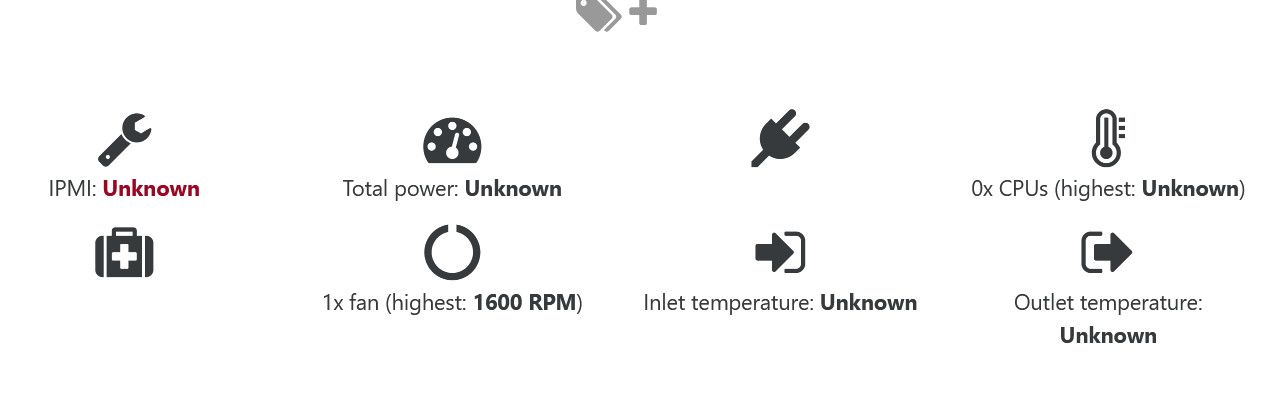
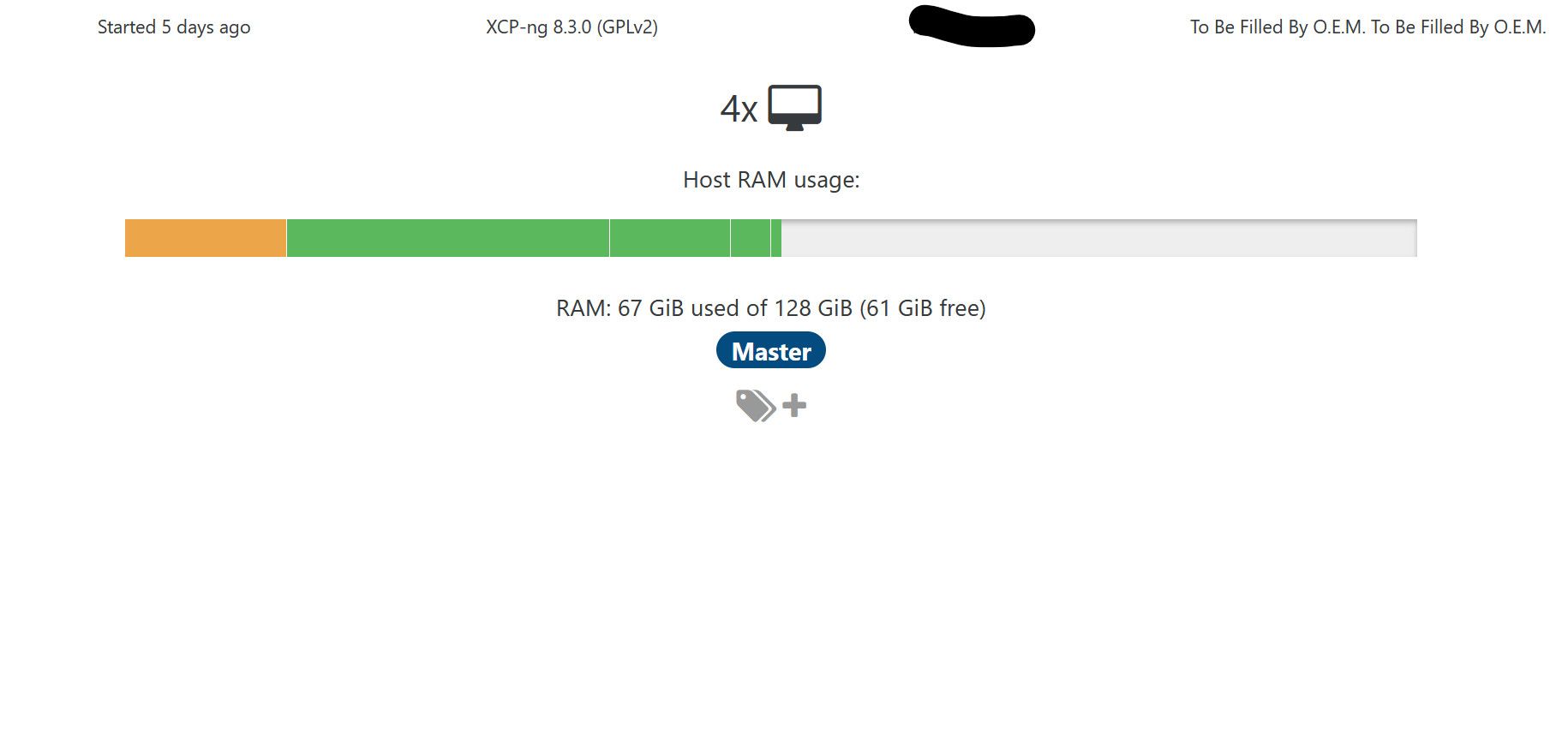
        the ipmitool works on my asrock MB but i dont see it in XO host screen.
        I also didnt see it on xo6 interface.

        a5e1c4e9-bcd7-4593-8485-0810a532809b-image.jpeg

        f04bedae-a959-4d9f-a2dc-7a3c940b799a-image.jpeg

        acebmxerA 1 Reply Last reply Reply Quote 0
        • olivierlambertO Offline
          olivierlambert Vates 🪐 Co-Founder CEO
          last edited by

          Hi,

          Each vendor got a different way to display their IPMI stats, so it needs a specific code in XO to display it. Sadly, it's not universal. There's no Asrock support yet.

          P 1 Reply Last reply Reply Quote 1
          • acebmxerA Online
            acebmxer @marcoi
            last edited by

            @marcoi said:
            the ipmitool works on my asrock MB but i dont see it in XO host screen.
            I also didnt see it on xo6 interface.

            @olivierlambert

            Is ipmi data supposed to show in v6 on support systems or not yet. I dont see ipmi data for my dell servers at work in v6 only v5.

            1 Reply Last reply Reply Quote 0
            • olivierlambertO Offline
              olivierlambert Vates 🪐 Co-Founder CEO
              last edited by

              Not yet, I think it's already planned, check https://feedback.vates.tech

              A 1 Reply Last reply Reply Quote 1
              • P Offline
                Pilow @olivierlambert
                last edited by Pilow

                @olivierlambert said:

                no Asrock support yet

                nor HPE servers 😢 (yet...)

                1 Reply Last reply Reply Quote 0
                • A Online
                  Andrew Top contributor @olivierlambert
                  last edited by

                  @olivierlambert I would think HP servers would be a top tier for IPMI support.... please...

                  1 Reply Last reply Reply Quote 0
                  • olivierlambertO Offline
                    olivierlambert Vates 🪐 Co-Founder CEO
                    last edited by

                    Go for https://feedback.vates.tech/ and create one and upvote then 🙂 We'll put it in the backlog. More votes = higher prio!

                    P A 2 Replies Last reply Reply Quote 0
                    • P Offline
                      Pilow @olivierlambert
                      last edited by

                      @olivierlambert https://feedback.vates.tech/posts/52/ipmi-for-hpe-servers

                      go vote all of you !

                      A 1 Reply Last reply Reply Quote 1
                      • C Offline
                        CodeMercenary
                        last edited by

                        I have two PE R630 and one PE R730xd. The two R630s show the IPMI data in XO but the R730xd does not. If I run ipmitool sensor from an ssh session, I get very similar data back on the 730 and 630.

                        This isn't critical to me, just letting you know that there are cases that functioning ipmitool on a Dell does not seem to be enough to show it.

                        There are some differences in the labels. The R730 has "Fan1 RPM", "Fan2 RPM" while the R630 has "Fan1A", "Fan2A", "Fan1B". Most of the other interesting fields seem to have the same names but the order is a bit different and I didn't do an exhaustive comparison.

                        It's very cool that you are surfacing this data now.

                        1 Reply Last reply Reply Quote 0
                        • A Online
                          Andrew Top contributor @Pilow
                          last edited by

                          Come on everyone! Click Here to vote to support HP IPMI info in XO!

                          1 Reply Last reply Reply Quote 1
                          • A Online
                            Andrew Top contributor @olivierlambert
                            last edited by

                            @olivierlambert With the new IPMI plugin for XO I was hoping to see support for HP servers. But at least it seems I can add it to my installation and then post my results.

                            I added "hp" as a vendor and all of the plugin settings (if you leave it blank there is an error when saving).

                            But I still see no sensor data for the hosts in XO.

                            Any thoughts on what I should add? check? do? to make it work?

                            A 1 Reply Last reply Reply Quote 0
                            • A Online
                              Andrew Top contributor @Andrew
                              last edited by

                              I found the first step. It's looking for the vendor as the whole name proliant dl360p gen8

                              Then I have a few working, and several that don't.

                              Works: Total Power, CPUs Temp, Fans Speed.

                              All-KiA 1 Reply Last reply Reply Quote 0
                              • All-KiA Offline
                                All-Ki Vates 🪐 XO Team @Andrew
                                last edited by All-Ki

                                @Andrew Hi, i'm the one that made the plugin, the documentation is in progress. Meanwhile, can you post the result of running
                                ipmitool sdr list ? You might find some leads as to which regexes should work for your particular host.
                                Also you can check ipmitool lan print (be carefull not to share ip's or sensitive info ).

                                M A 2 Replies Last reply Reply Quote 0
                                • M Do not disturb
                                  MajorP93 @All-Ki
                                  last edited by

                                  @All-Ki Thanks for your work on that plugin!

                                  This is the ipmitool sdr list output on one of my Supermicro based XCP-ng hosts, how can I derive the correct plugin settings (regex) from that?

                                  [13:36 xcpng01 ~]# ipmitool sdr list
                                  CPU Temp         | 59 degrees C      | ok
                                  System Temp      | 30 degrees C      | ok
                                  Peripheral Temp  | 29 degrees C      | ok
                                  M2NVMeSSD Temp1  | no reading        | ns
                                  VRMCpu Temp      | 31 degrees C      | ok
                                  VRMSoc Temp      | 43 degrees C      | ok
                                  VRMABCD Temp     | 34 degrees C      | ok
                                  VRMEFGH Temp     | 36 degrees C      | ok
                                  DIMMA1 Temp      | 36 degrees C      | ok
                                  DIMMB1 Temp      | 35 degrees C      | ok
                                  DIMMC1 Temp      | 34 degrees C      | ok
                                  DIMMD1 Temp      | 33 degrees C      | ok
                                  DIMME1 Temp      | 38 degrees C      | ok
                                  DIMMF1 Temp      | 37 degrees C      | ok
                                  DIMMG1 Temp      | 36 degrees C      | ok
                                  DIMMH1 Temp      | 34 degrees C      | ok
                                  FAN1             | no reading        | ns
                                  FAN2             | 4200 RPM          | ok
                                  FAN3             | no reading        | ns
                                  FAN4             | no reading        | ns
                                  FAN5             | no reading        | ns
                                  FANA             | 3600 RPM          | ok
                                  FANB             | 3600 RPM          | ok
                                  12V              | 12,05 Volts       | ok
                                  5VCC             | 5,02 Volts        | ok
                                  3.3VCC           | 3,33 Volts        | ok
                                  VBAT             | 0x04              | ok
                                  VDDCR            | 1,11 Volts        | ok
                                  VMEMABCD         | 1,23 Volts        | ok
                                  VMEMEFGH         | 1,22 Volts        | ok
                                  VDD_5_DUAL       | 5,16 Volts        | ok
                                  VDD_33_DUAL      | 3,28 Volts        | ok
                                  SOCRUN           | 0,87 Volts        | ok
                                  SOCDUAL          | 0,89 Volts        | ok
                                  Chassis Intru    | 0x00              | ok
                                  PS1 Status       | 0x01              | ok
                                  PS2 Status       | 0x01              | ok
                                  

                                  Thanks and best regards

                                  M 1 Reply Last reply Reply Quote 0
                                  • M Do not disturb
                                    MajorP93 @MajorP93
                                    last edited by

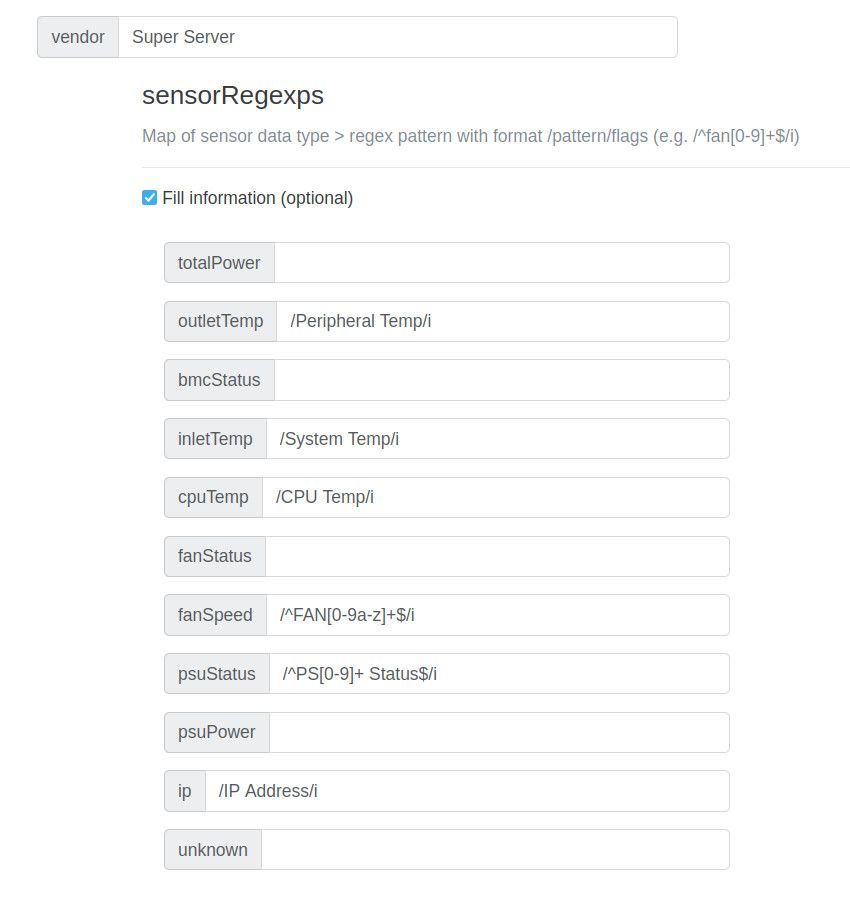
                                    For my fellow Supermicro enjoyers: I was able to get the plugin to show some information.
                                    Even if there are some parts missing it is better than nothing in my opinion.

                                    Go to settings --> plugins --> ipmi-sensors --> "+" --> Add --> Fill information and add the vendor string as well as the Sensor Reg Ex.
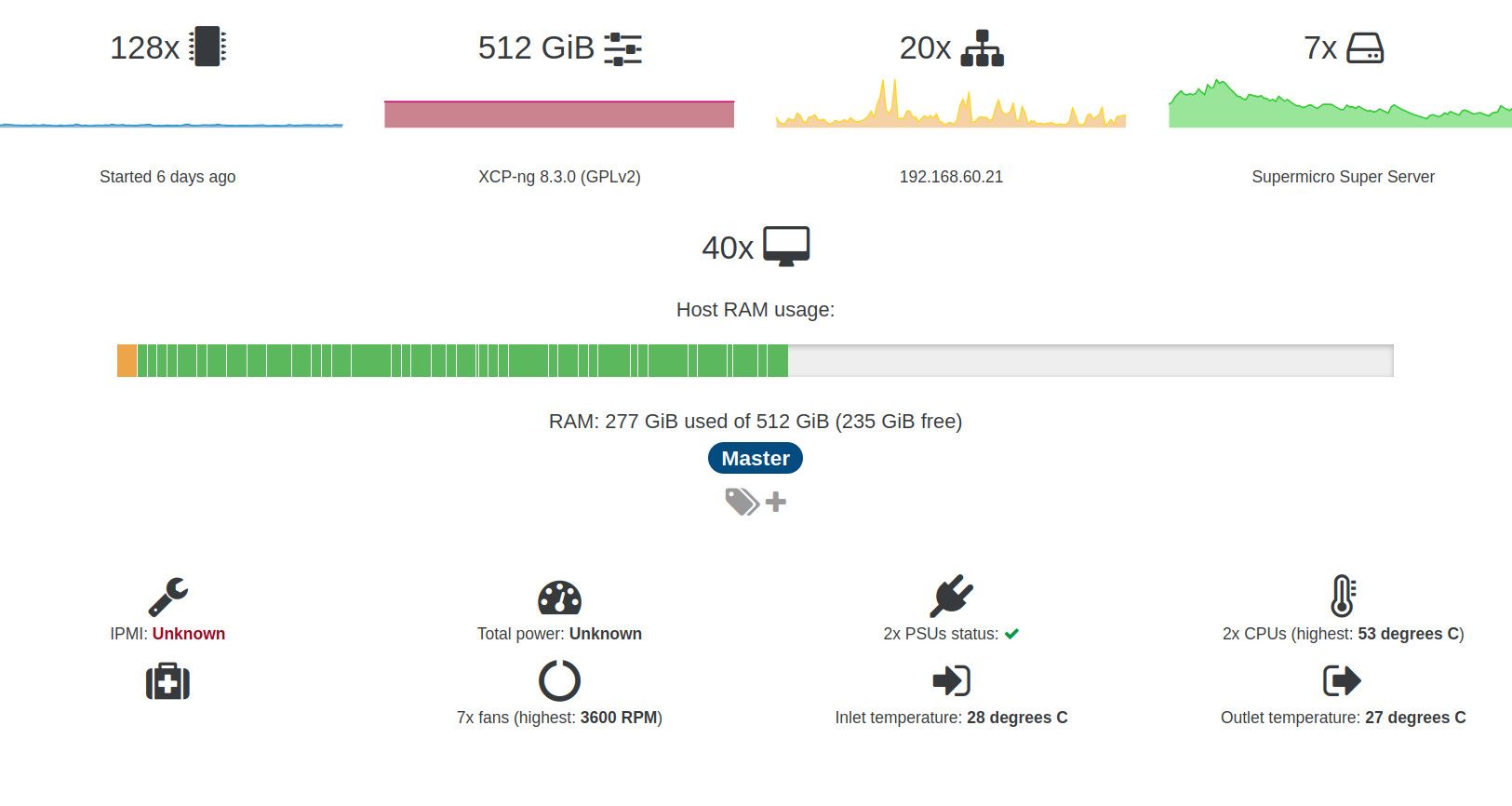
                                    045bb645-4c8b-4ede-8798-38e0b3475b9c-image.jpeg

                                    a83cee37-0ee2-4939-b6cb-c3884e814618-image.jpeg

                                    Hope this helps.

                                    Best regards

                                    1 Reply Last reply Reply Quote 0
                                    • marcoiM Offline
                                      marcoi
                                      last edited by

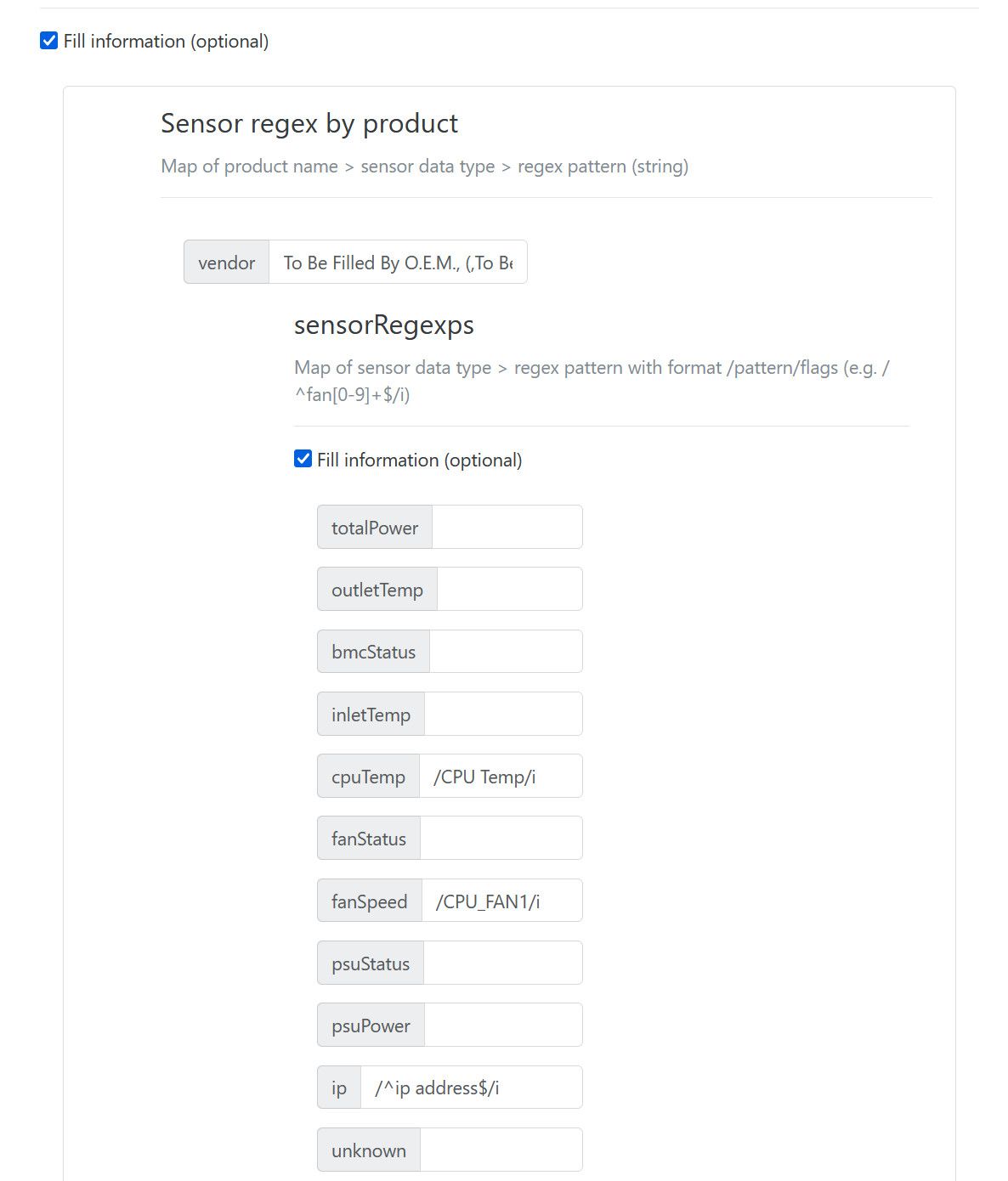
                                      i see the sensor info when i run ipmitool sensor on the server. So i took that info and put it into pluggin reg settings.
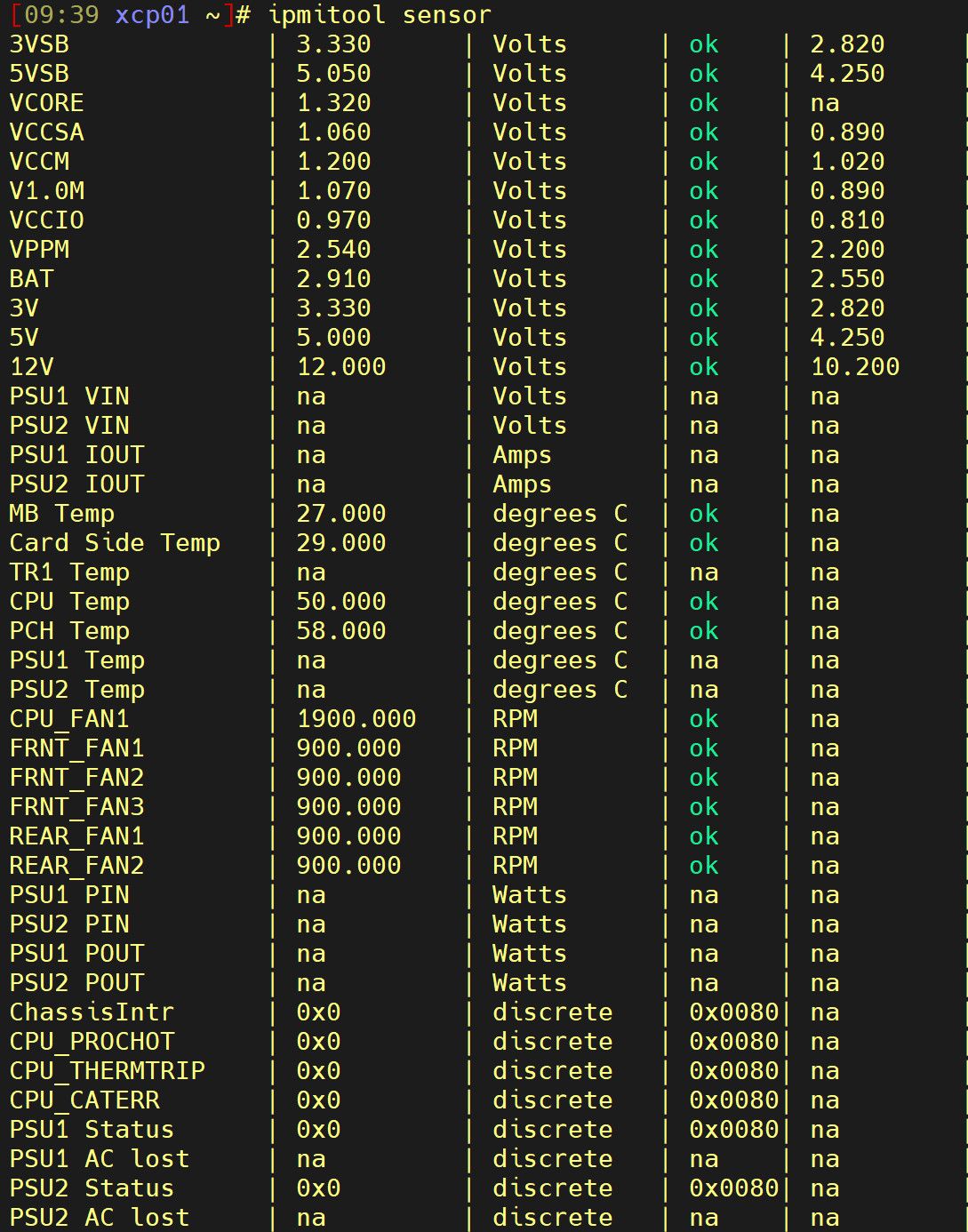
                                      ca4e4089-eb71-40fb-8aa6-07f6005a1c76-image.jpeg

                                      pluggin
                                      7757978f-e289-4baf-9837-ba5f81b3b8f3-image.jpeg

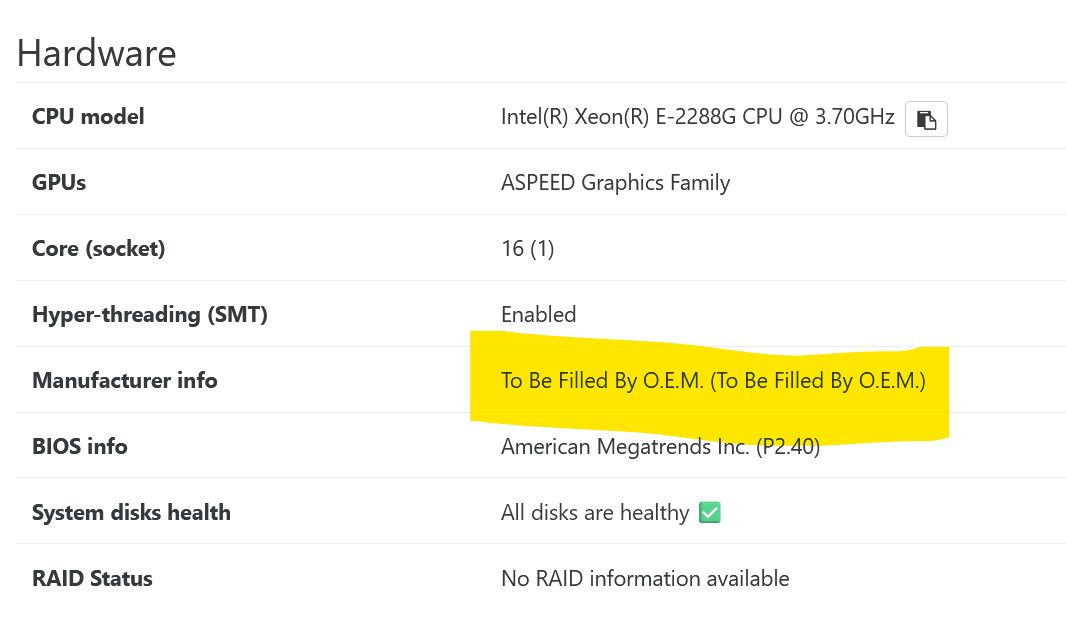
                                      my host shows OEM generic info as manufactor
                                      ff1040bf-d526-4295-b0e2-0f04dc908fd0-image.jpeg

                                      So am I doing something wrong to get the general stuff working on asrock motherboard?

                                      M 1 Reply Last reply Reply Quote 0
                                      • M Do not disturb
                                        MajorP93 @marcoi
                                        last edited by MajorP93

                                        @marcoi I found out what to enter for "vendor" by running "dmidecode -s system-product-name" on one of my XCP-ng hosts:

                                        [15:45 xcpng01 ~]# dmidecode -s system-product-name
                                        Super Server
                                        

                                        //EDIT: in your case it looks like you should enter "To Be Filled By O.E.M." for vendor. Not "To Be Filled By O.E.M. (To Be Filled By O.E.M.)"

                                        marcoiM All-KiA 2 Replies Last reply Reply Quote 1
                                        • marcoiM Offline
                                          marcoi @MajorP93
                                          last edited by

                                          @MajorP93 said:

                                          dmidecode -s system-product-name

                                          that fixed it
                                          be3fd9e6-3504-464c-af68-30797df065ef-image.jpeg

                                          1 Reply Last reply Reply Quote 0
                                          • All-KiA Offline
                                            All-Ki Vates 🪐 XO Team @MajorP93
                                            last edited by

                                            @MajorP93 Nice job, i'm thinking about working on an api route to have those infos without needing to go to the server console


                                            1 Reply Last reply Reply Quote 1

                                            Hello! It looks like you're interested in this conversation, but you don't have an account yet.

                                            Getting fed up of having to scroll through the same posts each visit? When you register for an account, you'll always come back to exactly where you were before, and choose to be notified of new replies (either via email, or push notification). You'll also be able to save bookmarks and upvote posts to show your appreciation to other community members.

                                            With your input, this post could be even better 💗

                                            Register Login
                                            • First post
                                              Last post