XCP-ng 8.3 updates announcements and testing
-
New packages in
xcp-ng-testingfor the next XCP-ng 8.3 LTS maintenance updateThis is a follow-up of the the previous post and addresses the issue reported by our testers.
First of all, a huge thanks to all testers who allowed us to catch this backup issue early:
@acebmxer, @jr-m4, @bufanda, @flakpyro, @Andrew.We decided to revert the change that improves the performance of
xapi-nbdsince it caused the backup issue. This change will be reworked and refined, then presented to you again in a future update, without this issue. While investigating, we also found a bug inblktap: in rare cases, the process handling a VM disk (tapdisk) could crash during a backup and leave the disk impossible to detach. The newblktapversion fixes it.Versions
blktap: 3.55.5-12.2.xcpng8.3 -> blktap-3.55.5-12.3.xcpng8.3xapi: 26.1.21-1.1.xcpng8.3 -> 26.1.21-1.2.xcpng8.3
Test on XCP-ng 8.3
yum clean metadata --enablerepo=xcp-ng-testing,xcp-ng-candidates
yum update --enablerepo=xcp-ng-testing,xcp-ng-candidates
reboot
If you reverted the previous candidates with
yum history undo, update normally with the commands above. Note that downgrading is not recommended. If you disabled NBD in your backup jobs as a workaround, please enable it again after the update.The usual update rules apply: pool coordinator first, etc.
What to test
If you have already carried out the initial updates and performed the tests mentioned in our previous post, please confirm that the XO backups are now back to a working state.
If you did not run the initial update and have not yet performed any tests, please be sure to review the "what to test" section of the the previous post.
Test window before official release of the updates
~7 days
-
of course i just downgraded again prior to this release... Sorry for the post. This was assisted with AI. I was also trying to do this while at work
 . I tried to verify this was not caused be my actions or configuration. If this is the results of upgrading and downgrading then everyelse use this a learning point.
[13:10 xcp-ng-disjqdnc ~]# yum history Loaded plugins: fastestmirror ID | Command line | Date and time | Action(s) | Altered ------------------------------------------------------------------------------- 16 | update --enablerepo=xcp- | 2026-10-27 13:04 | Update | 35 EE 15 | history undo 14 | 2026-10-27 10:37 | Downgrade | 35 EE 14 | update --enablerepo=xcp- | 2026-10-22 19:00 | Update | 35 EE 13 | update --disablerepo=* - | 2026-10-22 15:40 | Update | 1 12 | history undo 11 | 2026-10-22 13:37 | Downgrade | 35 EE 11 | update --enablerepo=xcp- | 2026-10-22 05:58 | Update | 35 EE 10 | update --disablerepo=* - | 2026-10-13 13:13 | Update | 6 9 | update --disablerepo=* - | 2026-10-05 15:04 | Update | 20 8 | update --enablerepo=xcp- | 2026-10-01 09:12 | Update | 45 EE 7 | update --disablerepo=* - | 2026-09-08 16:06 | Update | 6 6 | update --enablerepo=xcp- | 2026-08-26 08:39 | Update | 23 EE 5 | update --enablerepo=xcp- | 2026-08-14 13:23 | I, U | 53 EE 4 | update | 2026-07-28 10:46 | Update | 5 3 | update --enablerepo=xcp- | 2026-07-10 11:27 | Update | 23 EE 2 | install -y /root/twinsto | 2026-07-05 20:16 | Install | 12 1 | update --disablerepo=* - | 2026-07-05 01:56 | I, O, U | 138 EEhistory list
updates installed no issues. I did a full backup job prior to new updates. after updates I did a delta backup. (vms are in VHD format)
migrated VMS back to QCOW2 and ran another backup. Because of migration this was a full backup..
Ran into a massive storage deadlock testing this batch of candidates on my NFS setups with Mellanox ConnectX links.
Here is the exact timeline and raw outputs of what went down:
- Clean baseline: Rolled back previous stuff via
yum history undoso the host was at a completely clean slate first. - Pre-test: Ran a full backup on standard VHD layout on the stable build. Zero issues, finished perfectly fine.
- The update: Upgraded to the testing candidate repo (ID 16 in my history output above).
- The trigger: Cleared a delta backup right after, then kicked off a full backup job. No other out-of-band tasks or live migrations were happening.
The Breakdown:
Mid-way through that full VHD backup, the entire storage layer completely locked up.- Toolstack went blind:
xe task-listwas completely blank. The host totally lost track of the job it was supposed to be running. - VMs deadlocked: Every user VM instantly frozen into a hard Blocked/Halted (
B H) state. Trying a low-levelxl destroyjust turned them into permanent un-killable zombie domains (D P H).
[13:33 xcp-ng-rngyaiub ~]# xl destroy 1
[13:33 xcp-ng-rngyaiub ~]# list_domains
id |                                 uuid |  state
 0 | 2083b5bd-7878-4598-960f-bb425814d338 |     R
 1 | 49f51614-c105-4fea-3103-566613ec79f2 | D P  H
 2 | dcbfaff1-d782-b42b-6eed-3d6b6d1ca032 | D P  H
 3 | 8cc17a78-ef65-1c06-4ac1-8e56b609d714 | D P  H
 4 | 2f724b50-5b16-9975-839b-fd85dd8ed065 | D P  H
Hardware / Config Diagnostics:
Before pointing fingers at the candidate code, I checked if my Mellanox links or the network switch choked under the backup stream load. Ranethtoolimmediately following recovery and the physical interfaces are pristine:[14:16 xcp-ng-disjqdnc ~]# ethtool -S eth1 | grep -E "discard|drop|filter|error" rx_xdp_drop: 0 tx_queue_dropped: 0 rx_oversize_pkts_sw_drop: 0 rx_pet_hdr_lookup_drop: 0 rx_pet_mdata_lookup_drop: 0 rx_xsk_xdp_drop: 0 rx_xsk_oversize_pkts_sw_drop: 0 rx_crc_errors_phy: 0 rx_in_range_len_errors_phy: 0 rx_discards_phy: 0 tx_discards_phy: 0 tx_errors_phy: 0 rx_prio0_discards: 0 rx_prio1_discards: 0 rx_prio2_discards: 0 rx_prio3_discards: 0 rx_prio4_discards: 0 rx_prio5_discards: 0 rx_prio6_discards: 0 rx_prio7_discards: 0 tx_pause_storm_error_events: 0 [14:18 xcp-ng-disjqdnc ~]# ethtool -k eth1 | grep -i vlan rx-vlan-offload: on tx-vlan-offload: on rx-vlan-filter: on vlan-challenged: off [fixed] tx-vlan-stag-hw-insert: on rx-vlan-stag-hw-parse: off [fixed] rx-vlan-stag-filter: on [fixed]Conclusion:
Network layout config problems, buffer overflows, or silent packet drops are 100% ruled out here (all hardware discards are flat zero).This wasn't a user mistake or an accidental configuration mismatch. The new
smorblktapcomponents hit a deep kernel lockup handling the multi-stream VHD storage exports. The file locks deadlocked the kernel handles so badly that the hosts ignored standard and low-level CLI commands entirely, forcing a hard out-of-band physical power cycle of the XCP-ng hosts and the TrueNAS storage server just to clear the uninterruptible I/O sleep queue.I haven't touched a thing since getting the hardware back up and verifying what choked. The system is sitting exactly as it is right now. Let me know what specific debugging paths you want me to look at or what logs you need from that window to trace this down.
- Clean baseline: Rolled back previous stuff via
-
@lmolina Ok, this time all is working (so far).
-
Conclusion:
Network layout config problems, buffer overflows, or silent packet drops are 100% ruled out here (all hardware discards are flat zero).This wasn't a user mistake or an accidental configuration mismatch. The new
smorblktapcomponents hit a deep kernel lockup handling the multi-stream VHD storage exports. The file locks deadlocked the kernel handles so badly that the hosts ignored standard and low-level CLI commands entirely, forcing a hard out-of-band physical power cycle of the XCP-ng hosts and the TrueNAS storage server just to clear the uninterruptible I/O sleep queue.I haven't touched a thing since getting the hardware back up and verifying what choked. The system is sitting exactly as it is right now. Let me know what specific debugging paths you want me to look at or what logs you need from that window to trace this down.
@storage could someone please take a look and help analyze this issue?
-
Installed on my usual test hosts once again. This time i made sure to test backup job behaviour multiple times across the same two pools that gave me trouble last time. All backup job runs (4 runs on one pool, 2 on another) have been successful.
-
Updated both test-pools:
old-xcp-dev&new-xcp-devBackups seem to be working fine. But I'm noticing some warnings now (See below). However, these can very well be the result of clumsy and crude troubleshooting with fixing the previous test-release symptoms.
Dashboard/Health doesn't report any issues. And I'm not seing issues with the VMs in their running state.
Backups are seemingly clearing HealthChecks as well.I will update this post in a living matter. So to not spam the forum-thread with many small posts.
Symptom 1:
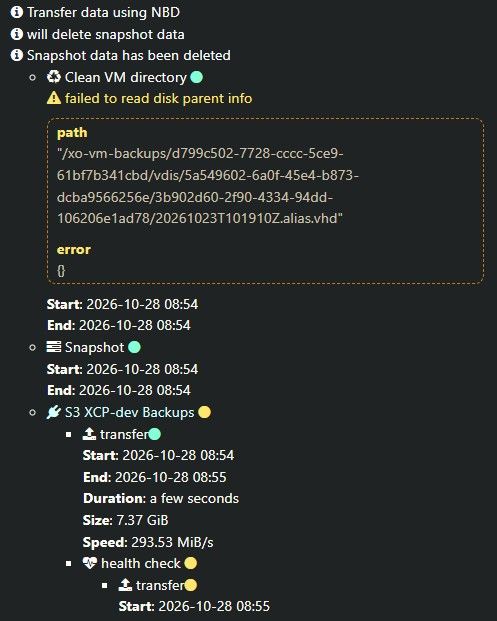
-
@acebmxer Hello, could you look into the xen and kernel logs for errors?
-
Here are the extracted Xen hypervisor, Dom0 kernel, and toolstack/storage manager logs tracking the exact window of the NFS storage deadlock on Oct 27 between 13:00 and 15:00.
During this window,
xe task-listwas completely blank, and user VMs went into an uninterruptible B H state (turning into zombieD P Hdomains upon anxl destroyattempt). Physical hardware interfaces showed zero errors or discards via ethtool.Looking closely at
crash_window_SMlog.log, there is a clear locking deadlock right at the start of the backup run (13:00:38):
"Failed to lock /var/lock/sm/96fd7d5a-1985-80be-5776-6ace7f651a41/sr on first attempt, blocked by PID 86371"It looks like the parallel multi-stream VHD storage exports/NBD operations lock-contended the SR control handles so badly that the underlying sm/blktap layer deadlocked entirely.
I have attached the full log bundle containing:
xen_hypervisor.log(Xen ring buffer /xl dmesg)crash_window_kernel.log(Dom0 kernel events from/var/log/kern.log)crash_window_SMlog.log(Storage manager tracks from/var/log/SMlog.1)xapi_crash.log(Toolstack logs from/var/log/xensource.log.1)
https://drive.google.com/drive/folders/1uCnWXArfgyvS1gPl3mViUl8G1-DBOGzD?usp=sharing - due to file size and type i could not upload here. So i posted it on my google drive.
-
@acebmxer Can you share the full kern.log.1 from yesturday? And is there a PID blocked in kernel mode and which one? Can you give us a
tap-ctl listoutput for example?
The "Failed to lock" message is a normal behavior, it should retry later. -
@anthoineb
Since I had to physical power cycle to clear the I/O block and recover the host, the live kernel state and any active blocked PIDs from the window of the deadlock were cleared upon reboot.
Checking the host right now, there are currently no processes sitting in an uninterruptible sleep (D) state, andtap-ctllist shows the standard operational mappings for the running VMs:# tap-ctl list 5175 0 0 vhd /var/run/sr-mount/4991d4aa-ed84-599b-7d19-97f2f943a366/8d3ce0d6-7d4d-40b0-a99f-09daab8d55e1.vhd 5720 1 0 vhd /var/run/sr-mount/4991d4aa-ed84-599b-7d19-97f2f943a366/1c200822-5a23-4afa-93cd-d0d89c076191.vhd 6941 2 0 vhd /var/run/sr-mount/4991d4aa-ed84-599b-7d19-97f2f943a366/0fac203e-4740-4f95-a78c-a3630e591e76.vhd # ps aux | awk '$8 ~ /D/' (Returned empty)Got it regarding the lock retry behavior in SMlog—thanks for clarifying that component. I am pulling the full un-truncated kern.log.1 from yesterday to add to the Google Drive folder so you can inspect the historical kernel call traces right when the backup stream hit the wall.
I have uploaded the raw
kern.log.1file directly to the shared folder.Let me know if you want to add the exact file name context anywhere else in the message.


Hello! It looks like you're interested in this conversation, but you don't have an account yet.
Getting fed up of having to scroll through the same posts each visit? When you register for an account, you'll always come back to exactly where you were before, and choose to be notified of new replies (either via email, or push notification). You'll also be able to save bookmarks and upvote posts to show your appreciation to other community members.
With your input, this post could be even better 💗
Register Login