XCP-ng 8.3 updates announcements and testing
-
@lmolina Ok, this time all is working (so far).
-
Conclusion:
Network layout config problems, buffer overflows, or silent packet drops are 100% ruled out here (all hardware discards are flat zero).This wasn't a user mistake or an accidental configuration mismatch. The new
smorblktapcomponents hit a deep kernel lockup handling the multi-stream VHD storage exports. The file locks deadlocked the kernel handles so badly that the hosts ignored standard and low-level CLI commands entirely, forcing a hard out-of-band physical power cycle of the XCP-ng hosts and the TrueNAS storage server just to clear the uninterruptible I/O sleep queue.I haven't touched a thing since getting the hardware back up and verifying what choked. The system is sitting exactly as it is right now. Let me know what specific debugging paths you want me to look at or what logs you need from that window to trace this down.
@storage could someone please take a look and help analyze this issue?
-
Installed on my usual test hosts once again. This time i made sure to test backup job behaviour multiple times across the same two pools that gave me trouble last time. All backup job runs (4 runs on one pool, 2 on another) have been successful.
-
Updated both test-pools:
old-xcp-dev&new-xcp-devBackups seem to be working fine. But I'm noticing some warnings now (See below). However, these can very well be the result of clumsy and crude troubleshooting with fixing the previous test-release symptoms.
Dashboard/Health doesn't report any issues. And I'm not seing issues with the VMs in their running state.
Backups are seemingly clearing HealthChecks as well.I will update this post in a living matter. So to not spam the forum-thread with many small posts.
Symptom 1:
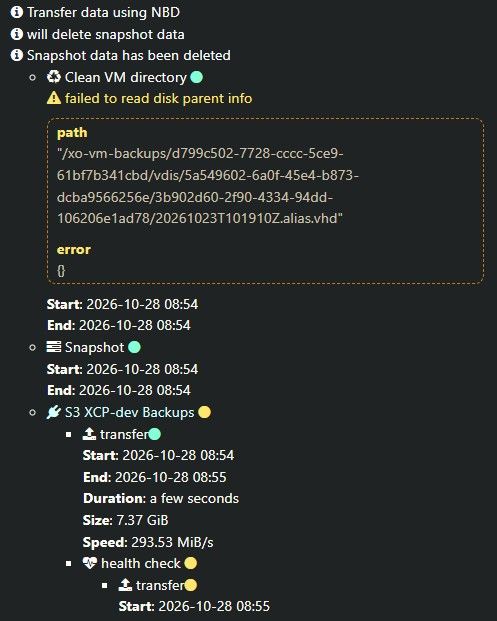
Update 1:
So the only way I could "solve" the issue, was to delete all of the backups for the VM in question. Afterwards it started behaving as expected. I haven't found anything else problematic so far. -
@acebmxer Hello, could you look into the xen and kernel logs for errors?
-
Here are the extracted Xen hypervisor, Dom0 kernel, and toolstack/storage manager logs tracking the exact window of the NFS storage deadlock on Oct 27 between 13:00 and 15:00.
During this window,
xe task-listwas completely blank, and user VMs went into an uninterruptible B H state (turning into zombieD P Hdomains upon anxl destroyattempt). Physical hardware interfaces showed zero errors or discards via ethtool.Looking closely at
crash_window_SMlog.log, there is a clear locking deadlock right at the start of the backup run (13:00:38):
"Failed to lock /var/lock/sm/96fd7d5a-1985-80be-5776-6ace7f651a41/sr on first attempt, blocked by PID 86371"It looks like the parallel multi-stream VHD storage exports/NBD operations lock-contended the SR control handles so badly that the underlying sm/blktap layer deadlocked entirely.
I have attached the full log bundle containing:
xen_hypervisor.log(Xen ring buffer /xl dmesg)crash_window_kernel.log(Dom0 kernel events from/var/log/kern.log)crash_window_SMlog.log(Storage manager tracks from/var/log/SMlog.1)xapi_crash.log(Toolstack logs from/var/log/xensource.log.1)
https://drive.google.com/drive/folders/1uCnWXArfgyvS1gPl3mViUl8G1-DBOGzD?usp=sharing - due to file size and type i could not upload here. So i posted it on my google drive.
-
@acebmxer Can you share the full kern.log.1 from yesturday? And is there a PID blocked in kernel mode and which one? Can you give us a
tap-ctl listoutput for example?
The "Failed to lock" message is a normal behavior, it should retry later. -
@anthoineb
Since I had to physical power cycle to clear the I/O block and recover the host, the live kernel state and any active blocked PIDs from the window of the deadlock were cleared upon reboot.
Checking the host right now, there are currently no processes sitting in an uninterruptible sleep (D) state, andtap-ctllist shows the standard operational mappings for the running VMs:# tap-ctl list 5175 0 0 vhd /var/run/sr-mount/4991d4aa-ed84-599b-7d19-97f2f943a366/8d3ce0d6-7d4d-40b0-a99f-09daab8d55e1.vhd 5720 1 0 vhd /var/run/sr-mount/4991d4aa-ed84-599b-7d19-97f2f943a366/1c200822-5a23-4afa-93cd-d0d89c076191.vhd 6941 2 0 vhd /var/run/sr-mount/4991d4aa-ed84-599b-7d19-97f2f943a366/0fac203e-4740-4f95-a78c-a3630e591e76.vhd # ps aux | awk '$8 ~ /D/' (Returned empty)Got it regarding the lock retry behavior in SMlog—thanks for clarifying that component. I am pulling the full un-truncated kern.log.1 from yesterday to add to the Google Drive folder so you can inspect the historical kernel call traces right when the backup stream hit the wall.
I have uploaded the raw
kern.log.1file directly to the shared folder.Let me know if you want to add the exact file name context anywhere else in the message.
-
Last night I finished migrating to new to me cisco 25gb switch. Other changes I made was remove an ISCSI SR I was not utilizing and an NFS SR. Also migrated all vms to newly created QCOW2 NFS SR (in XO) and migrated all vms to the new SR. Checked that NBD and CBD were enabled in the backup job. I ran a full backup and it completed successfully.
Just to be sure I decided to re-install xcp-ng 8.3 on both host and re-apply the recent version of the updates. Ran delta backup and it passed.
I dont believe i missed anything in between last failed backup and issue i posted. Maybe I has having issues with the previous 10gb switch that were not visible with out taken deeper look?
If there is something specific you would like for me to check to test. But starting from clean slate / new switch seems to have helped?
-
I have uploaded the raw kern.log.1 file directly to the shared folder.
From that log it seems that just before the reboot your NFS server wasn't responding, which that explain that your guests were freezed. Maybe that was coming from your previous switch ?
Please let us know if any new issues arise.



Hello! It looks like you're interested in this conversation, but you don't have an account yet.
Getting fed up of having to scroll through the same posts each visit? When you register for an account, you'll always come back to exactly where you were before, and choose to be notified of new replies (either via email, or push notification). You'll also be able to save bookmarks and upvote posts to show your appreciation to other community members.
With your input, this post could be even better 💗
Register Login